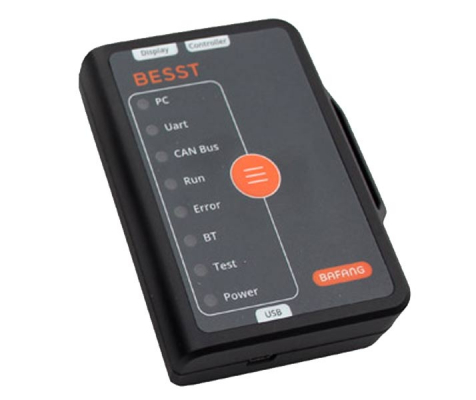
Bafang M500/M600 Tuning & The BESST Tool

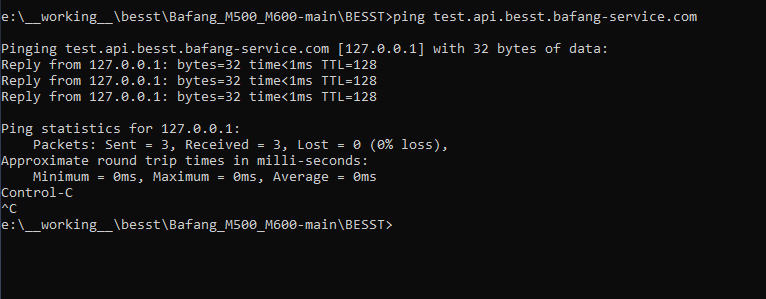
You have a problem with hosts file. Be sure, that your windows hosts file (located in System32/drivers/etc/hosts (not hosts.txt - typical error!!!) must reply to

ping test.api.besst.bafang-service.com with 127.0.0.1 which is localloop, not with bagang IP!

this is how it should look like
1649936594270.png


I can fix it remotely if you cannot, but it will cost you a beer...just sent me meeting id and i can have a look.

record in hosts file (not hosts.txt, just hosts) should look like this

127.0.0.1 test.api.besst.bafang-service.com
 
⚡ EMTB Pro Go Pro — Living Intelligence Reports, exclusive discounts & ad-free Up to 25% off Peaty's, PEMBREE, Magicshine & more · Ad-free browsing · Pro badge See the deals →
Thanks again for the speedy reply. It has worked! I have realized the mistake. The hosts file was in the right format. But I had the domain set to api.besst.bafang-service.com instead of test.api.besst.bafang-service.com... That was suggested in the readme for github.. Also I have tested that before, but when I saw the script wrote 'test.api.besst.bafang-service.com forwards to 139.196.174.48' instead of 'test.api.besst.bafang-service.com forwards to 127.0.0.1' I have changed it back to how it was, assuming the IP was of the real server and not the localhost.. Mystery solved!
 
Continuing my Bafang tuning journey : )I was able to update the firmware, but was unsuccessful in changing the speed limit even despite reading the S/N. Downgrading the software to 1.2.18 solved the issue!
 
Last edited:
use version 1.2.18 as I sayd, its working there. i think in 1.2.26 it was also not working for me.
 
Hello everyone. I ordered a besst tool. please if anyone has time to explain to me or send me a link how to login to besst program. I searched the forum but it's hard to find. thank you
 
can you tell me where it is described on the forum? thank you

You need to follow the below manuals - it will help you to set up the BESST without the password.
You need to unplug the controller cable from display, connect it to besst and besst to display

Manuals:
 
You need to follow the below manuals - it will help you to set up the BESST without the password.
You need to unplug the controller cable from display, connect it to besst and besst to display

Manuals:
Tnx
 
Feel free to write if you will have troubles with set this up.
true with the password delivred by bafang i'm very limmited in functional use of BESSTtool. I have tried to follow the tuto
- install PYTON custom made => OK
- command prompt in admin => OK
- pip install simplejson =< OK
- edit (wordpad) “C:\Windows\System32\drivers\etc\hosts => Ok
- insert 127.0.0.1 test.api.besst.bafang-service.com => OK
But i can't register the modifcations, the file haven't right in write (window10) ? how i can do to open it in "administrator" who have the right to write ?
1650127841815.png
 
You can't edit it in that folder, but you can edit it elsewhere. Just move the file to your desktop, edit it and then move it back. This worked for me on Windows 10
 
You can't edit it in that folder, but you can edit it elsewhere. Just move the file to your desktop, edit it and then move it back. This worked for me on Windows 10
OK, i will try. I hate computer science. i purchase an object who i don't have any control.
 
You can't edit it in that folder, but you can edit it elsewhere. Just move the file to your desktop, edit it and then move it back. This worked for me on Windows 10
Well done. thanks. i pass the step register file "hosts".
But i can't launch "Bafang.py ", where it is located ? i don't find it.

I notice also one thing, When i launch prompt in admin, i'm not located in the same repertory than in the tuto.
in tuto: C:\users\
me: C:\windows\system 32\

normal ?
 
Unzip attached loginbypass.zip into your working directory, f.e. C:\users. You should find loginbypass.py there.

Then run Windows from WIndows start menu with right mouse button click-> Windows Power SHell (admin)

In new opened window, navigate to your working directory using commands:

cd c:\
cd your_working directory f.e.
cd users
will show you
c:\users

there should you run your loginbypass.py with command loginbypass.py

or you can install TOTAL COMMANDER and have it with plain enter :).

if you have problems, let me know, i can make a short video for you.
 

Attachments

Unzip attached loginbypass.zip into your working directory, f.e. C:\users. You should find loginbypass.py there.

Then run Windows from WIndows start menu with right mouse button click-> Windows Power SHell (admin)

In new opened window, navigate to your working directory using commands:

cd c:\
cd your_working directory f.e.
cd users
will show you
c:\users

there should you run your loginbypass.py with command loginbypass.py

or you can install TOTAL COMMANDER and have it with plain enter :).

if you have problems, let me know, i can make a short video for you.

Thanks, clear, i will tried this afternoon. What is the discrepancy between oginbypass and total commander (i will not reduce protection of my computer ) ?
 
total commander is SHELL (like windows eplorer or norton commander). you definetly dont need to use it. its like Windows explorer (file commander). If you dont want it dont use it.

www.ghisler.com gives you idea about what is it. I am using it for >20 years, payed version, but shareware also works nice. your choice.
 
I have a question regarding calibration. I saw some folks in youtube were calibrating the m600 after installing a different firmware. Today I have installed the 13a firmware but saw no such option. Could this be related to m500 or maybe to the besst version(1.2.18) I am using? Is Calibration really necessary after an update of firmware?

Generally I am a bit disappointed about the performance of the motor coming from Bosch previously. I was aware that the motor will be less , which I was OK with. The issue starts with offroad riding, when you have a sudden steep uphill the m500 just drops assist dramatically once your cadence starts to slow done meaning that a lot of steep inclines are now undoable which I could previously do with ease on Bosch. Does anybody have any idea on this? Should I perhaps consider m600 detuned to 15a?(I still need a range of 80+km )
 
Theres no need to calibrate after firmware update.

I've never ridden an M500 or a Bosch motor but my M600 blazes up every hill I've so far thrown at it. Yes, you have to maintain cadence, but that's what gears are for - you'd have changed to a lower gear on an analog bike as you arrived at the incline, and an ebike is no different.
 
I have a question regarding calibration. I saw some folks in youtube were calibrating the m600 after installing a different firmware. Today I have installed the 13a firmware but saw no such option. Could this be related to m500 or maybe to the besst version(1.2.18) I am using? Is Calibration really necessary after an update of firmware?

Generally I am a bit disappointed about the performance of the motor coming from Bosch previously. I was aware that the motor will be less , which I was OK with. The issue starts with offroad riding, when you have a sudden steep uphill the m500 just drops assist dramatically once your cadence starts to slow done meaning that a lot of steep inclines are now undoable which I could previously do with ease on Bosch. Does anybody have any idea on this? Should I perhaps consider m600 detuned to 15a?(I still need a range of 80+km )
Probably does not have a tuned firmware.With M600 i do not have a problem.How did gear it up front and back?
 
I have a question regarding calibration. I saw some folks in youtube were calibrating the m600 after installing a different firmware. Today I have installed the 13a firmware but saw no such option. Could this be related to m500 or maybe to the besst version(1.2.18) I am using? Is Calibration really necessary after an update of firmware?

Generally I am a bit disappointed about the performance of the motor coming from Bosch previously. I was aware that the motor will be less , which I was OK with. The issue starts with offroad riding, when you have a sudden steep uphill the m500 just drops assist dramatically once your cadence starts to slow done meaning that a lot of steep inclines are now undoable which I could previously do with ease on Bosch. Does anybody have any idea on this? Should I perhaps consider m600 detuned to 15a?(I still need a range of 80+km )
With the 13A firmware your m500 should have more power then with the preinstalled firmware. Of course even with the 13A it is less powerfull then the Bosch motor but for me riding in the alps with steep uphills almost everything is rideable with the m500. Think you should try the new firmware. No need to recalibrate the motor.
 
Thanks for the advice! I have tried but still loses a lot of torque as soon as the cadence drops.

Another question - are you able to read the original dengfu battery using the BESSt tool?

I have a strong suspicion that my battery is faulty. It's been acting weird since day 1... Now it simply stopped working. I can power it on but as soon as apply pressure to the pedal the screen goes black and the whole system dies... Previously I was able to resolve this by taking it out and putting it back in, but now that stopped working. Before that it jumped from 70 to 0 a couple of times and needed about 10 minutes to recover. Also no read on Besst tool. I suspect this is a BMS issue, but I might be wrong... Any advice here?
 
Dengfu battery is not visible via BESST. Its probably because its not communicating via CANBUS its status, but this is only my theory.

Battery check is quite simple, you need to have some charging/discharging tool and check how its behave. ANother fix is to replacewith other battery. I generally recomend to check all connectors first and make sure, there is voltage in motor, this can be checked with motor cover down.

Have you cleaned bike with water?
If battery is under warranty, then ask for replacement. Now.
 
Keep reading
    Browse all

    Similar Threads

    Community Stats

    Since 2018
    672K
    Messages
    41,495
    Members
    Join 30,000+ Riders, it's free!
    Back
    Top