Thank you Paolo! That is a logical, but luckily very easy solution for the problem. I changed the setting in my iPhone, but can only test it when we home from our vacationIn order to keep BLEvo running you need to setup the gps position set to always.. you need to go in the setup of your iPhone..
Let me knpw
Navigation
Install the app
How to install the app on iOS
Follow along with the video below to see how to install our site as a web app on your home screen.
Note: This feature may not be available in some browsers.
More options
Style variation
You are using an out of date browser. It may not display this or other websites correctly.
You should upgrade or use an alternative browser.
You should upgrade or use an alternative browser.
The Official BLEvo Thread
a
- Thread starter Rob Rides EMTB
- Start date

- Status
- Not open for further replies.
⚡ EMTB PRO
25% off e*thirteen, Peaty’s & more with PRO
Member-only deals from e*thirteen, Peaty’s, PEMBREE and Magicshine · ad-free browsing · PRO badge · Living Intelligence Reports
See the deals →
From £1.99/month
rhouser
New Member
Brilliant, simply brilliant
For the biker power I'm thinking what is thr best solution... what you see is an average of 2 seconds.. you don't want an average, but a value that change slowly..
The value is changed every 300 milliseconds.. the value in the monitor is an average of 2 seconds.. but the value continues to change.. When you push on the pedal, if I will add a delay of 2 seconds, you will see the high biker power after 2 seconds.. I don't know if it is a good idea..
Being a programmer you probably know this already @PaoloBLEvo but I'll suggest it in case it's helpful anyway as I like programming problems

It might be worth trying to damp the displayed value a bit so it changes more slowly - trying a simple damp like this:
new value to display = old value to display * (1-X) + new actual value * X
where for example X = 0.1 (or adjust this according to how fast you want the value to change)
You could either feed in your average from the last 2 seconds, or feed in the direct value however fast you are sampling it.
You could also try only displaying a new value if more than a certain time has passed (2-5 seconds?) or if the value has changed by more than a certain percent (5%?). So that would handle fast changes and possibly be more stable when not changing a lot.

Thanks for your suggestion.. I will fo something like that..Being a programmer you probably know this already @PaoloBLEvo but I'll suggest it in case it's helpful anyway as I like programming problems
It might be worth trying to damp the displayed value a bit so it changes more slowly - trying a simple damp like this:
new value to display = old value to display * (1-X) + new actual value * X
where for example X = 0.1 (or adjust this according to how fast you want the value to change)
You could either feed in your average from the last 2 seconds, or feed in the direct value however fast you are sampling it.
You could also try only displaying a new value if more than a certain time has passed (2-5 seconds?) or if the value has changed by more than a certain percent (5%?). So that would handle fast changes and possibly be more stable when not changing a lot.

Hi @PaoloBLEvo,
Sorry if this is a dumb question.
Will Blevo work with Brose engines in other makes of ebikes like BULLS or is it purely limited to Specialized bikes?
Sorry if this is a dumb question.
Will Blevo work with Brose engines in other makes of ebikes like BULLS or is it purely limited to Specialized bikes?
Hi @PaoloBLEvo,
Sorry if this is a dumb question.
Will Blevo work with Brose engines in other makes of ebikes like BULLS or is it purely limited to Specialized bikes?
For now only Specialized Kenevo and Levo.. in the future who could know... ?
jxj
Member
I think a two second average is good, perhaps only update the display once per second rather than 3x per second.
Hi Paolo and thx for BLEvo,
I think I only can find the manual for Android and as I'm using iPhone I wonder what the main differences are.
I can’t find how to setup “dashboard” display.
It seems I don’t get a TCX or GPX file (fields are grayed out), EDIT!! found it generated when tour is ended SORRY.
I’m happy the battery consumption on the phone is so low even if I use the screen all the time.
//Thomas
I think I only can find the manual for Android and as I'm using iPhone I wonder what the main differences are.
I can’t find how to setup “dashboard” display.
It seems I don’t get a TCX or GPX file (fields are grayed out), EDIT!! found it
generated when tour is ended SORRY.I’m happy the battery consumption on the phone is so low even if I use the screen all the time.
//Thomas
I just released version 2.21 of BLEvo for Android.
Here are the news:
- New BLEvo Monitor
- Speed up the response of the Smart Power
- Added display of degrees in Fahrenheit
- Now the tour is saved on the same file even if you change the battery
- Added the "Auto FAST" increase of the Smart Power to get more assistance faster
The new monitor must be selected and configured in the "Display customization" menu.
The 8 fields are customizable by the user.
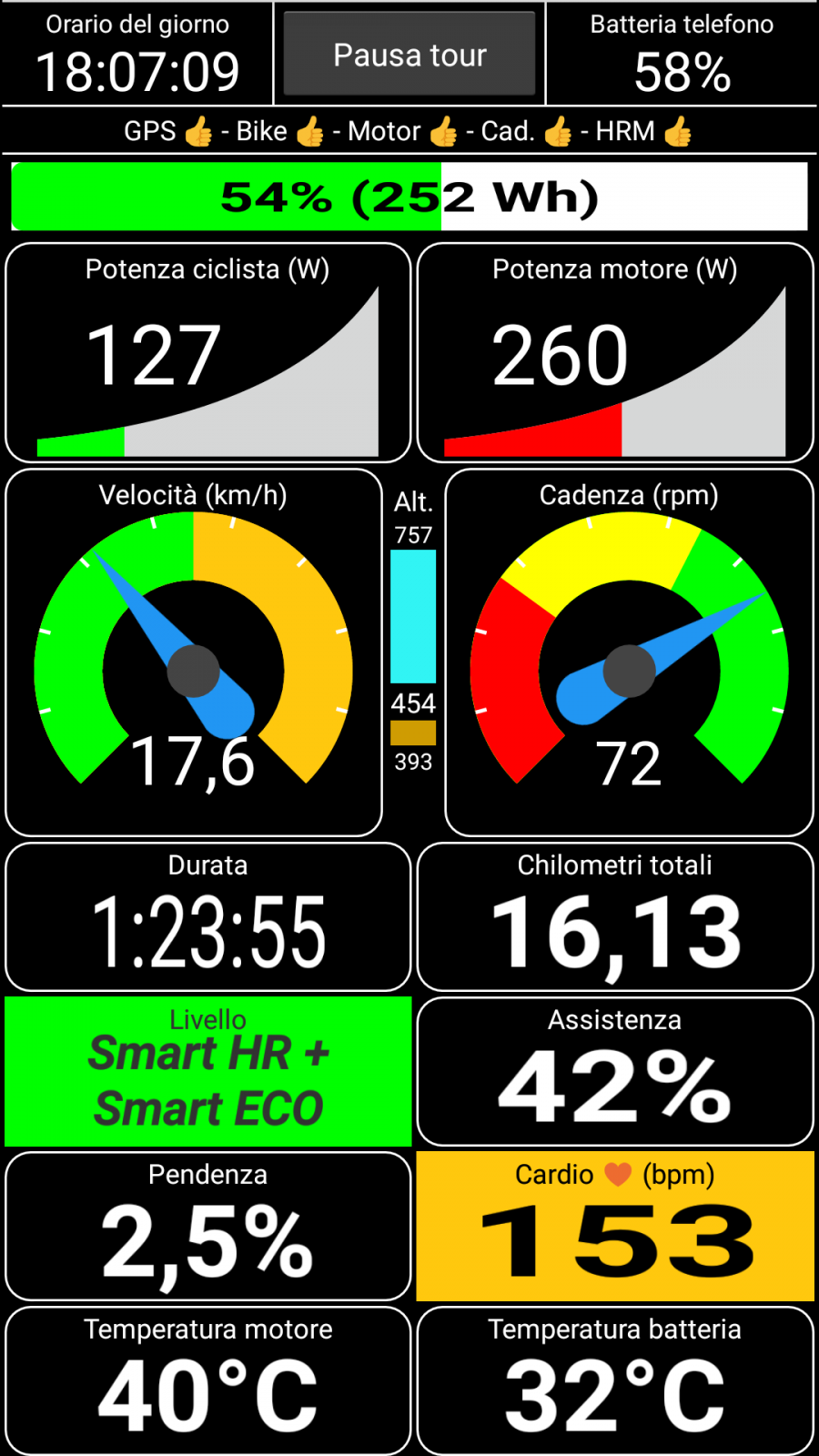
Update it from Google Play
https://play.google.com/store/apps/details?id=com.dopa.android.blevo
Here are the news:
- New BLEvo Monitor
- Speed up the response of the Smart Power
- Added display of degrees in Fahrenheit
- Now the tour is saved on the same file even if you change the battery
- Added the "Auto FAST" increase of the Smart Power to get more assistance faster
The new monitor must be selected and configured in the "Display customization" menu.
The 8 fields are customizable by the user.
Update it from Google Play
https://play.google.com/store/apps/details?id=com.dopa.android.blevo
jxj
Member
Did my first ride with smart power yesterday and all I can say is this is a game changer. This sets the Turbo Levo above all other bikes IMHO. I have lots to adjust and learn but my battery consumption appeared to be down and the power delivery was smoother. Blevo was fantastic without this feature enabled but with this Smart Power feature it really changes the bike to be almost seamless. Amazing to review the stats and see how many times power levels are adjusted. I didn't use this feature for several rides but a ride buddy encouraged me to try it and once getting over the initial setup it is amazing. Rode about 17 miles, 1500 feet of climbing summit at about 8000 feet. Used 37% of battery. The smoke was bad.
Paolo - Fantastic work on this application. I loved my bike before it but now it is so much better.
Paolo - Fantastic work on this application. I loved my bike before it but now it is so much better.

Hi @PaoloBLEvo , did you have any success getting the Apple Watch to work as a heart rate monitor?
Keep up the amazing work
Keep up the amazing work
Stay tuned.. ?Hi @PaoloBLEvo , did you have any success getting the Apple Watch to work as a heart rate monitor?
Keep up the amazing work


Hey, that's exciting news re: the Apple watch HRM possibly coming soon, nice one Paolo!
DEADMEAT
New Member
Can anyone post their smart power settings and possibly explain what the hell it all means!
Try to use preset "BLEvo Smart"Can anyone post their smart power settings and possibly explain what the hell it all means!
10/80/100 pp 100/100/100
Smart Power settings (as Stefano, or "not expert")
Eco 6-79
Trail 11-99
Turbo 100
For legs power start with 160 watt and increase it if the assistance is too high.. otherwise decrease it..

npatrix
Active member
Looks great @PaoloBLEvo , when will you update IOS version?I just released version 2.21 of BLEvo for Android.
Here are the news:
- New BLEvo Monitor
- Speed up the response of the Smart Power
- Added display of degrees in Fahrenheit
- Now the tour is saved on the same file even if you change the battery
- Added the "Auto FAST" increase of the Smart Power to get more assistance faster
The new monitor must be selected and configured in the "Display customization" menu.
The 8 fields are customizable by the user.
View attachment 3718
Update it from Google Play
https://play.google.com/store/apps/details?id=com.dopa.android.blevo
Which feature do you like more to be implemented in ios?Looks great @PaoloBLEvo , when will you update IOS version?
npatrix
Active member
All you added to the android version... but more impressed with the display customization, I would start to use the iPhone on the bike rather than in then pocket!Which feature do you like more to be implemented in ios?
Are you sure you want to use a iPhone (more or less 600 euro) on handle bar? I think it is better to buy a cheap Android phone for handle bar.. but this is only my opinion..All you added to the android version... but more impressed with the display customization, I would start to use the iPhone on the bike rather than in then pocket!
Are you sure you want to use a iPhone (more or less 600 euro) on handle bar? I think it is better to buy a cheap Android phone for handle bar.. but this is only my opinion..All you added to the android version... but more impressed with the display customization, I would start to use the iPhone on the bike rather than in then pocket!
Are you sure you want to use a iPhone (more or less 600 euro) on handle bar? I think it is better to buy a cheap Android phone for handle bar.. but this is only my opinion..
Hi Paolo,
Yes! iPhone on the handlebar!
Android functionality=iPhone functionality like version 2.21 of BLEvo for Android with the - New BLEvo Monitor
I guess some people like to use one gadget (phone) for each use but I like to have one gadget (phone) for every use. So please let us be able to modify the dashboard on the iPhone to. I bet there are Android users with the latest phone on the handlebar to. The phone is just like 10% of the cost of the bike
I like to be able to look at: heartrate, speed, time traveled, distance traveled, time, battery power, level (eco, trail, turbo), cadence.

I cannot for the life of me find what exactly is the "CM" setting. I see people talking about it and you guys seem to understand each other.
When I installed the app I did the only reasonable thing to do : all the way up to 100% !
But now I realise that may be a mistake. Yesterday I rode a preset with CM at 20 and it felt much better.
What does CM mean and what does it do ?
When I installed the app I did the only reasonable thing to do : all the way up to 100% !
But now I realise that may be a mistake. Yesterday I rode a preset with CM at 20 and it felt much better.
What does CM mean and what does it do ?
npatrix
Active member
I see your point, but there are good bike mounts like the Quad Lock that will protect the iPhone even on tough conditions/ crashes, it will cost around 60-80€ depending on iPhone model and will be much more convenient for iPhone users, all app are there, no need to swap SIM cards, etc...Are you sure you want to use a iPhone (more or less 600 euro) on handle bar? I think it is better to buy a cheap Android phone for handle bar.. but this is only my opinion..
Would be great if you could provide same functionalities and look & feel to the IOS version as you have in the Android one.
Love the idea of being able to configure the display the way I like it and that works best for me (like Garmin).
Thanks Paolo
I see your point, but there are good bike mounts like the Quad Lock that will protect the iPhone even on tough conditions/ crashes, it will cost around 60-80€ depending on iPhone model and will be much more convenient for iPhone users, all app are there, no need to swap SIM cards, etc...
Would be great if you could provide same functionalities and look & feel to the IOS version as you have in the Android one.
Love the idea of being able to configure the display the way I like it and that works best for me (like Garmin).
Thanks Paolo
Same here: I would love to see the same functionality on IOS!
Ok.. I understand your point of view..I see your point, but there are good bike mounts like the Quad Lock that will protect the iPhone even on tough conditions/ crashes, it will cost around 60-80€ depending on iPhone model and will be much more convenient for iPhone users, all app are there, no need to swap SIM cards, etc...
Would be great if you could provide same functionalities and look & feel to the IOS version as you have in the Android one.
Love the idea of being able to configure the display the way I like it and that works best for me (like Garmin).
Thanks Paolo
In any case you don't need sim card for BLEvo and with 60-80 you can buy an Android phone..
But don't worry.. I'm thinking how to implement the customizable display in ios..
Ok.. I understand your point of view..
In any case you don't need sim card for BLEvo and with 60-80 you can buy an Android phone..
But don't worry.. I'm thinking how to implement the customizable display in ios..
Yeaa!!

Im in the same boatI cannot for the life of me find what exactly is the "CM" setting. I see people talking about it and you guys seem to understand each other.
When I installed the app I did the only reasonable thing to do : all the way up to 100% !
But now I realise that may be a mistake. Yesterday I rode a preset with CM at 20 and it felt much better.
What does CM mean and what does it do ?
- Status
- Not open for further replies.
Similar Threads

Free account
Join 43,189
eMTB riders
eMTB riders
One tap. No forms. Fewer ads.
or sign up with email
Already a member? Log in