Reign E+ 2022

⚡ EMTB Pro Go Pro — exclusive discounts & ad-free Peaty's 25% off & more · Ad-free browsing · Pro badge See the deals →
I have the charger on a power measurement socket at this is what I noticed today after the ride. It seems that the charging is restarting every few seconds. I turned it off and 10min later on and now it seems to be stable.
Screenshot_2023-07-04-22-05-39-823_io.homeassistant.companion.android.jpg
 
Useless stopped charging at 83% ia. Pretty sure they don't allow charging over 80% so might need to run it down alittke
 
I rode today battery is down to 75%. I am timing how long till charged to 100. Will post back
1 hour 15 minutes to 99% on bike. Seems about same as before update. Maybe taking battery off first charged cleared it?

The battery light indicator when I turned on bike went full then nothing then one by one till 5 bars never seen that before.
 
Last edited:
1 hour 15 minutes to 99% on bike. Seems about same as before update. Maybe taking battery off first charged cleared it?

The battery light indicator when I turned on bike went full then nothing then one by one till 5 bars never seen that before.
Thanks for the test. I didn't have time yet to ride/charge test. I did describe the LED behavior in my previous post thread page 95.
I have two batteries, and I am sure I have seen this kind of "Knight Rider" LED behavior at least twice. I am sure it was on the 800Wh battery after the first full charge(of the bike) after the update, the second time It was on the 625Wh, but after the second full charge(of the bike). The first charge(on bike) on the 625Wh after the update was messed up.
I tried recreate this LED pattern, by turning the bike On/Off at least 30 times, but it didn't happen.
I had/have a hunch that this indicates that the system is doing some kind of self diagnostic check, and after that it should go back to normal. But as said I have to ride/charge(on bike) to fully confirm this theory.
 
I had the knight rider LEDs also while charging and when I have pressed the on button. After that I checked the motor settings and they were gone. Could it be just a reset signal?
 
I had the knight rider LEDs also while charging and when I have pressed the on button. After that I checked the motor settings and they were gone. Could it be just a reset signal?
Don't know, the motor settings at least for me reset if I remove the battery and press the power button or leave the bike without the battery for a prolonged time(overnight). When I press the power button without the battery all LEDs light up briefly(like there is charge left somewhere in the system that's being drained).

Don't know if this is a new feature but I think this charge keeps the settings for a while(like between quick battery changes). As said before It does not hold over night without the battery in the bike.

I assume(just my theory) as people have different battery's(like me) the firmware/software are different due to the fact that the 625 and 750 use older 18650 cells vs the 800 that is using extremely rare 22700 cells. The lather cells are more efficient so the programing for the controller could be different and so the bike controller needs to adapt.

I also don't think it's a reset signal as the first time I have seen it I went for a long range ride with the fully charged 800Wh battery and did my settings the previous night, on the next day when I turned the bike on it was the first time I saw this "knight rider" LED behavior and the settings I had set the previous night were still active.

As written before I tried to recreate this LED behavior with all kinds of battery off/on the bike, charge, no charge, turning the bike On/Off at least 30 times with my camera ready to film it, but no luck.

Again I really wish Giant would provide a changelog or update notes or similar...
 
Last edited:
New day, same problem. At the beginning I thought that charging is working as expected, but after 30min this weird behavior came back.
Sorry Giant, this is Banana development.
Screenshot_2023-07-05-16-36-55-727_io.homeassistant.companion.android.jpg
 
I have just published a video on my youtube channel where I talk about the problem of this latest update, I tell you that I have discovered the way to enter the application without necessarily having to update the ebike.
In this case, what you have to do is enter the application by putting the phone in airplane mode, once this is done, the application asks you to connect the bluetooth and you have to do it like this but always in airplane mode, by doing so you can enter your ebike without the Mandatory need to update your ebike
 
I have just published a video on my youtube channel where I talk about the problem of this latest update, I tell you that I have discovered the way to enter the application without necessarily having to update the ebike.
In this case, what you have to do is enter the application by putting the phone in airplane mode, once this is done, the application asks you to connect the bluetooth and you have to do it like this but always in airplane mode, by doing so you can enter your ebike without the Mandatory need to update your ebike
Thanks it's good Information👍 could help someone, although this was already pointed out a few times in this thread. Maybe we should have a sticky post with such info at the start of the thread.
 
Thanks it's good Information👍 could help someone, although this was already pointed out a few times in this thread. Maybe we should have a sticky post with such info at the start of the thread.
I had no idea that this solution had already been given in this forum, it just occurred to me to try the formula since I thought that if the application is not connected to the internet it would not know that there is an update, so I did it and it worked, I was not sure that it would work since there are applications that make it a condition to also be online.
 
Thanks it's good Information👍 could help someone, although this was already pointed out a few times in this thread. Maybe we should have a sticky post with such info at the start of the thread.
If you know which post is the most explanatory, just find the post and click on report and we can copy the post into a new thread and make it a sticky in the Giant section.

Alternatively, just write a new post about it and we'll watch out for it and make it a sticky or it could be added to the existing sticky :

 
If you know which post is the most explanatory, just find the post and click on report and we can copy the post into a new thread and make it a sticky in the Giant section.

Alternatively, just write a new post about it and we'll watch out for it and make it a sticky or it could be added to the existing sticky :

Roger 👍will do so ✌️Actually reading it again in peace @DOCTOR EBIKES post Is actually written pretty nice and clear to understand 👍the topic was mentioned briefly sometime back, and as far as I know this the clearest description and it definitely works, also tested by me in the early days, definitely good for a sticky. God job @DOCTOR EBIKES✌️
 
Last edited:
You guys had me worried with the latest update, but mine is charging just fine since the update.

Issues are really inconsistent with the latest updates by reading some of your comments.

Anyway, the garbage Reverb AXS I installed last winter on my Reign E+ went back for warranty for the second time in two months, now installed a One Up V2 210mm on my XL and I much prefer the clearance of the One Up, but we were not able to slam it completely on my XL.

Bike is super reliable if it wasn't for that crappy dropper, absolute worst ''upgrade'' I've ever made.

Now back on the bike having fun with a friend also riding a Reign E+.

Wiride3.jpeg
wride2.jpeg
 
Hey guys, just an update to the issues that came after the June app/bike update.

625Wh Battery seems to charge Ok(on the bike) now, tried in three steps 65%-83% in 50min, 83%-95% in 50min, 95% to 97% in 10min. Charging the last part as I write this.

I noticed the the little green LED on the Smart Gateway device lits up somewhere in between 20min to 50min of charging. Before the light lits on the motor settings stay the same, if the light lits up the motor settings get reset.

Yesterday I did a ride and also felt as If the motor had a bit less oomph as before, interestingly I felt this after the second charging after the update. Today is the third charging(second on the bike).

Could not recreate the Knight Rider LED behavior.

Will report if I see something new.
 
Yesterday I did a ride and also felt as If the motor had a bit less oomph as before
Remember that the motor settings are currently reset to default. Maybe you have lost your personal preference set with the app?
 
Remember that the motor settings are currently reset to default. Maybe you have lost your personal preference set with the app?
Thanks for the heads up, I know...my all preferred setting for fun rides was 175% at 60Nm to 70Nm, always felt great for almost all conditions. I definitely know how it felt and yesterday it felt lacking, almost as if the motor had some kind of resistance. I also did check and change settings mid ride.

BTW I am doing a long term analysis of the 625Wh and 800Wh battery consumption that I might release when In the right format. I test different settings and so have a pretty good feel for even subtle changes. So far more than 60 rides with different stats.
 
Thanks for the heads up, I know...my all preferred setting for fun rides was 175% at 60Nm to 70Nm, always felt great for almost all conditions. I definitely know how it felt and yesterday it felt lacking, almost as if the motor had some kind of resistance. I also did check and change settings mid ride.

BTW I am doing a long term analysis of the 625Wh and 800Wh battery consumption that I might release when In the right format. I test different settings and so have a pretty good feel for even subtle changes. So far more than 60 rides with different stats.

Nice regarding the battery consumption report.

Always felt that the 625Wh range was below average, not sure if it's because of the Reign E+ being heavy or it's just the system(or battery tech?) being a little less efficient than some other systems like Bosch.

Curious to see the range difference between both from some real data analysis.
 
Back from today's ride on the 625Wh...

Stats:
Distance 30,9 km
Elevation gain: 806m
Average speed: 18,6 km/h
Average incline: 8,6%
Tire pressure: Fr 1.8 Bar / Re 1.9 Bar
Battery consumption 40%( 100 》》》60)
Battery consumption: 248Wh(6,21Wh x 40)
Average battery consumption: 30,8Wh per 100m altitude gained
Average Assistance: Between 150%-175%
Average Temperature: 21°C
Motor Settings:
Assistance(%) 100 150 175 250 300
Torque(Nm) 30 40 50 60 70
Launch 2 2 3 3 4
Terrain: Asphalt 10%/Fire road 30%/Forest Access Road(40%)/Forest uphill single trails(20%).
Remarks: Rear tire is almost done(worn), grip was low.

The motor feel: It felt about the same as yesterday, still kind of lacking, I miss that Syncdrive reactivity, as If the update turned down Launch in general for one level. I will need to test the higher Launch settings. Also again as after the first time after update I feel as if the motor is slightly quieter.

The battery consumption definitely surprised me today, comparing it to my previous numbers from the analysis it's a bit better than the average for the 625.

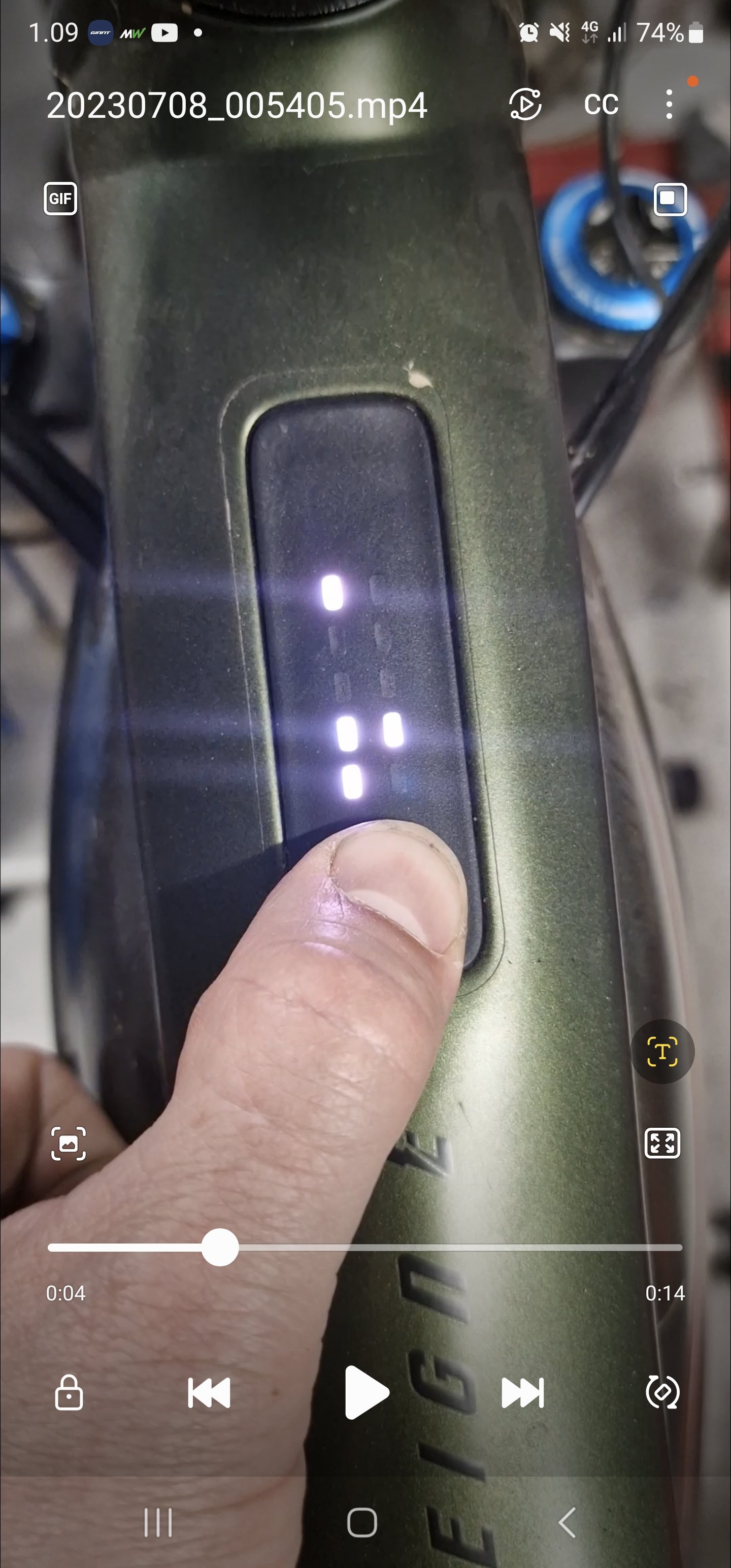
I also think I found the reason for the "Knight Rider" LEDs, also I succeeded to film it.

Giant Reign Knight Rider LEDs

It occurred when the battery was charged to full 100%. Then it occurred to me that the last two times I've seen it the batteries were also at 100%. Edit: My assumption was wrong, today the usual charge problems, and the "Knight Rider" LEDs when the battery was not fully charged.

The motor settings still get reset if:
1. you remove the battery overnight;
2. after you start charging on the bike and the Smart Gateway LED lits up during charging.
 
Last edited:
I also had the impression that Launch has tuned down a bit with the latest update.
Had to increase it up from 3 to 4 in Mode 3 (Active) to get the same feeling as before.

Looks like you have redued Torque and Launch to save some Battery? While this is a very good option to do so, it makes your results hardly comparable. But nevertheless interesting to see what other riders prefer.

I did some testing with these settings and they work pretty well for mixed alpine terrain with uphill trail riding:

100 / 150 / 200 / 300 / 400
50 / 60 / 70 / 85 / 85
2 / 2 / 3 / 5 / 7
 
I also had the impression that Launch has tuned down a bit with the latest update.
Had to increase it up from 3 to 4 in Mode 3 (Active) to get the same feeling as before.

Looks like you have redued Torque and Launch to save some Battery? While this is a very good option to do so, it makes your results hardly comparable. But nevertheless interesting to see what other riders prefer.

I did some testing with these settings and they work pretty well for mixed alpine terrain with uphill trail riding:

100 / 150 / 200 / 300 / 400
50 / 60 / 70 / 85 / 85
2 / 2 / 3 / 5 / 7
Yes you are right my torque settings are a bit lower, but as said before I have an analysis of several rides where torque settings were possible, and today's was bellow the average for comparable settings on previous rides.

I do like lower torque settings when riding alone, as I prefer to do a workout on the bike, I lift the settings for fun rides and rides with friends or groups.

I never liked how the Assistance feel of above 250% felt on the Syncdrive, as If it was all the same 300% felt almost the same as 400%...I hope the update created a better differentiation among Assistance levels, that way the higher levels would be more useful, didn't have time to try that out yet.

These were my yesterday settings and the Average consumption was 34,6Wh/100m
Average Assistance between 150%-200%

S 100 150 200 250 300
T 40 50 60 70 85
L 2 2 3 3 4
 
Had an error occur today. Middle led on left side blinking red, speed sensor.

Checked magnet was dislodged from its spot. Reinserted it and so far so good.

Are these magnets directional? Do they just sit in the black housing?
 
Last edited:
Another battery charge and the same thing again. Battery charging freezes. The bike was charging for a day and the charger light was still flashing charging. the charge was about 50%. I unplugged the bike and noticed that the charger continued charging, the light should change to red when unplugged. When the charger is used without power, the status is reset and the red light comes on. It started to charge again but the charge had stopped again after 20%, the same thing the green charge light was flashing.

I got the knight rider lights done when I put the bike on charge and turned on the power. Normally, you can't turn on the power during charging.

I tried a second time and got completely different light codes. That must be a bug that allows you to turn on the power during charging.

Now it's starting to really annoy me that I can't charge the bike without these measures. I have to remove the battery from the charger 2-3 times to get it full.

So when it has stopped charging, you can start the bike normally and you can connect with ride control, even though the charger shows that the charging is in progress .
You cannot do this while the battery is charging..

Screenshot_20230708_010955_Video Player.jpg
 
Last edited:
Hope u get well dude, an interesting fact about the cut off speed I realized and now remembered I also need to edit in my review somewhere back in this thread. I was seeing different cutoff speeds with my bike in different modes. Usually it was a bit lower than 25kmh.

Don't know what others were/are using for measuring speed, but I used my thrusty Garmin Fenix 6 watch that I had connected with the bike.

I always thought the speed I see on the watch was GPS speed, well the truth was far from reality. The show speed was the speed based on the connected bikes wheel circumference settings in the cadence/speed sensor. Will explain further...
View attachment 119386View attachment 119387View attachment 119388
The first time I became suspicious was when mid ride I glanced at the watch saying "wheel size calibrated" or something like that. I was like, ok great, didn't bother with it to much.

Well the next ride was a fast one, pushing hard, where I thought the bike had gone crazy, it was assisting up to 27kmh when it cutoff.

Then I started to deep dive into my Garmin and the bike sensors and also did some testing. To my surprise the cadence/speed sensor of the bike has a setting for Manual or Auto wheel circumference calibration in Garmin, that was set to Auto. As this is an mtb it is possible that the Auto calibration on rough terrain isn't very accurate. That's exactly what happened, The saved settings were wrong an so was the displayed speed. During my first test attempts with different max out wheel circumference settings I even thought I have free tuning, as the speed shown was close to 38kmh...but comparing it to GPS speed that was around 25ish I realized the point of everything. 🙆🤷‍♂️🙃It crazy how the mind works when it's fixed on an idea.

I have then set the sensor calibration to Manual and manually entered the correct circumference and since then the cutoff speed was always the same. It is possible that this can/did happen with other cycling computers or third party devices connected to the bike,...etc...

Maybe someone will also have a revelation like me...🙃
Are you saying manually changing the circumference gave you a faster speed before cutoff or it just thinks it’s doing a certain speed when cutoff? But it’s really only doing 25klm anyways?
 
Are you saying manually changing the circumference gave you a faster speed before cutoff or it just thinks it’s doing a certain speed when cutoff? But it’s really only doing 25klm anyways?
I think you got the point.

The bike always has the same cutoff speed, but If you manually enter the circumference of the wheel in the Garmin watch, u will see the speed based on your entry, think of it as calibration, Bosch motors have this in the bike phone app. This is due to different rear tire sizes giving different circumference.

So In my case I measured my back wheel by hand and entered that number and the shown speed was pretty close to 25kmh.

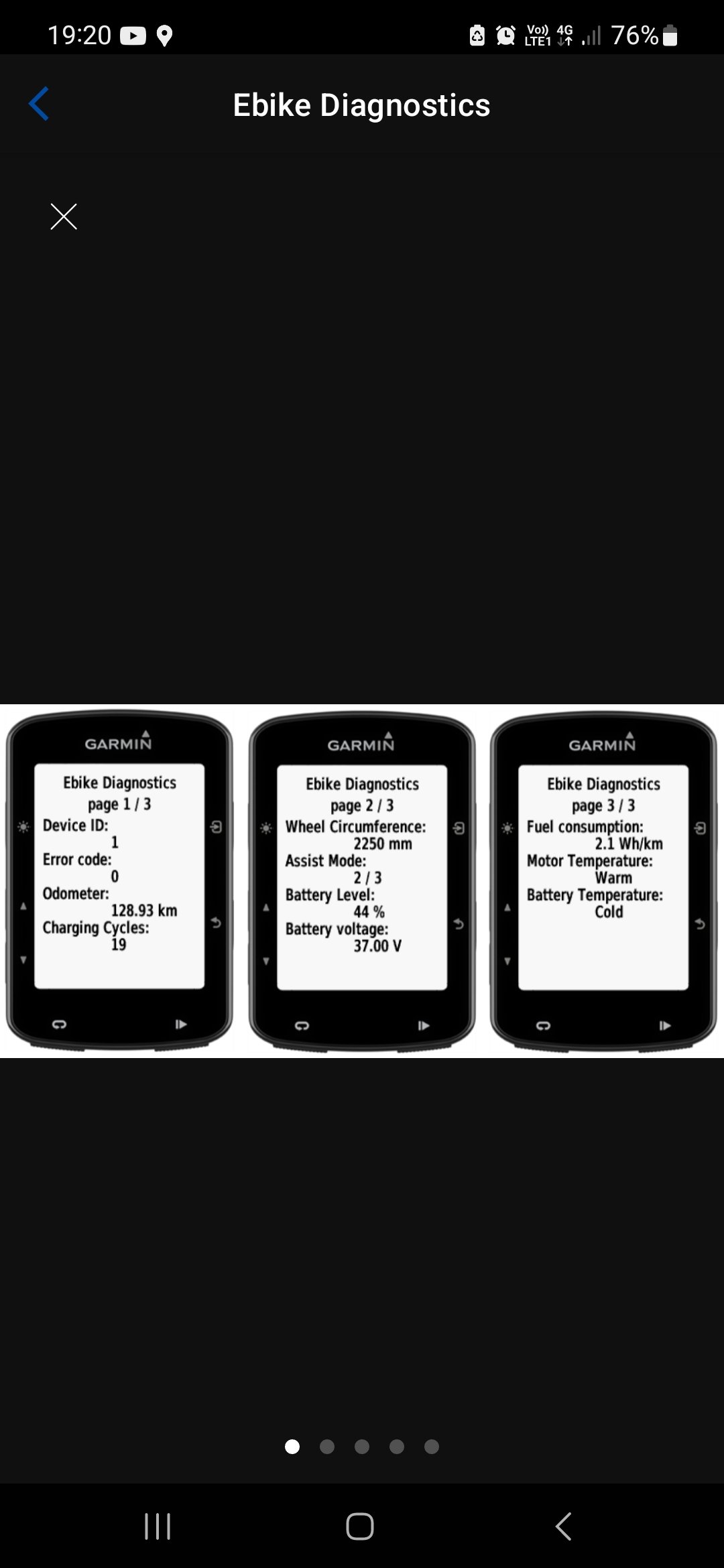
There is one app on the Garmin IQ store that I use, Ebike Diagnostics, with that app you can check the wheel circumference that is actually saved/locked(not possible to change) in your motor firmware and that number determines the Real motor cutoff speed.
Screenshot_20230708_192033_Connect IQ.jpg
 
[email protected]

Apparently who we have to email when there is issues
..
Do you think they will deal with riders outside of the UK? Probably not, I think I have seen on Fb someone reporting that he was turned down as he was not from the same country.

BTW...bellow is the email for the Giant Ride App developer support....I already sent a long email with cons and suggestions.

[email protected]

No answer yet.
 
Well I have finally experienced the dreaded Giant charging issue. I loaded my bike up to go ride the other day and when I got to the trail I discovered my bike was only at 35% charged. Super bummed but made the best of it and did a small ride. Then I got home and plugged it in. 24 hours later and it was only charged to 46%. I had to unplug the charger from both the bike and the wall because when I unplugged the charger from the bike it was still registering that it was connected and charging by showing the slow blinking green light.

Charger another full 24 hours and it is finally up to about 75%. Super frustrating. At this rate I can only do a good ride once a week at best.
 
Sorry to hear all the charging issues, going to try to skip this update.

I have the bike pretty sorted right now, new cockpit, new tyres, shock back from warranty. Still waiting on my 800Wh battery though, it's been months now. Still blown away at how well it rides tight trails despite the weight and length of the bike:

 
Keep reading
    Browse all

    Similar Threads

    Community Stats

    Since 2018
    668K
    Messages
    40,788
    Members
    Join 30,000+ Riders, it's free!
    Back
    Top