Navigation
Install the app
How to install the app on iOS
Follow along with the video below to see how to install our site as a web app on your home screen.
Note: This feature may not be available in some browsers.
More options
Style variation
You are using an out of date browser. It may not display this or other websites correctly.
You should upgrade or use an alternative browser.
You should upgrade or use an alternative browser.
Project to enable Bosch + Garmin integration
- Thread starter Soarcer
- Start date


⚡ EMTB PRO
25% off e*thirteen, Peaty’s & more with PRO
Member-only deals from e*thirteen, Peaty’s, PEMBREE and Magicshine · ad-free browsing · PRO badge · Living Intelligence Reports
See the deals →
From £1.99/month

Downloaded to phone ok, sent from phone to bike ok, fails at the actual bike update. The system controller LED blinks for 1-2 minutes, bike diconnects off and on from phone (I think this step is to be expected even when update is causing no issues), after that just a pop up 'Update failed' on Purion 400, bike powers down after a while. Luckily when powered back up the bike works fine, no issues whatsover with no motor support etc. Would have to go to LBS to push the update via dignostic connection. Had similar issues in the past with the Gen4 smart system on my previous Cube bike.Unfortunately yes, how far through the update process did you get?
baffobaffone
Member
Gentilmente potresti mettere le foto di come è installato grazie. Sul sito Bulcan vedo vedo un modulo che si installa solo vicino al motore.Ho pensato di raccontarvi la mia esperienza da quando ho ricevuto la mia unità circa una settimana fa.
L'ho installato nel tubo orizzontale, tra il display Kiox e lo Smart Controller. Ho semplicemente preso il cavo dal retro dello Smart Controller e l'ho collegato all'unità Bulcan, quindi ho collegato il Bulcan allo Smart Controller.
I sensori sono stati rilevati subito dalla mia unità Garmin e si sono collegati praticamente non appena ho acceso la bici.
Ho abbinato solo potenza e cadenza a causa degli attuali problemi con la velocità rilevata dal Bulcan. La pausa automatica funziona perfettamente poiché la velocità viene registrata solo tramite GPS sull'unità principale.
Poiché ho già il display Kiox e pago per Flow+, non mi interessa che le metriche non vengano registrate dal Bulcan tramite il sensore della bici elettrica non collegato, poiché l'app Flow registra anche altri dati, oltre alla temperatura.
Utilizzo Strava come archivio principale per le attività sportive e comunque questo non sincronizza nessuno dei dati aggiuntivi che il Garmin sta registrando.
Confrontando i dati forniti da Garmin, dall'app Flow e da Strava, si nota che sono tutti abbastanza in linea, con piccole differenze.
Sono molto contento di non dover più ottenere, caricare, manipolare e infine unire 2 file di allenamento separati, uno dal mio Apple Watch per i dati della frequenza cardiaca e l'altro dall'app Flow per le metriche della bici, solo per avere un file di allenamento completo da caricare su Strava.
Bulcan è il vincitore!
Just unscrew the single screw circled in red, that holds the smart controller in place and slide the controller out. There will be only 1 lead plugged into the rear, take it out and plug that into the Bulcan, then plug the Bulcan into the back of the system controller where you just removed the lead. Slide the Bulcan into the frame 1st so it’s sitting in the red square area, then slide the smart controller back in and tighten with the screw again.Gentilmente potresti mettere le foto di come è installato grazie. Sul sito Bulcan vedo vedo un modulo che si installa solo vicino al motore.
Reconnect battery and turn on and start the pairing process with n the head unit.
Take about a minute to fit the Bulcan and another minute to turn everything on and connect the sensors.
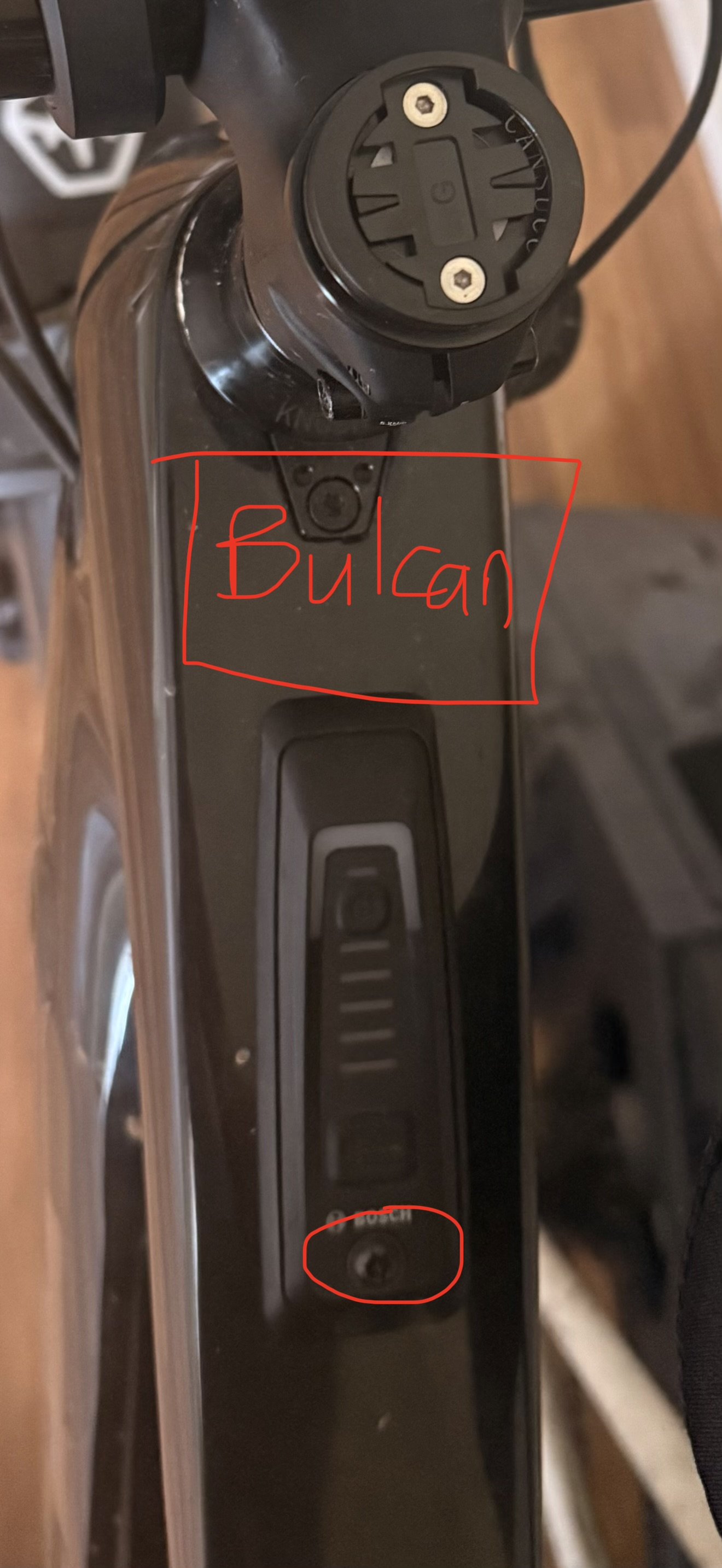
baffobaffone
Member
Molto gentile ma sul sito Bulcan vedo questo modello che a delle prese diverse sembra da quelle del controller o mi sbaglio io, ho fatto una simulazione di acquisto è il coupon risulta scaduto peccato.Basta svitare la vite cerchiata in rosso che tiene in posizione il controller intelligente e farlo scorrere fuori. Ci sarà solo un cavo collegato alla parte posteriore, estrailo e collegalo al Bulcan, quindi collega il Bulcan alla parte posteriore del controller di sistema dove hai appena rimosso il cavo. Fai scorrere prima il Bulcan nel telaio in modo che si trovi nell'area quadrata rossa, quindi fai scorrere nuovamente il controller intelligente e stringi nuovamente la vite.
Ricollegare la batteria, accendere e avviare il processo di associazione con l'unità principale.
Ci vorrà circa un minuto per installare il Bulcan e un altro minuto per accendere tutto e collegare i sensori.
[ALLEGA]169393[/ALLEGA]
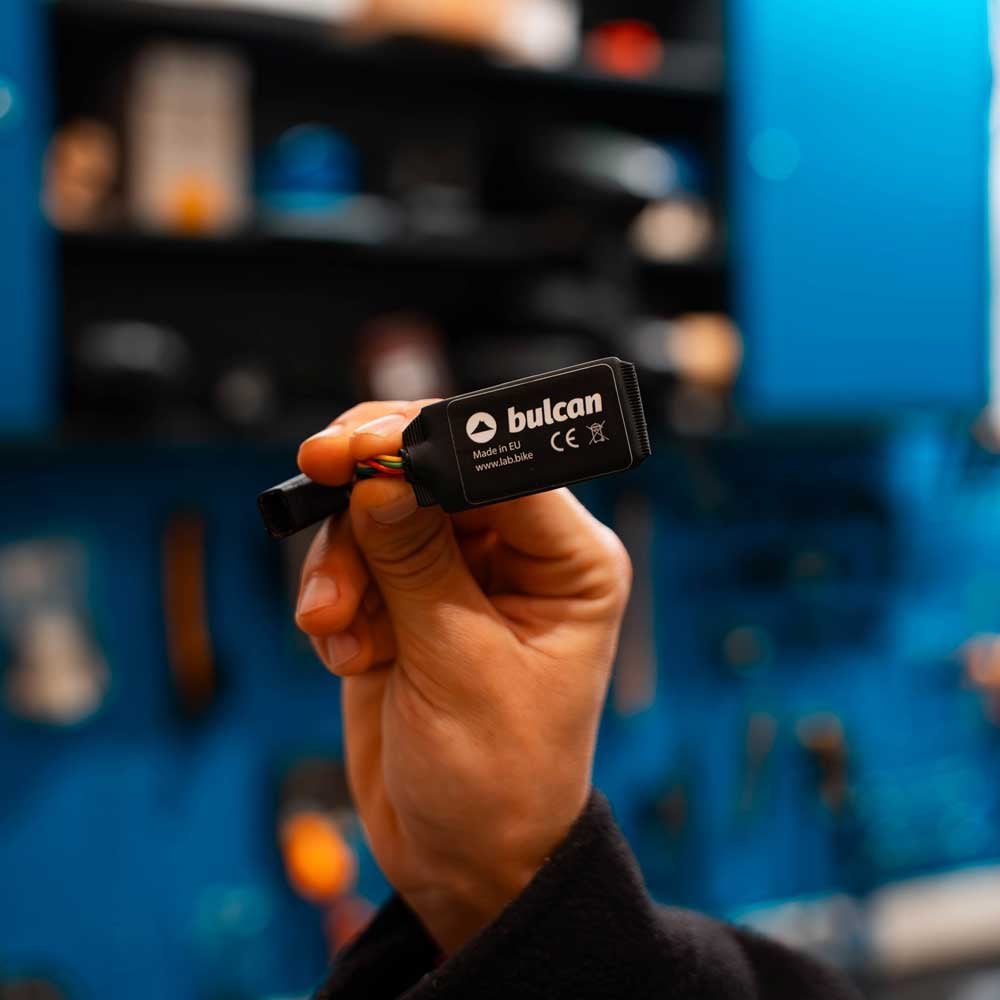
Last edited:
baffobaffone
Member
Alla fine non ho resistito alla tentazione e ordine effettuato 210€ con spedizione, speriamo mi soddisfi con i dati.
Seing all the app developpment I wanted to give it a try too.
First thanks to everyone that did research on thsi cause that helped a lot.
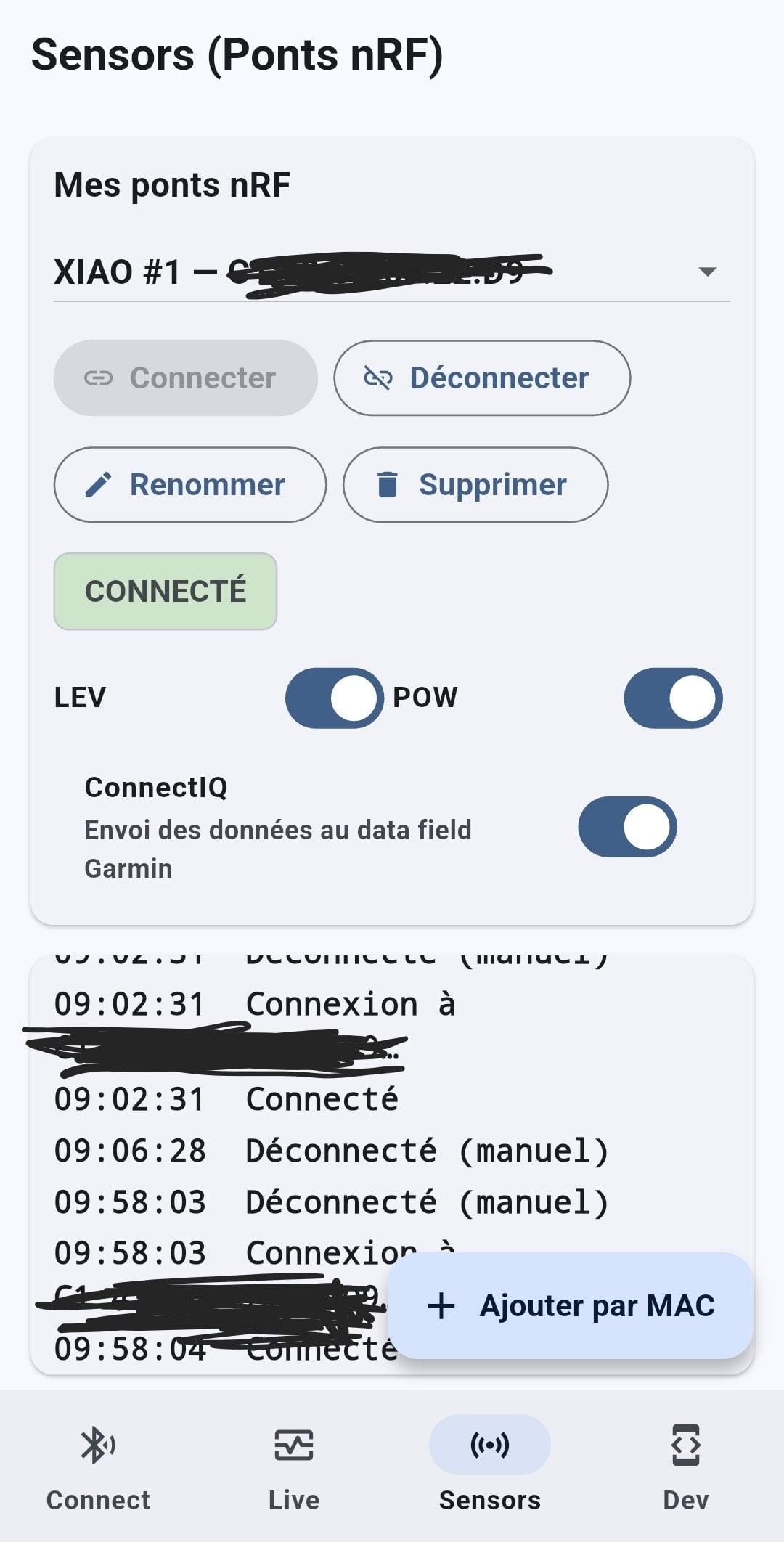
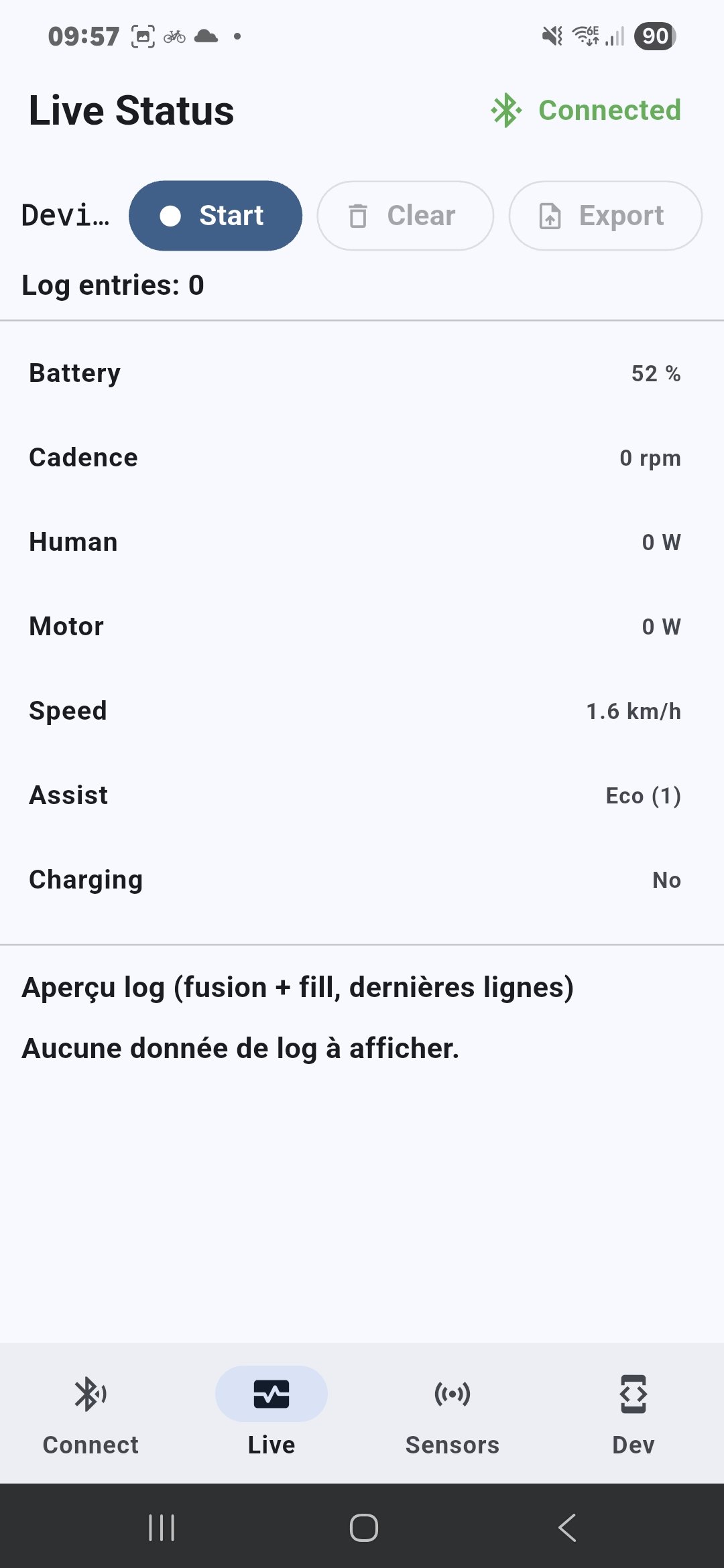
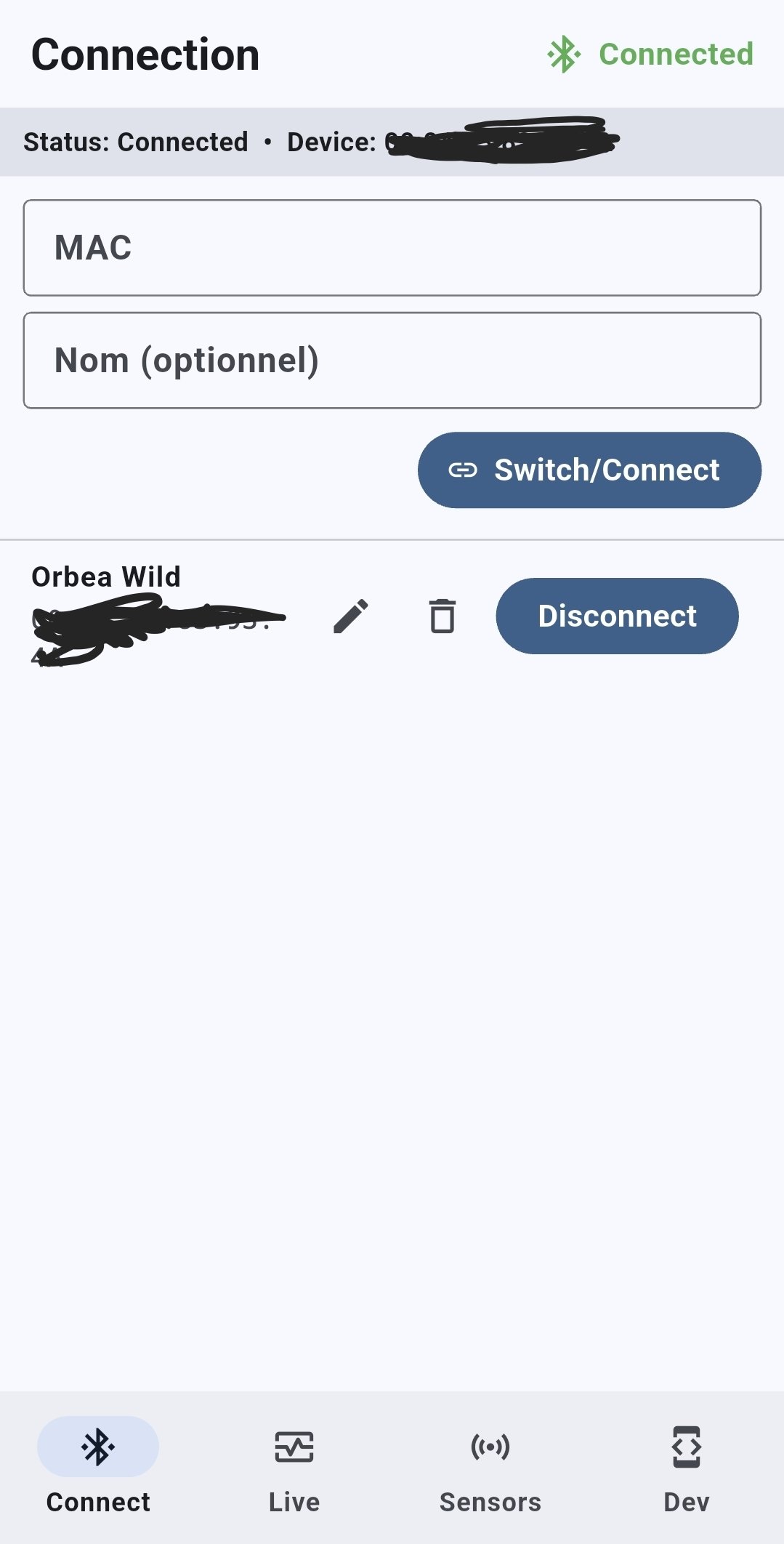
First thing I figured was that a Garmin device can't connect twice to the phone, so a BLE sensors published directly by the phone is a No Go, so I made a small bridge for Cadence and Human Power using an nrf52840 and decided to go with a connect IQ field for Motor Power, Remaining Battery and Assist Mode.
The general layout is that one:
ebike-------Phone------nrf52840-----Garmin (Power/Cadence)
|
|-----Garmin Connect-----Garmin (Motor/Battery/Assist)
By doing that I have succeeded in having all 5 logged in my Garmin data and shown on my watch.
My next step is to battery power the nrf52840 and explore how scalable it is to share the project, the nrf was not the most enjoyable to work with...
I'm also thinking about changing its firmware as it can create an ANT+ sensors and therefore would be able to create an eBike sensors directly, but I'm not sure if it is worth it compare to the logging info I have now.
I don't exclude porting the app to iOs but I still need to think how to distribute that as the store is a bit of a process.
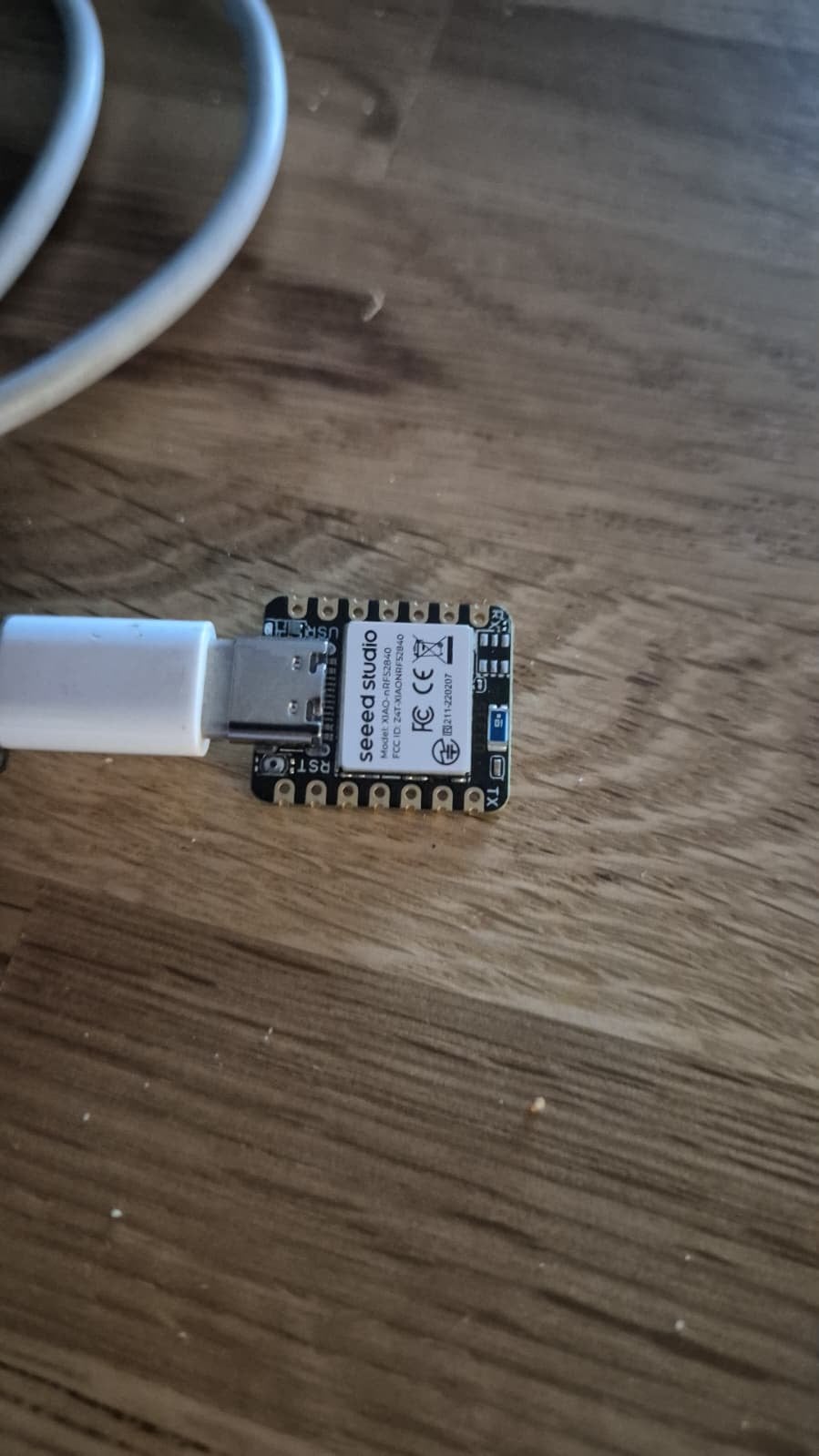
![20251012_090531[1].jpg](https://www.emtbforums.com/data/attachments/169/169294-72b63143df860780585d4e445a8f145d.jpg?hash=crYxQ9-GB4 "20251012_090531[1].jpg")
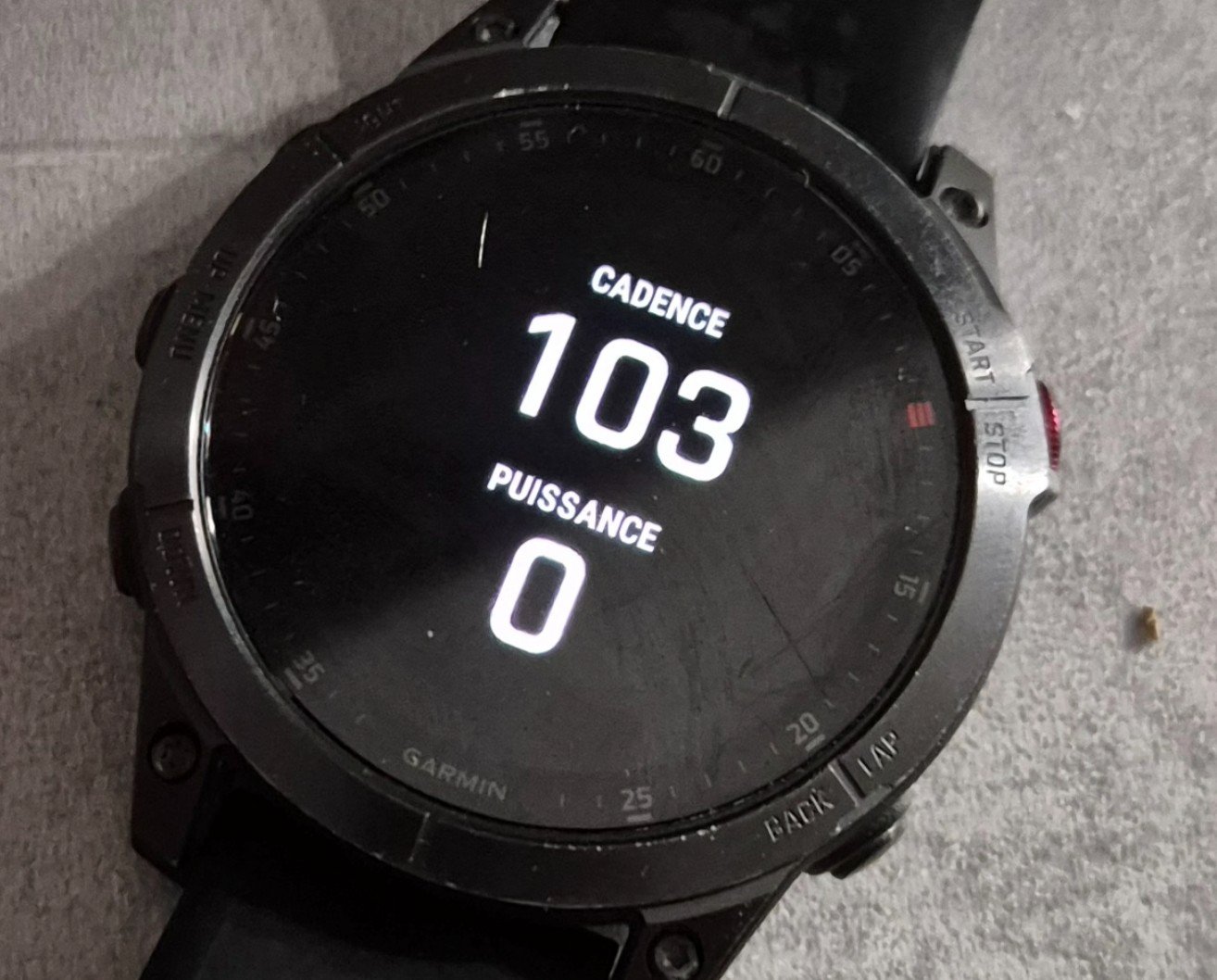
First thanks to everyone that did research on thsi cause that helped a lot.
First thing I figured was that a Garmin device can't connect twice to the phone, so a BLE sensors published directly by the phone is a No Go, so I made a small bridge for Cadence and Human Power using an nrf52840 and decided to go with a connect IQ field for Motor Power, Remaining Battery and Assist Mode.
The general layout is that one:
ebike-------Phone------nrf52840-----Garmin (Power/Cadence)
|
|-----Garmin Connect-----Garmin (Motor/Battery/Assist)
By doing that I have succeeded in having all 5 logged in my Garmin data and shown on my watch.
My next step is to battery power the nrf52840 and explore how scalable it is to share the project, the nrf was not the most enjoyable to work with...
I'm also thinking about changing its firmware as it can create an ANT+ sensors and therefore would be able to create an eBike sensors directly, but I'm not sure if it is worth it compare to the logging info I have now.
I don't exclude porting the app to iOs but I still need to think how to distribute that as the store is a bit of a process.
baffobaffone
Member
Ho installato il Bulcan tutto bene ma non riesco a cambiare il tipo di assistenza con l'unita di comando Bosch, se accendo su Eco sul Garmin risulta 1 ass. se passo a tour rimane a 1 ass, spengo e riaccendo il Bosch mi mostra assistenza 3 ma se ritorno a eco resta sempre 3 non passa a 1, l'autonomia e giusta solo il residuo batteria non è giusto app Flow segna 27% mentre Bulcan segna 21%, suggerimenti grazie
Unfortunately I don’t have any suggestions sorry, I don’t use the e-bike sensor as I already have a kiox display that shows me the battery and mode I’m in. As these are not transferred to Strava or Apple health I’m not interested in Garmin recording them, just HR, Power and Cadence in one file.
baffobaffone
Member
Il mio non funzione il cambio dell'assistenza, tu cambi ma sul Garmin resta 1 se accendi la bike in eco,3 se accendi in tour ecc, tu hai il Mini Remote wireless sulla tua Bosch Gen.5 magari e quello che non dialoga con Bulcan.Hai aspettato molto tempo per la consegna?
Mi chiedo (non è menzionato nel manuale) se Bulcan supporti il profilo ANT+ eBike solo per l'invio dei dati, o forse anche il profilo ANT+ bidirezionale, che permetterebbe di modificare, ad esempio, il livello di assistenza dalla schermata Edge. È piuttosto improbabile, ma vale la pena verificarlo.
D'altra parte, ho intenzione di utilizzare il campo: CIQ Edge eBike ( guida PDF )
View attachment 167861
Rispetto al campo ANT+ originale, LEV offre ampie possibilità di configurazione e utilizzo. Si consiglia di leggere il manuale utente.
Aggiunge la possibilità di calcolare l'autonomia in base ai viaggi salvati (disattivata per impostazione predefinita) o in base al consumo energetico del viaggio corrente.
Registra i valori nel file Attività FIT e visualizzali in Garmin Connect:
- Carica della batteria e modalità di assistenza (vengono scritte nel file fit senza dover fare nulla nelle impostazioni)
Queste opzioni devono essere abilitate nella configurazione:
-Stato della batteria Edge in %
-Indice di cambio marcia anteriore e posteriore
-Dati energetici della bici elettrica (pagina riassuntiva)
View attachment 167863
View attachment 167862
Naturalmente, i dati standard come potenza, cadenza, ecc. vengono registrati come di consueto.
La visualizzazione dei dati ANT+ LeV è ovviamente possibile nei campi Garmin standard, ma questi campi presentano delle limitazioni (e probabilmente non vengono registrati, ad esempio sotto forma di grafici di dati).
Campi Garmin standard disponibili per ANT+ LeV: Modalità assistenza (modalità di assistenza eBike corrente), Batteria eBike (carica residua della batteria di un'eBike), Consigli di cambiata (consiglio di cambiare marcia in base allo sforzo attuale. L'eBike deve essere in modalità di cambio manuale), Autonomia (distanza stimata che è possibile percorrere in base alle impostazioni eBike correnti e alla carica residua della batteria) e Autonomia intelligente (distanza residua stimata per cui l'eBike fornirà assistenza, tenendo conto del terreno locale).
In alternativa, è possibile utilizzare altri campi/applicazioni CIQ disponibili nello store Garmin. Tuttavia, è necessario tenere presente che solo un campo su una determinata schermata ha accesso ad ANT+ LeV. In pratica, si tratta di un insieme di campi standard, ovvero restrizioni introdotte deliberatamente per consentire la comunicazione tra un controller motore e un display (con la possibilità di trasferire dati in entrambe le direzioni). Questo non si applica ad altri dati come potenza, cadenza, velocità e temperatura.
Hammerhead Karoo:
Campi dati EBike:
Come puoi vedere, Karoo ha un set di campi dati piuttosto valido, a volte unico.
- Batteria bici - Livello batteria eBike (numerico, visivo)
- Autonomia stimata rimanente - Autonomia stimata dell'eBike nella modalità di assistenza corrente.
- Livello di assistenza - Modalità/livello di assistenza attuale della bici (numerico, visivo)
- Tasso di combustione - Tasso di consumo energetico, in wh/km o wh/mi (numerico, visivo)
- Velocità di combustione in 20 minuti: velocità media di consumo energetico negli ultimi 20 minuti.
- Potenza del motore della bici - Potenza attuale del motore della bici in watt.
- Potenza combinata: potenza combinata attuale del ciclista e del motore in watt.
- Autonomia rispetto alla distanza del percorso: autonomia stimata rimanente rispetto alla distanza rimanente sul percorso. (Visivo)
- Batteria vs. altitudine - Batteria rimanente rispetto all'altitudine (visiva)
- Potenza della bici contro potenza del ciclista:
- Smoothing 0 secondi - Potenza attuale del motore della bici rispetto alla potenza attuale del ciclista (visivo)
- Smoothing 3 secondi - Media mobile di 3 secondi (Visivo)
- Smoothing 10 secondi - Media mobile di 10 secondi (Visivo)
- Smoothing 30 secondi - Media mobile di 30 secondi (visiva)
Evviva:
Inoltre, dopo la pedalata, le E-Bike Specialized offrono anche:
- Velocità attuale
- Distanza percorsa
- Durata residua della batteria e autonomia
- Informazioni sulla modalità assistiva attuale
- Conteggio dei cicli di carica
- Errori segnalati
Wahoo registra le modalità di assistenza utilizzate, che possono essere visualizzate nell'app dopo la corsa (simile a Flow).
- Consumo totale
- Livello di supporto medio
Bulcan offre livelli di assistenza da 0 a 7, proprio come i controller dei motori Giant (disattivato e con 7 livelli di assistenza). Sono curioso di vedere come gestisce i display eMTB+ ed Eco+... Probabilmente lo stesso del Karoo, con livelli numerici da 1 a 7.
So che questa discussione riguarda il "Progetto per abilitare l'integrazione Bosch + Garmin", ma penso che la soluzione più ottimale sia utilizzare un'interfaccia CAN->ANT+ aggiuntiva. Lo svantaggio è il costo di acquisto. Bosch dovrebbe includere questo tipo di trasmettitore nei suoi motori, in quanto standard comune utilizzato da un gran numero di produttori di motori per eBike (eccezione: Bosch e Shimano...). L'app Flow è sufficiente per la maggior parte degli amatori, ma anche un abbonamento a Flow+ non fornisce nulla di significativo in termini di dati sulle prestazioni: registrare la percentuale di rapporto motore/uomo non è molto utile. Se voglio avere dati completi in Connect (come ho sulla mia bici da corsa, bici da ciclocross o rullo), devo aggiungere la misurazione della potenza alla mia eBike. E questo è "un po'" più costoso di Bulcan. Senza la misurazione della potenza, il monitoraggio delle prestazioni si basa solo sulla misurazione della frequenza cardiaca, che non mi fornisce molto.
Il "Progetto per abilitare l'integrazione Bosch + Garmin" avrebbe senso se qualcuno riuscisse effettivamente a intercettare i dati di comunicazione tra il controller Bosch e lo smartphone. Anzi, non solo a intercettarli (perché è facile), ma a sfruttarli appieno e convertirli in dati che possono essere inviati a dispositivi esterni, preferibilmente in ANT+ e BTLE. Il problema è che attualmente gli smartphone sono praticamente incapaci di inviare dati in ANT+, rimanendo solo in BTLE. In questo caso, è possibile inviare un set limitato di dati (ad esempio potenza, velocità, cadenza) in relazione al livello di energia ANT+. È possibile utilizzare uno smartphone intermediario a questo scopo.
Che i dati inviati da Bulcan (e registrabili, ad esempio, su Garmin Edge) siano importanti o meno per qualcuno è una questione personale. Per me lo sono, da qui la mia decisione di acquistare Bulcan (soprattutto con uno sconto del 30%). Probabilmente l'avrei acquistato anche se Flow+ avesse reso questi dati disponibili come parte di un abbonamento: non sono assolutamente d'accordo con l'idea di rendere disponibili tutte le funzionalità del dispositivo solo dietro pagamento di costi aggiuntivi. Allo stesso modo, il fatto che l'eMTB sia disponibile solo tramite un abbonamento Flow+ mi sembra a dir poco strano. Inoltre, Flow(+) non registra nemmeno la frequenza cardiaca, quindi i dati inviati a Strava non includono i dati relativi alla frequenza cardiaca.
Considerato quanto sopra, non dovrebbe sorprendere che gli utenti di eBike più esperti desiderino avere accesso al maggior numero possibile di dati utili durante e dopo la pedalata. Purtroppo, Flow(+) non offre questa possibilità, da qui la necessità di ricorrere ad altre soluzioni
The mini remote does not communicate with Bulcan, only with your Bosch System Controller. When you press up or down on the mini remote the signal goes via Bluetooth to the System Controller and that tells the motor over cable to change assistance. The Bulcan module is spliced into the cable between System Controller and motor and should not influence the communication over the bus.Il mio non funzione il cambio dell'assistenza, tu cambi ma sul Garmin resta 1 se accendi la bike in eco,3 se accendi in tour ecc, tu hai il Mini Remote wireless sulla tua Bosch Gen.5 magari e quello che non dialoga con Bulcan.
Try checking the two cable connections on the Bulcan module. Are they correctly and fully seated? You could also remove the mini remote from the list of connected components of you bike (done in the Flow app) and pair it agin to the bike.
baffobaffone
Member
Il mio non funziona il cambio dell'assistenza, tu cambi ma sul Garmin resta 1 se accendi la bike in eco,3 se accendi in tour ecc, tu hai il Mini Remote wireless sulla tua Bosch Gen.5 magari e quello che non dialoga con Bulcan.
Provato a rimuoverlo ma non cambia la visualizzazione delle assistenze neanche da system controller.Il mini telecomando non comunica con Bulcan, ma solo con il tuo Bosch System Controller. Premendo verso l'alto o verso il basso sul mini telecomando, il segnale viene trasmesso tramite Bluetooth al System Controller, che comunica al motore tramite cavo di cambiare l'assistenza. Il modulo Bulcan è inserito nel cavo tra il System Controller e il motore e non dovrebbe influenzare la comunicazione sul bus.
Prova a controllare i due collegamenti dei cavi sul modulo Bulcan. Sono correttamente e completamente inseriti? Puoi anche rimuovere il mini telecomando dall'elenco dei componenti collegati della tua bici (operazione eseguita nell'app Flow) e riassociarlo alla bici.
Remove the Bulcan module and check if mini remote and system controller work again.Provato a rimuoverlo ma non cambia la visualizzazione delle assistenze neanche da system controller.
baffobaffone
Member
Funziona regolarmente.Remove the Bulcan module and check if mini remote and system controller work again.
That only leaves the Bulcan module. Either the module is defect or the cable connections on one or both sides of the module are not seated correctly. I would contact Bulcan support.Funziona regolarmente.
By the way, do you have any tuning devices installed? That could interfere with the Bulcan module.
basti_emtb
New Member
Hello,Seing all the app developpment I wanted to give it a try too.
First thanks to everyone that did research on thsi cause that helped a lot.
First thing I figured was that a Garmin device can't connect twice to the phone, so a BLE sensors published directly by the phone is a No Go, so I made a small bridge for Cadence and Human Power using an nrf52840 and decided to go with a connect IQ field for Motor Power, Remaining Battery and Assist Mode.
The general layout is that one:
ebike-------Phone------nrf52840-----Garmin (Power/Cadence)
|
|-----Garmin Connect-----Garmin (Motor/Battery/Assist)
By doing that I have succeeded in having all 5 logged in my Garmin data and shown on my watch.
My next step is to battery power the nrf52840 and explore how scalable it is to share the project, the nrf was not the most enjoyable to work with...
I'm also thinking about changing its firmware as it can create an ANT+ sensors and therefore would be able to create an eBike sensors directly, but I'm not sure if it is worth it compare to the logging info I have now.
I don't exclude porting the app to iOs but I still need to think how to distribute that as the store is a bit of a process.
is there any update on the nrf52840 project? I think this sounds very interesting.
When is the EBike broadcasting information? I have tried to find it using the nrf Connect scanner, but only found it once.
Not sure what I did to make it appear.
BR
Basti

robbydobs
Active member
You have to have the ebike connected to the flow app and you should then be able to see it in Nrf Connect. The Flow app handles the authentication.Hello,
is there any update on the nrf52840 project? I think this sounds very interesting.
When is the EBike broadcasting information? I have tried to find it using the nrf Connect scanner, but only found it once.
Not sure what I did to make it appear.
BR
Basti
I updated my app a while back to stop it scanning for the bike as I realised it was unecessary, the Flow app handles scanning + connection
@ddje "First thing I figured was that a Garmin device can't connect twice to the phone, so a BLE sensors published directly by the phone is a No Go, so I made a small bridge for Cadence and Human Power using an nrf52840 and decided to go with a connect IQ field for Motor Power, Remaining Battery and Assist Mode."
It seemed to work ok on my, this was with a Garmin Forerunner 165 and a Samsung S23 5G. There's so many differing versions of things with differing capabiliies, a bridge device is probably the safest way of doing it.
basti_emtb
New Member
Is there any Github Project for this to use it?You have to have the ebike connected to the flow app and you should then be able to see it in Nrf Connect. The Flow app handles the authentication.
I updated my app a while back to stop it scanning for the bike as I realised it was unecessary, the Flow app handles scanning + connection
@ddje "First thing I figured was that a Garmin device can't connect twice to the phone, so a BLE sensors published directly by the phone is a No Go, so I made a small bridge for Cadence and Human Power using an nrf52840 and decided to go with a connect IQ field for Motor Power, Remaining Battery and Assist Mode."
It seemed to work ok on my, this was with a Garmin Forerunner 165 and a Samsung S23 5G. There's so many differing versions of things with differing capabiliies, a bridge device is probably the safest way of doing it.
I have a nrf52840 prepared to connect to my Garmin edge and this part seems to be working. Sending cadence and human power.
Need to test the connection to the Bosch environment and was struggeling finding the MAC of my bike.
So there is no need to actually starting padelling etc.? Just opening the Flow app to connect via bluetooth?
Does it show up as "Smart System eBike" in your scan?
Today I will receive a LiPo and a small OLED display. Looking forward to use this setup soon...
Hi,Is there any Github Project for this to use it?
I have a nrf52840 prepared to connect to my Garmin edge and this part seems to be working. Sending cadence and human power.
Need to test the connection to the Bosch environment and was struggeling finding the MAC of my bike.
So there is no need to actually starting padelling etc.? Just opening the Flow app to connect via bluetooth?
Does it show up as "Smart System eBike" in your scan?
Today I will receive a LiPo and a small OLED display. Looking forward to use this setup soon...
Sorry I didn't spend much time on it recently.
I haven't prepared a github yet. I had a first test ride last week and had minor issue to fix. (small periodic disconnection).
I'm gonna test them on my next ride and create a github also.
I backed off the iphone version as for an other project I discover that it is very hard to maintain the app alive with the phone lock.
Looking at other work I have this should be done before chrismas.
basti_emtb
New Member
Sounds like there is at least two nrf52840 projects in parallel now. Sounds great!
I have tried to scan for my bike using the nRF Connect iPhone app.
Is there any setting I need to use to find it?
I have tried to scan for my bike using the nRF Connect iPhone app.
Is there any setting I need to use to find it?
basti_emtb
New Member
@ddje, @robbydobs: Is there any code you can share for the connection to the Bosch system?
Sending values to Garmin is working fine, but the connection to my bike is not working as expected.
Don't know why at the moment.
Sending values to Garmin is working fine, but the connection to my bike is not working as expected.
Don't know why at the moment.
robbydobs
Active member
@basti_emtb
All my code is here... GitHub - RobbyPee/Bosch-Smart-System-Ebike-Garmin-Android: Android app to analyse bluetooth messages from Bosch Smart System ebike
I'm not a kotlin dev (usually C++), so its all LLM generated!
All my code is here... GitHub - RobbyPee/Bosch-Smart-System-Ebike-Garmin-Android: Android app to analyse bluetooth messages from Bosch Smart System ebike
I'm not a kotlin dev (usually C++), so its all LLM generated!
robbydobs
Active member
Flow App needs to be installed and running to connect to Bosch system.
basti_emtb
New Member
I can see the Android project on Github, but you mentioned a nrf52840 project as well.@basti_emtb
All my code is here... GitHub - RobbyPee/Bosch-Smart-System-Ebike-Garmin-Android: Android app to analyse bluetooth messages from Bosch Smart System ebike
I'm not a kotlin dev (usually C++), so its all LLM generated!
Where can I find this? I don't mind how it has been generated as long as it works
 .
.
robbydobs
Active member
ah sorry, I've not done an nrf project.
I'm in a worktrip and will have access to my project only when I'm back home in a few days.
The nRF is here only to do the bridge between a phone app and the garmin device.
The nRF will not be able to decrypt the connection protocole done by the eBike Flow app and identificate to your bike.
I use the bridge because:
- I'm not able to have Garmin Connect and a simulated sensors connected to my watch if the same phone is used, I needed a different MAC address for my simulated sensor, and that's the only role of the bridge. My phone send to the nRF the power value and then the nRF send them to Garmin.
The nRF is here only to do the bridge between a phone app and the garmin device.
The nRF will not be able to decrypt the connection protocole done by the eBike Flow app and identificate to your bike.
I use the bridge because:
- I'm not able to have Garmin Connect and a simulated sensors connected to my watch if the same phone is used, I needed a different MAC address for my simulated sensor, and that's the only role of the bridge. My phone send to the nRF the power value and then the nRF send them to Garmin.
basti_emtb
New Member
Why do you think the nrf cannot be used to decrypt the messages directly?I have switched to a ESP32 in the meantime, because it was easier to make it pair with the Bosch Bike.I'm in a worktrip and will have access to my project only when I'm back home in a few days.
The nRF is here only to do the bridge between a phone app and the garmin device.
The nRF will not be able to decrypt the connection protocole done by the eBike Flow app and identificate to your bike.
I use the bridge because:
- I'm not able to have Garmin Connect and a simulated sensors connected to my watch if the same phone is used, I needed a different MAC address for my simulated sensor, and that's the only role of the bridge. My phone send to the nRF the power value and then the nRF send them to Garmin.
This is working now as well as acting as a sensor for the Garmin Edge.
I "just" need to check if the messages from the Bosch bike can be used correctly.
But at the moment I don't know where you see an issue.
Why do you think the nrf cannot be used to decrypt the messages directly?I have switched to a ESP32 in the meantime, because it was easier to make it pair with the Bosch Bike.
This is working now as well as acting as a sensor for the Garmin Edge.
I "just" need to check if the messages from the Bosch bike can be used correctly.
But at the moment I don't know where you see an issue.
I never managed to pair my bike to anything that didn't have the bosch flow app installed. Also, I can't connect my bike to more than one phone with the flow app. So I believe their is an identification that goes with the app.
As I still want my flow app to work and also the connect IQ part to work (I send battery / mode and motor power that way), I didn't even look for a workaround for that.
Similar Threads
-
 DJI Avinox ANT+ support – does it transmit e-bike data to Garmin devices?
- Started by linkqwd
- Replies: 12
-
-
Looking for Bosch Smart System developers and BLE experts (Open Source BikeBridge project)
- Started by stereodreieck86
- Replies: 5
-
-

Free account
Join 43,224
eMTB riders
eMTB riders
One tap. No forms. Fewer ads.
or sign up with email
Already a member? Log in