Did you wait a long time for the delivery?
I wonder (this is not mentioned in the manual) whether Bulcan supports the ANT+ eBike profile only for sending data, or perhaps two-way ANT+ Lev – which would make it possible to change, for example, the assistance level from the Edge screen. It is rather unlikely, but it is worth checking.
On the other hand, I plan to use the field:
CIQ Edge eBike (
PDF-guide )
View attachment 167861
Compared to the original ANT+ field, LEV has extensive configuration and usage options. It is recommended that you read the user manual.
Adds the ability to calculate range from saved journeys (disabled by default) or range based on energy consumption from the current journey.
Log values to the FIT Activity file and show them in Garmin Connect:
- Battery Charge and Assist Mode (are written to the fit file without doing anything in settings)
These options must be enabled in the setup:
-Edge Battery Status in %
-Shift index for front and rear
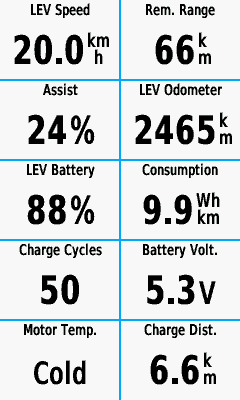
-Ebike Energy data (summary page)
View attachment 167863
View attachment 167862
Of course, standard data such as power, cadence, etc. are recorded as usual.
Displaying ANT+ LeV data is, of course, possible within standard Garmin fields, but these fields have limitations (and are probably not recorded, eg in the form of data graphs).
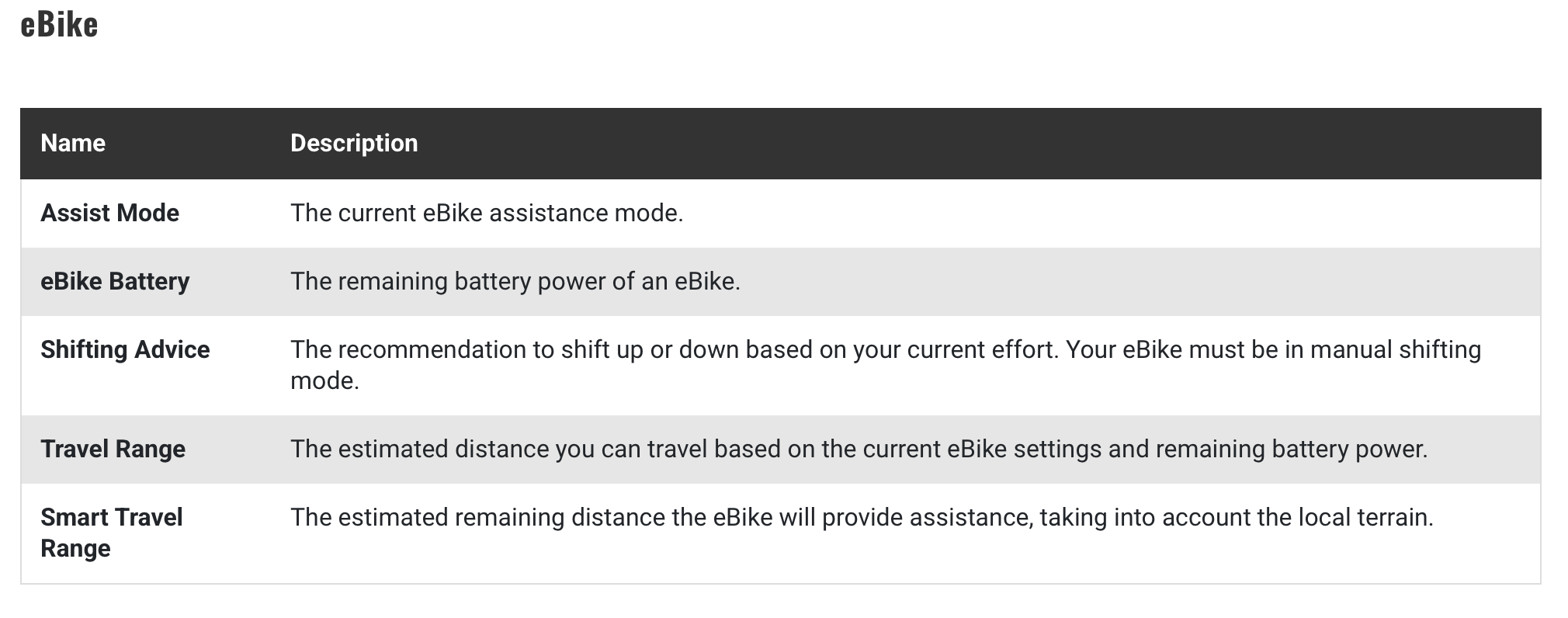
Available standard Garmin fields for ANT+ LeV: Assist Mode (current eBike assistance mode), eBike Battery (remaining battery power of an eBike), Shifting Advice (recommendation to shift up or down based on your current effort. Your eBike must be in manual shifting mode), Travel Range (estimated distance you can travel based on the current eBike settings and remaining battery power) and Smart Travel Range (estimated remaining distance the eBike will provide assistance, taking into account the local ground).
Alternatively, you can use other CIQ fields/applications available in the Garmin store. However, keep in mind that only one field on a given screen has access to ANT+ LeV. In practice, this is either a set of standard fields - restrictions deliberately introduced so that communication is possible between one motor controller and one display (with the ability to transfer data in both directions). This does not apply to other data such as power, cadence, speed, and temperature.
Hammerhead Karoo:
EBike data fields:
- Bike battery - eBike battery level (Numeric, Visual)
- Estimated range remaining - Estimated eBike range in current assist mode.
- Assist level - Current bike assist mode/level (Numeric, Visual)
- Burn rate - Rate of energy consumption, in wh/km or wh/mi (Numeric, Visual)
- 20min burn rate - Average rate of energy consumption over the last 20 min.
- Bike motor power - Current bike motor power output in watts.
- Combined power - Current combined rider and motor power in watts.
- Range vs route distance - Current estimated range remaining compared to distance remaining on route. (Visual)
- Battery vs elevation - Current battery remaining compared to elevation (Visual)
- Bike vs rider power:
- Smoothing 0 Seconds - Current bike motor power compared to current rider power (Visual)
- Smoothing 3 Seconds - 3-second rolling avg. (Visual)
- Smoothing 10 Seconds - 10-second rolling avg. (Visual)
- Smoothing 30 Seconds - 30-second rolling avg.(Visual)
As you can see, Karoo has a pretty good, sometimes unique set of data fields.
Wahoo:
- Current speed
- Distance traveled
- Remaining battery life and range
- Current assistive mode information
- Charge Cycle Count
- Reported errors
Additionally, after the ride, Specialized E-Bikes also provide:
- Total Consumption
- Average Support Level
Wahoo records the assistance modes used, which can be viewed in the app after the ride (similar to Flow).
Bulcan provides assistance levels from 0 to 7, just like Giant motor controllers (off and 7 assistance levels). I am curious to see how it handles the eMTB+ and Eco+ displays... Probably the same as in Karoo – numerically from 1 to 7.
I know that this thread concerns 'Project to enable Bosch + Garmin integration', but I think that the most optimal solution is to use an additional CAN->ANT+ interface. The downside is the cost of purchasing it. Bosch should include this type of transmitter in its motors as a common standard used by a large number of eBike motor manufacturers (exception: Bosch and Shimano...). The Flow app is sufficient for most amateurs, but even a Flow+ subscription does not provide anything meaningful in terms of performance data – recording the % motor/human ratio is not very useful. If I want to have full data in Connect (as I have on my road bike, CX bike or trainer), I need to add power measurement to my eBike. And that's 'a bit' more expensive than Bulcan. Without power measurement, performance monitoring is based only on heart rate measurement, which doesn't give me much.
The 'Project to enable Bosch + Garmin integration' would make sense if someone actually managed to intercept the communication data between the Bosch controller and the smartphone. In fact, not only intercept it (because that's easy), but fully utilize it and convert it into data that can be sent to external devices, preferably in ANT+ and BTLE. The problem is that currently, smartphones are practically incapable of sending data in ANT+, leaving only BTLE. Here, a limited set of data (eg power, speed, cadence) can be sent in relation to ANT+ LEV. It is possible to use an intermediate smartphone for this purpose.
Whether the data sent by Bulcan (and recordable in, for example, Garmin Edge) is important to someone or not is a personal matter. For me, it is, hence my decision to purchase Bulcan (especially at a 30% discount). I would probably have bought it even if Flow+ had made this data available as part of a subscription – I strongly disagree with making the full capabilities of the device available only after paying additional fees. Similarly, the fact that eMTB is only available to someone as part of a Flow+ subscription is strange to me, to say the least. In addition, Flow(+) does not even record heart rate, so the data sent to Strava does not include HR records.
Given the above, it should come as no surprise that more advanced eBike users would like to have access to as much useful data as possible during and after their ride. Unfortunately, Flow(+) does not provide this, hence the need to use other solutions.


The AIs love to pretend to be right, smugly so. Run it though different chats or different AIs to get cross verification.

 .
.