Project to enable Bosch + Garmin integration

Firstly, thanks for making what you have made so far! I can confirm that the app connected between a Pixel 8a (Android 16) and a CX gen 5, I did need to put the bike into pairing mode. I have had some thoughts on the project though please don't see it as negative, just seeing whether these other options have been thought about. I will see about ordering the board soon so I can try that bit too, I have previously done a few arduino based projects, reading your instructions seemed straight forward enough.

Some questions on the project.
1) Is the app constantly staying on in the background for connectivity reasons? If so, could be worth having a kill switch.

2) I am a little confused for the use of the sense version of the board, this means the board is always on? Would it not be a simpler setup to have a physical switch to turn it on and off instead? That would then allow going for the cheaper board.

3) Could you have the voltage readout of the battery for the bridge in the android app?

4) For testing purposes it seems like I could just power the bridge using a usb power bank, is that correct?


Regarding powering the bridge:
1) You could see the use of the Low Power Port on the motor as a power source for the bridge, then enclose it inside a waterproof case, therefore negating the need for a battery. You can buy cables with just a bare +- and is fed at 12v, so a step down board would work.


2) You can even get a SP Connect LPP cable which has a USBC (5V/2A) directly on it. It would make creating a small waterproof box simpler and no soldering. Downside of both LPP setups is the requirement to have that port activated.


3) Can't help but notice on the 400C display it has a USB charge port, it states this doesn't work if the HPP is used (or for the SX the MPP is set to High power). That must mean there is a fair amount of power available on the display cable. You can get Y cables when adding a Purion 200 to a mini controller, so would think you could use a the display cable as a power source. In addition, I wonder if you can read the data directly off the display cable, therefore removing the need for the phone app. However, no idea how easy it is to interrogate that.

4) If you didn't want to mount the bridge to your bike then you could use an inductive charging adapter, then making a waterproof case would be easy. Though have also seen qi charge addon boards for phones which have a USBC output directly.

 
Last edited:
⚡ EMTB Pro Go Pro — exclusive discounts & ad-free Peaty's 25% off & more · Ad-free browsing · Pro badge See the deals →
Thanks for your thoughts - and good news that it paired with your bike. It's natural that different people will have different thoughts about how they want to use this, so it's just a matter of seeing what I can support.

Some answers

No the app isn't permanently running in the background. Android has a capability to monitor connections at a system level then trigger processes when a device is detected. This is very low impact and is what the Flow app uses as well as stuff like my ear buds.

I wanted the bridge to be as "hands off" as possible. Another thing to power up and switch off just seemed like extra hassle compared to having something I could leave in my pack which would turn on and off by itself. Hence the motion detection of the Sense board made sense. I could possibly amend the bridge code to just rely on external power if there's demand for it.

The app will show the bridge battery level when the bridge is connected, and the bridge battery level is sent to the Garmin as part of the power sensor information so the Garmin should let you know when it's getting low.

Interesting thoughts about other power options too - thanks for sharing those.
 
Thanks for the reply there, software isn't my strong point so explaining how the app works there does make sense. I will get the sense version ordered anyways and will let you know how it goes. I will be connecting it to a gamin 520.
 
Honest answer is that I don't know if it will work with your motor. The best way to test is to install the app and see if it displays data, but obviously I've messed up the APK build so I'll investigate that. You could try building it from the source code using android studio but that's a bit more work. Thanks for letting me know.
Hi, tested :
1: have to disconnected from my phone
2: than I found the KIOX and paired with bike
3: start logging button pressed
4: but all datas are 0W power , 0 cadence , 100% battery so it's like it's not reading the data
 
That's with a Gen 4 motor? If so that means it uses different encoding for the data. If you generated your log while riding (so it should have valid power data etc) please upload it to the Feedback discussion thread on Github and I'll take a look. The log file should be in your Downloads folder.
 
Thanks @HexagonSun for your efforts, and especially for sharing it with the community!
I have successfully tested the first part, I have installed the App on an old Android 10 phone, paired it with my Bosch Gen 5 bike, and I am able to see the decoded values 👍
Now I am eagerly waiting for the BT board to test the second part of the data supply chain to my Garmin Edge.
Will keep you updated
Thanks again!
 
Love this! Just got a Bosch gen5 bike and was thinking what a pain it was that you cant see the data on garmin. I will definitely be giving this a go!
 
Well I got the bridge hardware today, hit a few issues. I was able to use the same box the board came in to fit the battery etc no problems.

1) needed to install python from the ms store when trying to upload to the seeed board.

2) not sure why but I can't get the blue light to stop flashing. Paired all fine in the app to both bridge and phone. I have tried turning the bridge on and off plus repairing with the phone.

3) my Garmin 520 doesn't want to find the bridge at all. Tried all different types of sensors but nothing came up.

Screenshot_20260428-192454.webp
 
The blue flashing light means that the bridge is advertising on Bluetooth (looking for a device to connect to) so that is linked with the fact it's not being found by the Garmin. From what I have found online it looks like the 520 only connects with ANT+ sensors so that would explain why it can't find the bridge.

All is not lost - the board supports ANT+ (with a bit of extra config) and that offers the full ebike sensor profile. I was aiming to explore that once I got the Bluetooth version working so hold on for a bit.
 
Ah yes thanks I didn't think of that. Now I've got the device I agree the accelerometer works well for turning the device on.
 
Quick update from my side:

I received my Seeed XIAO nRF52840 Sense board yesterday, flashed the sketch (I also had to install python from the MS Store first) and successfully paired it with the app ans also my Graming Edge Explore 2.
For those who also plan to power the Board with a powerbank beware that you either need to use a powerbank that supports "low power mode" to prevent the powerbank from switching off after few minutes as the board doesnt consume enough power to keep it on, or you use some kind of a hack and attach another consumer to the powerbank at the same time to avoid the described issue. I work around this issue by attaching my old phone that runs the App.

I haven't ridden the bike yet, but when I gave the cranks a few turns at the booth, I could see the corresponding values on the Garmin's display.

Long story short: I'm thrilled :) , big thanks again!
 
Sounds promising! FWIW I've had some random sensor disconnects/reconnects on recent rides and am trying to track down whether it's my code or the Garmin 830. There's plenty of reports of the 830 doing that sort of thing on its own, so I'd be interested to know whether you see anything. Also could you confirm your phone so I can add another 'known working config' to the list? (think you're Gen 5 motor, Seeed board, Edge Explore 2?).
 
I hope that I will be able to do a plenty of riding during the long weekend, and I will definitely share my experience!
The phone that I am using right now is an old OnePlus5 with an open bootloader running Android 10.
 
I did a first ride yesterday, and it worked quite well, but with some issues:

  • First I had to forget the bridge in the app and reconnect it
  • Then it worked quite well, I was also testing some things like bringing the board out of distance of my bike and back again, pause the activity on my Garmin etc, and all components were able to automatically find each other to function well
  • During this period, my Explore2 recorded as much as it could, I can see nice diagrams for cadence, power, and left/right balance (~40 minutes)
  • But finally we were having a break, my bike was shutting down, and afterwards the supply chain was not working any more, the Garmin was not able to find the sensor anymore.
  • I tried a couple of things, like closing the app, changing battery settings of the app, restarting Garmin etc, and eventually it started to work again. Unfortunately I'm not sure which of those steps did the trick.
I will continue to do some tests today.
 
Thanks for the feedback - is it possible that the board had dropped into sleep mode while you took that break? The initial forget and reconnect seems odd too - I'll check that out.
 
Oh and in case it happens again, if the Garmin can't find the sensor it won't be anything to do with the app. The board is the only thing that the Garmin can see so if you could check what LEDs are showing that might help - especially if the blue one is flashing. Restarting the board should fix it as a last resort - either press the small (tiny!) reset button by the USB plug or power cycle it.
 
Thanks for your reply, and yes, the blue led was flashing during that period!
 

Garmin users will be able to see some key statistics on their Edge devices soon, thanks to a new partnership between the two companies. Functionally, this will show the same data you'd see on Bosch's Kiox unit, but it now integrates directly into the GPS head unit. For those without the jumbotron display on the bike, this could be a good way to bridge that gap, should you want more information on the fly.
 
That would really be cool and totally unexpected.... Let's hope that they won't hide it behind their Flow+ pay wall...
 
Looks like it's only an update for smart system bikes so there might still be mileage in my solution for older bikes. From what @bati has shared so far they use different UUiDs so I'll need to make some tweaks - if anyone with a gen 4 motor can capture a log of the data transferred I'm happy to take a look at that (nrf connect/nrf Logger would do the job)
 
The new Garmin Bosch integration is welcome, but is a bit meh imo. It's still not an open ANT+ LEV protocol broadcasting the data. It's only Garmin-Bosch exclusively. You need to pair the Flow app with your device. It is only open currently for some Garmin bike computers and not for Garmin wearables.
I guess this integration was made for those ebike riders that mostly do tour riding. I mean, almost every new ebike has a display of some kind, who would want another display(bike computer) haning off the handlebars.
The whole point of third party device integration is data transfer to the platform the rider uses for their metrics. Data is money, I guess Bosch doesn't want the data/money to run away from them.
 
The new Garmin Bosch integration is welcome, but is a bit meh imo. It's still not an open ANT+ LEV protocol broadcasting the data. It's only Garmin-Bosch exclusively. You need to pair the Flow app with your device. It is only open currently for some Garmin bike computers and not for Garmin wearables.
Hmmm - maybe I won't archive my github repo just yet then.

@ATeam FWIW I saw those issues myself on a ride today, first time I'd seen them but think I've got a fix, will test it further this weekend.
 
Thanks @HexagonSun, I will of course test it. Out of curiosity: is the fix for the app or the Seed board sketch?
Please don't archive the git repo or stop your efforts. Reading quite some articles about the new interface I doubt that it comes close to your concept. For me personally it looks like that my Explore2 might not even be supported at all, at least it was not mentioned anywhere.
So please continue and let me know whether I can help in any way.
 
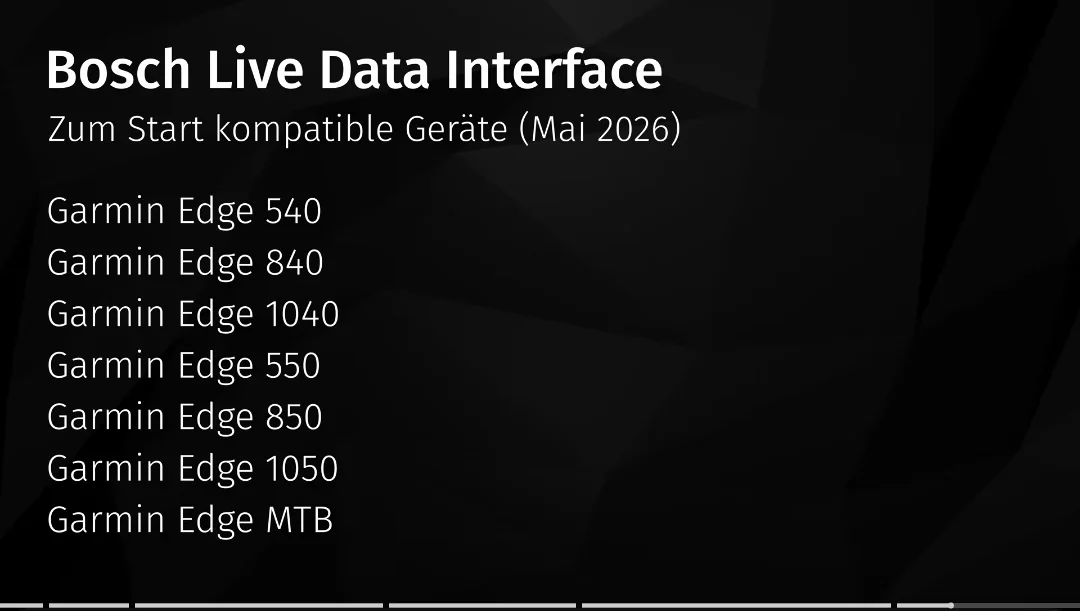
These are the Garmin bike computers currently supported:
Screenshot_20260502_100822_YouTube.webp
More information here:

 
Out of curiosity: is the fix for the app or the Seed board sketch?
It's an update to the sketch - if you see any other issues please try to record the exact circumstances so I can try to replicate them. FWIW I've started migrating to a different build environment for the board which will support ANT+, but the first step is replicating the current functionality so any bug reports are still useful.
 
These are the Garmin bike computers currently supported:
View attachment 183641
More information here:

Phew, I was very close to buying an edge explore for navigation, and was hoping one day there would be a Garmin data display. Looks like the explore won’t be supported so a 540 looks the best options. Currently have an edge130 which doesn’t appear as though it’s going to be supported.
 
After updating my Garmin Edge 840 to the newest beta software 31.23 I can confirm you can already pair Bosh Gen5 with Edge via the Flow app (version 1.34) (Settings -> Components -> Add new device -> Accessories and on your Garmin you need to go to Sensors section -> Add Sensor -> eBike -> Bosch Smart System eBike). After you pair both your Garmin should show up in Components section of the Flow app as External Display (see screenshot below)

Once done your Garmin will now show/record: Power, Cadence, (didn't check Speed as I have external speed sensor), Gear Combo (though for me it's bit skewed since it shows 39T as my chainring whereas I have 34T one installed). Battery Level, Smart Range

It still doesn't show/record Assistance Level, Range and compared to Bulcan it also doesn't show L/R balance which in Bulcan is effectvely a level of effort from you and the motor.

Other then that - works great.

1777811416848.webp
 
Here is an update from my last two riding days. Yesterday I tried to reproduce the situation where the Garming couldn't reconnect with the bridge after a pause, and succeeded one out of two. Resetting the bridge fixed the issue. Both situations were similar, bike + Garmin + bridge went to sleep.
Today during a ride where I again forcing myself to a pause, I had the same issue again. During the remaining ride I noticed two random connection losses for the first time. Second time I again had to reset the bridge to bring it back online.
What is may worth mentioning is that I changed my setup: I have installed the app on my primary phone, a pixel 10 pro XL, which is now powering the bridge via reverse USB charging. No more hassling with the power bank anymore.

@slavio did you already receive the new update for your bike?? I thought this would be released tomorrow only (May 4)
 
Keep reading
    Browse all

    Similar Threads

    Community Stats

    Since 2018
    668K
    Messages
    40,712
    Members
    Join 30,000+ Riders, it's free!
    Back
    Top