Same here. My acceleration response was 40% before and after the update. I wonder if it has something to do with the motor build date (and possibly hardware level). My motor build date is March 2019. (Motor serial number contains -100190316-)Fwiw the update didn’t change my acceleration response. It was 60% before and after the update.
Navigation
Install the app
How to install the app on iOS
Follow along with the video below to see how to install our site as a web app on your home screen.
Note: This feature may not be available in some browsers.
More options
Style variation
You are using an out of date browser. It may not display this or other websites correctly.
You should upgrade or use an alternative browser.
You should upgrade or use an alternative browser.
Mission Control RELEASE OF OVER THE AIR UPDATES FOR LEVO / KENEVO GEN 2 BIKES
a
- Thread starter Specialized Rider Care
- Start date

⚡ EMTB PRO
25% off e*thirteen, Peaty’s & more with PRO
Member-only deals from e*thirteen, Peaty’s, PEMBREE and Magicshine · ad-free browsing · PRO badge · Living Intelligence Reports
See the deals →
From £1.99/month
HopperMtb
New Member
My motor is June 2020
steven_from_belgium
Member
Maybe somebody can ask rider care about the update.so we don't need to make up guesses anymore

Levo Laland
Well-known member
Update all done took about 2 minutes. Had to log out and back in again within the app profile settings. Two rides in and using trail mode with no changes to any settings, the motor appears to deliver more initial power than before, like I’ve upped the acceleration response, which I have not.
Last edited:
Eduardoramundo
E*POWAH Master
Maybe somebody can ask rider care about the update.so we don't need to make up guesses anymore
They have already replied above. Its down to the app version.
The latest app keeps all the settings intact.
Alan Yeung
Member
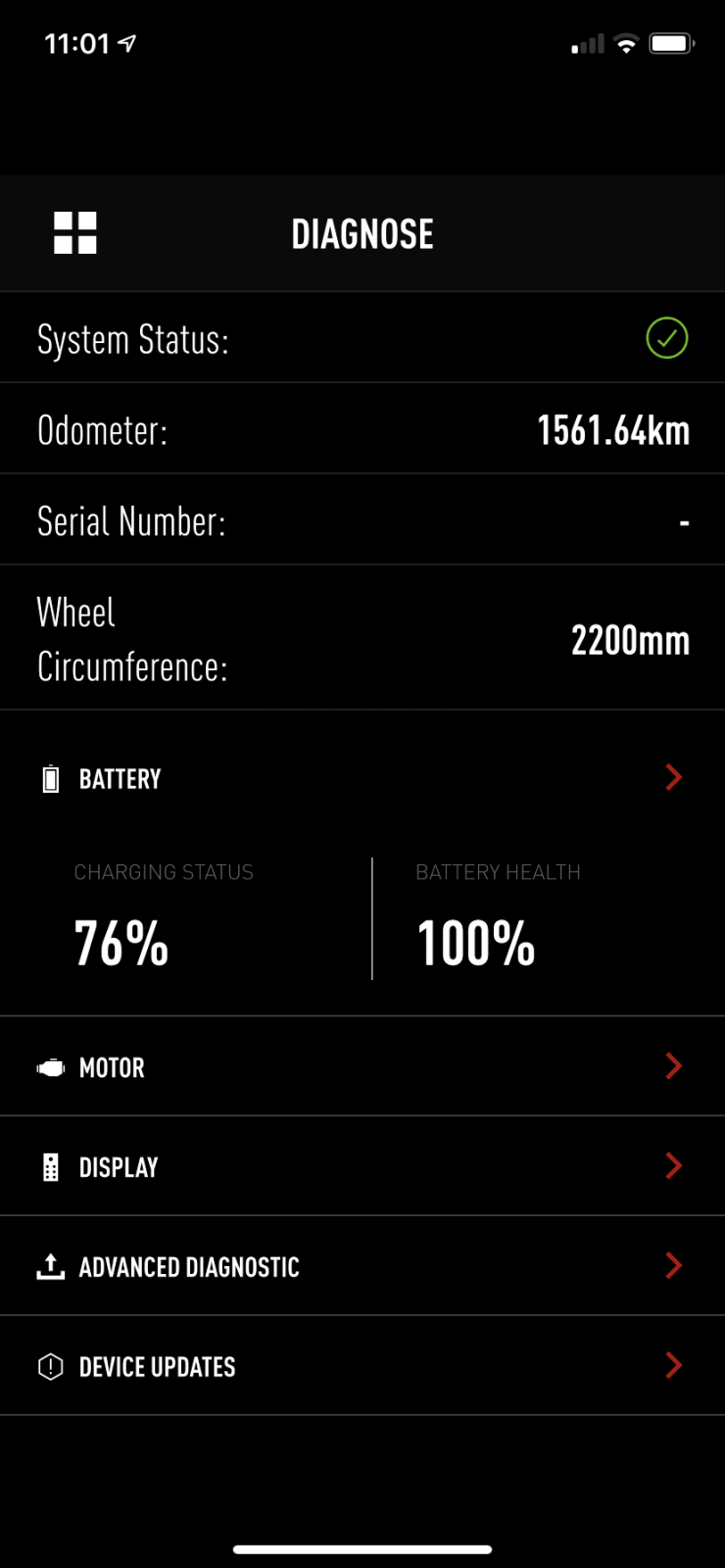
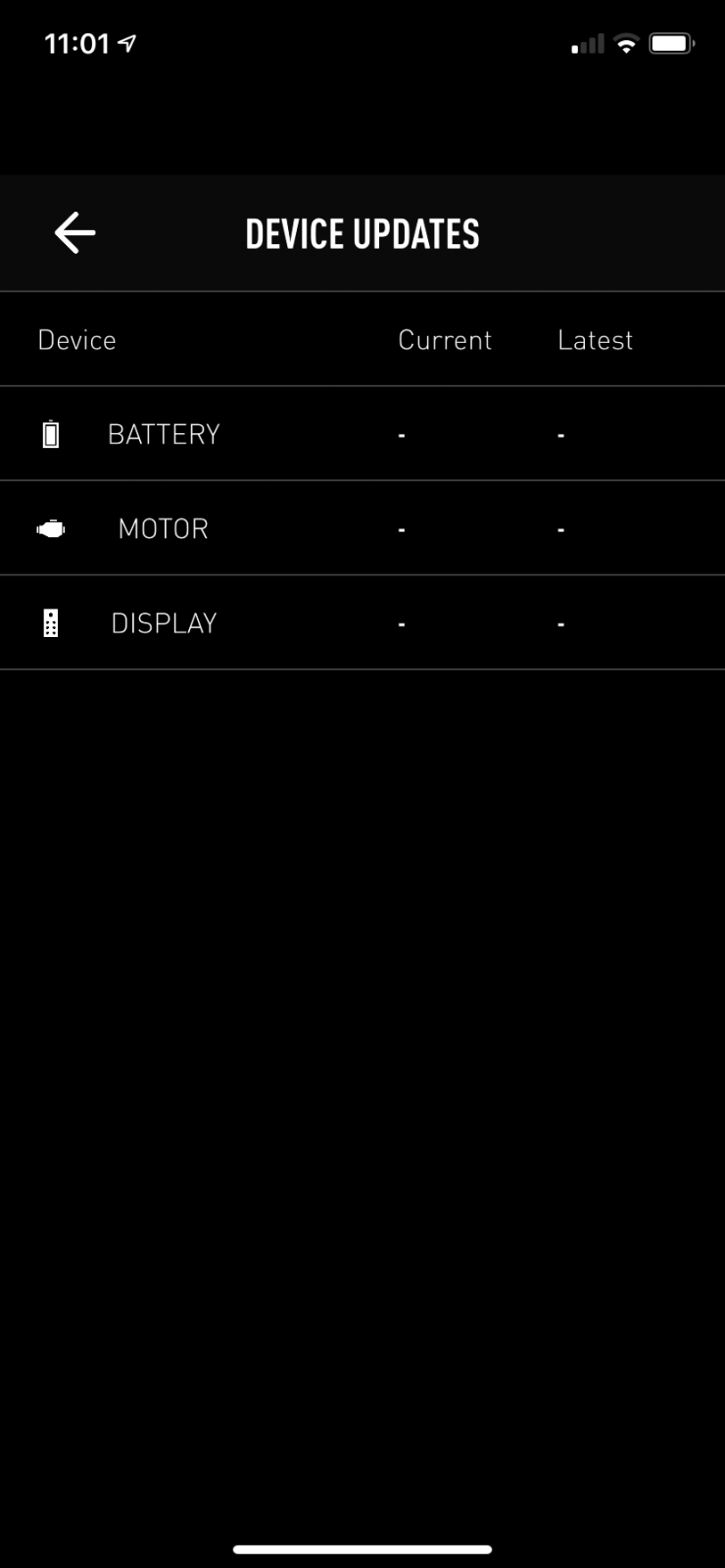
The OTA update doesn't work for me. I have a 2019 Levo Expert. I have installed Mission Control App 2.4.3 Build 75 on my Apple phone. I've tried logging out/in, as well as deleting and reinstalling the app. When I open up the Diagnose>Device Updates screen I see this.
My TCU was replaced under warranty last year and I'm wondering if that is the cause of my problem (note there is no S/N in the Diagnose screen)?
My TCU was replaced under warranty last year and I'm wondering if that is the cause of my problem (note there is no S/N in the Diagnose screen)?

- Jul 12, 2018
- 363
- 1,378
- Thread starter
- #97
The OTA update doesn't work for me. I have a 2019 Levo Expert. I have installed Mission Control App 2.4.3 Build 75 on my Apple phone. I've tried logging out/in, as well as deleting and reinstalling the app. When I open up the Diagnose>Device Updates screen I see this.
My TCU was replaced under warranty last year and I'm wondering if that is the cause of my problem (note there is no S/N in the Diagnose screen)?
Sadly @Alan Yeung you could be correct. When the TCU is replaced your retailer needs to connect this to their diagnostic cool and re-calibrate/update the bike by entering the bike Serial number. Unless the bike has a matching SN stored inside all the components it will not allow you to update. You'll need to go back to the retailer with this one and explain the situation. If it was their error then there shouldn't be any charge for this.
I can confirm this. My 2019 Levo TCU was replaced under warranty last month, and the dealer had to use their software tool to write my existing serial number into the new TCU. At the same time, I queried whether the bike total odometer value would transfer across, but it appears this value is stored in the motor, not the TCU.Sadly @Alan Yeung you could be correct. When the TCU is replaced your retailer needs to connect this to their diagnostic cool and re-calibrate/update the bike by entering the bike Serial number. Unless the bike has a matching SN stored inside all the components it will not allow you to update. You'll need to go back to the retailer with this one and explain the situation. If it was their error then there shouldn't be any charge for this.
Supratad
Well-known member
This is weird, and I’m glad I discovered it in my road rather than after driving out to a ride spot.
Update seems to have completed but the motor delivers no power at all. It’s just not working yet all the lights are on and no fault codes are showing.
I did the update a week or so back while the bike was hanging in storage so I didn’t test immediately, just assuming it would all work.
Update seems to have completed but the motor delivers no power at all. It’s just not working yet all the lights are on and no fault codes are showing.
I did the update a week or so back while the bike was hanging in storage so I didn’t test immediately, just assuming it would all work.

updated my Levo yesterday, piece of piss, took no time at all and I didnt notice any real change, a tad smoother to ride I think which suits me cos i run acceleration at 0
Just done the same and much happier with walk function, virtually no hesitation but builds speed gradually. I'll settle for that. Thanks Specialized.in the UK
Mission control update done on android phone at 0930 UTC.
Just gone out to the garage and updated the motor firmware on my 2019 turbo levo comp.
All worked very well and less than the 10 mins advised by the app.
Have not ridden the bike yet but did test the walk assist.
The walk assist is now instant and much better.
Thankyou Specialized
Just done mine, easy peasy no problems. Walk assist seems more instant than it was but will know more tomorrow when were out and about. Hope it works because it should! We all purchased these bikes and walk assist was a feature we paid for so it should bloody work.


DreamensioN
Member
Updated my Levo comp, no issues except for one thing...
Before on the Factory Default profile, I could change the acceleration response and it would stick - I had it set to 0%. After the update it was set to 40%. No problem...I'll just slide it back to 0%. But now each time I go into the Factory Default Profile, it resets itself to 40%.
I had to do a work around of creating a new custom profile that mirrored the factory support and power levels, but that had the shuttle mode and acceleration response set to 0%.
Anybody else notice the same issue?
Before on the Factory Default profile, I could change the acceleration response and it would stick - I had it set to 0%. After the update it was set to 40%. No problem...I'll just slide it back to 0%. But now each time I go into the Factory Default Profile, it resets itself to 40%.
I had to do a work around of creating a new custom profile that mirrored the factory support and power levels, but that had the shuttle mode and acceleration response set to 0%.
Anybody else notice the same issue?

DreamensioN
Member
Because Factory default profile has default settings and 40% Acceleration is default. You need to use custom profiles to make settings as you wish.
Understood. I'm just saying before the "defaults" could be changed. Now they can't.

DreamensioN
Member
I'm pretty sure default settings were not changeable, that's why they are called default settings ...
Before this setting could be changed on the default profile (as mentioned in the user manual).
Now the setting is hard coded and cannot be changed on the default profile.

GordS
Active member
Anyone having weird issues updating motor firmware? Motor update gets maybe 2% to 30% then stops saying could not update please try again later (or something like that).
I was trying and tried over several days multiple times but it kept failing. Was getting ready to take it back to shop and have them do it.
Turns out it was the Covid-19 tracking app I had installed several months ago. This app pings the Bluetooth every few seconds in search of other phones with the Covid-19 app. Once I uninstalled the app the firmware updated with no issue first try.
2021 Turbo Levo Comp Black/Red
I was trying and tried over several days multiple times but it kept failing. Was getting ready to take it back to shop and have them do it.
Turns out it was the Covid-19 tracking app I had installed several months ago. This app pings the Bluetooth every few seconds in search of other phones with the Covid-19 app. Once I uninstalled the app the firmware updated with no issue first try.
2021 Turbo Levo Comp Black/Red

KeithR
Well-known member
Impressive troubleshooting!Anyone having weird issues updating motor firmware? Motor update gets maybe 2% to 30% then stops saying could not update please try again later (or something like that).
I was trying and tried over several days multiple times but it kept failing. Was getting ready to take it back to shop and have them do it.
Turns out it was the Covid-19 tracking app I had installed several months ago. This app pings the Bluetooth every few seconds in search of other phones with the Covid-19 app. Once I uninstalled the app the firmware updated with no issue first try.
2021 Turbo Levo Comp Black/Red
Supratad
Well-known member
As if Covid wasn't disruptive enough already.
GordS
Active member
Add it to the list of side effects I guess.....
Wondering if any of the bricked motors that need lbs resuscitation were caused by covid app?
My heart stopped at 50% as the update seemed to pause for a split second then finish.
Wondering if any of the bricked motors that need lbs resuscitation were caused by covid app?
My heart stopped at 50% as the update seemed to pause for a split second then finish.
Supratad
Well-known member
I had the Covid app running when mine got screwed up. Gotta try and remember it for any future updates.
GordS
Active member
Maybe add to install note or pop-up on app to disable Covid19 app before updating.

GordS
Active member
Blame it on 5G , everyone else is ?
I had my tinfoil hat on so it can be that....

20 in 10
Member
Yes that bloody Covid app caused me trouble today in New Zealand. All bike software was up to date. Then I noticed an update on MC for the accessory display TCD (the cycle computer). You beauty I thought as occasionally it would do weird stuff. My 2020 bike and display were purchased in August 2019 so an older 2020 model. The software version in the TCD was C.5.0 and the latest is 12.5.0. I tried multiple times to update it and would get a failed message on the TCD. Then I came to this site, uninstalled the Covid app and the TCD updated first time.
I updated the motor software to the latest a few weeks ago and it worked well, I think I may have had the Covid app removed then too as it had been annoying me since the Bluetooth version was released.
I am impressed with Specialized and this bike. I think the fact they are updating things as mundane as basic cycle computer software is great. I have had my bike for 17 months, almost 3000 km, one motor quite early at 485 km and no problems since.
I updated the motor software to the latest a few weeks ago and it worked well, I think I may have had the Covid app removed then too as it had been annoying me since the Bluetooth version was released.
I am impressed with Specialized and this bike. I think the fact they are updating things as mundane as basic cycle computer software is great. I have had my bike for 17 months, almost 3000 km, one motor quite early at 485 km and no problems since.

jaggysnake
Active member
Not been here for a while is 742 out now seem to have it in the app.
Similar Threads
-
 Levo Gen 4 Levo 4 Initial Impressions= From Analog--> to SL--> to Full Power
- Started by JRitt
- Replies: 8
-
 Levo Gen 2 My Specialized Levo Expert 2019, The Good+Bad, Mods+Tweaks
- Started by Scoobaru
- Replies: 2
-

-
-
Free account
Join 43,137
eMTB riders
eMTB riders
One tap. No forms. Fewer ads.
or sign up with email
Already a member? Log in