Navigation
Install the app
How to install the app on iOS
Follow along with the video below to see how to install our site as a web app on your home screen.
Note: This feature may not be available in some browsers.
More options
Style variation
You are using an out of date browser. It may not display this or other websites correctly.
You should upgrade or use an alternative browser.
You should upgrade or use an alternative browser.
Bafang m510
a
- Thread starter Puschtrale
- Start date

⚡ EMTB PRO
25% off e*thirteen, Peaty’s & more with PRO
Member-only deals from e*thirteen, Peaty’s, PEMBREE and Magicshine · ad-free browsing · PRO badge · Living Intelligence Reports
See the deals →
From £1.99/month


which firmware?

thaeber
Well-known member
But this is not the latest firmware that Rob provided yesterday, correct? This is the firmware I‘m running currently with no issues, great attenuation and cut off at 41V. Why don’t You try Robs firmware?
thaeber
Well-known member
Are You running the 840 Wh Dengfu battery?Guys, unbelievable, it really limits from 10% !!! To around 400W. At 5% it is 220W. So bafang has listened to users? I think we just have christmass.)
But still very high cutoff, when I measured voltage at 5% it is 47.7V with no current. Too much. Then you leaving too much energy in battery. I dont care if Bafang wants to save cycles in my battery. User should choose how deep he wants to discharge. Like on Uart motors.
And down to 10% it took in peaks 740W!
Full charge and showing 73% - there is some bug.
Will check tomorrow with full batt and maybe will record a video "M510 - Will it burn?"

Is the firmware designed for 48V?I attach the latest M510 firmware from Bafang, not sure if you guys already have this, but here it is for reference. Also, I updated the forum to allow .bin file uploads.
thaeber
Well-known member
Yes. Thats what the firmware name is telling, 48V and 14A.Is the firmware designed for 48V?
thaeber
Well-known member
I think this is what they do. I mapped the SoC to Voltage multiple times, please refer to my earlier posts here. With my current firmware everything is fine. And yes, if the firmware is done for 52V and wrongly documented, this would explain the behavior!Yes, 840Wh Dengfu.
How hard is to make mapping from voltage reading to %SOC? Also developers didnt notice it?
Doesnt 74% SOC match to 14S system, when charged to 54.5V ? That would explain.

Fully charged 48V battery have 54.6V and thats 13S. The fully charged 52V 14S batery have 58.8V, just for record.
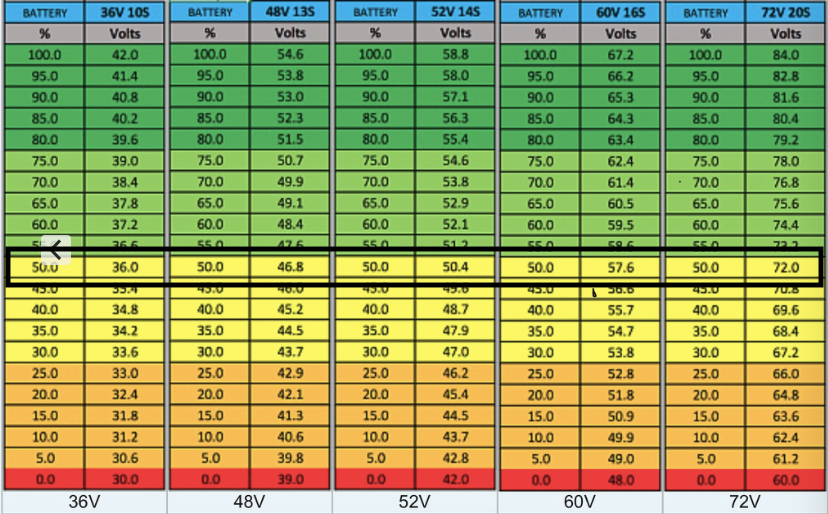
Check the output amperage (for example on display during full power output, just note the max values). Commonly the higher voltage means lower amperage, so its worth to check the firmware is not weaker than standard 48V.Yes. Thats what the firmware name is telling, 48V and 14A.
Last edited:
to me bms is set to charge up to 54v according to the table it suits, it shows me 72% of the battery.Fully charged 48V battery have 54.6V and thats 13S. The fully charged 52V 14S batery have 58.8V, just for record.
View attachment 91257
Check the output amperage (for example on display during full power output, just note the max values). Commonly the higher voltage means lower amperage, so its worth to check the firmware is not weaker than standard 48V.
thaeber
Well-known member
Would be the 2nd time we get a faulty firmware from Bafang. Unbelievable. I‘m wondering how Robs bike can run without issue…i installed the previous firmware now the battery is 100%. the firmware appears to be an error.
Yes.But this is not the latest firmware that Rob provided yesterday, correct? This is the firmware I‘m running currently with no issues, great attenuation and cut off at 41V. Why don’t You try Robs firmware?
I try to update Rob´s firmware at weekend

SchadowMaster
Member
Is the problem with the installing Rob's firmware or is the firmware not safe for the battery?

Dado
E*POWAH Master
- Jun 28, 2022
- 1,058
- 671
So then it explains, it match to 14S system.
Firmware is good, behaves really good, go ahead to flash it.
Thats just a bug of programmers, they didnt change some hardcoded value to 13S in firmware, so it just shows wrong percentage.
Just then also cut-off voltage will be 4V higher. This is the reason why I was getting 740W even on 13% SOC.
If this is 14S firmware, with 13S firmware it can be again 1 or 2A more. Today with fully charged battery I was getting up to 840W!
Or somebody renamed firmware file to 48V )
)
I do like how we are doing betatesters for bafang and Rob is our spokesman to them. Thanks Rob!
And hope they will remove that funny behaving after start. When throttle does not giving you power, but instead I see something like 10s ramp up.
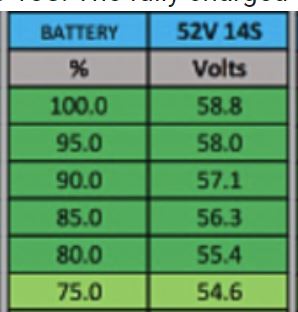
Firmware is good, behaves really good, go ahead to flash it.
Thats just a bug of programmers, they didnt change some hardcoded value to 13S in firmware, so it just shows wrong percentage.
Just then also cut-off voltage will be 4V higher. This is the reason why I was getting 740W even on 13% SOC.
If this is 14S firmware, with 13S firmware it can be again 1 or 2A more. Today with fully charged battery I was getting up to 840W!
Or somebody renamed firmware file to 48V
)I do like how we are doing betatesters for bafang and Rob is our spokesman to them.
Thanks Rob!And hope they will remove that funny behaving after start. When throttle does not giving you power, but instead I see something like 10s ramp up.
Last edited:
maybe @Rob Rides EMTB didn't install the FW upgrade?Would be the 2nd time we get a faulty firmware from Bafang. Unbelievable. I‘m wondering how Robs bike can run without issue…
thaeber
Well-known member
Hmm.. he posted the firmware that was supplied for his M510 by Bafang. Good question..maybe @Rob Rides EMTB didn't install the FW upgrade?
thaeber
Well-known member
Hi @Rob Rides EMTB is this the firmware You flashed on Your M510?I attach the latest M510 firmware from Bafang, not sure if you guys already have this, but here it is for reference. Also, I updated the forum to allow .bin file uploads.
Last edited:
SchadowMaster
Member
Maximum power I got on level 5 according to the following battery status:
30% 690W
25% 680W
22% 610W
13% 390W
Motor: Bafang M510
Firmware version: CRX10NC4814i101003-1-cs-28-2230-boot3-0-20220517161110-48v-M510
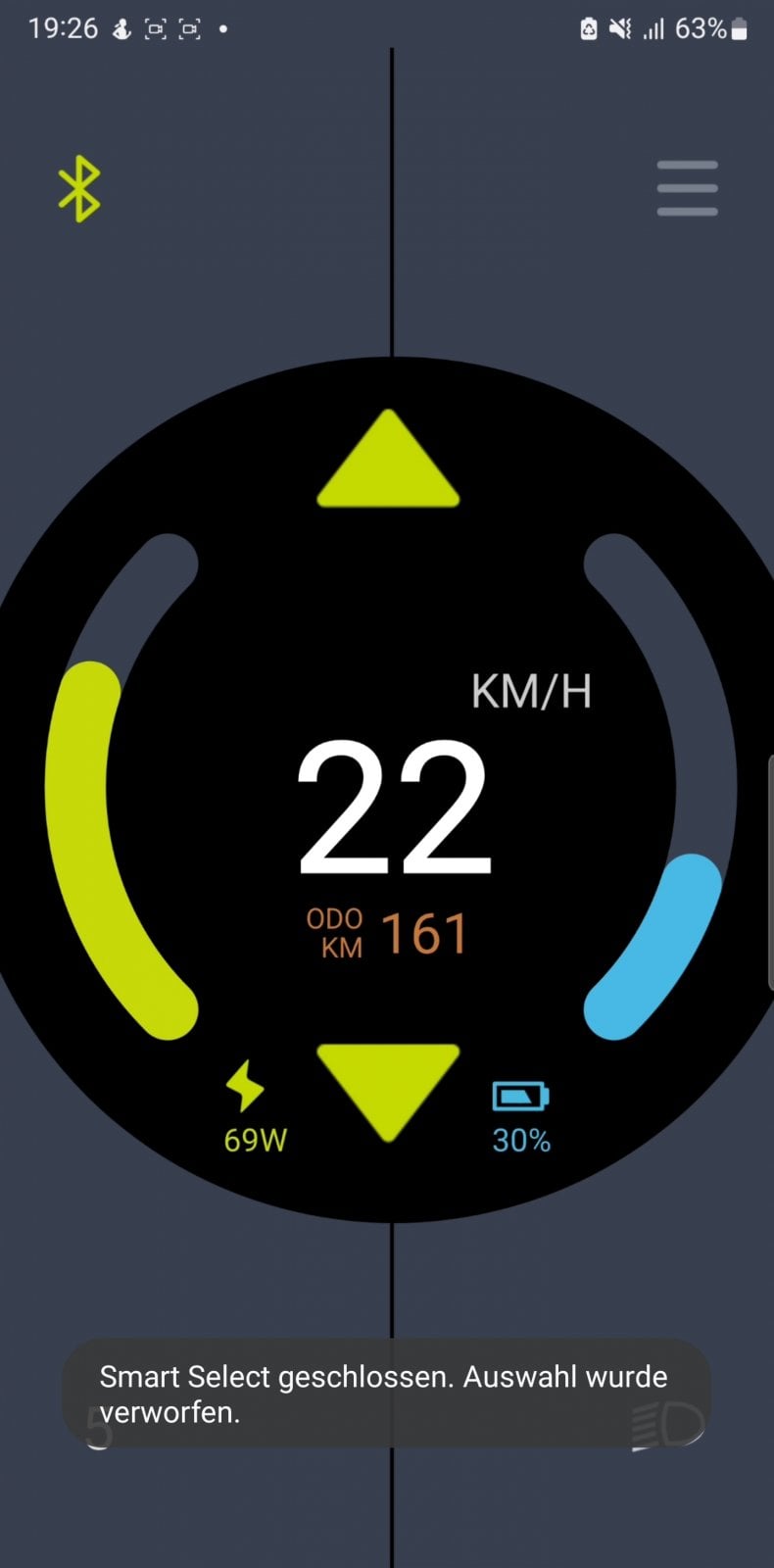
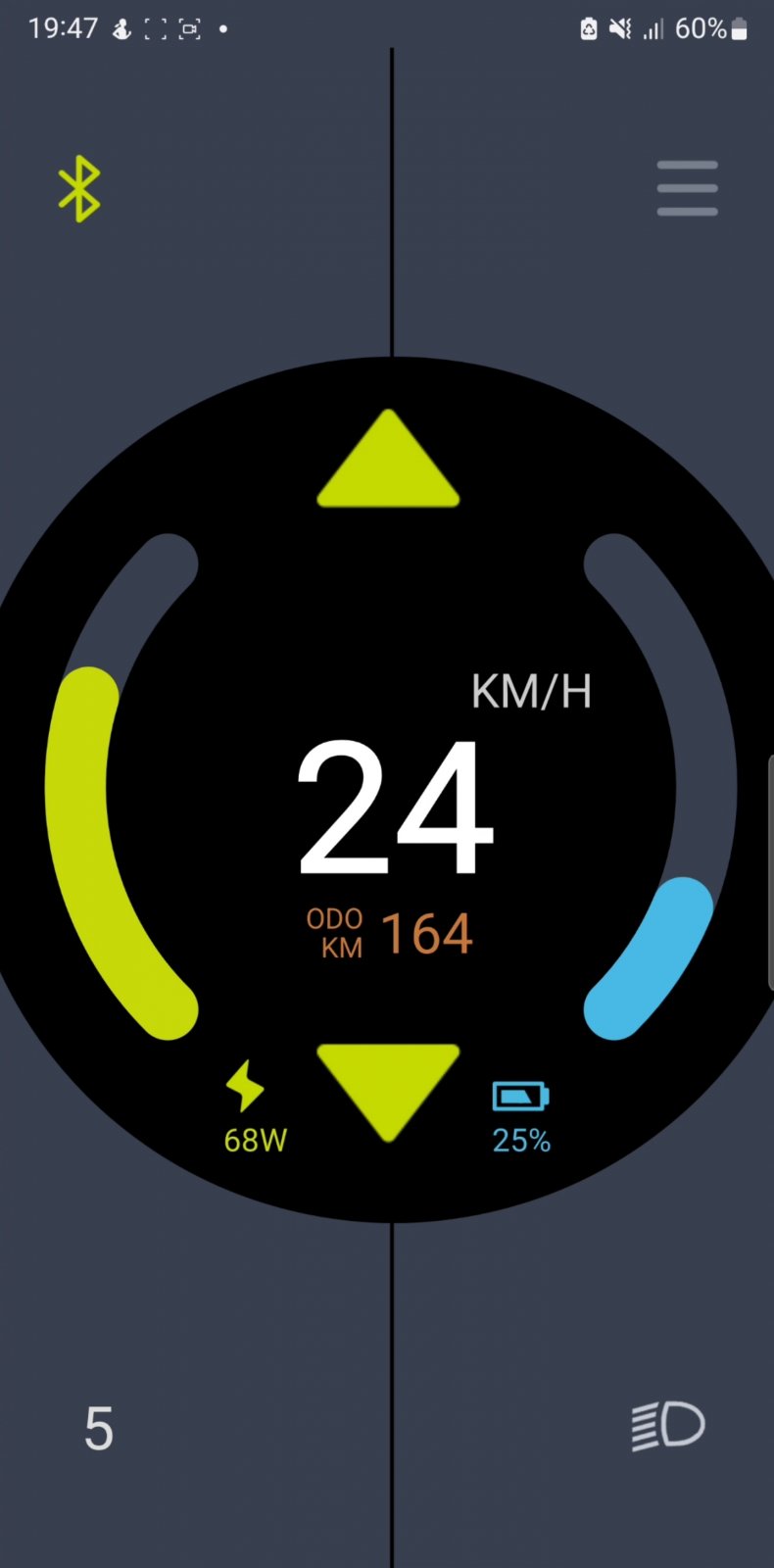
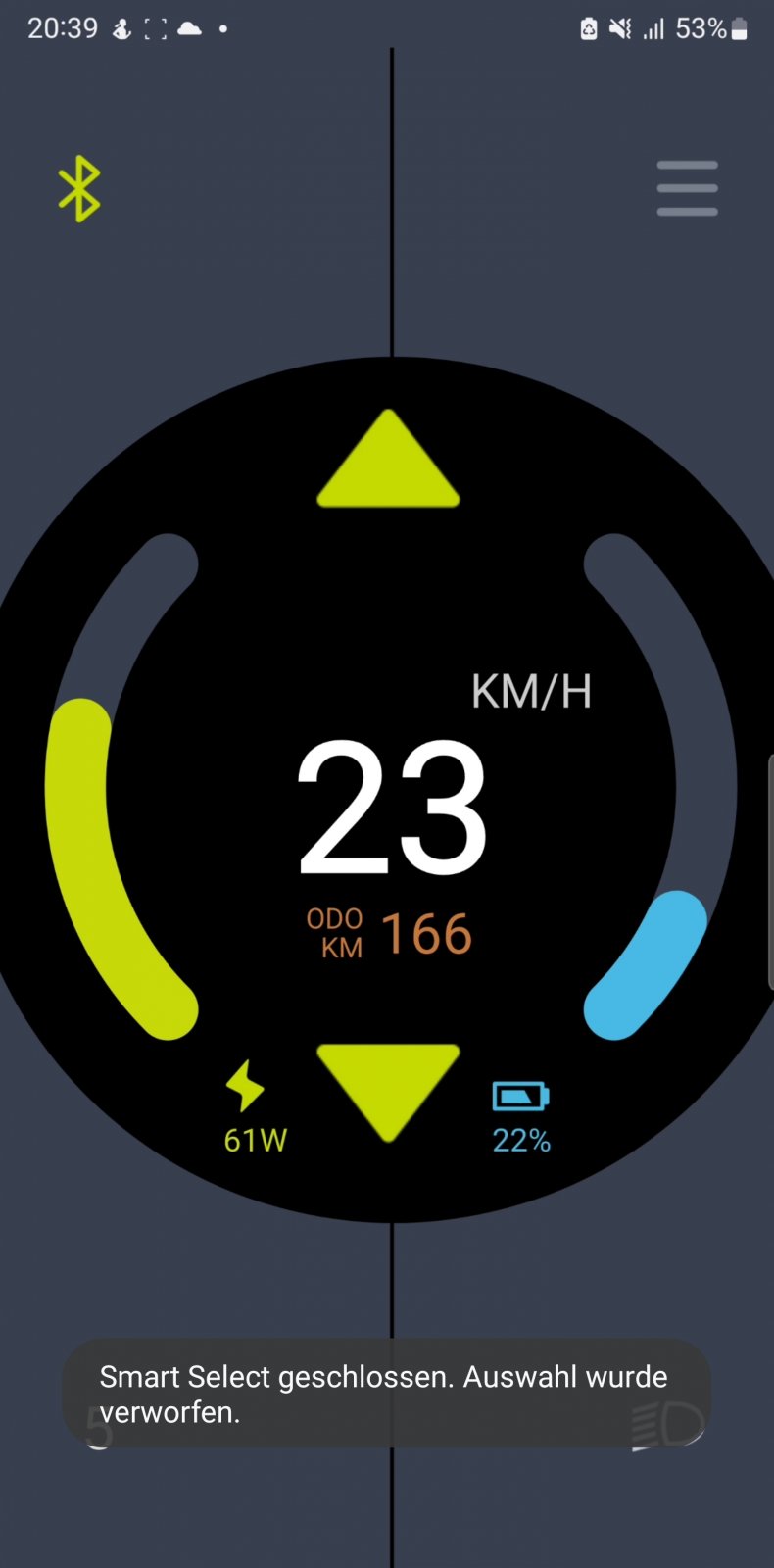
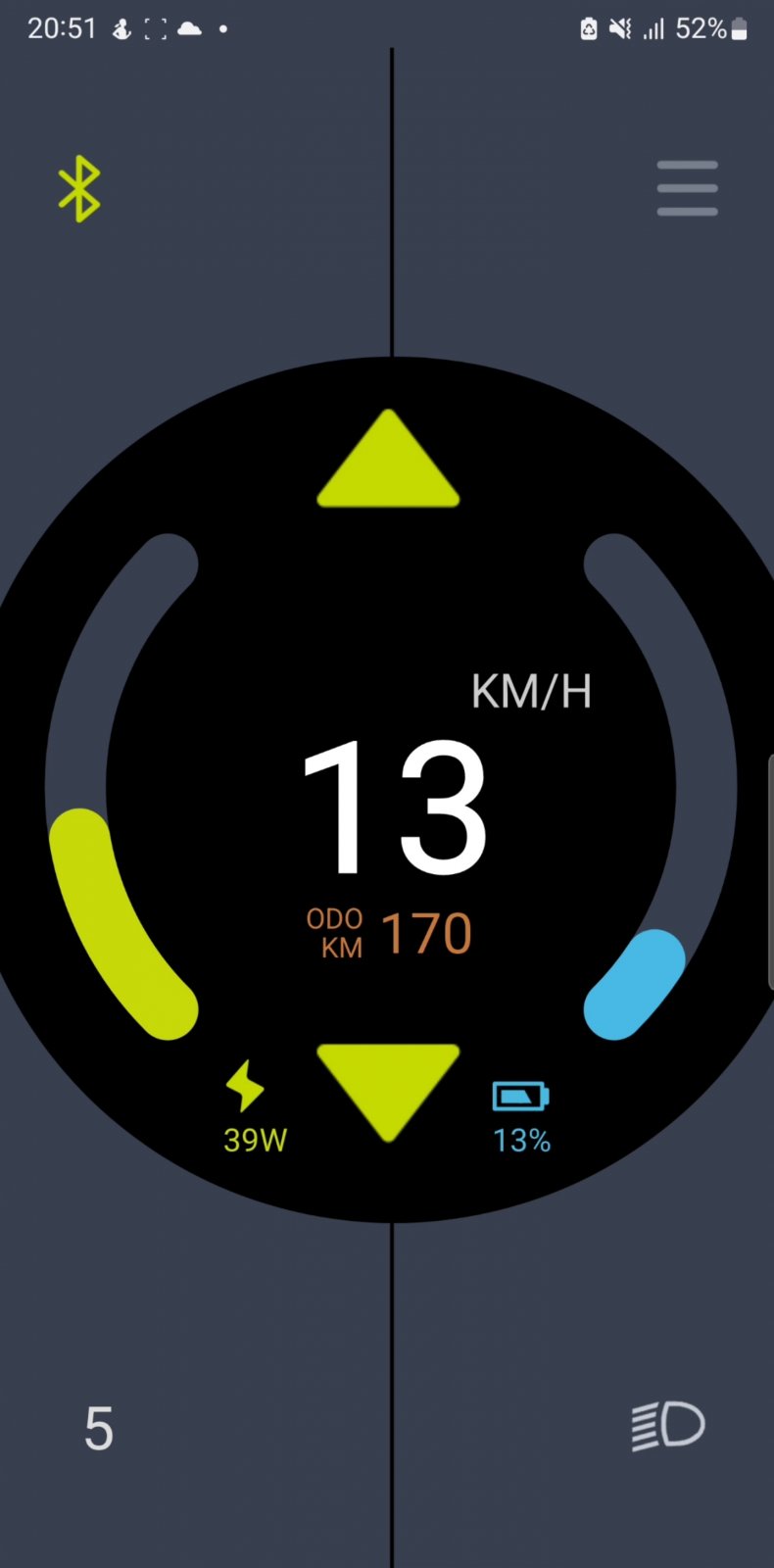
30% 690W
25% 680W
22% 610W
13% 390W
Motor: Bafang M510
Firmware version: CRX10NC4814i101003-1-cs-28-2230-boot3-0-20220517161110-48v-M510
thaeber
Well-known member
Fits to my experience with same firmware.Maximum power I got on level 5 according to the following battery status:
30% 690W
25% 680W
22% 610W
13% 390W
Motor: Bafang M510
Firmware version: CRX10NC4814i101003-1-cs-28-2230-boot3-0-20220517161110-48v-M510
View attachment 91303View attachment 91304
View attachment 91305View attachment 91306

Hi, I did actually try to update it, but I'm not 100% sure the update actually worked. Here's my software showing on the display, which looks like 3.0 (not 3.2), if i am reading this correct?Hi @Rob Rides EMTB is this the firmware You flashed on Your M510?
it seems no new FW is installed. don't install either. if you don't have a problem, report to bafang what the problem is. thank youHi, I did actually try to update it, but I'm not 100% sure the update actually worked. Here's my software showing on the display, which looks like 3.0 (not 3.2), if i am reading this correct?
View attachment 91343
Dado
E*POWAH Master
- Jun 28, 2022
- 1,058
- 671
Hi, I did actually try to update it, but I'm not 100% sure the update actually worked. Here's my software showing on the display, which looks like 3.0 (not 3.2), if i am reading this correct?
Hello Rob
Looks like didnt flash. Try again, it should work.
3.2 is Ok, just you wont get all the juice from battery (firmware is setup to 52V battery).
If you have contacts there, can you ask them for 48V firmware and report the bug, pls?
Last edited:
Dado
E*POWAH Master
- Jun 28, 2022
- 1,058
- 671
Theaber, dont know what to say to bafang mess in firmwares. Thats rediculous.
U know what they did in last firmware for M600? - it is spinning chain wheel 1.5s after u stop pedalling. Had to go one back. Not possible to ride it with the latest firmware.
How come the developers cant see it even if they have it just on testing bench.
But it was always like this. Remember that time, when bafang decided to fu*k up firmware on HD motor. Without no reason and older firmwares worked just well. They override throttle with pedalling and throttle kicks in just at the end of throttle lever and with 1000W. When u not pedalling, then throttle works as should.
U know what they did in last firmware for M600? - it is spinning chain wheel 1.5s after u stop pedalling. Had to go one back. Not possible to ride it with the latest firmware.
How come the developers cant see it even if they have it just on testing bench.
But it was always like this. Remember that time, when bafang decided to fu*k up firmware on HD motor. Without no reason and older firmwares worked just well. They override throttle with pedalling and throttle kicks in just at the end of throttle lever and with 1000W. When u not pedalling, then throttle works as should.
Hmm, every time I try to flash firmware nothing happens. I'm using a Macbook with windows installed via Parallels. Wonder if thats the issue?
Im able to connect to the controller and read the data, and start writing the firmware but nothing happens.
Im able to connect to the controller and read the data, and start writing the firmware but nothing happens.
I can get to step 5. When I get to step 6, having plugged the cable back in, nothing happens.
Update Step
1:Click "Connect" to make the connection between computer and service tool.
2:Select component type that you want to update.
3:Click "Read" to get SN and software version. If SN is empty, update is not allowed.
4:Click "Get a file from cloud" or "Get a file from local".
5:Unplug the component and click "Update" to download software to service tool. During this process,you will see service tool "PC" LED blinking. If the "PC" LED is always on, you need reset service tool to normal state and restart.
6:After downloading software to service tool successfully, you could plug the component and service tool would write software to it. For more detail, click "help" icon on right top.
Update Step
1:Click "Connect" to make the connection between computer and service tool.
2:Select component type that you want to update.
3:Click "Read" to get SN and software version. If SN is empty, update is not allowed.
4:Click "Get a file from cloud" or "Get a file from local".
5:Unplug the component and click "Update" to download software to service tool. During this process,you will see service tool "PC" LED blinking. If the "PC" LED is always on, you need reset service tool to normal state and restart.
6:After downloading software to service tool successfully, you could plug the component and service tool would write software to it. For more detail, click "help" icon on right top.
Dado
E*POWAH Master
- Jun 28, 2022
- 1,058
- 671
I can get to step 5. When I get to step 6, having plugged the cable back in, nothing happens.
Update Step
1:Click "Connect" to make the connection between computer and service tool.
2:Select component type that you want to update.
3:Click "Read" to get SN and software version. If SN is empty, update is not allowed.
4:Click "Get a file from cloud" or "Get a file from local".
5:Unplug the component and click "Update" to download software to service tool. During this process,you will see service tool "PC" LED blinking. If the "PC" LED is always on, you need reset service tool to normal state and restart.
6:After downloading software to service tool successfully, you could plug the component and service tool would write software to it. For more detail, click "help" icon on right top.
So it reads controller serial, u choose firmware and then update button. There is a progress bar then ( takes like 5s) and uploading to Besst first.
This did run with no error message, right?
If so, then just unplug and plug connector and it should start to flash controller. ( Takes up to 10sec).
Similar Threads
-

-
 Request for .bin Firmware for Bafang M510 (CR X10N.510.FC)
- Started by Marcin Sznura
- Replies: 2
-
 Dengfu E10 + E23 Carbon Fullsuspension E-Fatbike on Bafang M510
- Started by ncs
- Replies: 21
-

-

Free account
Join 43,172
eMTB riders
eMTB riders
One tap. No forms. Fewer ads.
or sign up with email
Already a member? Log in