Mission Control Mission Control App - Do you use it?

Mission Control App - Do you use it?

  • I use it all the time to log rides and to tune the bike

    Votes: 64 31.8%
  • I occasionally use it to tune the bike

    Votes: 77 38.3%
  • I’ve only used it a couple of times to log rides

    Votes: 11 5.5%
  • I’ve used it to update my bike firmware but not much else

    Votes: 39 19.4%
  • I’ve never used it

    Votes: 10 5.0%

  • Total voters
    201
Yes, this would be good, if I recall correctly, with the bosh Kiox, if the unit is not on the bike, the motor won't turn on, and if someone stole the the bike without the unit, that thief won't be able to purchase a new unit.
A bit of piece of mind when the bike sleep in a shed.
Not sure if implementing this to a phone app is a good idea though (if the phone battery is dead), but a code on the unit itself maybe?

EMTB sound like useful
Yes this was in my list above too. Good point about dead phone. There is no digital interface to the bike other than the TCD or phone. But It may be something you can turn on and off. The TCD would require a code. So if you park it some place potentially unsafe you turn it on. Maybe even adding loud beeping alarm on turning on and attempted usage without paired device or code via TCD would be good although the beeping would be more than a software firmware update to the bike and software change to mission control. But you can turn it off while riding etc so you don’t have a problem while riding.
 
⚡ EMTB Pro Go Pro — exclusive discounts & ad-free Peaty's 25% off & more · Ad-free browsing · Pro badge See the deals →
is there a setting availible to chose language of the interface ?

i could find anything.
 
I have a question for stats fields in mission control during ride.
what is "current motor support (%)" supposed to do ?

the naming implied to me the actual values for motor support between support% and peakpower% limits configured in the ride levels.
but what it shows is just the support% of the corresponding ride level. it changes when you change the ride level.
what have you experienced with this stats field so far?
 
After pairing a HR monitor, mission control should just connect to it before a ride or at least ask if there is a previously connected HR monitor in devices. There should be something that shows heart rate as well.
 
After pairing a HR monitor, mission control should just connect to it before a ride or at least ask if there is a previously connected HR monitor in devices. There should be something that shows heart rate as well.
current heart rate is availible as a stats field which can be configured to be displayed on the stats screen during a ride..
 
I have a question for stats fields in mission control during ride.
what is "current motor support (%)" supposed to do ?

the naming implied to me the actual values for motor support between support% and peakpower% limits configured in the ride levels.
but what it shows is just the support% of the corresponding ride level. it changes when you change the ride level.
what have you experienced with this stats field so far?

nobody ever tried this field ?
 
I think the GUi is great & straightforward. The ability to update the firmware is excellent, as is the HR.

Improve maybe g-force\jump meter

The app has crashed\stopped logging in the last couple of rides which is very annoying. I start the ride, then check after a few minutes to make sure it's working but then I forget about it. When I try to save the ride it's crashed\disconnected from the bike.
 
current heart rate is availible as a stats field which can be configured to be displayed on the stats screen during a ride..
That‘s good to know. But since i use the tcd while riding and not phone, Bigger issue is for me that app doesnt connect to HR automatically and they should enable that when you start a Ride Automatically. I forgot to do it at least once With the myriad of ride preparations. Surprisingly the TCD automatically connects, but doesnt reconnect of you step out of range.
 
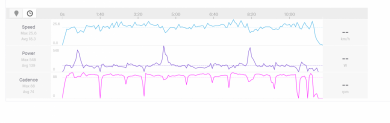
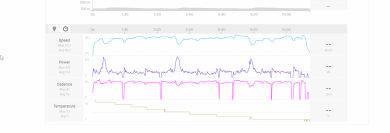
i have done some measurments on power and cadence with my SRM x power pedals:
measurments taken from levol sl MC app:
2021-03-21 15_46_16-Afternoon Activity _ E-Bike Ride _ Strava_levo_sl.png

measurments taken from garmin with srm xpower pedals:
2021-03-21 15_36_45-Afternoon Activity _ E-Bike Ride _ Strava_SRM_pedals.png

it seems that power is very close, cadence has a little bit more of a variance.
generally it seems the data from the MC app is smoother.

it will be interesting to see if the values behave the sameon a three to four hour ride.
 
Please Rob tell your speccy friends to do something for the font size.. i'm over 40 very closed to 50 and when i ride i'm without my lens...so i can only immagine what the visible nr means. Even to change something while riding is difficult same font size
 
Please Rob tell your speccy friends to do something for the font size.. i'm over 40 very closed to 50 and when i ride i'm without my lens...so i can only immagine what the visible nr means. Even to change something while riding is difficult same font size
....and red color for the stats field names ist a pain in bright light conditions.
 
  • Things what I like:
    Simple, clean interface.
    Strava support.
    Costless firmware update.
  • Things what I don't like:
    Connecting problems with a Garmin premium HRM belt.
    From the last two versions I can't see my actual HR on the dashboard.
 
I use MC on one 2018 Levo because eGENESIS doesn't work with the latest Motor FW (7.1.1). This bike had a 580W lemon (motor), so I was forced to do the update.
At the other 2018 Levo I use eGENESIS due to the possibility to use 6 Gears instead of 3.
 
  • What do you like about it? - Clean layout, quick connection to the bike, uploads instantly to Strava.
  • What do you not like about it? - Sometimes wonky GPS tracks or won't track at all.
  • What would you want to see added to it to improve? - Ability to load routes so they can be used offline with just GPS
  • What other feedback do you have, positive/negative - Would love a largish remote screen to display maps/routes along with all the other parameters, similar to a large Garmin.
 
I hava a lot of "false positive" gps tracking points.
Maybe there is a solution to add some algorithm, which can say if the next tracking point is possible or not.
If the bike does not move its not possible to travel more than 500m, or within only 10 seconds its also not possible to travel more than 500m for example.
I never had the same behaviour with other tracking apps like strava or komoot...
Here is a picture of an exported ride to strava.
I was never on the yellow dot. So the hole green sector was never traveled. But I did a short break where the straight line starts...
Screenshot 2021-04-22 075851.jpg
 
I wish I could play with TUNE settings without having to connect to a bike. Pick a bike previously connected, setup assist levels or TCU2 screens for example, and have it sync up to the bike next time it's connected.
 
I hava a lot of "false positive" gps tracking points.
Maybe there is a solution to add some algorithm, which can say if the next tracking point is possible or not.
This is entirely out of app's control, and apps don't invent their own tracking. They use whatever the OS provides. If Strava or Komoot track better than Mission Control, then check that MC has the same permissions as those two. Typically what makes a difference are [exact wording depends on your OS version, the following are just clues] Location permissions (Access location all the time, in the background) and battery optimization settings (do not optimize, do not put to sleep).
 
Like: simple to use as a newbie. Get to check key aspects like firmware up to date, health of battery etc. ( Really handy to check battery: does two bars mean 29% left or 21%?)

Don’t Like: can’t explore the app unless linked to the bike. Could a “dummy bike” be included in the app so a user could learn the app’s features away from the bike?
 
Like: simple to use as a newbie. Get to check key aspects like firmware up to date, health of battery etc. ( Really handy to check battery: does two bars mean 29% left or 21%?)

Don’t Like: can’t explore the app unless linked to the bike. Could a “dummy bike” be included in the app so a user could learn the app’s features away from the bike?
.. or a last-known state and `rsync` / diff it with the bike when re-connected (or state all data will be lost on reconnect [mastership])
 
Would like to be able to set up a "hotkey/shortcut" to shuttle mode on the bike
 
Anyone able to get Smart Control and a Garmin to work at the same time? I finally figured out why my Smart Control did not work. IT works fine, until I turn on my Garmin. Then it disconnects the TCU from my phone. If I shut my Garmin it reconnects. Would like to be able to use both at the same time.
 
@Jersey Skier What Smart Control Option are you using? I am using often the heart rate option and that is working fine. Be sure, that your chest strap or optical sensor is supporting more than one connection.

Connection #1: Garmin - Chest strap
Connection #2: Mission Control - Chest strap

I am using the Garmin HRM Pro or the Polar Verity Sense.
 
The battery bars shown on the TCU are so incorrect it’s laughable. At 40% battery I am still seeing but one bar - like I have 80+% battery. Have to use the app to know.

I use a Garmin Fenix and I’d love to see battery state & cadence data fields on my Garmin - the MC app is a fraction of my overall health activities. This would let me ditch the app aside from tuning.

Using an app on a phone makes sense when you live in a city. Where I ride there is zero cell coverage. the phone stays in the truck to avoid potential crash damage.
 
@Jersey Skier What Smart Control Option are you using? I am using often the heart rate option and that is working fine. Be sure, that your chest strap or optical sensor is supporting more than one connection.

Connection #1: Garmin - Chest strap
Connection #2: Mission Control - Chest strap

I am using the Garmin HRM Pro or the Polar Verity Sense.
I've been using a Wahoo HR strap. I assume it supports more than one connection as it connects to the Garmin and my phone at the same time. However, even though it's connected to my phone the TCU will switch from purple to green.
 
I've been using a Wahoo HR strap. I assume it supports more than one connection as it connects to the Garmin and my phone at the same time. However, even though it's connected to my phone the TCU will switch from purple to green.
I have a Wahoo Tickr. It will connect to one device using ANT+ and another device simultaneously using Bluetooth. I don't think it will connect to two devices using the same protocol?
 
Keep reading
    Browse all

    Similar Threads

    Community Stats

    Since 2018
    668K
    Messages
    40,770
    Members
    Join 30,000+ Riders, it's free!
    Back
    Top