Worked perfectly for me on iPhone. Thanks @Specialized Rider Care for the new feature.
Navigation
Install the app
How to install the app on iOS
Follow along with the video below to see how to install our site as a web app on your home screen.
Note: This feature may not be available in some browsers.
More options
Style variation
You are using an out of date browser. It may not display this or other websites correctly.
You should upgrade or use an alternative browser.
You should upgrade or use an alternative browser.
Mission Control Mission Control app now allows you to update your bike
- Thread starter salko
- Start date

+1Worked perfectly for me on iPhone. Thanks @Specialized Rider Care for the new feature.

babarnicle
Member
Sorry to hear - you definitely don't need to reinstall Mission Control. Could be worth logging out and in again, if that doesn't solve it I'll PM you get serial number and check in our back end here.
Thank you. Logging out and back in solved it.


Banktramp
Well-known member
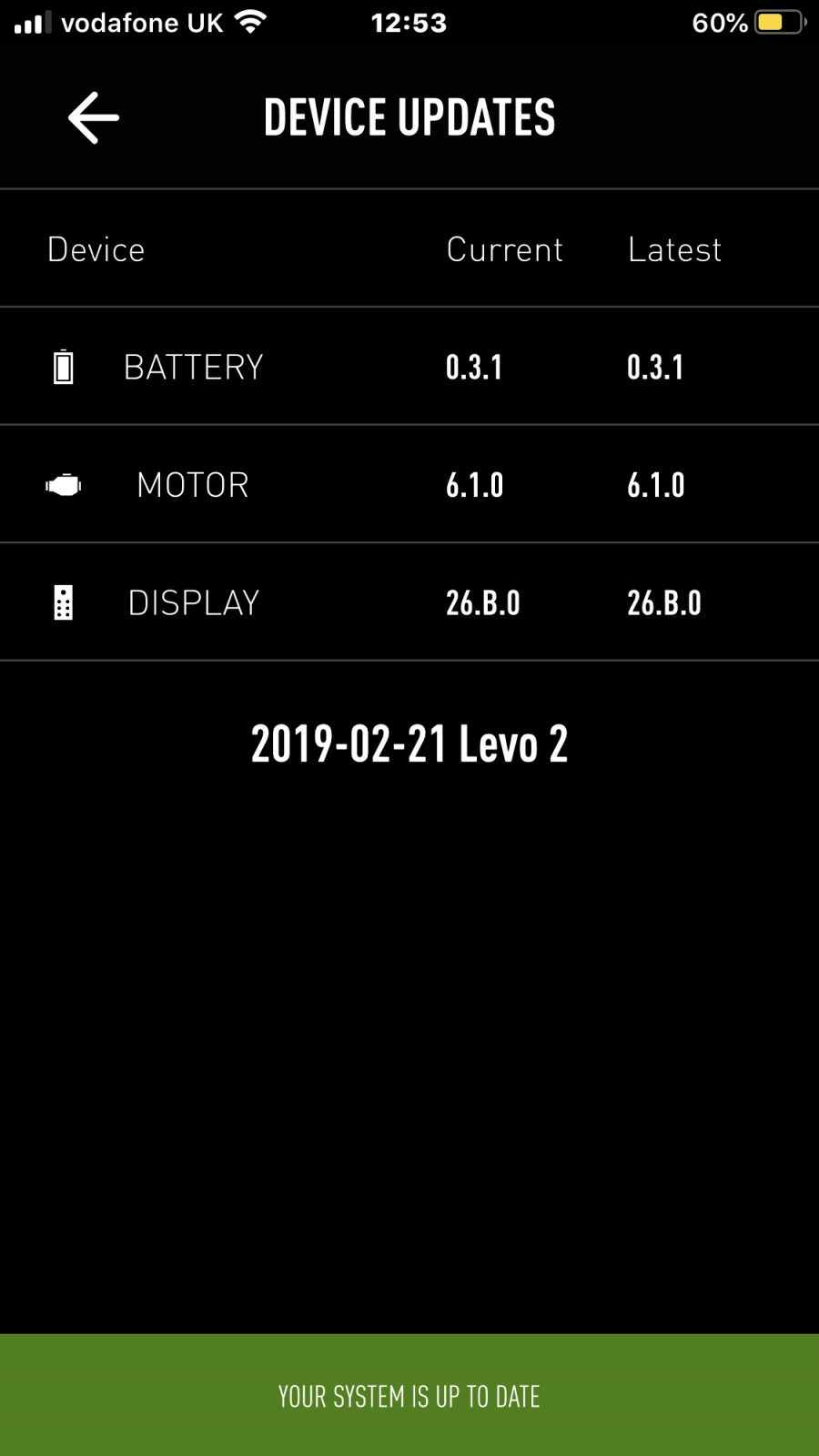
The logout - login trick worked for me, now updated in around 5 minutes.
Eduardoramundo
E*POWAH Master
What battery do you have? Mines on V2.4.4The logout - login trick worked for me, now updated in around 5 minutes.
View attachment 33866

Logged on and off ..
Can confirm it doesn't work for the older TCU in the battery bikes
It looks a bit prettier though ..
A tricky one, @Specialized Rider Care would it be possible to add a switch in the app to adjust speed/distance to be calculated by GPS instead of wheel size. If you swap between 27.5 and 29 the stats aren't accurate so people end up not using it. I think in terms of diagnosis and data gathering for development, you'd rather people did use it, no matter the circumstances ?
Can confirm it doesn't work for the older TCU in the battery bikes
It looks a bit prettier though ..
A tricky one, @Specialized Rider Care would it be possible to add a switch in the app to adjust speed/distance to be calculated by GPS instead of wheel size. If you swap between 27.5 and 29 the stats aren't accurate so people end up not using it. I think in terms of diagnosis and data gathering for development, you'd rather people did use it, no matter the circumstances ?
I want my 2 Dollars!
Member
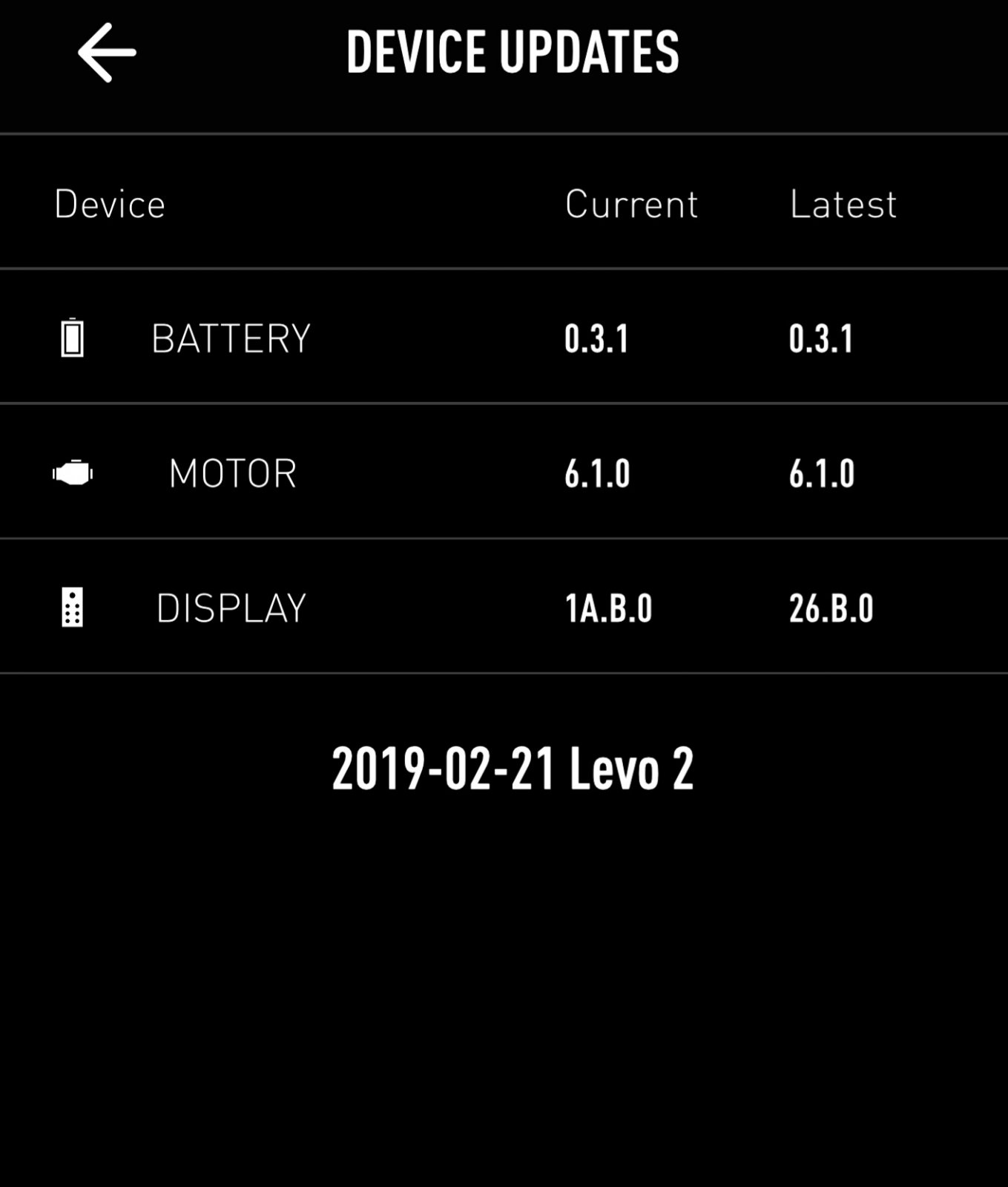
I jumped from 20.B to 26.B -. So much better!!
Faster and more consistent connect and snappier power on and off.
Did it after my ride so not sure if any changes to the bikes riding personally -
Faster and more consistent connect and snappier power on and off.
Did it after my ride so not sure if any changes to the bikes riding personally -
@Specialized Rider Care would it be possible to provide a link out from the app to release notes?
@Specialized Rider Care would it be possible to provide a link out from the app to release notes?

Mission Control - Mission Control app now allows you to update your bike
My Android phone says I have MC v2.3.0 from 19th May but today I supprisingly found out this version allows to check current and latest versions of motor, battery and display (TCU) firmware and lets you perform OTA update of the TCU. It took more than 5min to update, but I already see at least...
 www.emtbforums.com


Jeff H
Well-known member
On iOS all my versions are correct (bike & MC) but the key was I needed to log out and back into MC for “device updates” to show.

jaggysnake
Active member
Worked here , had to log out and re add bike


Logged on and off ..
Can confirm it doesn't work for the older TCU in the battery bikes
It looks a bit prettier though ..
A tricky one, @Specialized Rider Care would it be possible to add a switch in the app to adjust speed/distance to be calculated by GPS instead of wheel size. If you swap between 27.5 and 29 the stats aren't accurate so people end up not using it. I think in terms of diagnosis and data gathering for development, you'd rather people did use it, no matter the circumstances ?
Log off/on also worked for me on IOS.
I love that I can see that all my firmware is up to date.
I would also like to be able to change wheel circumference...I run 27.5+ in the rear...PIA leaving it at the dealer...I do a roll out and what they entered was not accurate...had it in twice...they mistakenly put in the value for my 29+ front tire (apparently not realizing the rear was 27.5+).
@Specialized Rider Care couldn’t you just restrict the lower and upper values of wheel circumference?
My roll out test was 89 inches for my rear 27.5+ (Specialized Purgatory Grid 27.5 X 3.0), but somehow the dealer recorded it as 91.06 inches...the default value was closer than what they entered...have to take it back for a third time.
I guess there will always be folks that want to change their speed limit by putting in a smaller circumference...I just want a more accurate mileage recording.
jaggysnake
Active member
Just been out on mine feels smoother , could be placebo effect though.
2019 almost 3000 miles
2019 almost 3000 miles
I want my 2 Dollars!
Member
Maybe I spoke too soon. First out this morning and it connected immediately.
Later after hiking and getting back to the bike I couldn't connect.
Back home I still couldn't connect. I rebooted the bike with no success.
I got it to connect again after rebooting the phone.
I'm wondering if having it connected to another blue tooth device - a speaker,
Broke the ability to reconnect. On 20B it was slow but always reconnected.
Even when I had the speaker connected.
I ride with music most of the time
Later after hiking and getting back to the bike I couldn't connect.
Back home I still couldn't connect. I rebooted the bike with no success.
I got it to connect again after rebooting the phone.
I'm wondering if having it connected to another blue tooth device - a speaker,
Broke the ability to reconnect. On 20B it was slow but always reconnected.
Even when I had the speaker connected.
I ride with music most of the time

Log off/on also worked for me on IOS.
I love that I can see that all my firmware is up to date.
I would also like to be able to change wheel circumference...I run 27.5+ in the rear...PIA leaving it at the dealer...I do a roll out and what they entered was not accurate...had it in twice...they mistakenly put in the value for my 29+ front tire (apparently not realizing the rear was 27.5+).
@Specialized Rider Care couldn’t you just restrict the lower and upper values of wheel circumference?
My roll out test was 89 inches for my rear 27.5+ (Specialized Purgatory Grid 27.5 X 3.0), but somehow the dealer recorded it as 91.06 inches...the default value was closer than what they entered...have to take it back for a third time.
I guess there will always be folks that want to change their speed limit by putting in a smaller circumference...I just want a more accurate mileage recording.
Count me in @Specialized Rider Care , I put 27.5" wheels on my Levo SL and want my speed/mileage to be accurate. I shouldn't have to take my SL to the dealer and leave it for days just to get this done.
jaggysnake
Active member
When i look on the update page there are no figures at all in the columns, am i only supposed to see figures if there is an update available?
I had that log out and log in to app , restart phone and bike
I want my 2 Dollars!
Member
When i look on the update page there are no figures at all in the columns, am i only supposed to see figures if there is an update available?
If your display is on 26B your up to date. If not it seems like it takes a couple times connecting before the app will indicate an update is available.

couplands
Member
im usually the first to update my tech, but as this is an expensive bike I’m treading carefully. Mine is on the same version as yours before update.
Have you noticed any downsides to doing the update..?
I’m also a BLEvo user if that makes any difference.
jaggysnake
Active member
im usually the first to update my tech, but as this is an expensive bike I’m treading carefully. Mine is on the same version as yours before update.
Have you noticed any downsides to doing the update..?
I’m also a BLEvo user if that makes any difference.
No it went smoothly, blue lights seem to appear different when u turn bike off. Don't use blevo
- Thread starter
- #55
Yes new LEDs indication when power off are defenetely an useful upgrade, before the upgrade I never really knew if I turned the bike off on no (I use stealth mode all the time), now LEDs going down makes this very clear.

Paul Carruthers
Member
I’ve got that motor version but I don’t see the update below advanced diagnostics, any ideas?And the first prize goes to @salko !
Correct - on the 15th June 2020 we soft-launched functionality within Mission Control for Levo 2019/2020 and Kenevo 2020 owners to update their TCU firmware. This will ensure that riders have the latest TCU performance updates, bluetooth connectivity improvements and error management revisions. Only those bike types will allow updates at this time - and only if motor firmware is at version 6.1.0.
Our aim here is to let riders make incremental updates themselves - however bike build/set-up, battery/motor updates, advanced diagnostics etc remain within the remit of our authorised retail partners.
Creo / Vado / Levo SL bikes do not support over the air (OTA) updates at this time. Earlier Levo/Kenevo without TCU will not ever support OTA updates - sorry about that. We'll keep a watch on this thread - let us know how you get on.

Open the app and logout. Close the app, reopen it and login.I’ve got that motor version but I don’t see the update below advanced diagnostics, any ideas?
couplands
Member
Ive done the update, no harm done.
It would be useful to know what changes we should expect to see....or is it just bug fixes..?
Not sure I had any before the update. Will be interesting to see if anything got worse..;-(
It would be useful to know what changes we should expect to see....or is it just bug fixes..?
Not sure I had any before the update. Will be interesting to see if anything got worse..;-(
couplands
Member
I have the same error (I use the light connector to provide power for my phone running BLEvo). It does say that error will be caused by non-standard lights.So did update but throwing an error now because of my lupine light setup now
@Specialized Rider Care ...is there a reason for the diagnostics to flag an error when using the light port..? Again, a change log would help, a text file in this thread would be fine. Don’t need it formatted for a mobile screen on the app.

Stephen
Member
I did the update yesterday and luckily it has not caused any problems with the Lupine light , ie no error code . The Lupine light is the 2020 model , which I have been using since January with no problems . The pre 2020 lights did cause errors .So did update but throwing an error now because of my lupine light setup now
Similar Threads
-
 I got some Mission Control app problems, can anyone help?
- Started by Dazzling1984
- Replies: 2
-

-
Mission Control Very old red mission control app 2.4.3 I think from over 3 years ago
- Started by Acc
- Replies: 1
-
Levo Gen 3 New Spec app cannot "find" bike, "connection failed" ??
- Started by 713Fmhs
- Replies: 3
-
