The Official BLEvo Thread

Status
Not open for further replies.
I changed from BV6000S to my main iPhone 11 Pro Max. It is very durable even without a case, but I have an Ultra Armor Luvvit case and a screen protector. IOS version of Blevo works well, except you need to use a cable to transfer maps to it until it is updated to work with Google Drive, DropBox, or email. That has not been a big deal.

It's nice to use a phone with service rather than my BV6000s which was WiFi only.

See drop testing:
“It's nice to use a phone with service rather than my BV6000s which was WiFi only.”

Connect a WiFi only phone to your iPhone using Personal Hotspot. No cell calls or iMessage so it is a compromise but at least you have internet access. I use it with my BV5500 while my iPhone is in my pocket or pack but not seeing texts or call info kinda sucks so I don’t blame you. Apple Watch?
 
⚡ EMTB Pro Go Pro — exclusive discounts & ad-free Peaty's 25% off & more · Ad-free browsing · Pro badge See the deals →
I changed from BV6000S to my main iPhone 11 Pro Max. It is very durable even without a case, but I have an Ultra Armor Luvvit case and a screen protector. IOS version of Blevo works well, except you need to use a cable to transfer maps to it until it is updated to work with Google Drive, DropBox, or email. That has not been a big deal.

It's nice to use a phone with service rather than my BV6000s which was WiFi only.

See drop testing:
A great way to destroy the cameras image stabilization system. If you are not intending on using the cameras it’s a good choice. I don’t think it will be covered by Apple warranty erither.
 
I used my previous iPhone X 2 years mounted with a SP connect stem mount riding through mud and rough terrain and my phone made it fine, the new one will also have to survive this.
We will see...
They also have a vibration damped mount soon, really considering this because of the price of the phone... SP Vibration Damped (35mm)

@PaoloBLEvo :
the Map download always stops at around 50% at imported GPX files, this is not really nice if I’m riding in a remote area... iOS 13.1 on a 11 Pro Max, BLEvo 3.5.2.

And do you plan to integrate horizontal view on iOS soon?
 
I used my previous iPhone X 2 years mounted with a SP connect stem mount riding through mud and rough terrain and my phone made it fine, the new one will also have to survive this.
We will see...
They also have a vibration damped mount soon, really considering this because of the price of the phone... SP Vibration Damped (35mm)

@PaoloBLEvo :
the Map download always stops at around 50% at imported GPX files, this is not really nice if I’m riding in a remote area... iOS 13.1 on a 11 Pro Max, BLEvo 3.5.2.

And do you plan to integrate horizontal view on iOS soon?
In few days I will release the update for iOS 13.. The horizontal view is planned, but I don't know when I will have free time to do this.. sorry for that..
 
I accidentally changed the speed to 25 km/h & was wondering how to get back to exactly 28.8 km/h as it was not 28.0 or 29.0. I'll try that.
I think everyone using BLEvo can set their wheel size back to 2000mm, however doing it using BLEvo may void warranty :unsure:. If you set the speed limit to 29 or above, you will find (after power off and back on) BLEvo will now show 28.8 km/h -- the speed you attempted to set was overridden by TCU (firmware version 2.025 or later).

@PaoloBLEvo could you in BEvo's programming check TCU firmware version and if 2.025 (or 3.025) or later; set wheel size to 2000 rather than attempting to set value < 2000 which may void warranty.
 
I used my previous iPhone X 2 years mounted with a SP connect stem mount riding through mud and rough terrain and my phone made it fine, the new one will also have to survive this.
We will see...
They also have a vibration damped mount soon, really considering this because of the price of the phone... SP Vibration Damped (35mm)

@PaoloBLEvo :
the Map download always stops at around 50% at imported GPX files, this is not really nice if I’m riding in a remote area... iOS 13.1 on a 11 Pro Max, BLEvo 3.5.2.

And do you plan to integrate horizontal view on iOS soon?
Good luck. I have seen many iPhones with damaged image stabilizatio.
 
I think everyone using BLEvo can set their wheel size back to 2000mm, however doing it using BLEvo may void warranty :unsure:. If you set the speed limit to 29 or above, you will find (after power off and back on) BLEvo will now show 28.8 km/h -- the speed you attempted to set was overridden by TCU (firmware version 2.025 or later).

@PaoloBLEvo could you in BEvo's programming check TCU firmware version and if 2.025 (or 3.025) or later; set wheel size to 2000 rather than attempting to set value < 2000 which may void warranty.
Sorry but with TCU version 2.025 or later, BLEvo is not able to change the wheel size. Are you able to do this?
 
Sorry if this is off topic. I ordered the o_synce on Sep 20th and my order status shows "Your order has not been processed yet." Tried sending an inquiry to the company with no reply. Is this company legit? Have other people experienced the same?
 
Sorry if this is off topic. I ordered the o_synce on Sep 20th and my order status shows "Your order has not been processed yet." Tried sending an inquiry to the company with no reply. Is this company legit? Have other people experienced the same?

Which company did you order from? O_Synce directly?
 
Yes, direct from their website. I'm in the USA couldn't find it locally.

So www.o-synce-shop.de? I think you shouldn’t be too worried as I really think it’s a reliable supplier. They only had a supply chain issue for the BLEvo remote for somewhile due to sudden increased demand after Paolo released this remote in the BLEvo software. What I understood is that a new batch of remotes has now been manufactured and is on stock again. So that should not be the reason of your issue today. If you doubt why they do not respond I would suggest to give them a call next week. Maybe something went wrong with your order? Or the confirmation ended up in your spam folder?
 
I have just released the 3.5.3 version of BLEvo for iOS.

These are the news:
- The speed multiplier can reach up to 4 and has steps of 0.1
- Fixed GPX import with online tag
- Added the possibility of not showing the initial disclaimer message
- "Stop" key inserted to stop downloading maps
- Update for ios 13
- Update mapbox v5.4.0
- Bugfix: Crash with iOS 13

Update the app from the app store.
‎BLEvo - For Smart Turbo Levo
 
I have just released the 3.5.3 version of BLEvo for iOS.

These are the news:
- The speed multiplier can reach up to 4 and has steps of 0.1
- Fixed GPX import with online tag
- Added the possibility of not showing the initial disclaimer message
- "Stop" key inserted to stop downloading maps
- Update for ios 13
- Update mapbox v5.4.0
- Bugfix: Crash with iOS 13

Update the app from the app store.
‎BLEvo - For Smart Turbo Levo

I rode with it today Paolo (using an iPhone 11 max with iOS 13.1) and functionally it’s super smooth and working as expected.

One thing I did notice is an improvement with connectivity using Smart HR and the Apple Watch but I’m pretty sure this is an Apple side fix now I’m using watchOS 6?
 
Dark Mode! Very nice! :)
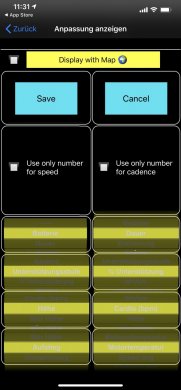
but there’s a Bug... in the Display customization the white text doesn’t really work with the yellow checkboxes... maybe you should consider them a generic (changing) color too if you can configure that with shades.
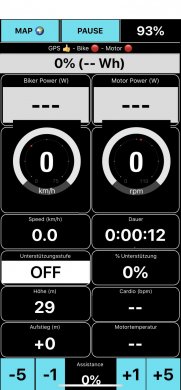
On the Bike monitor display there seems to be something wrong with the frames of the km/h and rpm circles and the overlay of the time and carrier signs around the notch.
sorry but you think it’s more helpful to tell what seems tobe wrong :)

Map Download works nor but there seems to be a limit of 6000 (???) map tiles which doesn’t seem to be to much and the cache is not being cleared if you delete the rides. After reinstall I was able to download, but there was only one gpx file left in the list and the download wasn’t possible until reinstall. Now a map which covers 1 tour around my home takes like 2000 of these tiles. Would be nice to be able to use some of the 160gb free space!

Another request: did you think about on giving different patterns for the Map display and the without map?
I configured ‚speed‘ to the upper left Box so I can see my speed while riding with an open map. If i switch to only display I got the speed twice.
would be very nice if the configuration would change when ticking the ‚display with map‘ feature.
in example: speed in the upper left box when having the display with map and elevation gain or motor temp when the speed is in the big box... same with wattage.

have to say again: stunning work you’re doing here!

if you need some help with translations to German hit me up! ;):)
45DCFAA3-4A9D-49B9-A5C2-B8806BECE06B.jpegFD8142B4-FB48-438C-A9DF-8DD3266B3D20.jpeg
 
Last edited:
Good luck. I have seen many iPhones with damaged image stabilizatio.

I'm curious about this as I've been thinking up upgrading from my SE to an 11 pro. My understanding is the image stabilization is done with magnets that suspend the camera. So mounting the phone on the handle bar shakes the camera too much within the magnetic fields?
 
I use BLEvo with a Wahoo TICKR and it seems to perform quite well. I'm wondering if you can add an alarm feature to alert when the hear rate passes a certain value. I would like to keep below 160bpm when training and it would be helpful if I could set an alarm.
 
I'm curious about this as I've been thinking up upgrading from my SE to an 11 pro. My understanding is the image stabilization is done with magnets that suspend the camera. So mounting the phone on the handle bar shakes the camera too much within the magnetic fields?
I don’t know how the lense is suspended, but it is moving around to compensate for your movements when holding the phone. The vibrations will kill it in time. Your se has no optical image stabilization so is fine in that regard.
 
what is the usa speed cut in kph and the corresponding wheel size for a 2019 levo ?
I set it to 32 kph and it shows around 1750 +- in mission control , not 2300 like it should
 
Last edited:
what is the usa speed cut in kph and the corresponding wheel size for a 2019 levo ?
I set it to 32 kph and it shows around 1750 +- in mission control , not 2300 like it should
Sorry but for BLEvo in USA you don't have to touch the speed limit and keep it to 25km/h.. This value is correct only where the motor has the speed limit set to 25km/h..
 
@PaoloBLEvo While using smart power plus smart HR, in the bike monitor when I push "deactivate smart power" smart HR is still active. I prefer both to be deactivated for full manual control of assistance without it changing based on heart rate. Is there a reason why smart HR is still active? Maybe have two buttons?
 
Sorry but for BLEvo in USA you don't have to touch the speed limit and keep it to 25km/h.. This value is correct only where the motor has the speed limit set to 25km/h..

ok so 32 kph is the correct speed to set to return to factory specs? And it's ok if mission control doesnt show 2300? thanks
 
@PaoloBLEvo While using smart power plus smart HR, in the bike monitor when I push "deactivate smart power" smart HR is still active. I prefer both to be deactivated for full manual control of assistance without it changing based on heart rate. Is there a reason why smart HR is still active? Maybe have two buttons?
I think the Smart HR is kept active... I will deactivate in the next release..
 
Status
Not open for further replies.
Keep reading
    Browse all

    Similar Threads

    Community Stats

    Since 2018
    669K
    Messages
    40,926
    Members
    Join 30,000+ Riders, it's free!
    Back
    Top