ST Ride App - Tracker/dash/logger for STEPS motors

Why do I want this: I use Locus Map on my bike and I want to display the battery level as an overlay.
You can do that on any modern Android system by overlaying/stacking STRide App with other apps. STRide has the "transparent background" mode.
 
⚡ EMTB Pro Go Pro — Living Intelligence Reports, exclusive discounts & ad-free Up to 25% off Peaty's, PEMBREE, Magicshine & more · Ad-free browsing · Pro badge See the deals →
Hello
On Android, I only see ANT+ to display a heart rate monitor. Is it possible to connect a heart rate sensor via Bluetooth to display the heart rate in StRide? Thank you for your reply.
 
@vadII I use the iOS version. Where do you get the heatmap traces from? I’d love to look at them when planning or reviewing a ride, not just during (they are so useful when exploring).
 
STRide v2 Beta Update (for Android)

General:​


The application has been completely rewritten on a multiplatform engine. Functionality and UI are now identical on iOS and Android.

Changelog:​


Wear OS Support: Added session management (start, stop, record), real-time metrics display, and heart rate data transmission to the session record.

Wear OS Layout Editor: Added an editor to customize the metrics display layout on the watch.

Multiple Bike Profiles: Added support for configuring multiple bicycles. Available settings include drivetrain parameters, wheel circumference, speed correction coefficient, and battery capacity (Wh).

Power Consumption Metric: Added calculation of average power consumption based on battery capacity (Wh) and the percentage of battery used.

Current Gear Calculation: Added real-time gear estimation using drivetrain data (front chainring, cassette parameters) and wheel circumference.

Assist Mode Usage: Added calculation of assist mode usage percentage per session (recorded only when the motor is active).

ANT+ Sensors: Support has been temporarily removed. It may be re-implemented in future updates based on user demand.

Installation and Migration:​


Beta Access: Version 2 is currently in Beta testing on Android. To update, join the Beta program on the STRide Google Play page.

Wear OS Installation: Install the STRide app directly on the watch.

Data Migration: Upon the first launch, the app will notify you to migrate previously recorded and imported sessions to the new version. This migration can also be initiated manually at any time via Settings -> Maintenance.
 
Wear OS Installation: Install the STRide app directly on the watch.
Stride App 1.20.84
Wear App 2.0.107

How does pairing work? I have the app on my watch, and when I open it, I get a message saying "Open on phone." tap on it does nothing (the app is running + paired with the Bike) Do I need to pair the watch with the Stride app on my phone?

Thanks
 
Stride App 1.20.84
Wear App 2.0.107

How does pairing work? I have the app on my watch, and when I open it, I get a message saying "Open on phone." tap on it does nothing (the app is running + paired with the Bike) Do I need to pair the watch with the Stride app on my phone?

Thanks
You need to install version 2.0.107 on your phone as well. You can find detailed installation instructions in my post above.
 
You need to install version 2.0.107 on your phone as well. You can find detailed installation instructions in my post above.
sorry i cant see instructions above
>install version 2.0.107 on your phone
du you mean a new STRide apk V.2.0.107 ? Where can I get them?
please let me know what you think.

Thanks
 
Beta Access: Version 2 is currently in Beta testing on Android. To update, join the Beta program on the STRide Google Play page.


There seems to be a problem. I signed up for the beta (Google confirmed it) and I got version 1.20.84 installed.
Screenshot1_20260503-065458_Google Play Store.webp
Screenshot2_20260503-065551_Google Play Store.webp
 
Last edited:
Hi vadll
Any ideas?
I'd love to support the beta test, but I only have version 2 on my watch, and I can't install version 2 for my phone.
Phone is Android 9.

Google is only offering me version 1.20 as a beta version.(the Photo above)
Downloadlink for the apk V2 ?
 
Hello, ANT+ is becoming rare on smartphones; it would be great to be able to connect a heart rate sensor via Bluetooth.
Thank you.
 
Hello, ANT+ is becoming rare on smartphones; it would be great to be able to connect a heart rate sensor via Bluetooth.
Thank you.
Bluetooth HRMs are supported
 
The new 2.0.108 version of the STRide App is now available to all users. Joining the beta program is no longer required to access the latest version.
 
Hello,
I just installed version 2. I completely uninstalled my old version. The speed display on the screen remains at zero, but the cadence is displayed correctly, and the arcs on the side are working. I have a Xiaomi 9T running Android 11, an E7000 screen, and an upgraded E8000 motor.

Any ideas? Thanks, have a good day.
 
Hello,
I just installed version 2. I completely uninstalled my old version. The speed display on the screen remains at zero, but the cadence is displayed correctly, and the arcs on the side are working. I have a Xiaomi 9T running Android 11, an E7000 screen, and an upgraded E8000 motor.

Any ideas? Thanks, have a good day.
No. Would be nice to see screenshots/screen recordings

BTW, There is no need to uninstall the old version - you will lose your recorded and imported sessions.
 
Thanks for the new version - would you have any idea what i do wrong? app ver 2.0.112, installed WearOs app on my Galaxy watch, checked permission, both app on the phone and on watch have rights to read pulse. yet, there is no pulse coming through. How to check that it is connected? Thanks!
 
Thanks for the new version - would you have any idea what i do wrong? app ver 2.0.112, installed WearOs app on my Galaxy watch, checked permission, both app on the phone and on watch have rights to read pulse. yet, there is no pulse coming through. How to check that it is connected? Thanks!
You have to start the connection with a bike from watch to see the pulse
 
Last edited:
No. Would be nice to see screenshots/screen recordings

BTW, There is no need to uninstall the old version - you will lose your recorded and imported sessions.
I ran into the same issue and debugged it a bit. The bug is coming from "Default bike settings" -> "Real rear wheel size". If you change it from the default 27.5+" to something else like 29", the speedometer dies and it won't come back even if you restore the 27.5+" setting. You have to go to the app settings and clear storage — i.e., clean all app settings.

Leaving it untouched (even if it says the wrong wheel size) seems to still give correct-looking numbers.
 
I ran into the same issue and debugged it a bit. The bug is coming from "Default bike settings" -> "Real rear wheel size". If you change it from the default 27.5+" to something else like 29", the speedometer dies and it won't come back even if you restore the 27.5+" setting. You have to go to the app settings and clear storage — i.e., clean all app settings.

Leaving it untouched (even if it says the wrong wheel size) seems to still give correct-looking numbers.
Thanks for the feedback. Please check the new 2.0.120 version
 
Thanks for the feedback. Please check the new 2.0.120 version
Oh, super quick fix, thanks! Seems to work now. I think the wheel size was selected by default, whereas a multiplier would be more natural.

Yet, I found another issue with the .fit file timestamps. According to the Garmin specification, FIT Epoch timestamps must be in UTC. However, STRide seems to store local time instead.

This causes issues when trying to sync the data with GoPro videos using gopro-dashboard.py. Since GoPro stores its telemetry in UTC, the mismatch makes syncing very difficult. My current workaround is to manually shift the timestamps to UTC and regenerate the .fit file, which fixes the sync issue completely.

Could you update the export to use UTC timestamps? Here is the Garmin spec for reference: Cookbook | FIT SDK | Garmin Developers
 
@vadll
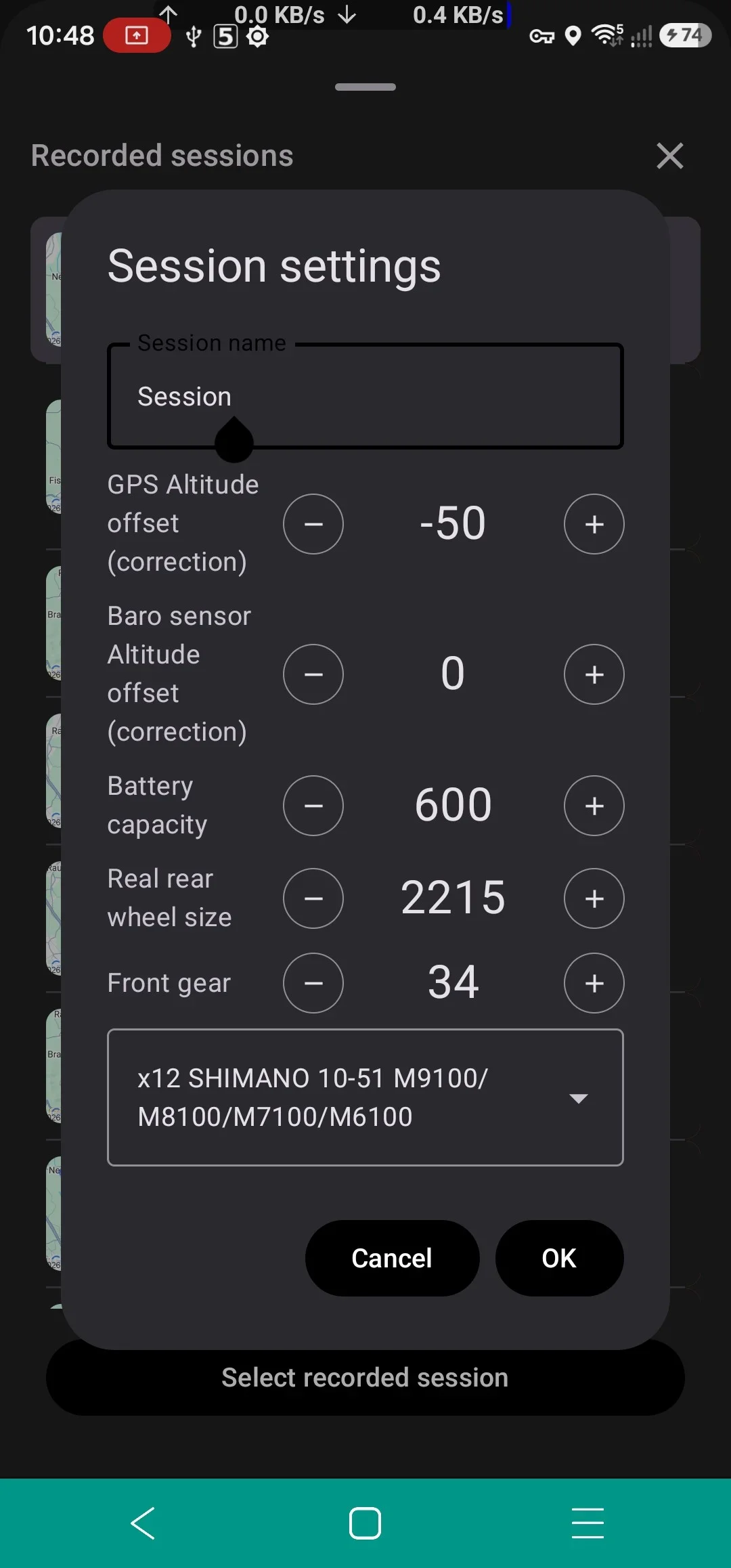
could you please change the colour of the write cursor in session settings from black to white? It is almost not visible on the display.Screenshot_20260525_104841.webp
 
The new iOS version is now available. It features the same design and functionality as the Android version.
 
For about a month now, the app has been constantly interrupting data recording while running in the background. The app is connected to the bike and a heart rate monitor, I start the recording, and leave the app in the background for the ride. The bike's display shows that the Bluetooth connection remains active. But when I open the app after the ride and stop the recording, the result is usually an incomplete activity that cut off mid-ride – it typically just draws a straight line from the dropout point to the finish location.

The resulting stride log XML file only shows up to the point where data recording stopped, followed by a single point with the correct coordinates at the location where I manually stopped the recording – but all the data points in between are missing.

The phone is a Google Pixel 8a and the software is up to date. Settings are: Location permission: Allow all the time | Use precise location | Not Allowed: No permissions denied | App battery usage: Allow background usage.

I suspect the issue is related to background execution. Does anyone have any ideas? I think I might try installing a 1-2 month old version to test it out.
 
I suspect the issue is related to background execution. Does anyone have any ideas? I think I might try installing a 1-2 month old version to test it out.
Please email me and send screenshots of location permissions of STRide app (from phone settings). Also check the "Battery optimization" for the App in phone settings - set it "unrestricted".
 
Last edited:
For about a month now, the app has been constantly interrupting data recording while running in the background.
Hi, I have this problem too since v2.0.127.
All permissions are allowed and battery is unrestricted of course.
It happens not every time, some trips are fine (perhaps short ones with <2 hours), during the last one (5 hours) it happens 3 times :-(
The app runs in the background too. If I open then the screen, the GPS position and the HRM are correct updating. But all other charts are frozen.
Temporary solution: pause the record, disconnect from bike, reconnect

I attach the app_log_20260628.
In the mean time I am back to v2.0.125

Samsung S23U, Android 16 OneUI 8.5
 

Attachments

Update 2026/04/07:
App is available at Google Play
App is available at AppStore

I decided to start developing an App for collecting and displaying information that is available for Shimano STEPS motors: speed/cadence/assist/Di2 data and etc, combined with GPS data and data from other external sensors as heart rate monitors and etc. The only problem is that data from the motor can be collected from any STEPS displays (E7000, E6100, EN100) other than the most common E8000. This is outrageously stupid on the part of Shimano.

It's lucky that the E7000 display is installed in my bike, so I made some initial version. At this moment the App collects bikes data (including Di2 data), HR from common Bluetooth HRM sensor and phone's GPS data. App has circumference correction factor, so it shows correct Speed/Distance on the dash even if you set minimal circumference for a higher speed limit.

So I am ready to listen to your suggestions for the further development of the App. For example, what features do you want to see in such Apps?
View attachment 23126
% battery please
 
Keep reading
    Browse all

    Similar Threads

    Community Stats

    Since 2018
    676K
    Messages
    42,066
    Members
    Join 30,000+ Riders, it's free!
    Back
    Top