Navigation
Install the app
How to install the app on iOS
Follow along with the video below to see how to install our site as a web app on your home screen.
Note: This feature may not be available in some browsers.
More options
Style variation
You are using an out of date browser. It may not display this or other websites correctly.
You should upgrade or use an alternative browser.
You should upgrade or use an alternative browser.
Levo Gen 3 Specialized Gen 3 2022 Levo Megathread!
a
- Thread starter Rob Rides EMTB
- Start date

⚡ EMTB PRO
25% off e*thirteen, Peaty’s & more with PRO
Member-only deals from e*thirteen, Peaty’s, PEMBREE and Magicshine · ad-free browsing · PRO badge · Living Intelligence Reports
See the deals →
From £1.99/month

beutelfuchs
Active member
My expert is also missing it.

Do you have the sticker on to protect it. If you look the cable is too far away from the bolt to fit a clip correctly

Can you post a photo of this part fitted on your bike? ThanksExpert Maroon Color 22

roccobarocco
Active member
Sorry, the Bike is in the shop for fitting a new light... probably by next week. CheersCan you post a photo of this part fitted on your bike? Thanks
Twvandoren
Member
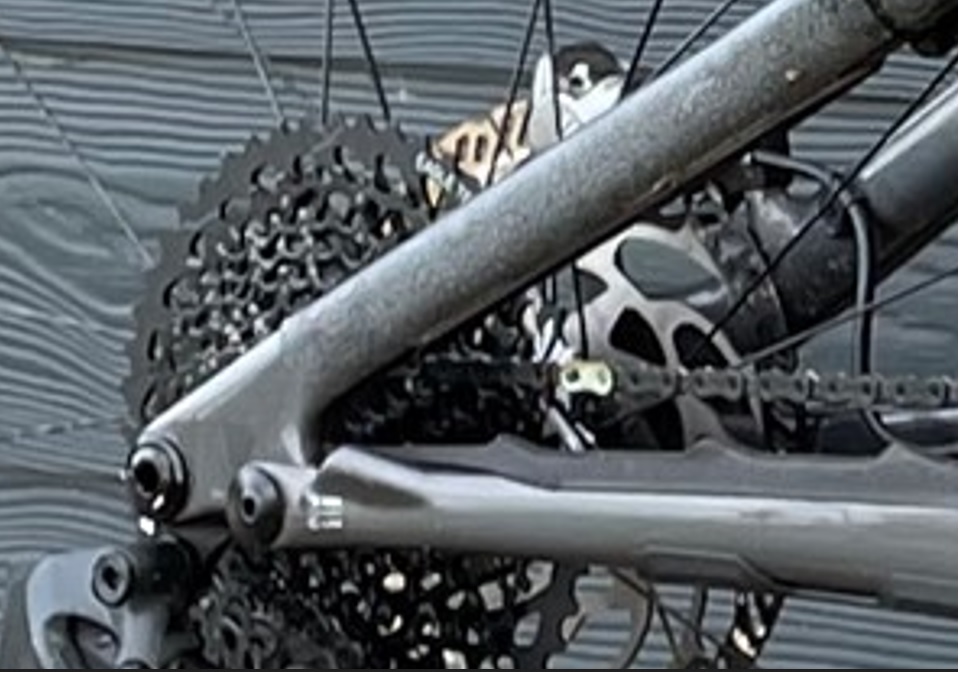
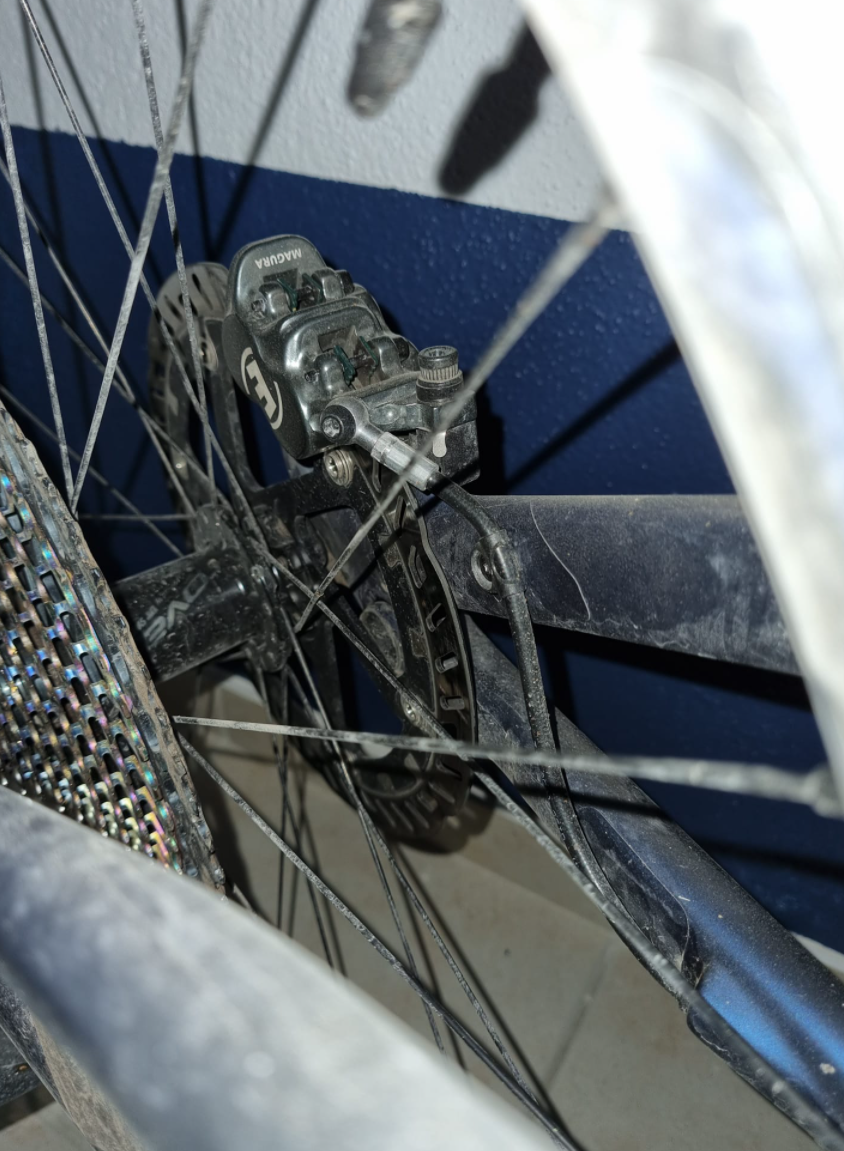
I bought an S-Works frame and it did not come with the guide. For what that frame cost I find that really disappointing.Anyone with a Gen3 Expert, Pro, or S-works have this rear upper brake line guide on their frame from the factory? I see it in the 2022 small parts schematic (see the arrow pointing to the guide), but it’s not on my expert and the rear brake line rubs against the frame. My frame has a bolt inserted, but no guide.
The photo of actual bike below is a friends 2021 Comp. You can see the brake line guide circled in yellow.
View attachment 81429
View attachment 81431

I have it 

Darkyhs
Well-known member
My 2022 S-Works has it as well, and I have a 220 Disc fitted on the back.
notes
Member
I'd guess that this guide (which was on my Gen 2, but I removed it when installing new brakes) is sometimes removed at the bike shop's discretion based upon brake calliper type and rotor size, excess cable length and frame size. The guide/clip can interfere with the cable movement and make the cable radius too tight and kink. Best not to stress too much about it and add some frame protective tape. Just make sure that the brake cable's not too loose or slapping the frame! Hate those unnecessary noises..

Californiacarver
Member
Curious if anyone knows why the larger size Levos have the smaller seat ? Seems strange to me.
Curious if anyone knows why the larger size Levos have the smaller seat ? Seems strange to me.
weight savings. haha, not really sure but i do have an S4 with the 143mm saddle
Californiacarver
Member
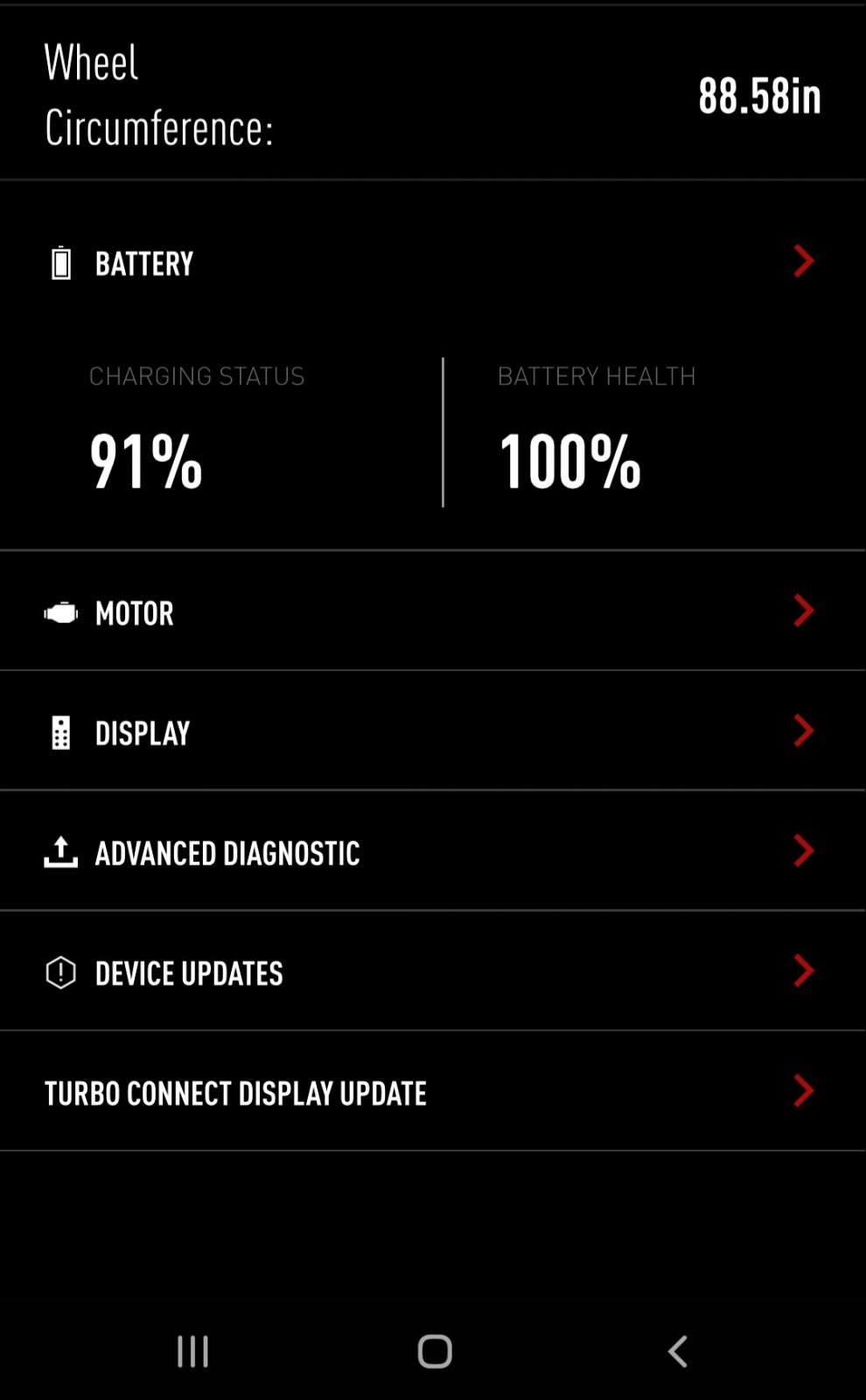
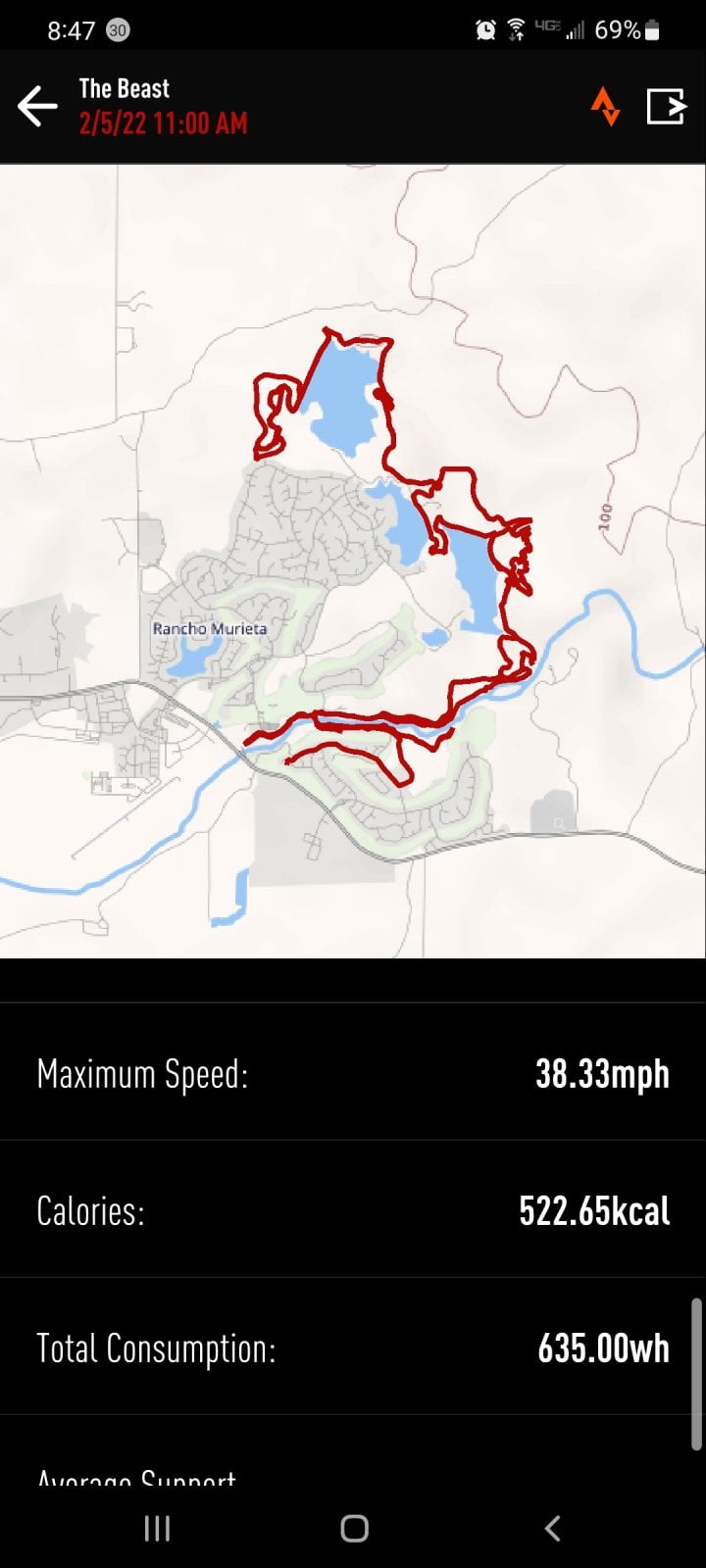
Seems like wheel circumference is off or something... As I'm almost covering twice the speed and distance on the app... comparing to the Garmin.
Can someone let me know what has worked better for them specialized app wheel circumference? Assuming I will need to take it too a shop to be adjusted.
Can someone let me know what has worked better for them specialized app wheel circumference? Assuming I will need to take it too a shop to be adjusted.
You setup for imperial or metric speed measurements? Check in MissionControl or on the Mastermind TCU menu.Seems like wheel circumference is off or something... As I'm almost covering twice the speed and distance on the app... comparing to the Garmin.
Can someone let me know what has worked better for them specialized app wheel circumference? Assuming I will need to take it too a shop to be adjusted.
View attachment 81563
View attachment 81565

I have 2021 Levo Comp M-size and it's spot on with size.
So, S3 with 2022?
I'm 173cm "tall" and 79cm inseam.

 geometrygeeks.bike
So, S3 with 2022?
I'm 173cm "tall" and 79cm inseam.
Geometry Geeks
The world's biggest open geometry database. Find bikes by name or numbers. Easily compare bike geometry side-by-side.
geometrygeeks.bike
Last edited:

I have 2021 Levo Comp M-size and it's spot on with size.
So, S3 with 2022?
I'm 173cm "tall" and 79cm inseam.
Geometry Geeks
The world's biggest open geometry database. Find bikes by name or numbers. Easily compare bike geometry side-by-side.
S3 will be fine!
Darbs
New Member
Just took delivery of my new Levo Carbon Comp from Tredz today! Anyine every got there's out the box and had a yellow writing on the display screen saying "Please up date before riding"
Any peeps on here have any ideas?
- I've checked for updates on mission control - nothing
- I've done the factory reset by holding the two buttons for 45 seconds
Any peeps on here have any ideas?
Darbs
New Member
Same issue for me....any ideas...I've got the full bike thoughNo, the main battery is installed and I charged it up to about 50%. The firmware is the factory default, showing a turtle icon locked to something like 15kph and saying that it needs to be updated. Maybe this has something to do with the firmware.

Stompweaver
Active member
No hose guide on mine either. It doesn’t rattle and the hose runs in a nice smooth curve.
Open the Mission Control app, connect to the bike and then force close it. Open it again and the diag message will be gone. The “take to the dealer for a firmware update” message is a known issue with the MC app. The last updates were March 2020 so I doubt yours will have any parts in it manufactured before then.Same issue for me....any ideas...I've got the full bike though
Darbs
New Member
How do you mean force close it?No hose guide on mine either. It doesn’t rattle and the hose runs in a nice smooth curve.
Open the Mission Control app, connect to the bike and then force close it. Open it again and the diag message will be gone. The “take to the dealer for a firmware update” message is a known issue with the MC app. The last updates were March 2020 so I doubt yours will have any parts in it manufactured before then.

Daveed F
Active member
Nothing is wrong with your new bike, All the new ones come with this sticker and you see the turtle on the screen. It requires the dealer to connect the bike to the computer for the update. Unfortunately you can not do it using Mission Control. The bike shop should've taking care of it before giving you the bike.Same issue for me....any ideas...I've got the full bike though
Enjoy your new Levo!!!!
Had same issue with mine saying firmware update needed. Try this as this is what the bike shop did to mine after taking it back, to date its behaving fine. Take out the TCU display screen and charge it up overnight, the old tcu had a battery installed but the new mastermind has an internal battery. They said it could have been this on mine which was causing the issue. Its bad that the shop has delivered the bike to you in this state, complain about it as I got a substantial cash payment as an apology, worth a try.
Last edited by a moderator:
Eduardoramundo
E*POWAH Master
Next time buy from Raceco and get some proper customer serviceJust took delivery of my new Levo Carbon Comp from Tredz today! Anyine every got there's out the box and had a yellow writing on the display screen saying "Please up date before riding"
Have contacted Tredz's and waiting for a call, some 3 hours ago, not great when you've spent so much with them!
- I've checked for updates on mission control - nothing
- I've done the factory reset by holding the two buttons for 45 seconds
Any peeps on here have any ideas?

Californiacarver
Member
Dang it... had the bike less than a month and its already at the bike shop for service. Rode yesterday and all was fine with ride. Then later while home was going to show a friend and it simply wouldn't start. Just a black screen of death. Charged the main battery and TCU battery. Cleaned charging port with compressed air. uuuugh
Stompweaver
Active member
Sorry, I thought you meant that it was showing that there was an update required on Mission Control not on the TCU screen. As @Repsol says try charging the TCU battery and if not it’ll have to go back to the dealer. Depending on your location it would be worth calling either RaceCo (Midlands) or Berkshire Cycles (Southwest) as they’ll be able to help you faster than Tredz. I, as have a large number of others on the forum, have had excellent service from both dealers.How do you mean force close it?
Stompweaver
Active member
@Californiacarver bad news. I’m sure it can be quickly fixed although it’s definitely not what you want on a new bike. You’ll be back to carving soon.
Hoppy
Member
Ok I got the rattle! So I have been off the forum for awhile. Like up to page 38. Did we ever decided definitively where the rattle comes from? I have changed to axs shifter and axs dropper so those conduits could be pulled but not sure how to do it and is it a contributor? It seems to only rattle over roots and rocks when on the bike. If I bounce the bike when off it doesn’t do it. Also was it decided the battery is what is rattling? It drives me crazy! Any guidance would be appreciated before I start tearing things apart on my new bike. Could be as simple as the tcu cables behind the display I could wrap those in something soft first.
Sincerely Rattled
Sincerely Rattled
Hi all. I joined the 22 Levo club yesterday. I had no plans of replacing my 18 Meta Power but the S6 Levo just fits in a way no other bike ever has. A local shop had an alloy comp on the floor and I went in for a test ride. That was an expensive test ride.
The only fit adjustment has been move the 2 spacers from above to below the stem. On its maiden voyage today I am impressed. I went to my local spot so I could have apple to apples. My private segment times improved significantly compared to where I’d been on my meta lately. I’m caulking the improvements up to fit. I’m no longer freakishly high above a bike that was too short (485 reach vs 532)
My first question is how can I adjust the over run when I stop pedaling? It’s not major but maybe a second. I notice it more in trail 45/100 than eco 35/35. I played with the acceleration setting and didn’t notice much difference in regard to surge after I stop
Pedaling. My E-8000 does it too but maybe I’m just used to it and there are subtle differences. Thanks
The only fit adjustment has been move the 2 spacers from above to below the stem. On its maiden voyage today I am impressed. I went to my local spot so I could have apple to apples. My private segment times improved significantly compared to where I’d been on my meta lately. I’m caulking the improvements up to fit. I’m no longer freakishly high above a bike that was too short (485 reach vs 532)
My first question is how can I adjust the over run when I stop pedaling? It’s not major but maybe a second. I notice it more in trail 45/100 than eco 35/35. I played with the acceleration setting and didn’t notice much difference in regard to surge after I stop
Pedaling. My E-8000 does it too but maybe I’m just used to it and there are subtle differences. Thanks

Ok I got the rattle! So I have been off the forum for awhile. Like up to page 38. Did we ever decided definitively where the rattle comes from? I have changed to axs shifter and axs dropper so those conduits could be pulled but not sure how to do it and is it a contributor? It seems to only rattle over roots and rocks when on the bike. If I bounce the bike when off it doesn’t do it. Also was it decided the battery is what is rattling? It drives me crazy! Any guidance would be appreciated before I start tearing things apart on my new bike. Could be as simple as the tcu cables behind the display I could wrap those in something soft first.
Sincerely Rattled
search for my posts in this thread, I solved it by removing the conduits and using bubble wrap.
Similar Threads
-
-
-
 Specialized Turbo Levo Comp Gen 3 (2022-23) — worth buying second-hand in 2026?
- Started by Grinkush
- Replies: 6
-
-
Free account
Join 43,195
eMTB riders
eMTB riders
One tap. No forms. Fewer ads.
or sign up with email
Already a member? Log in