Ebike Garmin apps ~ UPDATE: new multi battery support

? or maybe??
Dude, I wear glasses, that is the problem.

If I don’t wear glasses I will have absolutely no problem seeing the small text on any watch very clearly.

However, I will not be able to see where I am going down the trail. It just turns into a very fuzzy, blurry, scary place to be ?
 
⚡ EMTB Pro Go Pro — exclusive discounts & ad-free Peaty's 25% off & more · Ad-free browsing · Pro badge See the deals →
@Kiwi in Wales This is unfortunate but on another hand, it is always bad idea to stare at handlebars instead of ahead. I am still waiting for same crash related to this, yesterday it was close. :D

BTW, biggest font you can achieve with my apps are use Ebike Field "Simple" and set value to battery number only (applies for EDGE devices also).
20181004_112948.jpg
20181004_114554.jpg
 
Last edited:
@Decca Interesting. These are ID of modes in ANT+ communication. I thought all Turbo Levos or Kenevos are same in this, but apparently not. Don't you have old firmware?

Don't worry thought, I will fix this in next release.
 
Works well on my 820 and 1000 and importantly doesn't make the Garmin read the speed data from the bike which is a pain if you've done the wheel size hack. Good work.
 
@Decca Interesting. These are ID of modes in ANT+ communication. I thought all Turbo Levos or Kenevos are same in this, but apparently not. Don't you have old firmware?

Don't worry thought, I will fix this in next release.

This is the 2019 Levo
 
I tested it a couple of hours ago on my wife’s 2019 Levo Hardtail together with an edge 520 and again it works perfectly(y)

Karsten
 
Hi Jan, it would be great to have a possibility to manage multiple batteries (or at least two batteries). Not sure if this is something that can be implemented easily, but it would for sure be very helpful for bigger trips where you have to switch to a second battery... (y):)
 
@Decca Thank you! But I am confused a little. Datafield is be able to show assist mode by both number (1,2,3) or text description (ECO, TRAIL, TURBO) depending on settings in Garmin Connect Mobile. By default it is shown as text. Does it means that you got only numbers? Thanks

@Hannes_3000 Hi, thanks for idea. This is something which I have in "wish list" already and after I finish current project, I will look into that if there will be time.
 
@Decca Thank you! But I am confused a little. Datafield is be able to show assist mode by both number (1,2,3) or text description (ECO, TRAIL, TURBO) depending on settings in Garmin Connect Mobile. By default it is shown as text. Does it means that you got only numbers? Thanks

@Hannes_3000 Hi, thanks for idea. This is something which I have in "wish list" already and after I finish current project, I will look into that if there will be time.

I have it as a half-width field at the moment as shown in my screen shots earlier, so I guess only room for just the number? Would it need to be a full width field to show the text also?

In this situation, showing just the number is perfectly acceptable!
 
No, it is not that clever, you must have set to show both values numeric in settings, otherwise it will show assist mode with description by default. Am I assuming right that you set to show only battery level on older version? I remapped settings in latest update, so it started to show you assist mode again, but by number. Am I right? I keep this in mind while resorting settings again. :)
 
No, it is not that clever, you must have set to show both values numeric in settings, otherwise it will show assist mode with description by default. Am I assuming right that you set to show only battery level on older version? I remapped settings in latest update, so it started to show you assist mode again, but by number. Am I right? I keep this in mind while resorting settings again. :)

In Garmin Express for your app, it is set to "Both".

01.jpg
 
@Decca wow, I didn't expected this. Garmin Express shows you settings from older version and not the one you have currently installed. That is some nasty bug on Garmin side. It is just another reason why I recommending to change settings of apps on Garmin Connect Mobile as for myself, Garmin Express don't even load list of my apps, so it is completely unusable..

I hope uninstalling app and installing it again will fix this issue for you. But before that, if you have your Edge linked with your smartphone and your are willing to spend a minute with this, can you please confirm, that Garmin Connect Mobile shows correct settings? On first place of value selector should be "Battery level + Assist Mode description" while you probably have already selected "Battery level + Assist Mode numeric". I really hope it is bug only on Garmin Express side and not whole Garmin Apps workflow.

@outerlimits Don't get me wrong, but I am still surprised how difficult is for many people to read app description on Garmin Connect IQ Store during installation. :) In case of Ebike Field, premium function is rendering additional graphs to Garmin Connect workout which will show battery state of charge and used assist mode for every moment of workout. Check image on first post of this thread. And very soon, there will be new announcement. :)
 
@Decca wow, I didn't expected this. Garmin Express shows you settings from older version and not the one you have currently installed. That is some nasty bug on Garmin side. It is just another reason why I recommending to change settings of apps on Garmin Connect Mobile as for myself, Garmin Express don't even load list of my apps, so it is completely unusable..

I hope uninstalling app and installing it again will fix this issue for you. But before that, if you have your Edge linked with your smartphone and your are willing to spend a minute with this, can you please confirm, that Garmin Connect Mobile shows correct settings? On first place of value selector should be "Battery level + Assist Mode description" while you probably have already selected "Battery level + Assist Mode numeric". I really hope it is bug only on Garmin Express side and not whole Garmin Apps workflow.

As requested, Garmin Connect mobile before uninstalling app looks correct, so a bug in Garmin Express:

Image-1.jpg


After uninstalling app and installing it again, now Garmin Express looks correct:

01.jpg
 
hoi is it possible to match it with the Garmin Oregon 600
I bought the 2019 turbo levo and I don't want to buy a new gps
 
@Decca Thank you! You can change that "value shown on screen" settings on the fly while datafield is running, so if you can confirm that even first option (with assist mode description) work for you properly, it would me much appreciated.
EDIT: Ok, I maybe know why you don't getting assist mode description by default.. Lets wait for my new app which will be able to confirm lots of things...

@kdr52 sorry, no Connect IQ on your device - no third party apps.
 
Last edited:
Hi, I want to introduce new application for my donators from my creative activity time. :)

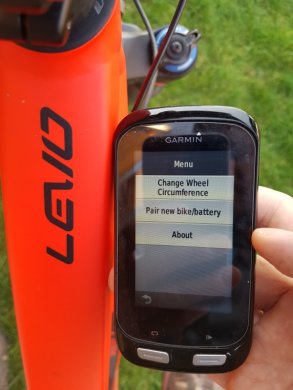
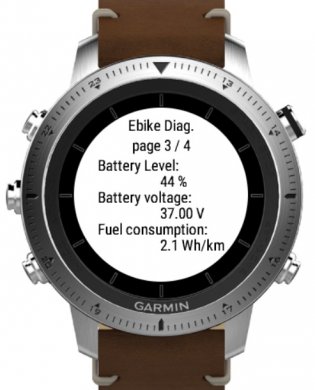
Ebike Diagnostics app is able to load lots of useful information from ebike directly to your garmin device, so its great tool to check status of your bike. It is even able to change wheel circumference. This app is not supposed to replace datafields or be used during workout as it is not recording any data but when you want to know more about your bike via your Garmin, this is app to go.

Unfortunately new 2019 FSR Turbo Levo with Mag motor was stripped a lot in ANT+ connectivity, so no support for this bike. This is initial release, next app release will support even more garmin devices. I decided to publish this app as bonus for my donators, so it require PIN to fully run.

I also updated first post with new apps. Big thanks to @Decca for his tests on 2019 FSR Levo.

combine.png
20181011_165451s.jpgchronos.jpg
 
Last edited:
Hi, I am trying to fix the issue with new Levo, where datafield don't show assist mode description, but only number. Can @Decca or anybody else with 2019 FSR levo help please?

New levo reports 4 supported assist modes instead of 3 on old Levos. Are they all 4 configurable on mission control or the first one is always OFF? What numbers do you then get on Ebike Field for all particular assist modes? Is it 0-1-2-3 or 1-2-3-4 or something else? I am trying to understand which is ECO, TRAIL or TURBO.. Thanks!
 
Your field displays 0,1,2,3 for off, ECO, TRAIL and TURBO.

Off is not configurable in mission control - it just turns off all assistance.
 
Then 4 must be for shuttle mode or Specialized is violating ANT+ specification.. Can you please check if it will show 4 in shuttle mode?

Thanks!
 
Shuttle mode has no effect on your field. It is not an ON/OFF switch, it is a variable slider.

I'm not sure yet how that effects the bike!

IMG_2799.PNG
 
Ah, I thought it is ON/OFF feature and theoretically stands for strongest assist mode. Then Specialized really don't follow ANT+ specification... That is strange, I might even try to write them somewhere. Anyway, thanks again! So if you really never get assist mode 4 on display, I will pair descriptions like you said with 1-2-3. (Thats all because 0 is motor off and not assist mode according to specifications. I can get 0 even on old Levo with 3 supported assist modes. )
 
Hey Jan, great app.

Could you tell me if there is any way I can make the text for the % & mode bigger and more bold on my Garmin 130 please?
On my Garmin 1000 the text is big and bold, but on the 130 is smaller only on that field. Even if I change it and put it in the second field is still the same and difficult to see at times.

Cheers

datafield.jpg
 
Hi @pgtips , in order to make datafield universal across devices, in this case device itself controls used font. Basically the size is determined if it is number or text, like in your case. Ofcourse the issue is, that I am trying to render more than one value by one datafield. That is because you can't connect two separate datafields to one bike due to Garmin limitation.

That is why you have lots of options to select in configuration what to render by my datafield. You can experiment with them on-the-fly - you don't need to restart activity for this setting to change. Note the difference between battery with % and plain number.

For this reason I am considering to add even another option which renders both assist mode and battery as one single number, like this (assistmode.battery):

edge130.png


Would you be interested in this style? In case of edge 130, it can help a lot in readability.
 
Hi @pgtips , in order to make datafield universal across devices, in this case device itself controls used font. Basically the size is determined if it is number or text, like in your case. Ofcourse the issue is, that I am trying to render more than one value by one datafield. That is because you can't connect two separate datafields to one bike due to Garmin limitation.

That is why you have lots of options to select in configuration what to render by my datafield. You can experiment with them on-the-fly - you don't need to restart activity for this setting to change. Note the difference between battery with % and plain number.

For this reason I am considering to add even another option which renders both assist mode and battery as one single number, like this (assistmode.battery):

View attachment 6496

Would you be interested in this style? In case of edge 130, it can help a lot in readability.
Jan I think that should work better thanks.
So what I'm looking above is, the number two is the assistance and 78 is the battery % ?
 
Keep reading
    Browse all

    Similar Threads

    Community Stats

    Since 2018
    669K
    Messages
    40,884
    Members
    Join 30,000+ Riders, it's free!
    Back
    Top