Other Brose 2.1/2.2 firmware update problem (Levo/Kenevo)

montivagant

Member
Joined
Apr 11, 2021
Messages
14
Reaction score
18
Location
BC, Canada
Updated firmware just a few days ago, and today have this in Mission Control, a warning about available update, and no versions listed, so can't tell which part needs an update. The versions are shown on each component's page, and they are: battery 2.4.4, display 1E.B.0, motor 7.4.2. The help page (the circle with the question mark in the upper right) does not list any newer versions. Could be a coincidence, but this happened after Mission Control update from Play store, so making me think this could be a Mission Control glitch rather than a real update available??
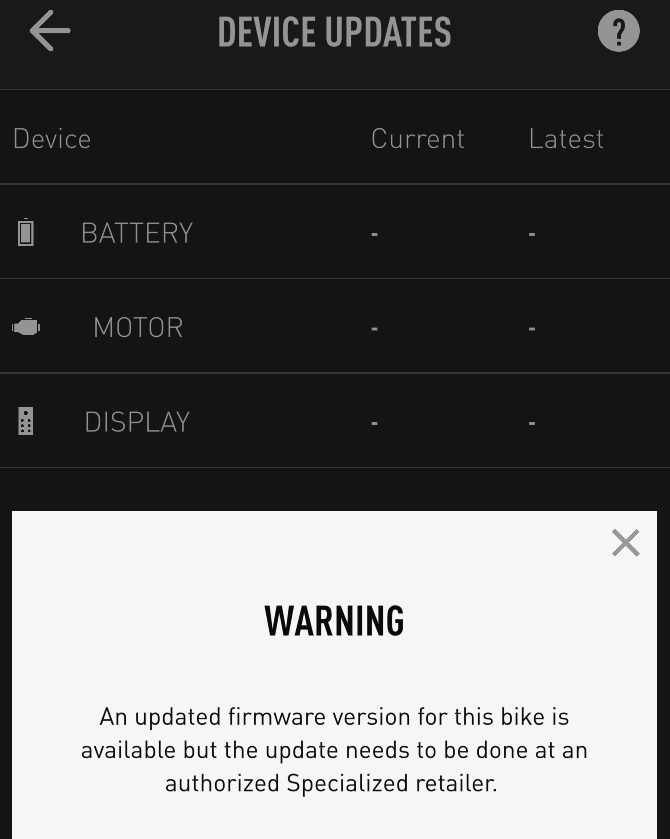
Screenshot_20210526-213143.png
 
⚡ EMTB Pro Go Pro — exclusive discounts & ad-free Peaty's 25% off & more · Ad-free browsing · Pro badge See the deals →
Updated firmware just a few days ago, and today have this in Mission Control, a warning about available update, and no versions listed, so can't tell which part needs an update. The versions are shown on each component's page, and they are: battery 2.4.4, display 1E.B.0, motor 7.4.2. The help page (the circle with the question mark in the upper right) does not list any newer versions. Could be a coincidence, but this happened after Mission Control update from Play store, so making me think this could be a Mission Control glitch rather than a real update available??

View attachment 62582
Hey @montivagant,

Thanks for sharing and sorry you experienced this issue. This was caused by a configuration change when we released our latest version of Mission Control 2.6.0.

You should no longer receive this pop-up and your bike is on the latest firmware.

Please let us know if the pop-up continues.

Thanks, Specialized Team!
 
Can anyone check the firmware on their Gen2 Levo please? Mine was up to date as of April but having just checked I'm getting the attached message? I've not seen any other threads for a new update.
Cheers!

BA435A4D-A667-4765-AA91-8175B82CEA7E.png


CBCB90F2-2747-4745-9E7E-C5650517A71C.png


7287CB98-DD00-4FFE-A687-831486B9FB19.png
 
  • Agree
Reactions: EME
Hey @montivagant,

Thanks for sharing and sorry you experienced this issue. This was caused by a configuration change when we released our latest version of Mission Control 2.6.0.

You should no longer receive this pop-up and your bike is on the latest firmware.

Please let us know if the pop-up continues.

Thanks, Specialized Team!

I have today the same problem, reinstal mission control did not help. An interesting thing because I have a second phone and the software update is running on it
 
I have the same versions as you and saw this today as well. Last updates were OTA so I too am looking for answers. Well that link explains it. Knew I would find the answer here!
 
Last edited:
Hey @montivagant,

Thanks for sharing and sorry you experienced this issue. This was caused by a configuration change when we released our latest version of Mission Control 2.6.0.

You should no longer receive this pop-up and your bike is on the latest firmware.

Please let us know if the pop-up continues.

Thanks, Specialized Team!

I’m having the same issue, getting the error. I’m running Mission Control 2.6.0. Is there a fix for this?
 
Can anyone check the firmware on their Gen2 Levo please? Mine was up to date as of April but having just checked I'm getting the attached message? I've not seen any other threads for a new update.
Cheers!

View attachment 62621

View attachment 62622

View attachment 62623
I think its a bug of the Mission Control app. I updated my bikes firmware a few days ago and everything was fine. Mission Control had an update in the App store on Wed and since then I am getting the same message.

@Specialized Rider Care Can you please have a look?

Thanks
 
Hey @montivagant,

Thanks for sharing and sorry you experienced this issue. This was caused by a configuration change when we released our latest version of Mission Control 2.6.0.

You should no longer receive this pop-up and your bike is on the latest firmware.

Please let us know if the pop-up continues.

Thanks, Specialized Team!
Hi,

I am on 2.6.0 and still getting the pop-up. I was at my local dealer and updated the bikes firmware on the 21 May 2021. Do I need to take the bike in again?

Thanks
 
Thanks, how do you do that on ios?
I should have started a new thread about the issue instead of diluting this stream of people gushing over their new bikes, LOL.
Perhaps it's time we had a Mission Control Megathread @Moderator?

I don't use iOS, but I googled this:
How to delete app data on your iPhone
  1. Launch the Settings app.
  2. Tap "General," and then "iPhone Storage."
  3. From the iPhone Storage screen, tap on any app you wish to delete.
  4. Tap "Delete App" to remove it.
  5. If you still want to use an app, just launch the App Store and reinstall the app you just deleted.
 
Hey @montivagant,

Thanks for sharing and sorry you experienced this issue. This was caused by a configuration change when we released our latest version of Mission Control 2.6.0.

You should no longer receive this pop-up and your bike is on the latest firmware.

Please let us know if the pop-up continues.

Thanks, Specialized Team!

Ihave the same problem, reinstal mission control the problem remained , delete data in app problem remained, log out and log in stiil the same, any idea what can we do?
 
Updated firmware just a few days ago, and today have this in Mission Control, a warning about available update, and no versions listed, so can't tell which part needs an update. The versions are shown on each component's page, and they are: battery 2.4.4, display 1E.B.0, motor 7.4.2. The help page (the circle with the question mark in the upper right) does not list any newer versions. Could be a coincidence, but this happened after Mission Control update from Play store, so making me think this could be a Mission Control glitch rather than a real update available??

View attachment 62582
did you solve the problem ? I have the same
 
Ihave the same problem, reinstal mission control the problem remained , delete data in app problem remained, log out and log in stiil the same, any idea what can we do?
Do you want to give some more information ?

Apple or Android ?

Previously updated or first time ?

And - well, anything you can think of :)
 
did you solve the problem ? I have the same
@sqter72 Did you try looking back a bit before spamming? I tagged you specifically in my reply yesterday:
@gingergirl @sqter72 I got rid of it by clearing data of Mission Control app.
"I got rid of it" means yes, I solved the problem, and today my Device Updates page looks like this:

Screenshot_20210528-121342.png


I provided enough info, I even googled a step-by-step for iOS for @mathiaspap. Why do people think it's appropriate to ask basic stuff about their mobile device on emtb forums instead of using Google themselves, hello? An I have to keep it peachy or risk getting banned, right? End of rant.
 
An I have to keep it peachy or risk getting banned, right?
No. You're safe :-) We appreciate it when people actually take some effort themselves.

You don't have to stay peachy. We are all human and get frustrated. It's how people express themselves against others which causes problems.
 
@sqter72 Did you try looking back a bit before spamming? I tagged you specifically in my reply yesterday:

"I got rid of it" means yes, I solved the problem, and today my Device Updates page looks like this:

View attachment 62726

I provided enough info, I even googled a step-by-step for iOS for @mathiaspap. Why do people think it's appropriate to ask basic stuff about their mobile device on emtb forums instead of using Google themselves, hello? An I have to keep it peachy or risk getting banned, right? End of rant.
True, you can get banned, but rather for not kind behavior;)
I deleted my data and it didn't help in my case, but thank you for your help.I think there will be a lot of other people more helpful ;)
 
Hey @montivagant,

Thanks for sharing and sorry you experienced this issue. This was caused by a configuration change when we released our latest version of Mission Control 2.6.0.

You should no longer receive this pop-up and your bike is on the latest firmware.

Please let us know if the pop-up continues.

Thanks, Specialized Team!
Mission Control 2.6.0 iOS is also "broken" for Turbo Levo SL:

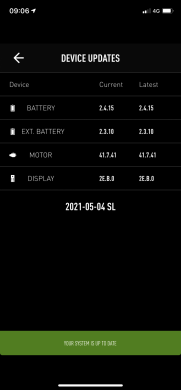
SL recently updated to latest versions of Battery 2.4.15, Motor 41.7.41 & Display 2E.B.0 before Mission Control 2.6.0:

IMG_4440.PNG

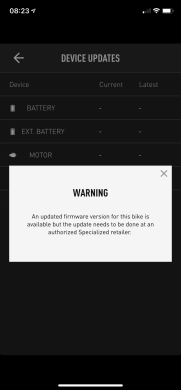
After update to Mission Control 2.6.0 iOS [iPhone XR]:

IMG_4444.PNG

Tried full App deletion and re-install/registration and problem persists.

Please investigate and fix soonest. Thanks.
 
i had on my levo sl and uninstalled the app and now impossible to login
double check on the specialized site after login (successfully) seems that it's impossible to check registered bikes
 
Last edited:
Mission Control 2.6.0 iOS is also "broken" for Turbo Levo SL:

SL recently updated to latest versions of Battery 2.4.15, Motor 41.7.41 & Display 2E.B.0 before Mission Control 2.6.0:

View attachment 62846

After update to Mission Control 2.6.0 iOS [iPhone XR]:

View attachment 62847

Tried full App deletion and re-install/registration and problem persists.

Please investigate and fix soonest. Thanks.
@E759 sent a direct message. Thanks
 
Keep reading
    Browse all

    Similar Threads

    Community Stats

    Since 2018
    668K
    Messages
    40,722
    Members
    Join 30,000+ Riders, it's free!
    Back
    Top