
Im using the 48v f version. My bike is 12 speed using 34t front chainring and a 11-52 cassette. Before running Fake Taxi I was running 43v firmware on a 48v battery. Although the battery percentage was not accurate, it gave me more usage from it. It also seemed to have a bit more power - maybe I imagined it. On the display the max watts went higher than 600.What do you mean more torque and power? Which firmware are you using? What gear setup do you have on your e-bike?
Navigation
Install the app
How to install the app on iOS
Follow along with the video below to see how to install our site as a web app on your home screen.
Note: This feature may not be available in some browsers.
More options
Style variation
You are using an out of date browser. It may not display this or other websites correctly.
You should upgrade or use an alternative browser.
You should upgrade or use an alternative browser.
Bafang M820 Firmware thread
- Thread starter Zimmerframe
- Start date

⚡ EMTB PRO
25% off e*thirteen, Peaty’s & more with PRO
Member-only deals from e*thirteen, Peaty’s, PEMBREE and Magicshine · ad-free browsing · PRO badge · Living Intelligence Reports
See the deals →
From £1.99/month
So tried the f1 version briefly in my yard. Battery was full and it showed 100% on the display.FAKE TAXI 2022.05.22
Link: Proton Drive
File: FT_2026_05_22_public.zip
SHA256: 9e1977fa385cff3a6e500b52f16b241c9f97d54a249d5bf32128534f9fa2f046
This is the result of the entire team's work. Many thanks to maglo18, mdi and Radolf.
The archive contains a PDF with all the details.
Installed the i1 version and went for a proper ride. Battery still basically full(99% on bms) but display showing 84%. After the ride it was showing 31%, same time bms showing 51%.
Otherwise it was working great. Little bit more power, display now going over 600W. Maybe felt somewhat less natural now, more harsh when power really kicking in. But it could be only imagination. On Sport mode, that I mostly use on trails, it is still nice and natural.
Thanks to you all, great work!
Edit: Earlier versions bms and display percentage was more or less same.

@maglo18 Similar sensations over here,
Between the new F1 and previous F1 version I do feel that the battery % is more accurate now (13s 48v 10a) but it doesn't feel in ECO and Tour as natural as before, a bit more kick and motor kept spinning more sometimes when im not pedalling.
Overall I still find the previous version a tad better but both are still great improvements over the original FW
Between the new F1 and previous F1 version I do feel that the battery % is more accurate now (13s 48v 10a) but it doesn't feel in ECO and Tour as natural as before, a bit more kick and motor kept spinning more sometimes when im not pedalling.
Overall I still find the previous version a tad better but both are still great improvements over the original FW

I think you either didn't read the release notes or didn't fully understand the new functionality.@maglo18 Similar sensations over here,
Between the new F1 and previous F1 version I do feel that the battery % is more accurate now (13s 48v 10a) but it doesn't feel in ECO and Tour as natural as before, a bit more kick and motor kept spinning more sometimes when im not pedalling.
Overall I still find the previous version a tad better but both are still great improvements over the original FW
Previously, there was only one slider that limited power, and the assist level changed proportionally with it. With the latest update, these two functions have been separated.
Torque Assist has been added, and the Speed Limit parameter no longer acts as a speed limit in the traditional sense. Instead, it now functions as a Torque Assist Ratio ranging from 0% to 200%. For compatibility reasons, the input range remains 0–100, where each step corresponds to 2%, so a value of 50 = 100% (the default setting).
This means you can now configure low power with high assist or high power with low assist, which wasn't possible before. In other words, the assist behavior has effectively been moved to the Speed Limit parameter.
If you want the bike to behave similarly to the previous firmware version, try setting the Speed Limit values to match the Power values for each assist level. That should provide a riding feel very close to the old configuration.
This allows us to have a feel similar to both the E1 and F1 versions within a single firmware.
Test it a bit and I think you’ll be happy with the result.

Hi there.The new battery level indicator curve was created based on the average values from our internal discharge tests across several of the most popular cell models. We logged some serious mileage on this, and the conclusion was unanimous – it’s way better!Earlier versions bms and display percentage was more or less same.
Another highly important matter: the percentage shown on the display does not depend on the readings from your BMS, multimeter, or any other measuring tool (that’s completely irrelevant here). What matters most are the readings taken by your motor controller (which can differ significantly from a multimeter). Check out the table below to see how the voltage correlates with the percentage readings.
And most importantly – did you flash the correct FW (firmware) for your battery? If you have a 48V battery, flash the 13S FW... but hey, I probably don’t need to explain that to an old pro like you! :-D
Thanks for explaining, that table seems good. But my point is the i-version(13S 13A), does not follow that table. Now at fully charged it shows 86%. On my brief test on f-version it was at 100% when fully charged, so based on that the f-version is according to the table but the i-version is not.Hi there.The new battery level indicator curve was created based on the average values from our internal discharge tests across several of the most popular cell models. We logged some serious mileage on this, and the conclusion was unanimous – it’s way better!
Another highly important matter: the percentage shown on the display does not depend on the readings from your BMS, multimeter, or any other measuring tool (that’s completely irrelevant here). What matters most are the readings taken by your motor controller (which can differ significantly from a multimeter). Check out the table below to see how the voltage correlates with the percentage readings.
View attachment 185645
And most importantly – did you flash the correct FW (firmware) for your battery? If you have a 48V battery, flash the 13S FW... but hey, I probably don’t need to explain that to an old pro like you! :-D
I read them! But with one ride I wanted to first try everything in default without playing a little bit with Torque/Speed differentiation.I think you either didn't read the release notes or didn't fully understand the new functionality.
Previously, there was only one slider that limited power, and the assist level changed proportionally with it. With the latest update, these two functions have been separated.
Torque Assist has been added, and the Speed Limit parameter no longer acts as a speed limit in the traditional sense. Instead, it now functions as a Torque Assist Ratio ranging from 0% to 200%. For compatibility reasons, the input range remains 0–100, where each step corresponds to 2%, so a value of 50 = 100% (the default setting).
This means you can now configure low power with high assist or high power with low assist, which wasn't possible before. In other words, the assist behavior has effectively been moved to the Speed Limit parameter.
If you want the bike to behave similarly to the previous firmware version, try setting the Speed Limit values to match the Power values for each assist level. That should provide a riding feel very close to the old configuration.
This allows us to have a feel similar to both the E1 and F1 versions within a single firmware.
Test it a bit and I think you’ll be happy with the result.
View attachment 185633
View attachment 185634
I need to play a little bit to find what works best for me and will update here, of course i'm not going back to the previous one till I do an extensive test with proper settings.
Again, thanks for all the hard work, it's a massive improvement
`FT Bafang APP M820` is an Android app for BLE communication with a Bafang M820 motor running the custom `Fake Taxi` firmware. It allows the user to connect to the bike, read system information and configure basic assist parameters. The available functions are mapped and organized to make motor setup and tuning easier. The app works locally and does not require an internet connection.
Main features:
- Bluetooth LE scanning and connection,
- authentication compatible with the Fake Taxi protocol,
- reading controller, display, battery and sensor information,
- assist configuration: speed and current/power limits,
- charts showing assist levels,
- acceleration and start angle adjustment,
- presets with the option to save and load custom user settings,
- Polish and English language support.
The app is intended for `Bafang M820` with `Fake Taxi 2026.05.22` firmware. It has been tested only with the `DPC245 v3` display. Use at your own risk.
Inspiration comes from user bart594
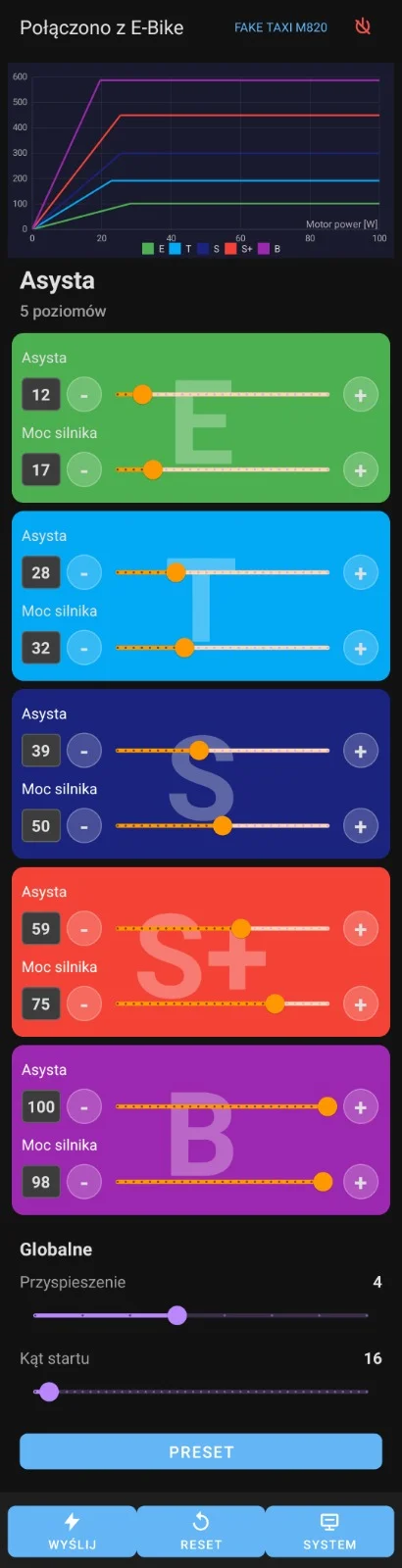
Main features:
- Bluetooth LE scanning and connection,
- authentication compatible with the Fake Taxi protocol,
- reading controller, display, battery and sensor information,
- assist configuration: speed and current/power limits,
- charts showing assist levels,
- acceleration and start angle adjustment,
- presets with the option to save and load custom user settings,
- Polish and English language support.
The app is intended for `Bafang M820` with `Fake Taxi 2026.05.22` firmware. It has been tested only with the `DPC245 v3` display. Use at your own risk.
Inspiration comes from user bart594
Attachments
Last edited:
In the 2022.05.22 FAKE TAXI version, the speed slider changes function to Assist. This means Power limits power and Assist is a crank pressure multiplier.Question about the faketaxi adjustments. In the official Bafang Go app (iphone) there are same adjustments as in Besst Pro. Are these doing the same or is this somehow different?
View attachment 187881
View attachment 187882
So I have done a few rides on the faketaxi, versions E, I and J. When playing with settings, I really can't tell the difference between I and J. E has marginally less power, but really not a big difference.
Boost mode I have had on full power, but the torque multiplier set on more then 50% makes it really edgy, impossible to use for cruising but really nice as a full attack mode, where I am pushing all the time.
A good compromise has been to have sport+ and boost set to full power but the multiplier on sport+ to 50% or even less to use for trails where I want power but not pushing all the time.
The overrun is longer then I would want but not crazy long. Normally it is fine but combined with the multiplier set high it can give some interesting situations in technical terrain.
The battery percentage is messed up on all tested versions. I have tried with both my batteries with more or less same result. I never get 100% on display. I don't now where it is getting the information but it is not according to the table posted earlier in this thread. At fully charged, 54.2V it shows 86% on display. Already on 52V it is down to 70%, The more I discharge the battery the better it gets, at close to fully discharged it is correct more or less. On older faketaxi versions this was very exact so I don't know what is going on. This does not effect actual riding and how long I can ride.
This values I recorded from one ride:
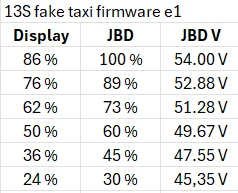
Since I only have an old phone with old android version, I can't connect to the bike. So I cannot use the app for adjustments. It seems to work also in the iphone Bafang Go official app as well. The problem there is the slider is not giving exact percentage values, so it is harder to know what value I actually have on power and multiplier. Also zero on the slider is not zero in reality, it is more like 15-20 percent.
Again, overall this is a fantastic firmware, really nice to be able to set so many settings myself, but also on preset settings it is better then any Bafang firmware. Huge thanks to everybody involved!
Boost mode I have had on full power, but the torque multiplier set on more then 50% makes it really edgy, impossible to use for cruising but really nice as a full attack mode, where I am pushing all the time.
A good compromise has been to have sport+ and boost set to full power but the multiplier on sport+ to 50% or even less to use for trails where I want power but not pushing all the time.
The overrun is longer then I would want but not crazy long. Normally it is fine but combined with the multiplier set high it can give some interesting situations in technical terrain.
The battery percentage is messed up on all tested versions. I have tried with both my batteries with more or less same result. I never get 100% on display. I don't now where it is getting the information but it is not according to the table posted earlier in this thread. At fully charged, 54.2V it shows 86% on display. Already on 52V it is down to 70%, The more I discharge the battery the better it gets, at close to fully discharged it is correct more or less. On older faketaxi versions this was very exact so I don't know what is going on. This does not effect actual riding and how long I can ride.
This values I recorded from one ride:
Since I only have an old phone with old android version, I can't connect to the bike. So I cannot use the app for adjustments. It seems to work also in the iphone Bafang Go official app as well. The problem there is the slider is not giving exact percentage values, so it is harder to know what value I actually have on power and multiplier. Also zero on the slider is not zero in reality, it is more like 15-20 percent.
Again, overall this is a fantastic firmware, really nice to be able to set so many settings myself, but also on preset settings it is better then any Bafang firmware. Huge thanks to everybody involved!
You can try actual app. GitHub - glodnickim/BafangCon-M820-So I have done a few rides on the faketaxi, versions E, I and J. When playing with settings, I really can't tell the difference between I and J. E has marginally less power, but really not a big difference.
Boost mode I have had on full power, but the torque multiplier set on more then 50% makes it really edgy, impossible to use for cruising but really nice as a full attack mode, where I am pushing all the time.
A good compromise has been to have sport+ and boost set to full power but the multiplier on sport+ to 50% or even less to use for trails where I want power but not pushing all the time.
The overrun is longer then I would want but not crazy long. Normally it is fine but combined with the multiplier set high it can give some interesting situations in technical terrain.
The battery percentage is messed up on all tested versions. I have tried with both my batteries with more or less same result. I never get 100% on display. I don't now where it is getting the information but it is not according to the table posted earlier in this thread. At fully charged, 54.2V it shows 86% on display. Already on 52V it is down to 70%, The more I discharge the battery the better it gets, at close to fully discharged it is correct more or less. On older faketaxi versions this was very exact so I don't know what is going on. This does not effect actual riding and how long I can ride.
This values I recorded from one ride:
View attachment 188098
Since I only have an old phone with old android version, I can't connect to the bike. So I cannot use the app for adjustments. It seems to work also in the iphone Bafang Go official app as well. The problem there is the slider is not giving exact percentage values, so it is harder to know what value I actually have on power and multiplier. Also zero on the slider is not zero in reality, it is more like 15-20 percent.
Again, overall this is a fantastic firmware, really nice to be able to set so many settings myself, but also on preset settings it is better then any Bafang firmware. Huge thanks to everybody involved!

I believe I'm looking for firmware for the DPC245 v2 display; I found some information at the link below:Hi everyone, where can I find the updated firmware versions? I now have the DPC245CF80301.2 thanks

No. The v2 has Bluetooth 5.0. the v3 has Bluetooth 5.1.
My v2 works with go but not go+
My v3 works with go+ but not go, not sure if that is general problem or just something limited to me.

ok thanks, but I haven't found the new versionI believe I'm looking for firmware for the DPC245 v2 display; I found some information at the link below:
No. The v2 has Bluetooth 5.0. the v3 has Bluetooth 5.1.
My v2 works with go but not go+
My v3 works with go+ but not go, not sure if that is general problem or just something limited to me.
Similar Threads

Free account
Join 43,052
eMTB riders
eMTB riders
One tap. No forms. Fewer ads.
or sign up with email
Already a member? Log in