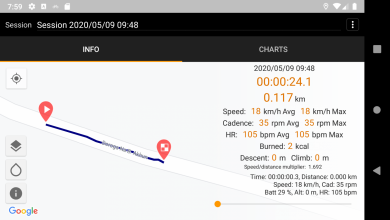
ST Ride App - Tracker/dash/logger for STEPS motors

Public version was released. Special minimum price for next week.

Warning: SC-E8000 display is not supported! You can upgrade it to SC-E7000 or get EW-EN100

Here is the latest video:


STRide at Google Play
Nice job.

How do I get this work with my garmin 820?
 
⚡ EMTB Pro Go Pro — exclusive discounts & ad-free Peaty's 25% off & more · Ad-free browsing · Pro badge See the deals →
App was made for Android system. You can use it on any Android system
 
No. Because Shimano does not provide those data. It's possible to calculate it according Assist Level, but it will be not accurate.

Anyway, I can add any parameter that can be calculated using sensors and motor data. If you know how it can be calculated - let me know.


Export to TCX and GPX files is available including HRM,Cadence,Speed data (all parameters that Strava supports)

thx for reply @vadII and thx for all your great work!!

i think calculating the watts is not the way because trail mode is dynamic and - you mentioned it - calculating is not accurate.
Maybe there will be a firmware update from shimano in the future.

The whole E-MTB thing is based on adding motor power in relation to human power. Why is this measure not available? - very strange.... (only on Levo and Giant Bikes, not on Shimano and Bosch)
 
The whole E-MTB thing is based on adding motor power in relation to human power. Why is this measure not available? - very strange.... (only on Levo and Giant Bikes, not on Shimano and Bosch)
I have no idea. They ALL have a torque sensor, so it's possible to calculate a motor power according assist level and power/torque limiters. And they do calculate it, but it's not accessible in their diagnostic protocols... It's so stupid
 
I purchase the app last night. Looking forward to trying it out. I've been very please with the ST Unlocker app so far.
 
I tested the new app and it worked like a charm. I actually just kept the phone in my pocket, and looked at the data later but it recorded the whole time and everything looks good. The mapping is really neat!
 
App was made for Android system. You can use it on any Android system

Any plans to port this to iOS? The app sounds super useful as I have a proper phone mount on my bike to use it as a display. If the on-screen info is customizable with xmls (is there an import option on the app?), that's even better!
 
Not yet


It's possible to see/download schemes from Online library from the App. I don't have any plans to create built-in schemes editor.

Ok great, hope to see an iOS version :) No need for the scheme editor in app, I can fiddle with the xml schema on my laptop and then use it in the app.
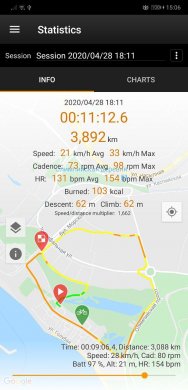
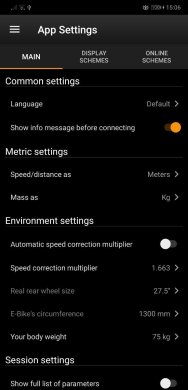
 
New version (12) is available.
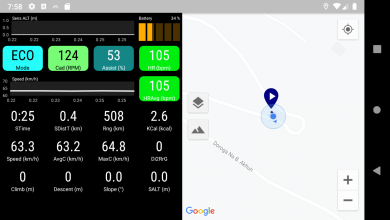
- In Statistics the track of your session can be colorized depending on Speed/Cadence/Assist/HR/Altitude/Slope
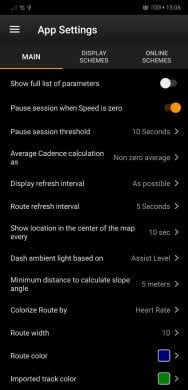
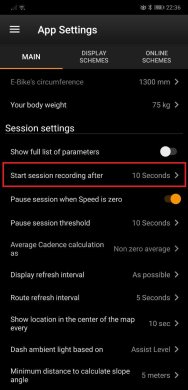
- New App's settings with many parameters
photo_2020-05-11_15-07-48.jpgphoto_2020-05-11_15-07-45.jpgphoto_2020-05-11_15-07-41.jpg
 
My app updated 10 hours ago and now keeps crashing immediately on opening.
 
I don't see any crash reports from Google. Wait until 12 version will be available for update
 
I also had problems after the update, but deleting and re-installing fixed it.
 
Fixed version was uploaded (thanks to @b4rt)

I raised the price slightly after a week of selling at the lowest possible price. The price will change in the future when I finish everything that is planned.
 
Last edited:
Might be nice to turn off heart rate charts in settings for those who don't use a HRM. Also, be nice to have a 'Delete All' function under Statistics, or be able to select multiple to delete, or maybe have a "Keep last n" setting.
 
Might be nice to turn off heart rate charts in settings for those who don't use a HRM. Also, be nice to have a 'Delete All' function under Statistics, or be able to select multiple to delete, or maybe have a "Keep last n" setting.
HRM charts (chart where only HRM data is exists) should not be visible if the session doesn't have HRM data. Charts where other than HRM data are displayed will be visible anyway.
 
New version is released.
- Auto recording sessions (configurable timeout)
- Export/Import complete session recordings
 
HRM charts (chart where only HRM data is exists) should not be visible if the session doesn't have HRM data. Charts where other than HRM data are displayed will be visible anyway.
I don't have a HRM but I'm seeing charts labeled "Heart rate & Assist Level/Mode vs Time" and "Heart rate & Cadence vs Time".

While we're on the subject, what kind of HRM can be used, is there one that just connects to phone via bluetooth, or do you have to use something like a Garmin?
 
New version is released.
- Auto recording sessions (configurable timeout)
- Export/Import complete session recordings
Just updated. Where are the 'Auto recording" settings? Also still seeing the HRM charts.
 
New version is available.
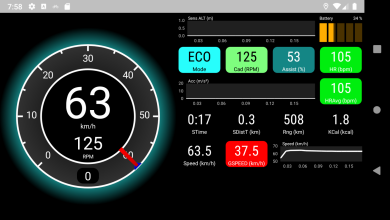
+ Screen orientation changes are now supported. You can configure it as “Automatic” (default) or force it to set “Portrait” or “Landscape”.
+ Countdown timer for session recording
Screenshot_1590955096.png
Screenshot_1590955104.png
Screenshot_1590955142.png
 
Keep reading
    Browse all

    Similar Threads

    Community Stats

    Since 2018
    669K
    Messages
    40,957
    Members
    Join 30,000+ Riders, it's free!
    Back
    Top