
Thank you for your reply .. regarding using another ( non smart battery charger) … would you connect it to the BMS Red +( small .5mm sqd wire) and the Black - ( again .5mm sqd wire) ? Does this then still use the BMS to still be “active” ? …. Or not …. ? Would you recommend going directly to the main battery posts ?@Zola you could try charging the way I did above. Connect the positive and negative terminals of the charger directly to the positive and negative terminals on the discharge side of the battery. When I did this the battery was recognised by the charger and it started to charge and illuminate the LEDs same as a good battery when charging the normal way.
The 5th stage in you diagnostic test is possibly showing the amount of charge cycles the battery has done. Try doing a double push on the button and see if you get the same result of 1 LED flashing which indicates 50-100 charge cycles from memory. Refer to attached manual.
Navigation
Install the app
How to install the app on iOS
Follow along with the video below to see how to install our site as a web app on your home screen.
Note: This feature may not be available in some browsers.
More options
Style variation
You are using an out of date browser. It may not display this or other websites correctly.
You should upgrade or use an alternative browser.
You should upgrade or use an alternative browser.
Energypak 625 not working or charging

Jpirga
Member
I personally tried going off the main battery posts directly to the battery and it did charge to 41v but when push the battery button it only displayed 3 bars out of 5 for charge. I later charged via the discharge wires and it fully charged the battery and appeared to wake up the BMS so to speak as LEDs incrementally climbed to show charging in progress.Thank you for your reply .. regarding using another ( non smart battery charger) … would you connect it to the BMS Red +( small .5mm sqd wire) and the Black - ( again .5mm sqd wire) ? Does this then still use the BMS to still be “active” ? …. Or not …. ? Would you recommend going directly to the main battery posts ?
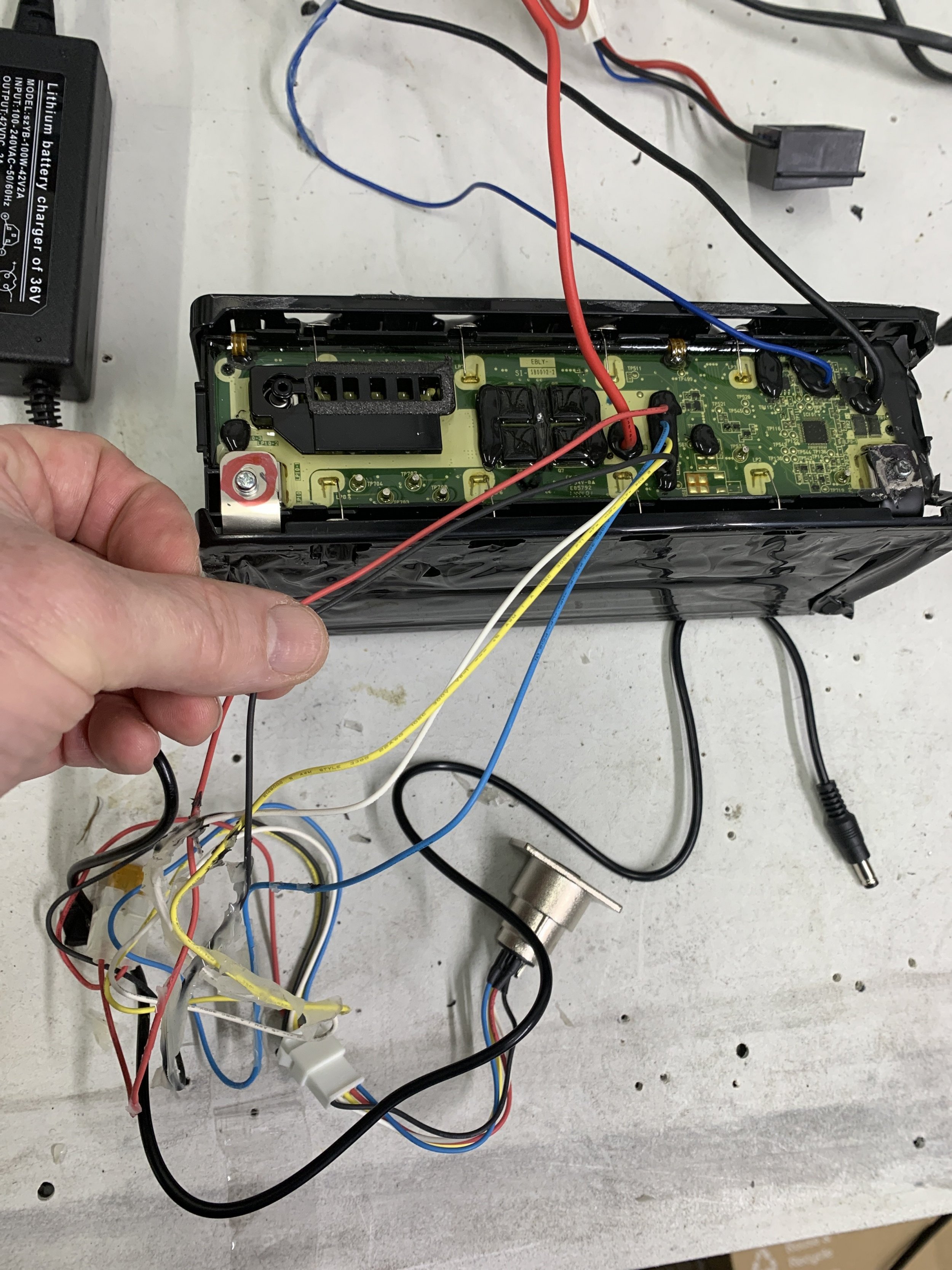
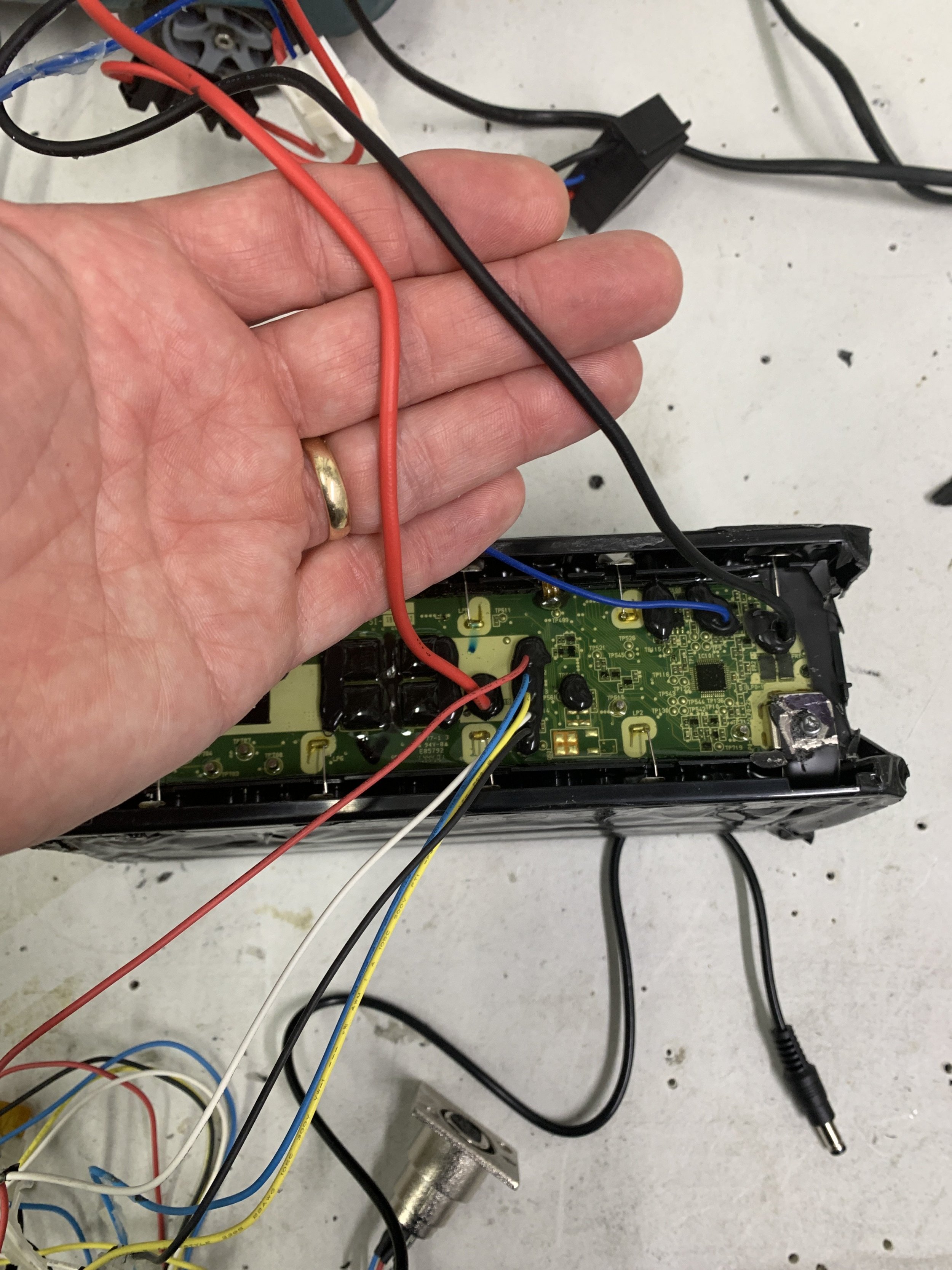
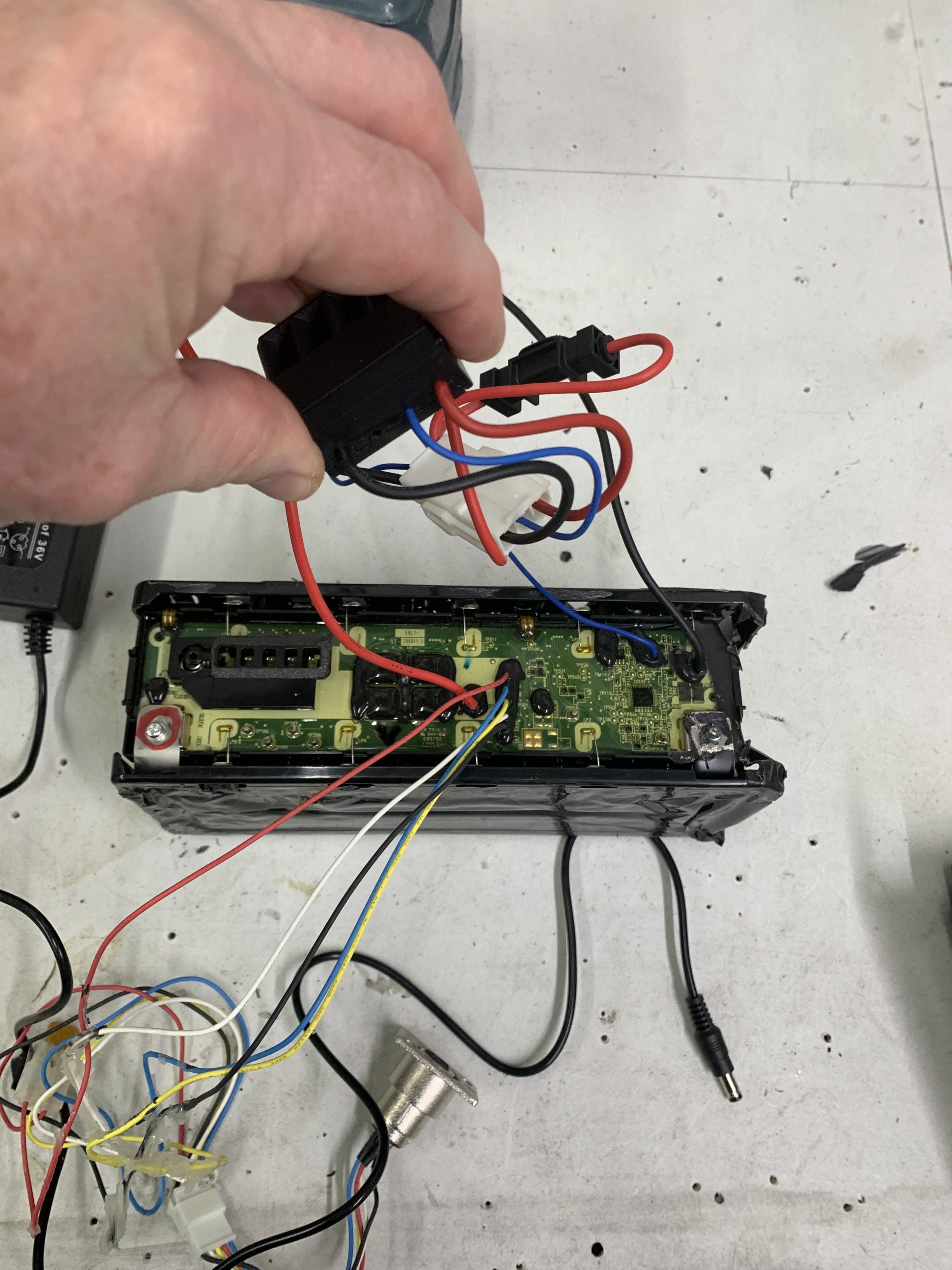
Thank you… I’ll try that … btw Mine has this wiring arrangement. Do you mean these are the discharge wires ? … the larger red and black to the output black connector ?I personally tried going off the main battery posts directly to the battery and it did charge to 41v but when push the battery button it only displayed 3 bars out of 5 for charge. I later charged via the discharge wires and it fully charged the battery and appeared to wake up the BMS so to speak as LEDs incrementally climbed to show charging in progress.
Jpirga
Member
Co
Thank you… I’ll try that … btw Mine has this wiring arrangement. Do you mean these are the discharge wires ? … the larger red and black to the output black connector,
Correct, those thicker wires. Keep us postedThank you… I’ll try that … btw Mine has this wiring arrangement. Do you mean these are the discharge wires ? … the larger red and black to the output black connector ?
View attachment 149507 View attachment 149508 View attachment 149509
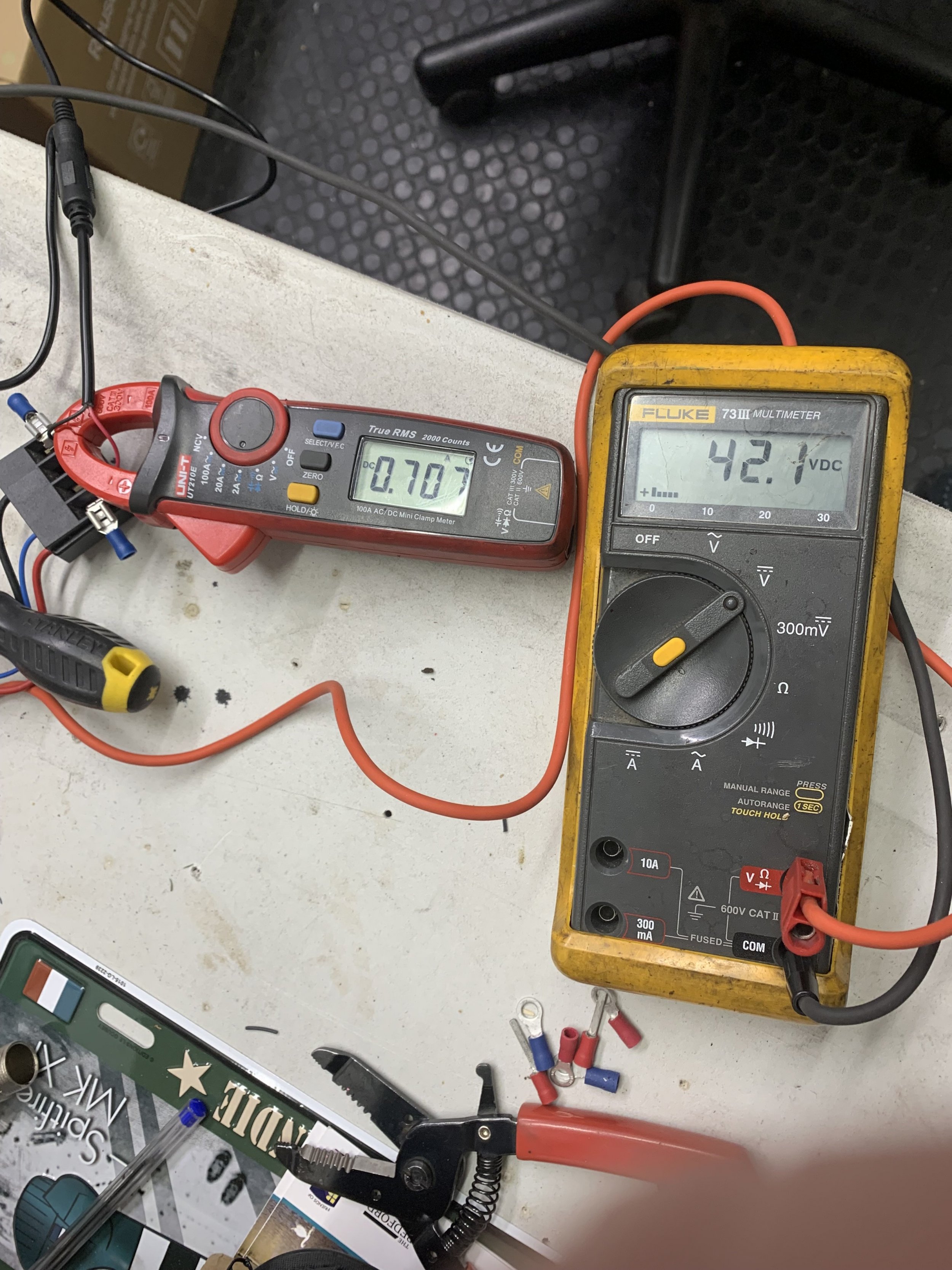
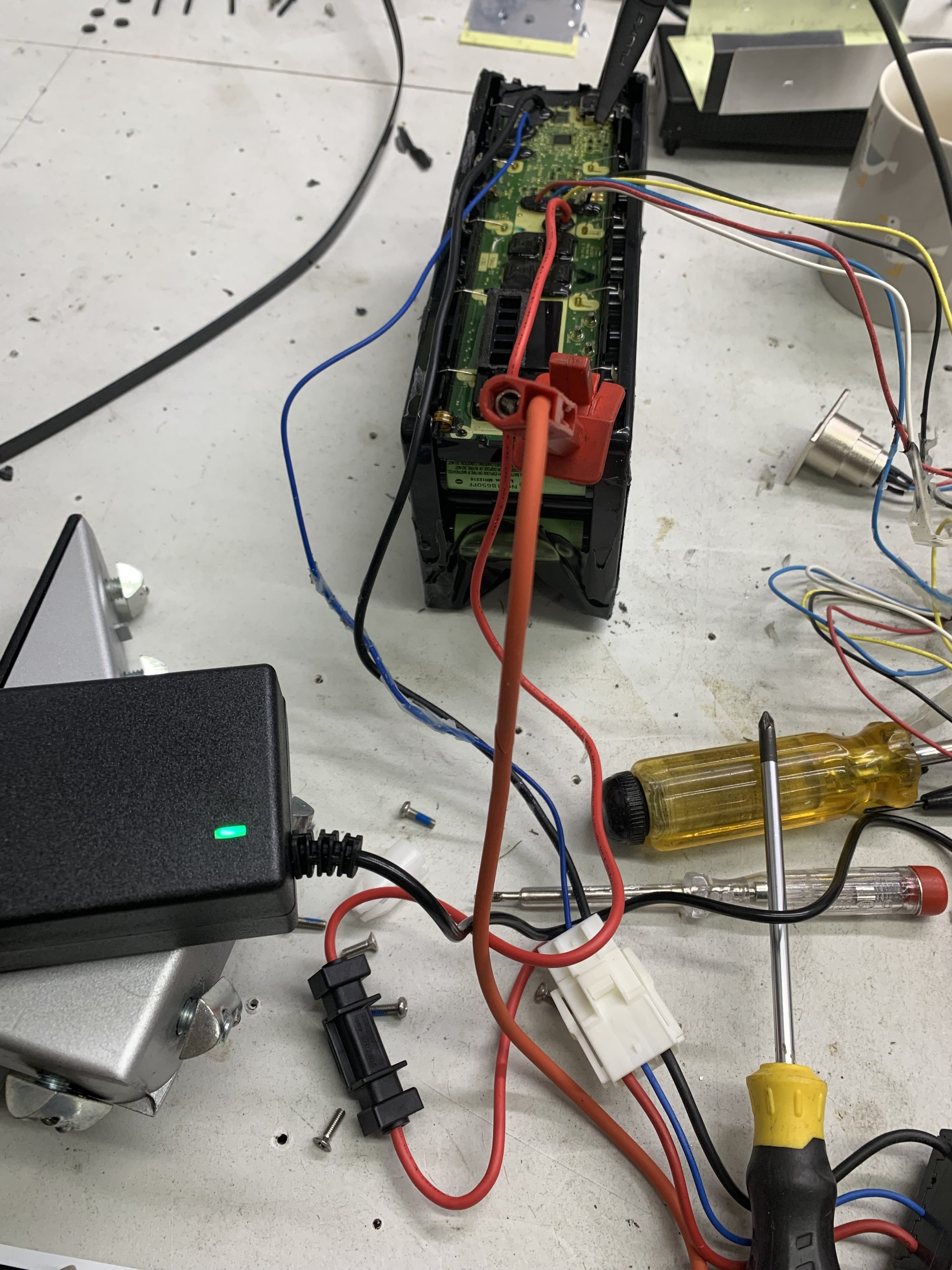
Wired up charger to discharge port … it charging @ 0.8 A …. The voltmeter is connected to the main battery posts ..35.0 volts … I’ll monitor it to see how it behaves.
View attachment 149520
Has increased to 1.5A
Battery appears to be fully charged….. but the leds on the battery don’t appear to show state of charge .. what is the button press sequence for getting the charge of battery status? Thank youHas increased to 1.5A
Jpirga
Member
Battery appears to be fully charged….. but the leds on the battery don’t appear to show state of charge .. what is the button press sequence for getting the charge of battery status? Thank you
View attachment 149603 View attachment 149604
Jpirga
Member
Does it only show the battery state … whilst charging? Or
Jpirga
Member
Says whilst and without charging. Holding the button down goes into test mode. Double pressing shows how many charge cycles completed.Does it only show the battery state … whilst charging? Or read both lines on the page.
I get no battery charge status leds , with the charger on / off ( the non smart one that did charge ok) … battery voltage is now at 42v . Does this function only work with the BMS woke up and a working comms via the giant “ smart charger “ ? . I disconnected the non smart charger, plugged the Giant charger in to see if there’s any change …The Red led on the charger just flashes as before… !
Hello,
I know it's a bit late but here's what I found out about Giant batteries. I usually repair all kinds of electronics so I got a couple of faulty giant intube batteries to play with. I thought, even if I don't repair them, I will keep the cells (which in most cases are intact) which are high quality Panasonic 18650GA which if used correctly will last for many years.
Anyway, battery construction is space proofThey could easily save some weight using a thinner case and also what I don't like, the whole pack is potted with some silicone compound, including BMS board. That makes things more complicated and also significant weight "bonus" but I took the following approach:
I've tried to remove the silicone from the BMS board, without blowing SMD components. It was quite a nasty job and only 2 components were removed in the process but but I thought doing this I might isolate the common failure point of this battery and on the next one I will only remove the silicone where I needed. Also I have the board to reverse engineer as much as I can at least from the hardware perspective.
The pinout is as follows:
1. GND (-)
2. Wake up /Charge control (2.5v, if put to gnd the battery will power on and give a voltage on discharge port P+ for powering the rest of bike electronics)
3. Can (L/H)
4. Can (H/L)
5. Charge port (C+)
6. Discharge port (P+)
You mentioned in this thread that you have 32v. This means your battery has charging port failure (mosfets shorted) which exposes battery voltage directly on pin 5. The same thing I measured on my faulty batteries I bought. First, I thought that it was a control voltage (high impedance) for the charger or something. But then, I saw I could pull a higher current than a control signal needs and still it supplied the same voltage. So this was a low resistance signal that shouldn't be present when the battery is off/standby.
Also, in your case, at 32V, the BMS assumes the battery is empty, that's why it wouldn't work on the bike and because mosfet failure, it won't charge.
Anyway, after I remove the silicone on the first battery, I analyzed/measured different things, including the charge/discharge mosfets. Bingo, charge mosfets were shorted. Anyway, when accidentaly damaged some smd components in the silicone removal step, I software locked the BMS. This is a project for another time as it might take a while...if possible at all.
So now, back to the second battery, I only removed the silicone around charging mosfets, changed the mosfets while the BMS was still powered and what do you think. The battery behaves as it should. On pin 5 there was no voltage. Charging now works, discharging also works. So I have one good battery out of 2.
It seems it's a common failure point.
Besides this thread there's another in which someone has 3 batteries, all with Vbat on pin 5. Why that happens so often? Maybe because some will charge their batteries off the bike, and the charging adapter can be put backwards (not completely maybe just as to make contact with some battery pins). Also the order might be important. In their manual, giant have the following procedure.
1. Plugin the charger to the bike/battery.
2. Plugin the charger to AC outlet.
When charging is complete:
1. Remove the charger from AC outlet.
2. Remove the charger from the bike/battery.
Usually it's the other way around, I think most people plug in the charger to AC then on the bike/battery.
Another fault (when the battery won't communicate with the bike) I discovered is that on can bus lines there are some protection diodes, on one of the batteries one was shorted (one can line didn't have idle voltage of around 2.5v when powered on).
I've posted a photo showing where the charging mosfets are or the protection diodes on can lines and also can transceiver (which might also fail, I've seen it in smart chargers).
Energypak 625 has a completely different PCB layout, also potted in silicone (transparent). I didn't have time to look at it but I have one faulty 625Wh battery It's a 2 board (stacked) design. It seems to suffer the same fault (charge mosfets failure) but it's impossible to get to them without removing all electrical connections as they are on the bottom PCB. I need to find a way not to software lock the BMS in the process. For 500Wh it's not necessary to remove any connection from the pack to the BMS.
Jpirga
Member
I’m not too sure about the charger. Not something I’ve dabbled with yet. Try looking up the charger model and what the red flash means. I have an old charger but have seen there’s a newer one that does storage mode. Make sure you aren’t set on that as it will only charge to 60%I get no battery charge status leds , with the charger on / off ( the non smart one that did charge ok) … battery voltage is now at 42v . Does this function only work with the BMS woke up and a working comms via the giant “ smart charger “ ? . I disconnected the non smart charger, plugged the Giant charger in to see if there’s any change …The Red led on the charger just flashes as before… !
Does the battery now power the bike?
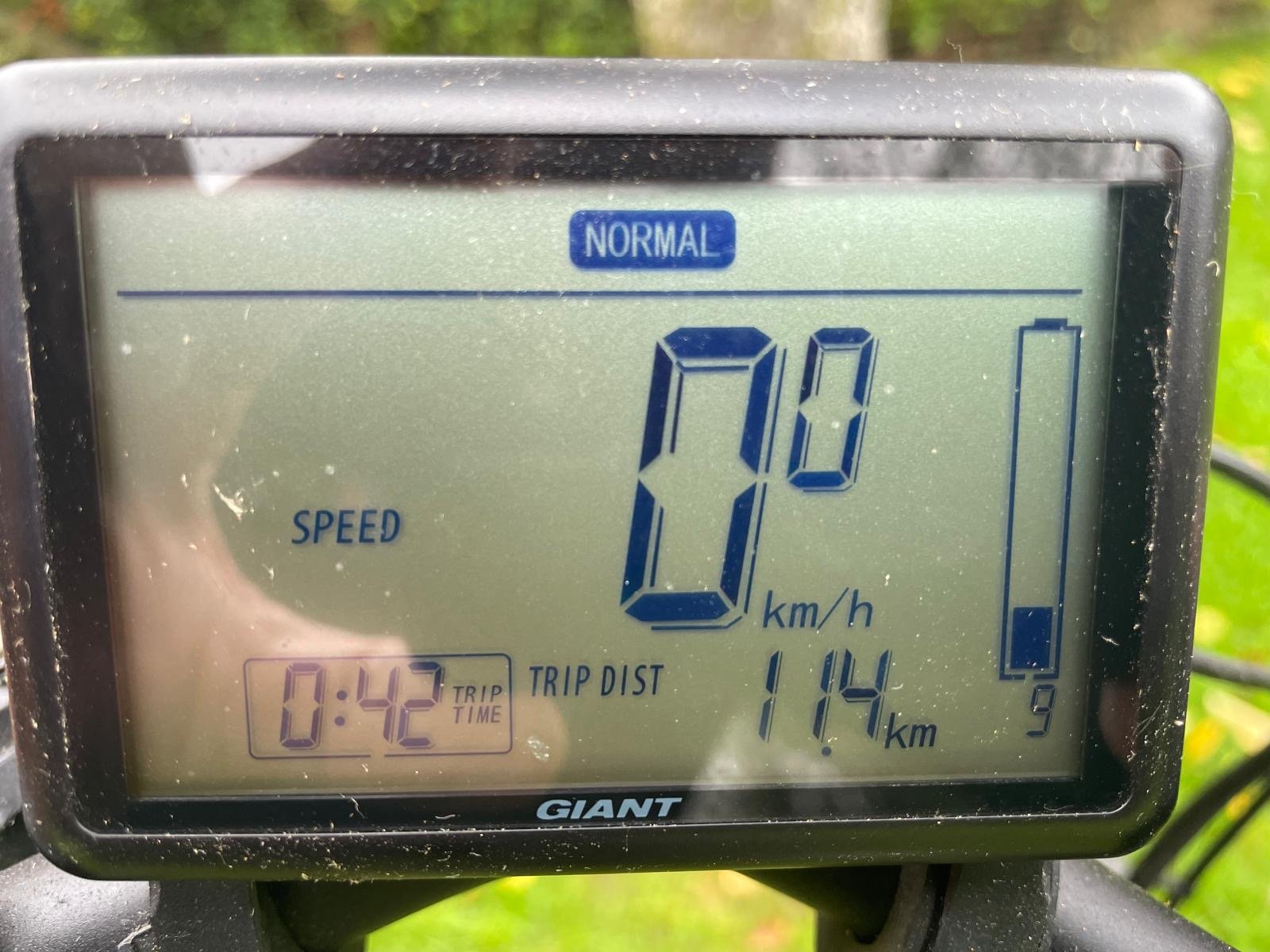
To check the battery health you can connect the app to your bike and read the battery charge status, cycles and health.
The non smart charger

I’ll check tomorrowI’m not too sure about the charger. Not something I’ve dabbled with yet. Try looking up the charger model and what the red flash means. I have an old charger but have seen there’s a newer one that does storage mode. Make sure you aren’t set on that as it will only charge to 60%
Does the battery now power the bike?
To check the battery health you can connect the app to your bike and read the battery charge status, cycles and health.

Greetings! This is my first post on the forumHello,
I know it's a bit late but here's what I found out about Giant batteries. I usually repair all kinds of electronics so I got a couple of faulty giant intube batteries to play with. I thought, even if I don't repair them, I will keep the cells (which in most cases are intact) which are high quality Panasonic 18650GA which if used correctly will last for many years.
Anyway, battery construction is space proof
I've tried to remove the silicone from the BMS board, without blowing SMD components. It was quite a nasty job and only 2 components were removed in the process but but I thought doing this I might isolate the common failure point of this battery and on the next one I will only remove the silicone where I needed. Also I have the board to reverse engineer as much as I can at least from the hardware perspective.
The pinout is as follows:
1. GND (-)
2. Wake up /Charge control (2.5v, if put to gnd the battery will power on and give a voltage on discharge port P+ for powering the rest of bike electronics)
3. Can (L/H)
4. Can (H/L)
5. Charge port (C+)
6. Discharge port (P+)
You mentioned in this thread that you have 32v. This means your battery has charging port failure (mosfets shorted) which exposes battery voltage directly on pin 5. The same thing I measured on my faulty batteries I bought. First, I thought that it was a control voltage (high impedance) for the charger or something. But then, I saw I could pull a higher current than a control signal needs and still it supplied the same voltage. So this was a low resistance signal that shouldn't be present when the battery is off/standby.
Also, in your case, at 32V, the BMS assumes the battery is empty, that's why it wouldn't work on the bike and because mosfet failure, it won't charge.
Anyway, after I remove the silicone on the first battery, I analyzed/measured different things, including the charge/discharge mosfets. Bingo, charge mosfets were shorted. Anyway, when accidentaly damaged some smd components in the silicone removal step, I software locked the BMS. This is a project for another time as it might take a while...if possible at all.
So now, back to the second battery, I only removed the silicone around charging mosfets, changed the mosfets while the BMS was still powered and what do you think. The battery behaves as it should. On pin 5 there was no voltage. Charging now works, discharging also works. So I have one good battery out of 2.
It seems it's a common failure point.
Besides this thread there's another in which someone has 3 batteries, all with Vbat on pin 5. Why that happens so often? Maybe because some will charge their batteries off the bike, and the charging adapter can be put backwards (not completely maybe just as to make contact with some battery pins). Also the order might be important. In their manual, giant have the following procedure.
1. Plugin the charger to the bike/battery.
2. Plugin the charger to AC outlet.
When charging is complete:
1. Remove the charger from AC outlet.
2. Remove the charger from the bike/battery.
Usually it's the other way around, I think most people plug in the charger to AC then on the bike/battery.
Another fault (when the battery won't communicate with the bike) I discovered is that on can bus lines there are some protection diodes, on one of the batteries one was shorted (one can line didn't have idle voltage of around 2.5v when powered on).
I've posted a photo showing where the charging mosfets are or the protection diodes on can lines and also can transceiver (which might also fail, I've seen it in smart chargers).
Energypak 625 has a completely different PCB layout, also potted in silicone (transparent). I didn't have time to look at it but I have one faulty 625Wh battery It's a 2 board (stacked) design. It seems to suffer the same fault (charge mosfets failure) but it's impossible to get to them without removing all electrical connections as they are on the bottom PCB. I need to find a way not to software lock the BMS in the process. For 500Wh it's not necessary to remove any connection from the pack to the BMS.
View attachment 143925

I have this exact issue with the charging MOSFETs on my EnergyPak 500Wh battery. So far, so good — the silicone has been removed (around the charging MOSFETs), the shorted MOSFET has been identified, and replacements are on their way.
Is it generally considered safe to replace the MOSFETs while the BMS is still powered (to avoid triggering a lockout)? Or is it better to fully disconnect/cut power somehow — and is that even possible without risking a software lock?
Any firsthand experience, tips, or warnings are greatly appreciated! I’m comfortable with soldering, but I want to be sure I’m not missing something critical.

I usually don't disconnect the BMS on this model when replacing charging mosfets. If you're not comfortable working with it powered on (although there's no potential difference between mosfets terminals), you also need to remove silicone around MCU/reset test point. Then, make a bridge between this point and gnd. But this approach is more involved and risky (you can easily damage smd parts in that area).Greetings! This is my first post on the forum
I have this exact issue with the charging MOSFETs on my EnergyPak 500Wh battery. So far, so good — the silicone has been removed (around the charging MOSFETs), the shorted MOSFET has been identified, and replacements are on their way.
Is it generally considered safe to replace the MOSFETs while the BMS is still powered (to avoid triggering a lockout)? Or is it better to fully disconnect/cut power somehow — and is that even possible without risking a software lock?
Any firsthand experience, tips, or warnings are greatly appreciated! I’m comfortable with soldering, but I want to be sure I’m not missing something critical.
Many thanks for being so helpful, and sorry for the delayed reply!I usually don't disconnect the BMS on this model when replacing charging mosfets. If you're not comfortable working with it powered on (although there's no potential difference between mosfets terminals), you also need to remove silicone around MCU/reset test point. Then, make a bridge between this point and gnd. But this approach is more involved and risky (you can easily damage smd parts in that area).
I finally got some time to work on the battery again and tested a few things. I replaced the charge MOSFETs while BMS was still powered, and now discharging works, but charging with either of my original Giant chargers doesn't.
I checked the new MOSFETs — they seemed fine (no longer shorted), but I noticed something strange while measuring voltages: One of the charge MOSFET drains read 38V, while the other showed 0V. There was also no continuity from that 0V drain to the battery positive or to the other MOSFET’s drain.
I removed the 0V MOSFET and inspected both it and the pad — nothing obviously wrong. But even with it removed, the drain pad still measured 0V, so I suspect something is broken between that pad and the battery positive (possibly a damaged trace or internal layer?).
To test further, I replaced the MOSFET with a new one just in case and temporarily bridged the two drain pads (the 0V one and the one reading 38V). After doing that, the battery stopped working again entirely — just like it did before replacing the MOSFETs. 38V at the charge port, but no activity. After removing the bridge, discharging worked again, and the bike powered on and functioned normally.
Interestingly, before changing the MOSFETs, I managed to charge the battery using a non-Giant charger through the discharge pin (pin 6), and that seemed to work. This time, however, charging now works through the actual charge pin (pin 5) — just not with either of my original Giant chargers.
Here are the current pin readings from the charge port:
1: 0V
2: 1.5V
3: 2.5V
4: 2.5V
5: 0V
6: 0V (reads 38V if jumper between pins 1 & 2 is inserted)
So now I’m wondering — could it be that both of my Giant chargers are faulty? Or is there still something in the battery circuit that only interferes with the Giant charger communication?
Either way, I’m now able to charge and use the battery. I know that charging through the discharge pin might bypass BMS protections, but now that charging works through the actual charge pin again, could this mean the BMS is active and protecting the pack?
From your description it seems the battery works fine. Wakeup works, communication works (as you said it’s working fine on the bike). So it seems the problem might be with your chargers.Many thanks for being so helpful, and sorry for the delayed reply!
I finally got some time to work on the battery again and tested a few things. I replaced the charge MOSFETs while BMS was still powered, and now discharging works, but charging with either of my original Giant chargers doesn't.
I checked the new MOSFETs — they seemed fine (no longer shorted), but I noticed something strange while measuring voltages: One of the charge MOSFET drains read 38V, while the other showed 0V. There was also no continuity from that 0V drain to the battery positive or to the other MOSFET’s drain.
I removed the 0V MOSFET and inspected both it and the pad — nothing obviously wrong. But even with it removed, the drain pad still measured 0V, so I suspect something is broken between that pad and the battery positive (possibly a damaged trace or internal layer?).
To test further, I replaced the MOSFET with a new one just in case and temporarily bridged the two drain pads (the 0V one and the one reading 38V). After doing that, the battery stopped working again entirely — just like it did before replacing the MOSFETs. 38V at the charge port, but no activity. After removing the bridge, discharging worked again, and the bike powered on and functioned normally.
Interestingly, before changing the MOSFETs, I managed to charge the battery using a non-Giant charger through the discharge pin (pin 6), and that seemed to work. This time, however, charging now works through the actual charge pin (pin 5) — just not with either of my original Giant chargers.
Here are the current pin readings from the charge port:
1: 0V
2: 1.5V
3: 2.5V
4: 2.5V
5: 0V
6: 0V (reads 38V if jumper between pins 1 & 2 is inserted)
So now I’m wondering — could it be that both of my Giant chargers are faulty? Or is there still something in the battery circuit that only interferes with the Giant charger communication?
Either way, I’m now able to charge and use the battery. I know that charging through the discharge pin might bypass BMS protections, but now that charging works through the actual charge pin again, could this mean the BMS is active and protecting the pack?

DaveMatthews
Well-known member
I don't think I understand the question.Hi Everyone,
is it possible to unlock the battery after cells change?
Regards
What does "unlock" mean?
Thanks for reply.I don't think I understand the question.
What does "unlock" mean?
As fas as I know, if battery see low voltage, it assumes that cells are damaged and the BMS does not allow to charge or discharge the battery.
"Unlock" I mean somehow to bring the BMS to the working state. Probably, I've used a wrong word for that
DaveMatthews
Well-known member
I've heard of people charging the battery off of the bike by plugging it in, then unplugging repeatedly. For some people it seems to get the system running again.Thanks for reply.
As fas as I know, if battery see low voltage, it assumes that cells are damaged and the BMS does not allow to charge or discharge the battery.
"Unlock" I mean somehow to bring the BMS to the working state. Probably, I've used a wrong word for that
Well, the obvious stuff or let's call it easy ways I already tried (like charger glitch, changing charger, inserting to bike etc..) but I believe the undervoltage error is located somewhere in the internal memory. As a result, the controller does not allow the switch the voltage to the pin.I've heard of people charging the battery off of the bike by plugging it in, then unplugging repeatedly. For some people it seems to get the system running again.
Has anyone seen such an error, and if there any solution?

Good question about whether an undervoltage event will permanently disable the bms. I have saved many batteries that have a voltage drop during storage by physically connecting a power source to get them to a correct voltage range, and then have them recognized by the charger once they have voltage.Thanks for reply.
As fas as I know, if battery see low voltage, it assumes that cells are damaged and the BMS does not allow to charge or discharge the battery.
"Unlock" I mean somehow to bring the BMS to the working state. Probably, I've used a wrong word for that
Is that the reason that repairs to batteries are done with them powered up during the process?
If the battery is locked for charging will the motor operate or does the voltage error lock the use of the battery for the motor.
This is indeed what I've done. One battery has started somehow but another 2 - now, under any condiution they do not want to be recognised by the charger, nor by the bike.Good question about whether an undervoltage event will permanently disable the bms. I have saved many batteries that have a voltage drop during storage by physically connecting a power source to get them to a correct voltage range, and then have them recognized by the charger once they have voltage.
Is that the reason that repairs to batteries are done with them powered up during the process?
If the battery is locked for charging will the motor operate or does the voltage error lock the use of the battery for the motor.
So I did not have what to lose and I unscrewed the terminal and replaced cells, so now LED1 is simply blinking. I believe the error is somewhere stored and some diagnostic tool has to remove this error.
The question is pretty simple: how and what tool
Lets hope that there is a diagnosis tool that can reset the error. I understand that "right to repair" has become a quagmire with the solution often being directly related to profit incentives.The question is pretty simple: how and what tool
So, does there need to be an open source solution to the issue. Would bypassing the problem require an aftermarket speed controller that would not look for error codes or would it take more hardware to convert to open source.
Charlie
Member
had the same problem. My battery was working on the bike but would not charge.
I bought a cheap Chinese 42, volt 4 Amp charger from a guy who sells them on ebay. I cut off the Giant old cable and connected it to the new charger, just the positive and negative. You can check them with a meter. Works perfectly. You don't need the other wires. For storage, just stop it at three bars.
I bought a cheap Chinese 42, volt 4 Amp charger from a guy who sells them on ebay. I cut off the Giant old cable and connected it to the new charger, just the positive and negative. You can check them with a meter. Works perfectly. You don't need the other wires. For storage, just stop it at three bars.
Similar Threads
-
Giant EnergyPak 36V battery charges fine with aftermarket charger, but battery % never updates – any workaround?
- Started by goranimo
- Replies: 4
-
 Smart Charger (GLI180CA) and or 200Wh EnergyPak Plus issues - 2023 TRANCE ADVANCE ELITE E+2
- Started by Nasty Nick
- Replies: 0
-

-
 Need Help with 2019 Giant Trance E+1 - Bike Won't Turn On After Spark Near Battery Connector
- Started by mmgg
- Replies: 0
-
