
Navigation
Install the app
How to install the app on iOS
Follow along with the video below to see how to install our site as a web app on your home screen.
Note: This feature may not be available in some browsers.
More options
Style variation
You are using an out of date browser. It may not display this or other websites correctly.
You should upgrade or use an alternative browser.
You should upgrade or use an alternative browser.
YAMAHA e-Bike diagnostic software Ver.2
- Thread starter Bullmonster
- Start date

This is like VCDS ( diagnostics for VAG cars) for Yamaha......excellent find!Found this I hope it helps someone.

I have tried to connect my bike to laptop without success. Tried several laptops with the same problem. The problem is, that Device Manager shows "Device cannot start (error 10)." It recognizes a new COM-port and new device named YAMAHA but states that no driver installed for that. Suppose that this is either a driver issue or my hardware is faulty. Any suggestions? My OS is Win10Pro.
Nilz1
New Member
Not able to enter the usb mode when holing the down arrow and power button at the same time, anyone have any tips?
Problem solved. Virtual COM port driver reinstallation solved the issue.I have tried to connect my bike to laptop without success. Tried several laptops with the same problem. The problem is, that Device Manager shows "Device cannot start (error 10)." It recognizes a new COM-port and new device named YAMAHA but states that no driver installed for that. Suppose that this is either a driver issue or my hardware is faulty. Any suggestions? My OS is Win10Pro.
Nilz1
New Member
Problem solved. Virtual COM port driver reinstallation solved the issue.
Im not getting the error bot not able to choose com port. What virtual driver did you use?
Geordie Grafter
New Member
Does anyone have the full manual for this ? And/or know how to check/update software versions if needed? (I have PW - ST )
Last edited:

Does anyone have the full manual for this ? And/or know how to check/update software versions if needed? (I have PW - ST )
Yamaha Diagnostics – Google Drive
 drive.google.com
ernetmyk
New Member
Could explaine, please:
Installed the software on the laptop and made a "Drive unit/ Display" successful diagnostics. But to make battery diagnostics, it does not work, it gives an error "communication error".
What could be the problem is: driver, software, battery any else?
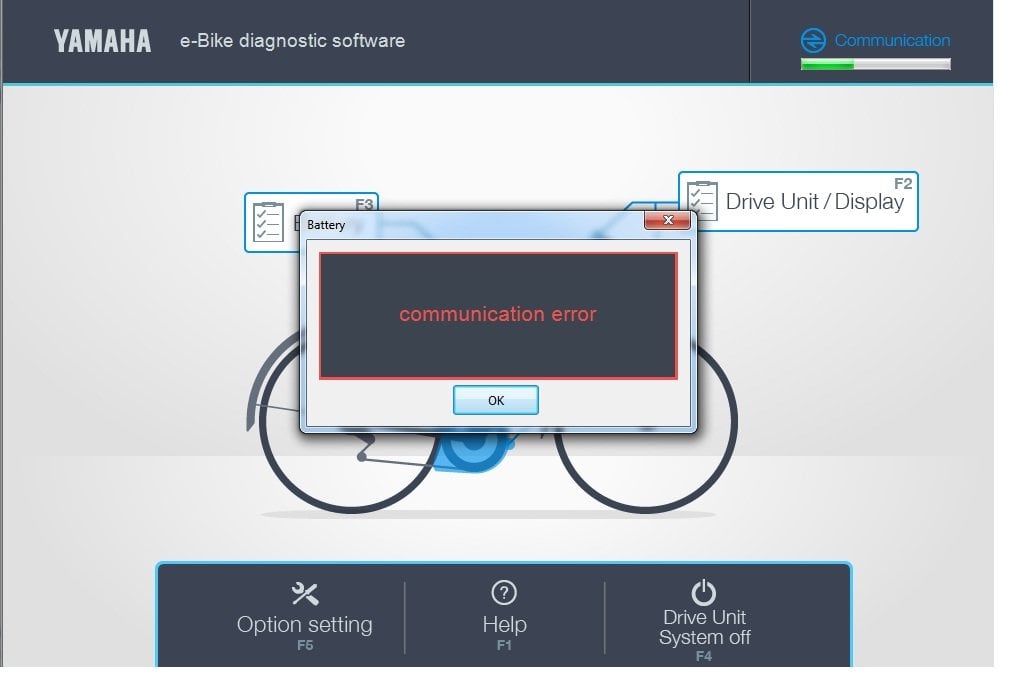
Installed the software on the laptop and made a "Drive unit/ Display" successful diagnostics. But to make battery diagnostics, it does not work, it gives an error "communication error".
What could be the problem is: driver, software, battery any else?

Could explaine, please:
Installed the software on the laptop and made a "Drive unit/ Display" successful diagnostics. But to make battery diagnostics, it does not work, it gives an error "communication error".
What could be the problem is: driver, software, battery any else?
View attachment 115884
I get the same with my Allmtn 10 with the Yamaha PW-X3 motor.
I can connect to the motor OK, but not the battery.
I think this is due to Yamaha changing from there own branded batteries to Simplo/Trendpower battery manufacture, at the end of 2022.
Yamaha either need to bring out new Software, or we need Simplo/Trendpower software.


Some of the yam bikes don’t have yam batteries, this is why the Sw can’t read them and reports an error. This is normal, the battery probably isn’t faulty, just a limitation of the SW

Hey fellow MTB Bikers,
i tried to use the software on my Sduro Hardnine 7.0, but can't get the virtual com port driver to work. I have exactly thew same problem as emtbiker had:
@emtbiker, what exactly did you do while reinstalling the driver? And did you really use the driver from this thread?
Would really appreciate if someone could help me out on this issue.
Cheers!
i tried to use the software on my Sduro Hardnine 7.0, but can't get the virtual com port driver to work. I have exactly thew same problem as emtbiker had:
I also tried reinstalling, without any success. My OS is Win 10 Pro but I also tried on a fresh Install of WIn 7 Pro. Both say installation was fine, but then the "Device cannot start (error 10)." appears.I have tried to connect my bike to laptop without success. Tried several laptops with the same problem. The problem is, that Device Manager shows "Device cannot start (error 10)." It recognizes a new COM-port and new device named YAMAHA but states that no driver installed for that. Suppose that this is either a driver issue or my hardware is faulty. Any suggestions? My OS is Win10Pro.
@emtbiker, what exactly did you do while reinstalling the driver? And did you really use the driver from this thread?
Would really appreciate if someone could help me out on this issue.
Cheers!
Nevermind, I got it to work. The error still shows up in Device Manager, but as soon as I connect the bike another working virtual Com Port appears (instead of the Yamaha Device). This is for my Win7 SP1 Intstallation, Win10 still does not work. For me this is fine enough.Hey fellow MTB Bikers,
i tried to use the software on my Sduro Hardnine 7.0, but can't get the virtual com port driver to work. I have exactly thew same problem as emtbiker had:
I also tried reinstalling, without any success. My OS is Win 10 Pro but I also tried on a fresh Install of WIn 7 Pro. Both say installation was fine, but then the "Device cannot start (error 10)." appears.
@emtbiker, what exactly did you do while reinstalling the driver? And did you really use the driver from this thread?
Would really appreciate if someone could help me out on this issue.
Cheers!
I own a Haibike Sduro Hardnine 7.0 (2016, PW-X1) and an AllMnt7 (2023, PW-X3). Software works on both, and also on both the battery cannot be checked (Communication Error). Reading the fault History works fine, cleaning it does not (An error occurred). I only tested history cleaning on the PW-X3, as tghe PW-X1 had no errors reported.
If anybody had access to a newer version, this would be a breeze!
Cheers,
Frank
Last edited:
Hi.
New on the forum. Has anyone been able to make the e-Bike diagnostic software work with Yamaha PW LCD like on the picture (Haibike Sduro trekking 4.0 2016)? I've connected the Yamaha to a PC (Win10Pro), display on bike shows "0" (not PC), get the correct comm.port setting. Neither red or green on the "Communication" symbol.
Any ideas on what to do?
Cheers.
New on the forum. Has anyone been able to make the e-Bike diagnostic software work with Yamaha PW LCD like on the picture (Haibike Sduro trekking 4.0 2016)? I've connected the Yamaha to a PC (Win10Pro), display on bike shows "0" (not PC), get the correct comm.port setting. Neither red or green on the "Communication" symbol.
Any ideas on what to do?
Cheers.
Hello.Hi.
New on the forum. Has anyone been able to make the e-Bike diagnostic software work with Yamaha PW LCD like on the picture (Haibike Sduro trekking 4.0 2016)? I've connected the Yamaha to a PC (Win10Pro), display on bike shows "0" (not PC), get the correct comm.port setting. Neither red or green on the "Communication" symbol.
Any ideas on what to do?
View attachment 134956
Cheers.
Right now I'm writing program for 2019+ displays (open source alternative to program from this topic). But according to my information, old 2016-2018 years displays had no pc connectable port at all. How do you connect your display to pc?
Connected through micro-USB.Hello.
Right now I'm writing program for 2019+ displays (open source alternative to program from this topic). But according to my information, old 2016-2018 years displays had no pc connectable port at all. How do you connect your display to pc?
Here Dealer Yamaha there is a link to archive with program and many manuals. I can not find any mention to pc software for old displays, but here described how to diagnose everything without pcConnected through micro-USB.
Can you send a photo where does have usb connector?Connected through micro-USB.
Looks like I got my hopes up a bit too early then. Thanks, I'll check it out. Here's a picture of the connection.Here Dealer Yamaha there is a link to archive with program and many manuals. I can not find any mention to pc software for old displays, but here described how to diagnose everything without pc
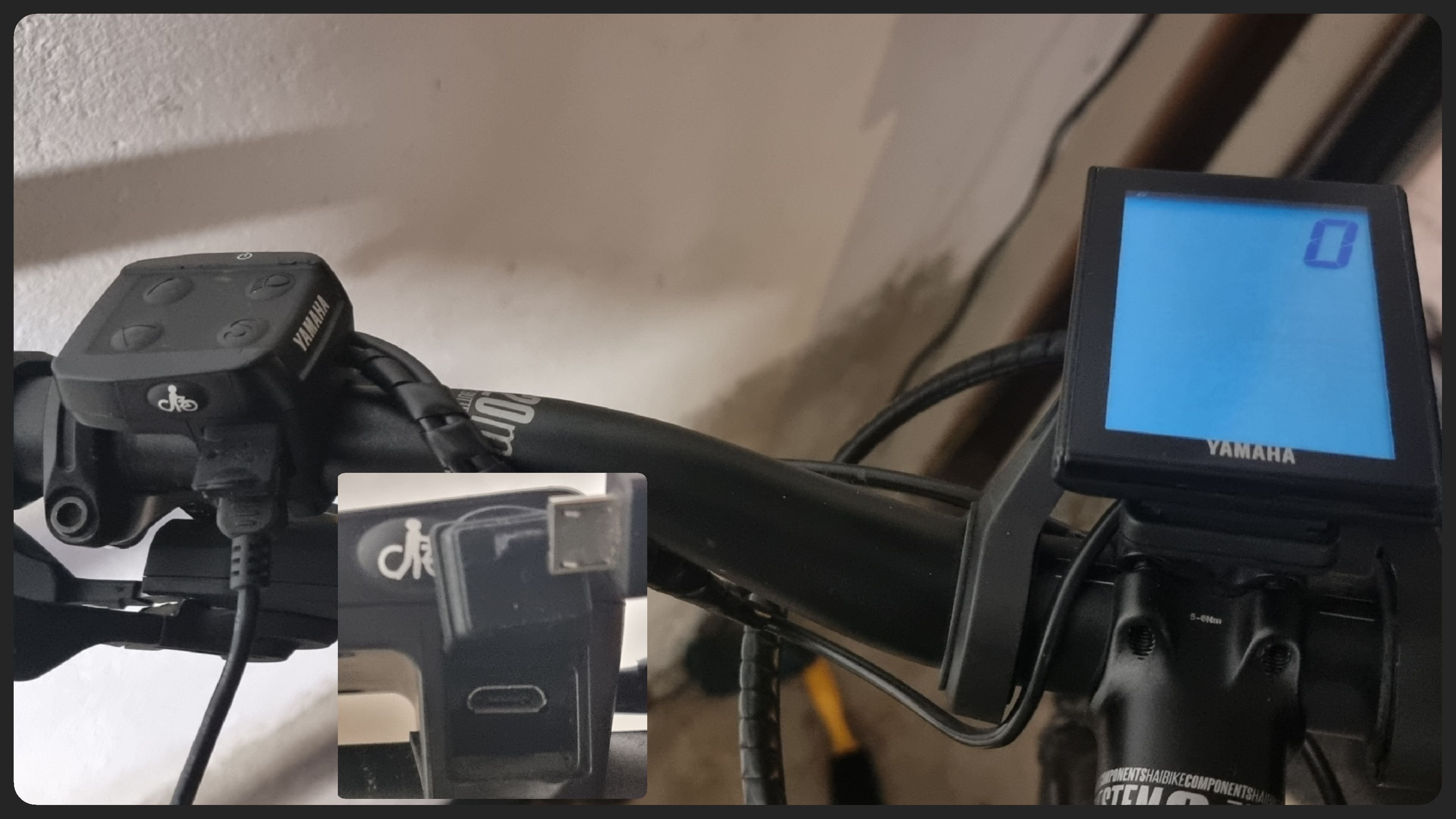
Looks like its charge only First Look: Haibike sDuro Yamaha eBikes – e-bikeshop.co.ukLooks like I got my hopes up a bit too early then. Thanks, I'll check it out. Here's a picture of the connection.
View attachment 134961
Everything looks fine in device manager.You can test it with windows device manager - is there any unknown device
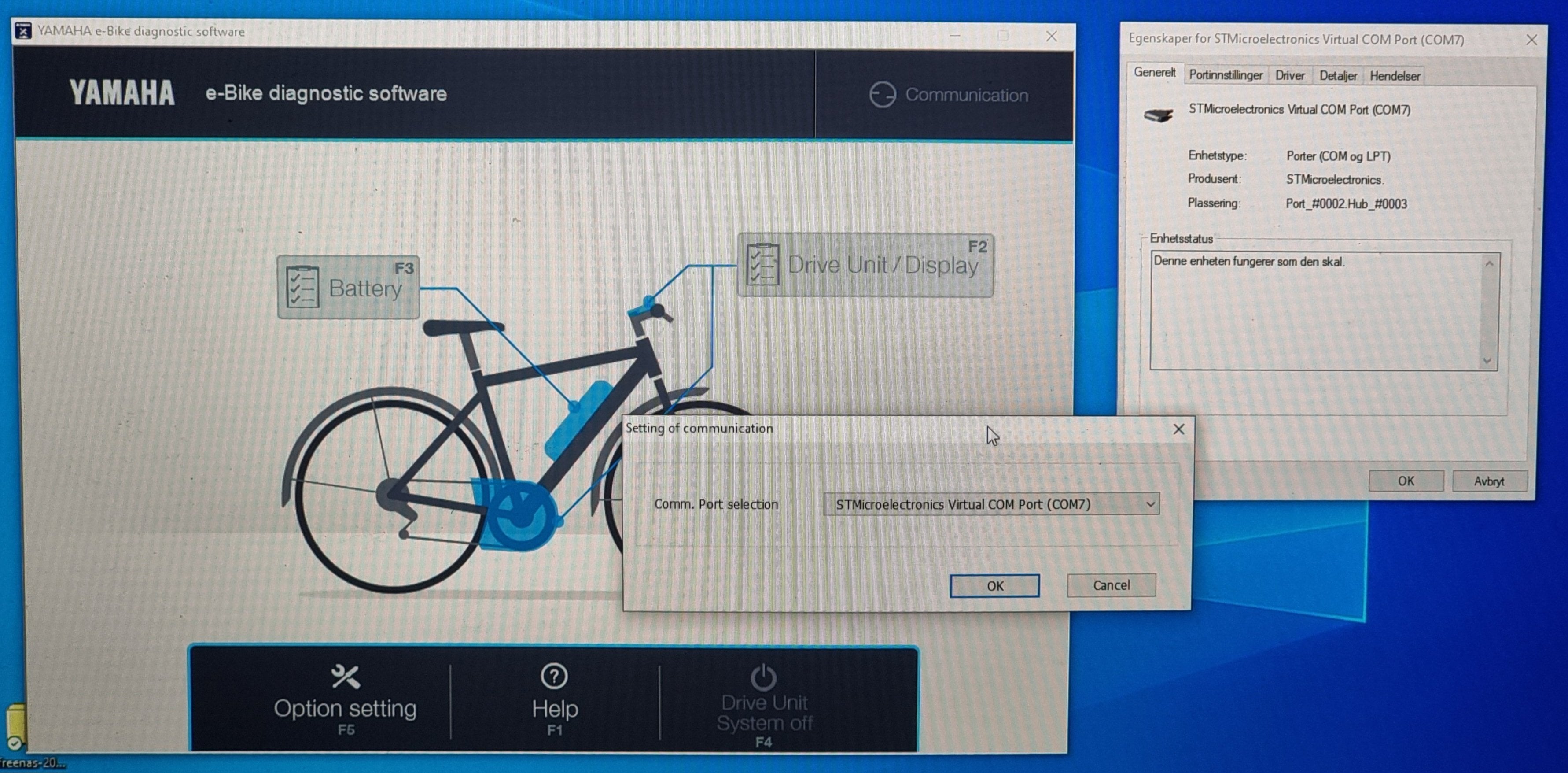
Ok, so what happens when you trying to read it with program? Now you have dialog window to select port, what's wrong when you checked port and trying to read something?
Guy from this thread Dealer Yamaha just asked his bike vendor and vendor sent a program for 2019+ devices. Try to ask your vendor for older program for your bike. If you'll get it, please share program here
Unable to make any readings. The connection is not made, stays grey (not failed connection/red nor good connection/green).Ok, so what happens when you trying to read it with program? Now you have dialog window to select port, what's wrong when you checked port and trying to read something?

Salve a tutti ,ho scaricato il software per Yamaha ed installata la p da voi fornita ed ora si può fare la diagnosi anche sul Pwx ed il PWX3 che ho . Confermo che legge solo il motore e non la batteria.In memoria guasti ho 3 errori però sono vecchi in quanto a settembre 2023 mi è stata cambiata la batteria perché difettosa.Ho visto però che non ti lascia cancellarli sapete perché? Grazie a chi mi risponderà.
Hello everyone, I downloaded the software for Yamaha and installed the p you provided and now I can also do the diagnosis on the Pwx and PWX3 that I have. I confirm that it only reads the engine and not the battery. In the fault memory I have 3 errors but they are old as in September 2023 I had the battery changed because it was faulty. However, I saw that it doesn't let you delete them, do you know why? Thanks to those who answer me.
Hello everyone, I downloaded the software for Yamaha and installed the p you provided and now I can also do the diagnosis on the Pwx and PWX3 that I have. I confirm that it only reads the engine and not the battery. In the fault memory I have 3 errors but they are old as in September 2023 I had the battery changed because it was faulty. However, I saw that it doesn't let you delete them, do you know why? Thanks to those who answer me.
Similar Threads
-

-
-
Haibike Nduro 7 Yamaha PW-X3 software upgrade — what's the process?
- Started by JohnR2
- Replies: 1
-
 Yamaha replacement (X2 or X3?) for Giant Sync Drive Pro X0PB1
- Started by Spiff
- Replies: 11
-
