Have you tried to gently pull some more of the cable out of the head tube? On mine I was able to push the excess cable into the head tube and then pull it back out. It was fairly free moving, in or out of the head tube.Hello guys,
I need some more help. So me and my wife both have Rise M20 and I installed SC-E7000 display on both bikes.
On wife's bike, EW-SD50 cable which comes out a headtube is long enough and everything looks like on Rod's pictures. (even the bike is same colour)
On my bike, the cable is really short and therefore sometimes disconnect from the display.
Is it any possibly to drop the fork and fetch some more cable out of the headtube?
Probably the cable from the EW-AD305 adapter is the same length on any bike?
Any suggestions?
Navigation
Install the app
How to install the app on iOS
Follow along with the video below to see how to install our site as a web app on your home screen.
Note: This feature may not be available in some browsers.
More options
Style variation
You are using an out of date browser. It may not display this or other websites correctly.
You should upgrade or use an alternative browser.
You should upgrade or use an alternative browser.
Orbea Rise - Shimano SC-E7000 Display Installation
- Thread starter Rod B.
- Start date


Rod B.
E*POWAH Master
- Thread starter
- #32
Kuri,
The cable isn't stuck at the motor, it's stuck in a wired bundle at the top of the down tube. The AD305 cable running from the Rise's motor is very long. It travels up the down tube, past the battery and to the head tube. At the head tube, there is about four feet or 120 centimeters of excess AD305 cable. The Orbea assembly workers fold the excess AD305 cable into a bundle, wrap it in a foam pad, and zip tie everything tightly together. The foam bundle is then tucked back into the down tube. The Orbea workers leave about one foot or 30 centimeters AD305 cable free. They run this cable out the head tube cable port and over to the black box.
If you try to pull on the AD305 cable you may be able to pull some slack from the zip tied bundle, but you won't get much and you may also damage the cable by pulling on it. On my Rise, the zip tied AD305 cable bundle was pushed into the down tube several inches. Unless you know it's there, you won't see it.
To access the bundle, you'll need to remove your fork, stick your finger inside the down tube several inches and pull the wire bundle out. I ended cutting the zip tie. I estimated how much cable I needed to reach the display and then zip tied the excess cable, wrapped it back in foam and tucked everything back into the down tube.
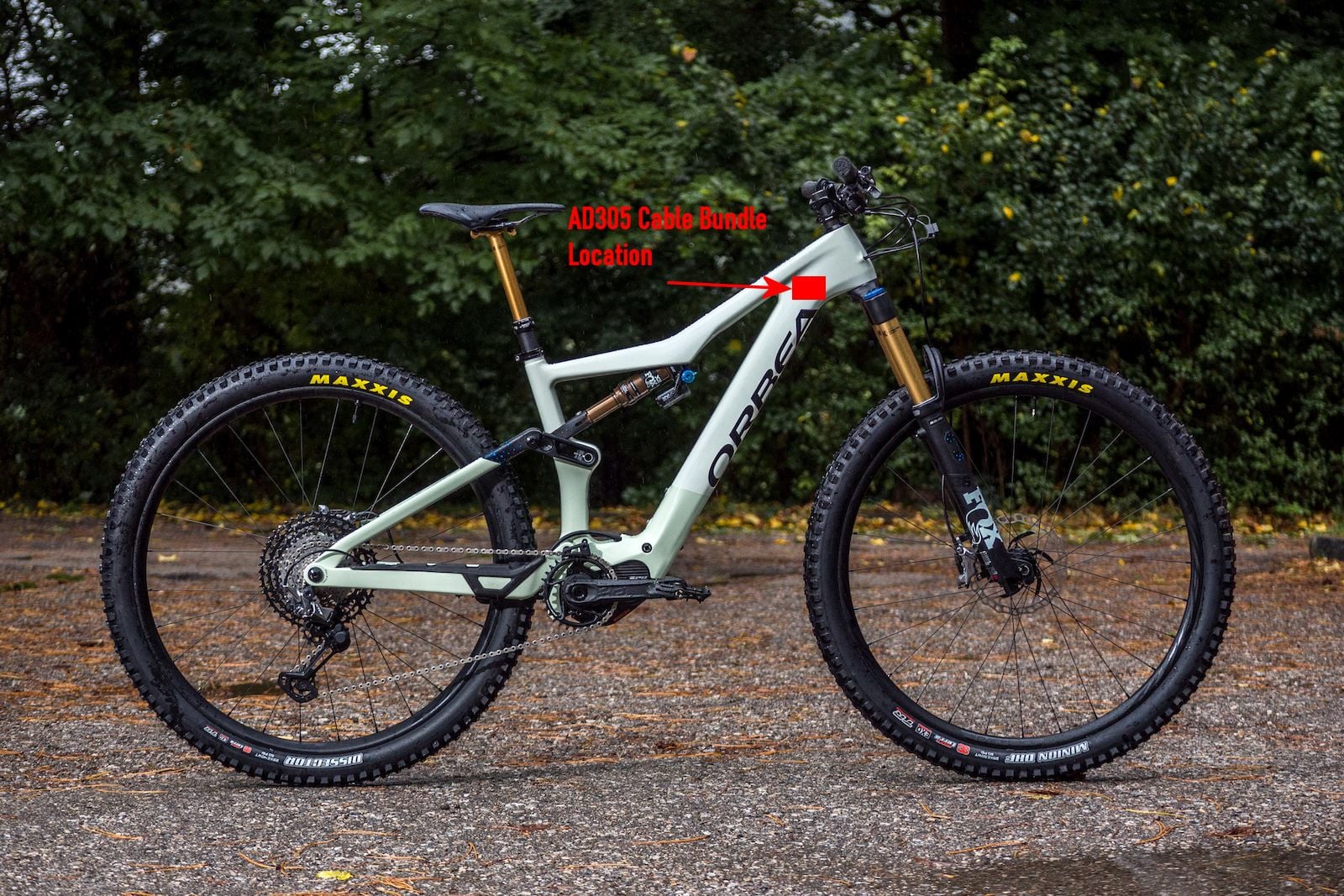
The cable isn't stuck at the motor, it's stuck in a wired bundle at the top of the down tube. The AD305 cable running from the Rise's motor is very long. It travels up the down tube, past the battery and to the head tube. At the head tube, there is about four feet or 120 centimeters of excess AD305 cable. The Orbea assembly workers fold the excess AD305 cable into a bundle, wrap it in a foam pad, and zip tie everything tightly together. The foam bundle is then tucked back into the down tube. The Orbea workers leave about one foot or 30 centimeters AD305 cable free. They run this cable out the head tube cable port and over to the black box.
If you try to pull on the AD305 cable you may be able to pull some slack from the zip tied bundle, but you won't get much and you may also damage the cable by pulling on it. On my Rise, the zip tied AD305 cable bundle was pushed into the down tube several inches. Unless you know it's there, you won't see it.
To access the bundle, you'll need to remove your fork, stick your finger inside the down tube several inches and pull the wire bundle out. I ended cutting the zip tie. I estimated how much cable I needed to reach the display and then zip tied the excess cable, wrapped it back in foam and tucked everything back into the down tube.
I think it is not the same on every bike. I removed the fork some time ago, and the "bundle" was just at the top of the tube, very close to the fork. I could see it when removing the tube, and it even move past the fork hole close to the exitKuri,
The cable isn't stuck at the motor, it's stuck in a wired bundle at the top of the down tube. The AD305 cable running from the Rise's motor is very long. It travels up the down tube, past the battery and to the head tube. At the head tube, there is about four feet or 120 centimeters of excess AD305 cable. The Orbea assembly workers fold the excess AD305 cable into a bundle, wrap it in a foam pad, and zip tie everything tightly together. The foam bundle is then tucked back into the down tube. The Orbea workers leave about one foot or 30 centimeters AD305 cable free. They run this cable out the head tube cable port and over to the black box.
If you try to pull on the AD305 cable you may be able to pull some slack from the zip tied bundle, but you won't get much and you may also damage the cable by pulling on it. On my Rise, the zip tied AD305 cable bundle was pushed into the down tube several inches. Unless you know it's there, you won't see it.
To access the bundle, you'll need to remove your fork, stick your finger inside the down tube several inches and pull the wire bundle out. I ended cutting the zip tie. I estimated how much cable I needed to reach the display and then zip tied the excess cable, wrapped it back in foam and tucked everything back into the down tube.
View attachment 75508

hdqboss
Member
Received my SC-E7000 display today and the install was indeed easy. Thank again Rod B. for the detailed explanation of the differences between the two units with regards to the install.


hdqboss
Member
After getting my M10 I installed a Shimano SC-E7000 display. I did not want to move the SW-EM7000 L Mode Controller Switch so I had to install the display on the left side of the stem because the cable from the control is short and hard wired. I wish Shimano made an adapter or an EW-SD50 cable that could attached to the controller cable to extend the length.
Rod B.
E*POWAH Master
- Thread starter
- #40
After getting my M10 I installed a Shimano SC-E7000 display. I did not want to move the SW-EM7000 L Mode Controller Switch so I had to install the display on the left side of the stem because the cable from the control is short and hard wired. I wish Shimano made an adapter or an EW-SD50 cable that could attached to the controller cable to extend the length.
Hdqboss,
My mode controller switch wire running to the SC-E7000 display just barely reached. My OneUp handlebar is 800mm wide which complicated things. I had to mess around with my handlebar setup to get the wire to reach the display.
If you are coming up just a little bit short, you could cut down the width of your handlebar a little bit. Another option would be to buy a Shimano "EW-JC200 2-port inline junction" and a short EW-SD50 extension wire. The EW-JC200 2-port inline junction allows you to connect two EW-SD50 wires together and create a longer run of wire.
If you don't have access to a EW-JC200 2-port inline junction or the budget doesn't allow purchasing one, it is possible to splice and solder an EW-SD50 extension wire onto your mode controller wire. I have not personally done this, but here is a Reddit article where a person details how to go about splicing a EW-SD50 wire.
Rod
hdqboss
Member
Rod, that’s exactly what I was looking for! Thanks once again for the info.Hdqboss,
My mode controller switch wire running to the SC-E7000 display just barely reached. My OneUp handlebar is 800mm wide which complicated things. I had to mess around with my handlebar setup to get the wire to reach the display.
If you are coming up just a little bit short, you could cut down the width of your handlebar a little bit. Another option would be to buy a Shimano "EW-JC200 2-port inline junction" and a short EW-SD50 extension wire. The EW-JC200 2-port inline junction allows you to connect two EW-SD50 wires together and create a longer run of wire.
If you don't have access to a EW-JC200 2-port inline junction or the budget doesn't allow purchasing one, it is possible to splice and solder an EW-SD50 extension wire onto your mode controller wire. I have not personally done this, but here is a Reddit article where a person details how to go about splicing a EW-SD50 wire.
Rod

rschenkels
Member
Rod B.
E*POWAH Master
- Thread starter
- #43
thanks @Rod B. for this very helpful thread which made me buy the SC-EM7000, and which is already delivered 2 days later, so just need to install it tomorrow ;-)
Ron
Super easy and quick install Ron. Depending upon the width of your bars and grips, you may have to do some fine tuning on the left side handlebar component arrangement in order to get the mode switch wire to reach the display.
If I may make a suggestion. Place the black box and rubber protective cover in a small zip lock baggie and keep it in your riding pack. It the display takes a hit and breaks, it may disable your eBike. If this happens, you can quickly connect the black box while on the trail in order to get home.
Be safe
Rod
rschenkels
Member
good advice Rod, appreciated !
GizmoSL
Member
I decided to try the installation of the 8000 display after having obtained one, so I began the procedure with some reservations, and after pulling what seemed like yards of the 150 cable, it hung up. The length was easily as long as the down tube, leaving me to conclude that the connection with the 300 was near the motor, not near the junction of the down tube/head tube. I subsequently discovered the 305 adapter could have a very long lead. Not being eager to drop the motor/battery, I put things back together and resigned myself to live with the EN100 junction box and wait till the supply chain for shimano ebike parts improved. Meanwhile I discovered that Ohm ebike in Canada had the B&W 7000 in stock at a good price and reasonable shipping to North America. Since the installation for the 7000 is so much easier...
Funks
Member
I decided to try the installation of the 8000 display after having obtained one, so I began the procedure with some reservations, and after pulling what seemed like yards of the 150 cable, it hung up. The length was easily as long as the down tube, leaving me to conclude that the connection with the 300 was near the motor, not near the junction of the down tube/head tube. I subsequently discovered the 305 adapter could have a very long lead. Not being eager to drop the motor/battery, I put things back together and resigned myself to live with the EN100 junction box and wait till the supply chain for shimano ebike parts improved. Meanwhile I discovered that Ohm ebike in Canada had the B&W 7000 in stock at a good price and reasonable shipping to North America. Since the installation for the 7000 is so much easier...
Hmmmm, the SC-E8000 (ISCE8000B) computer doesn't work - the one that does is the
SC-EM800 (note, it's not the SC-E8000).
Installation of the SC-EM800 is pretty much plug and play as well as long as you have an extra EW-SD300 cable (fairly short one 150mm - which you need to buy).
1. Locate the AD305 from the downtube / head tube.
2. Unplug the EW-SD300 cable that's plugged into the AD305 and plug it directly into the SC-EM800
3. Unplug the SW-EM7000-L power assist switch from the EN100
4. Plug the Mode Switch to the AD305 you removed (it uses the fatter EW-SD50 cable).
5. Plug the AD305 to the DISPLAY using the EW-SD300 (the one you should have bought extra)
EP8 Motor -> EW-SD300 -> SC-EM800 -> EW-SD300 -> EW-AD305 -> SW-EM7000-L
Last edited:
Rod B.
E*POWAH Master
- Thread starter
- #47
GismoSL,
The Shimano EP8 eBike can only use a Shimano computer display designed for the EP8 motor. The Shimano SC-E8000 computer display was designed to work with the Shimano E8000 motor and will not work with the Shimano EP8 motor.
There are several Shimano computer displays which will work with the Shimano EP8 motor. The two best computer displays for mountain biking applications are the SC-E7000 and the SC-EM800. I have installed both types of displays on my bike and several of my friend's Orbea Rise eBikes.
Each display has it's Pro and Cons:
SC-E7000 Computer Display
PROS:
The SC-E7000 is less expensive than the SC-EM800. The SC-E7000 display body is smaller and more compact than the EM800. It's less likely to be damaged in a crash. The SC-E7000 is direct plug and play on the Orbea Rise. You mount the display on your handlebars. You remove the EW-EN100 black junction box from your bike. Plug the two wires that went to the EW-EN100 into the back of the display and you're good to go.
Note: Keep the EW-EN100 in your riding backpack. The EP8 motor will not work without a display or the EW-EN100 junction box. If your display is damaged in a hard crash, your bike will not work. You can quickly re-install the EW-EN100 and get back to riding.
CONS:
The SC-E7000 has a smaller and more compact black & white screen. If your eyesight is bad, it may be difficult to see the information displayed on the screen when riding.
The SC-E7000 screen set to a black background. Note the small screen size.
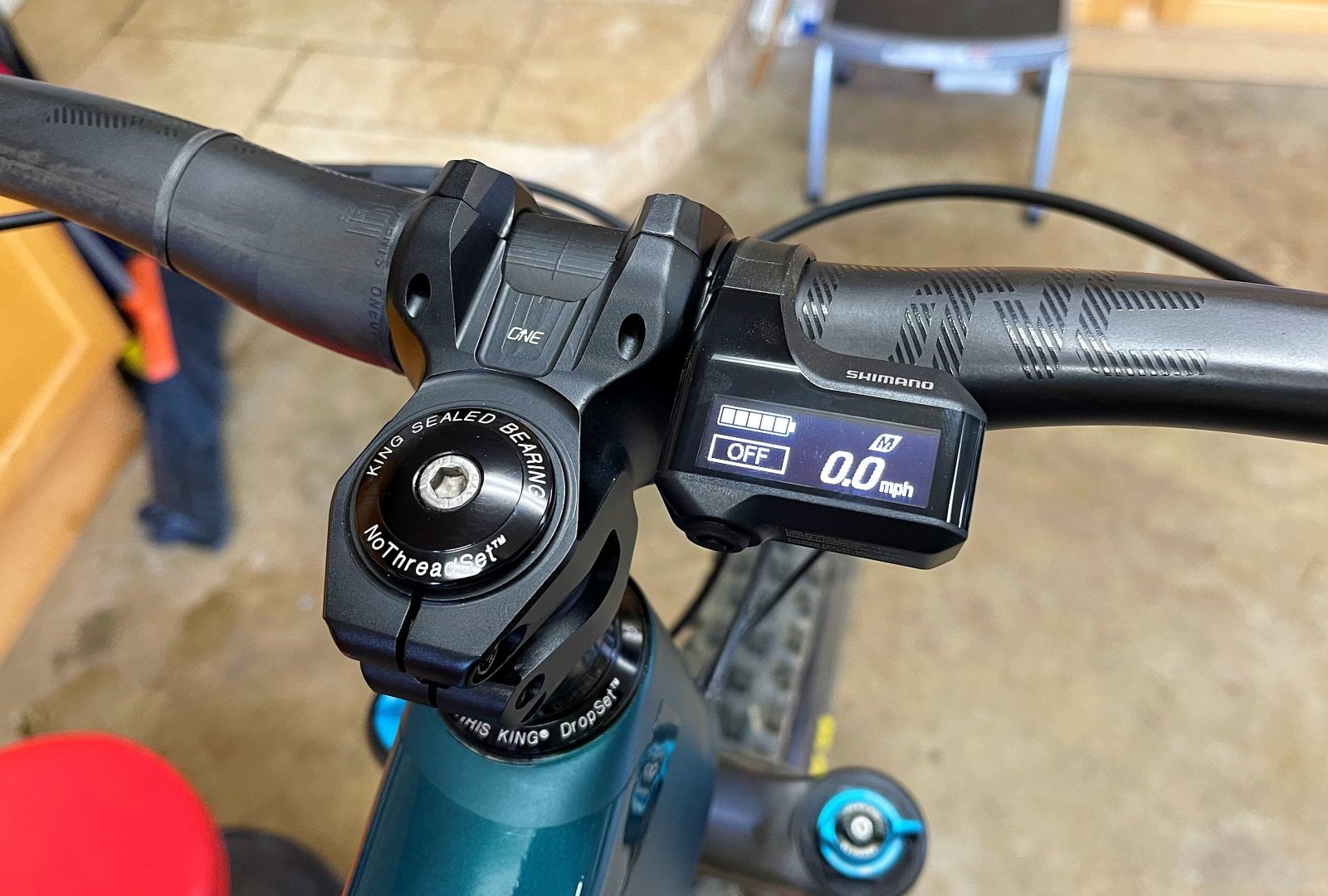
The SC-E7000 screen set to white background.
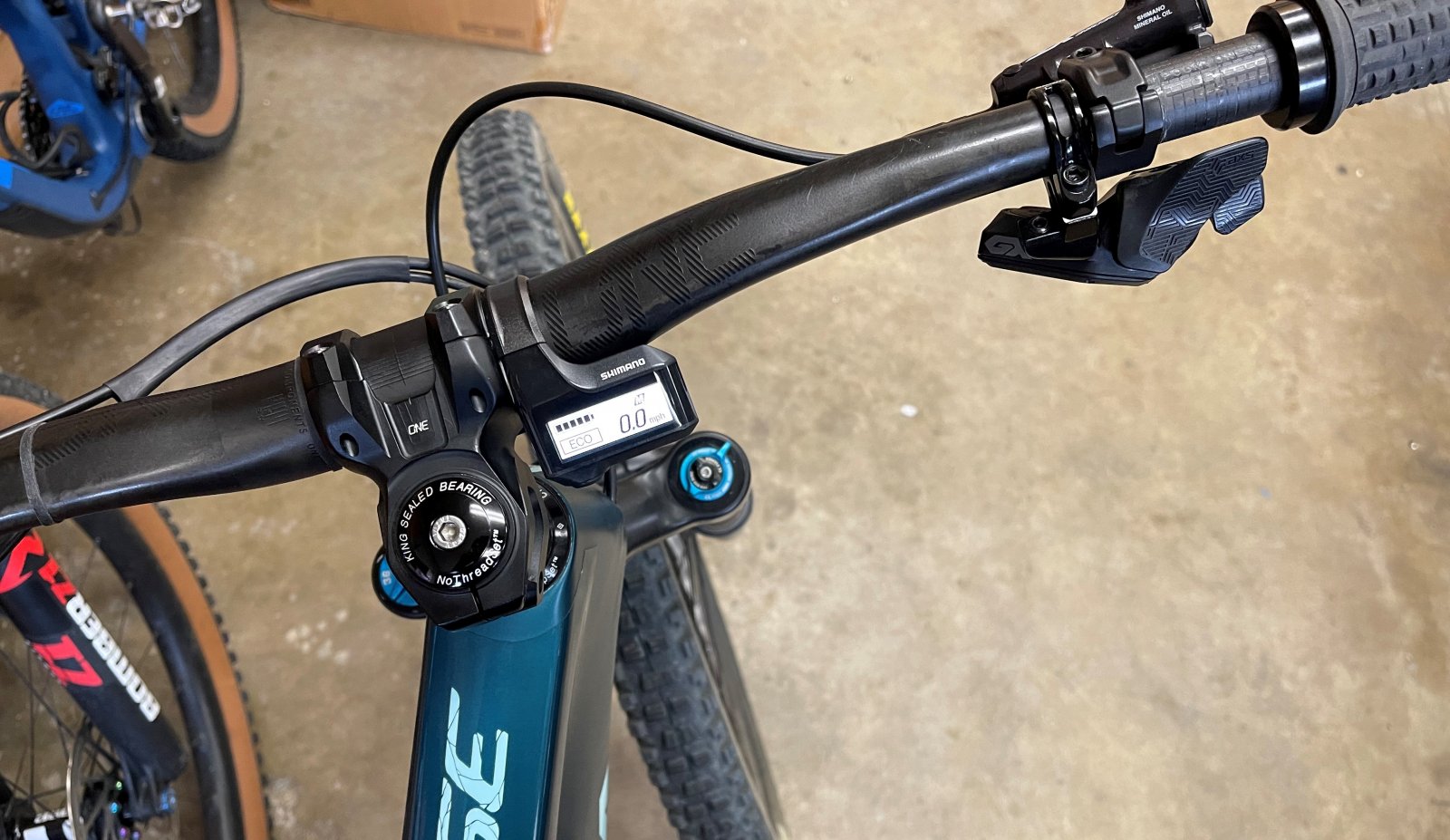
The mode switch wire is run along the bottom side of the handlebar and over to the SC-E7000 display. I use black silicone bands purchased on Amazon to hold the wire in place. I also like to use electrical shrink wrap tubing to keep my brake and dropper hose together so they don't flop around when riding. Message me if you want to know how to do this.
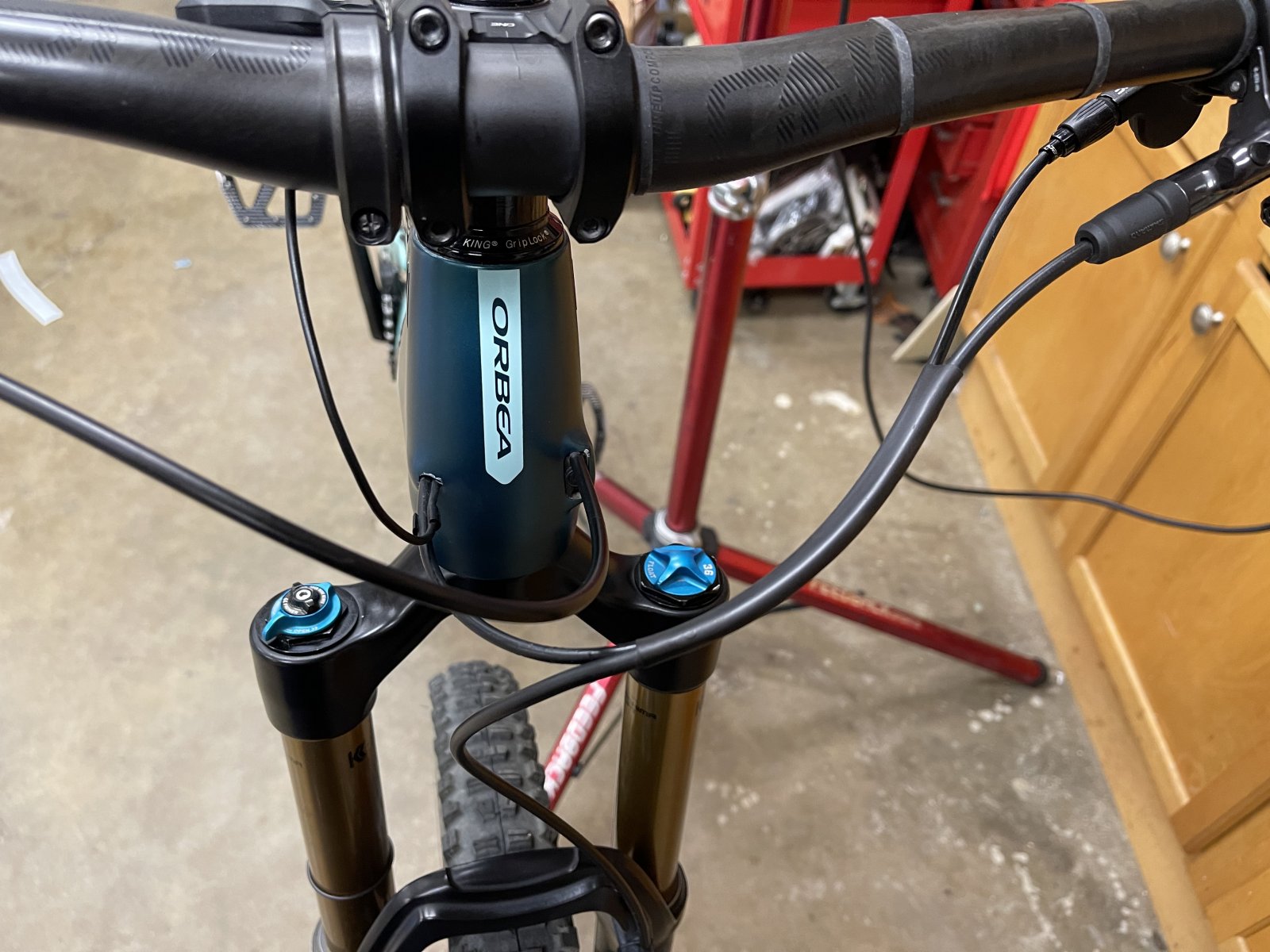
SC-EM800 Computer Display
PROS:
The SC-EM800 has a larger screen which is more easily read while riding. The screen is also colorized to show which mode you are in while riding. The screen will show blue for Eco, Green for Trail and Yellow for Boost mode.
CONS:
The SC-EM800 costs more than the SC-E7000 and requires the additional purchase of a 150mm length, EW-SD300 wire. The SC-EM800 requires dropping the fork to gain access to the EW-AD305 adapter tucked into the downtube at the junction of the headtube. Refer to previous posts on how to install the SC-EM800 display.
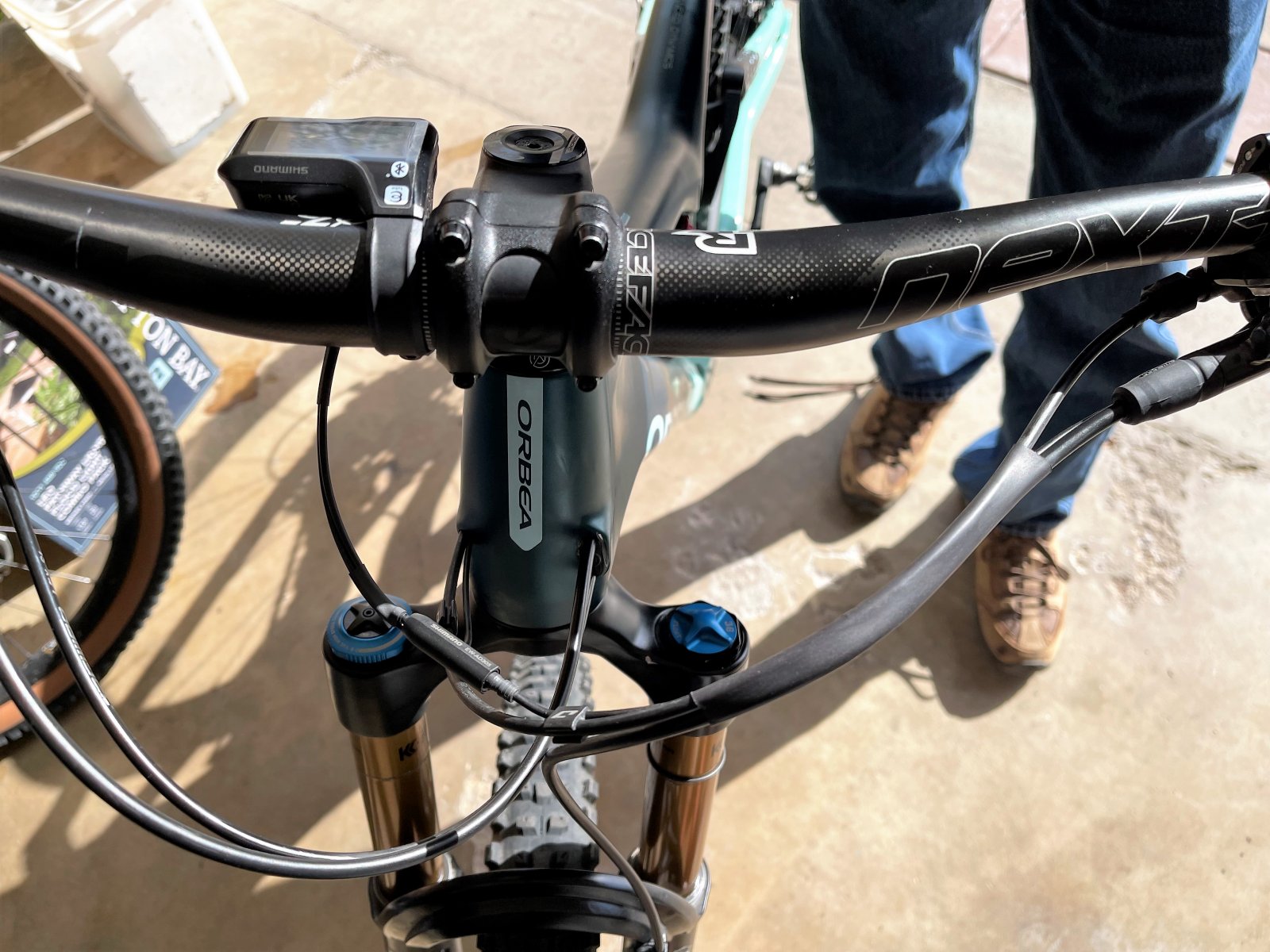
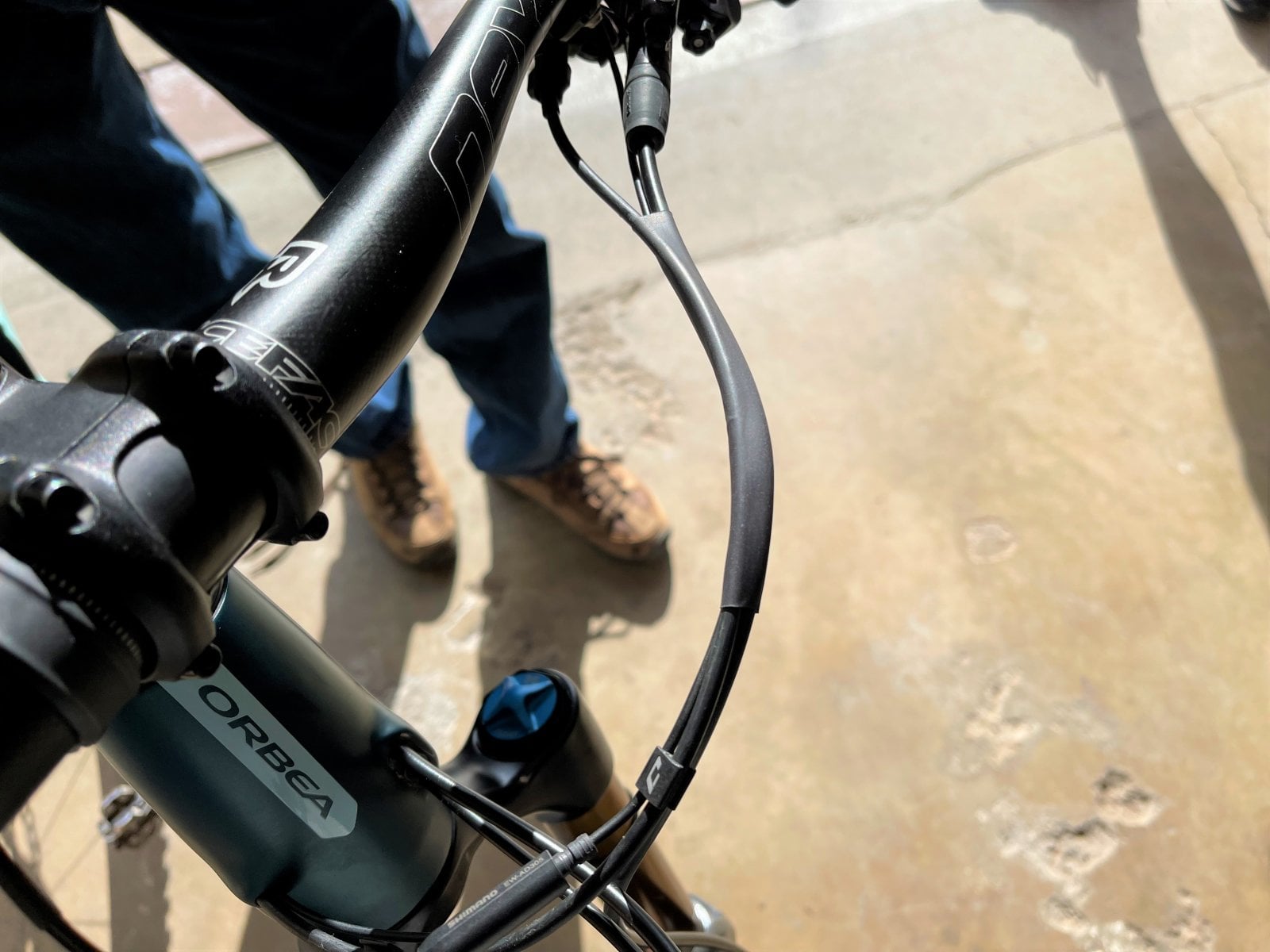
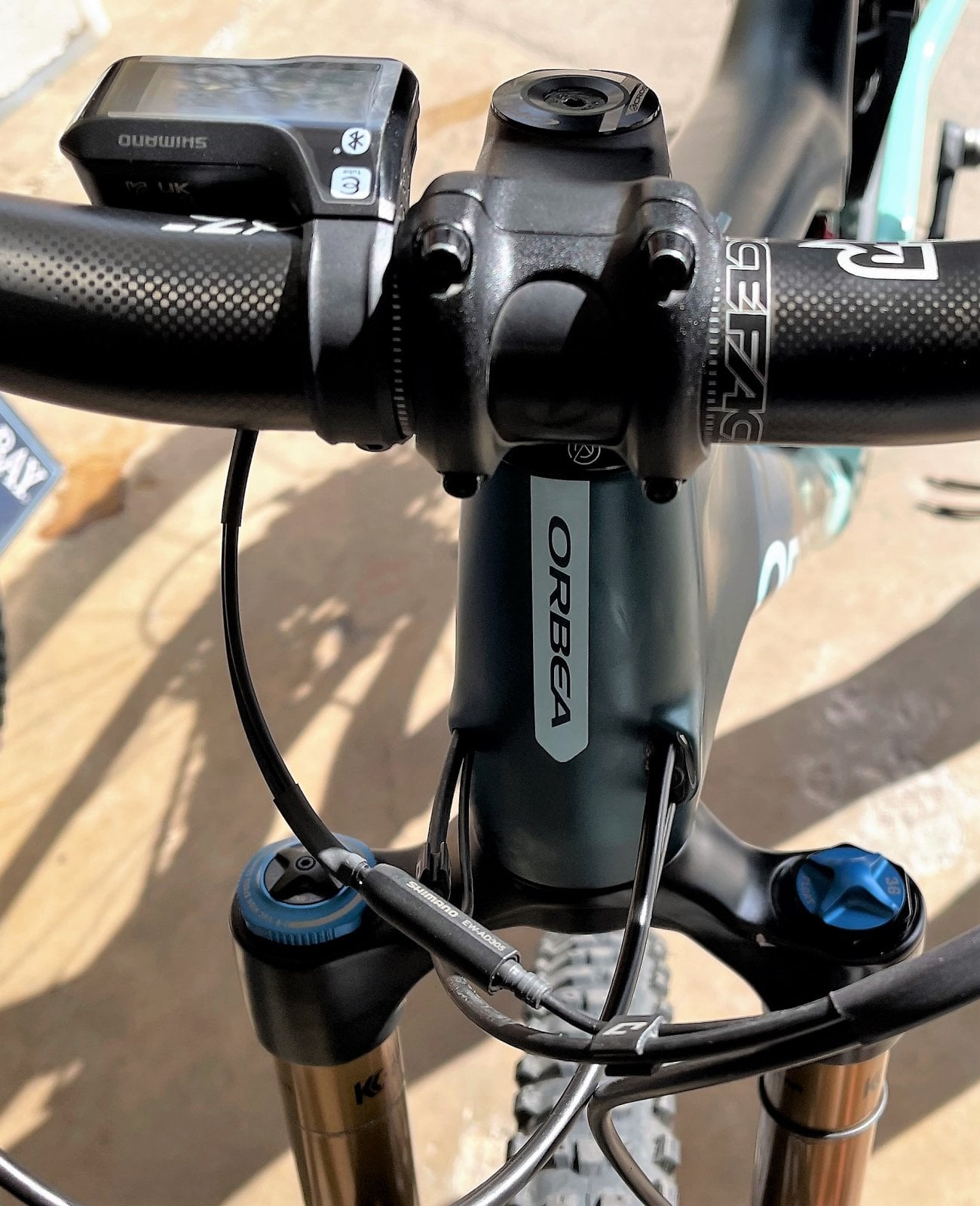
When I installed an SC-EM800 on my buddy's bike, I used a different wire routing method. Instead of attaching the mode switch wire to the handlebar with silicone bands, I ran the mode switch wire, dropper post housing and brake hose housing together via electrical shrink wrap tubing. I also used smaller diameter electrical shrink wrap tubing to wrap the two wires which plug into the back of the display. Overall, I think it makes a much cleaner look on the bike.
If you are interested in doing this to your SC-EM800 display, send me a message and I can help you out.
The Shimano EP8 eBike can only use a Shimano computer display designed for the EP8 motor. The Shimano SC-E8000 computer display was designed to work with the Shimano E8000 motor and will not work with the Shimano EP8 motor.
There are several Shimano computer displays which will work with the Shimano EP8 motor. The two best computer displays for mountain biking applications are the SC-E7000 and the SC-EM800. I have installed both types of displays on my bike and several of my friend's Orbea Rise eBikes.
Each display has it's Pro and Cons:
SC-E7000 Computer Display
PROS:
The SC-E7000 is less expensive than the SC-EM800. The SC-E7000 display body is smaller and more compact than the EM800. It's less likely to be damaged in a crash. The SC-E7000 is direct plug and play on the Orbea Rise. You mount the display on your handlebars. You remove the EW-EN100 black junction box from your bike. Plug the two wires that went to the EW-EN100 into the back of the display and you're good to go.
Note: Keep the EW-EN100 in your riding backpack. The EP8 motor will not work without a display or the EW-EN100 junction box. If your display is damaged in a hard crash, your bike will not work. You can quickly re-install the EW-EN100 and get back to riding.
CONS:
The SC-E7000 has a smaller and more compact black & white screen. If your eyesight is bad, it may be difficult to see the information displayed on the screen when riding.
The SC-E7000 screen set to a black background. Note the small screen size.
The SC-E7000 screen set to white background.
The mode switch wire is run along the bottom side of the handlebar and over to the SC-E7000 display. I use black silicone bands purchased on Amazon to hold the wire in place. I also like to use electrical shrink wrap tubing to keep my brake and dropper hose together so they don't flop around when riding. Message me if you want to know how to do this.
SC-EM800 Computer Display
PROS:
The SC-EM800 has a larger screen which is more easily read while riding. The screen is also colorized to show which mode you are in while riding. The screen will show blue for Eco, Green for Trail and Yellow for Boost mode.
CONS:
The SC-EM800 costs more than the SC-E7000 and requires the additional purchase of a 150mm length, EW-SD300 wire. The SC-EM800 requires dropping the fork to gain access to the EW-AD305 adapter tucked into the downtube at the junction of the headtube. Refer to previous posts on how to install the SC-EM800 display.
When I installed an SC-EM800 on my buddy's bike, I used a different wire routing method. Instead of attaching the mode switch wire to the handlebar with silicone bands, I ran the mode switch wire, dropper post housing and brake hose housing together via electrical shrink wrap tubing. I also used smaller diameter electrical shrink wrap tubing to wrap the two wires which plug into the back of the display. Overall, I think it makes a much cleaner look on the bike.
If you are interested in doing this to your SC-EM800 display, send me a message and I can help you out.
I just wanted to add a few comments with regard to my experience of upgrading to the SC-EM800 display on the Orbea Rise. I used the information provided in this thread and removed the fork and gained access to the EW-AD305 used to connect the SD300 cable to the SD50. The problem i encountered which i wasted some time on, is that it is not possible to remove the SD50 cable from the bike intact. You will need to cut it. This is because the hole the the cable passes through is only large enough for the cable but not for the SD50 connector. The only way you will successfully remove the cable in one piece would be to first remove the gear change cable. I can only imagine that in assembly Orbea installed the SD50 cable first through the larger hole and then moves it over to the smaller hold before installing the gear change cable.
Since the SD300 connector is much smaller there was no problem passing it through the frame hole. I also noticed that the on the inside of the head tube there is a fixing with two holes one of which is free and the SD300 connected can pass through it which will keep the cable away from the fork.
Where i say gear change cable above it should say seat post dropper cable.
Since the SD300 connector is much smaller there was no problem passing it through the frame hole. I also noticed that the on the inside of the head tube there is a fixing with two holes one of which is free and the SD300 connected can pass through it which will keep the cable away from the fork.
Where i say gear change cable above it should say seat post dropper cable.
Last edited:
hdqboss
Member
I didn’t want to have to deal with those issues that it why I went with the SC-E7000..I just wanted to add a few comments with regard to my experience of upgrading to the SC-EM800 display on the Orbea Rise. I used the information provided in this thread and removed the fork and gained access to the EW-AD305 used to connect the SD300 cable to the SD50. The problem i encountered which i wasted some time on, is that it is not possible to remove the SD50 cable from the bike intact. You will need to cut it. This is because the hole the the cable passes through is only large enough for the cable but not for the SD50 connector. The only way you will successfully remove the cable in one piece would be to first remove the gear change cable. I can only imagine that in assembly Orbea installed the SD50 cable first through the larger hole and then moves it over to the smaller hold before installing the gear change cable.
Since the SD300 connector is much smaller there was no problem passing it through the frame hole. I also noticed that the on the inside of the head tube there is a fixing with two holes one of which is free and the SD300 connected can pass through it which will keep the cable away from the fork.
Rod B.
E*POWAH Master
- Thread starter
- #50
Nebo1ss,
Installing the SC-EM800 definitely a pain in the ass and requires a bit of fiddling work to install. However, you do not have to cut the EW-SD50 wire. Here is my process for installing the SC-EM800, should anybody wish to install it, instead of installing the SC-E7000 display.
Notes:
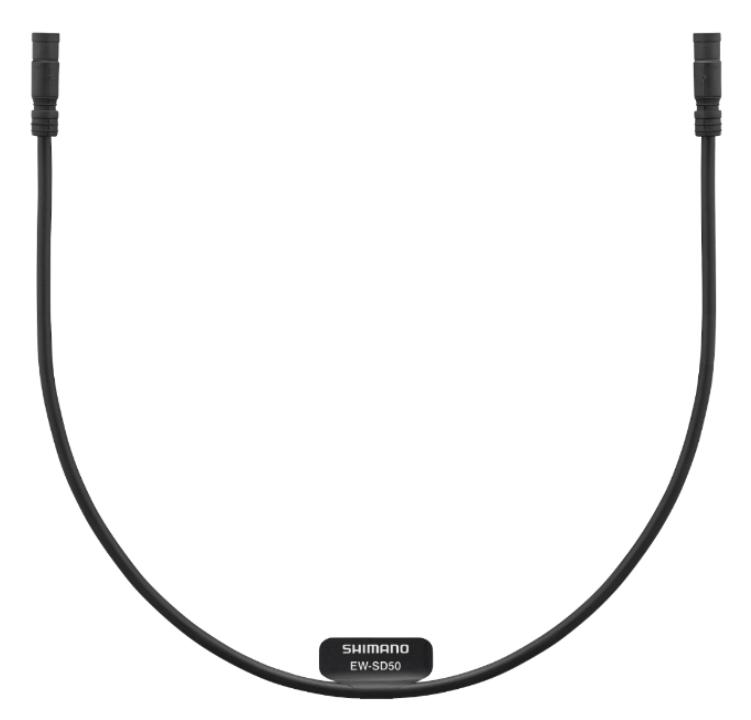
A) Preserve the short EW-SD50 wire that formerly went from the EW-AD305 adapter to one end of the EW-EN100. Do not cut and remove it. You want to keep this wire and the EW-EN100 in your riding kit. If you take a bad fall and break the SC-EM800 display, your bike will not work. If you have the EW-SD50 wire and EW-EN100 with you, you can quickly bypass the broken display by re-installing the items and get your badass self back on the trail. For those viewing this post, I've attached pictures of the items for reference.
B) You will need to purchase a 150mm length (Shortest length offered by Shimano) EW-SD300 cable to complete the SC-EM800 installation. You will also need the EW-AD305 adapter located inside the downtube, where it meets at the headtube.
C) Below I've detailed how to install the SC-EM800 using the EW-AD305 adapter located inside the downtube which requires removing the front fork. However, if you are not mechanically inclined, or simply don't want to mess around with dropping the fork, there is an alternative method which will require additional purchase or parts. The SC-EM800 color display only accepts EW-SD300 wire inputs. If you buy the items listed below, you can install the SC-EM800 color display on your Rise as a direct plug and play without having to do any mechanical work. One adapter and EW-SD300 wire will convert the EW-SD50 wire coming out of the headtube and the second adapter and EW-SD300 wire will convert the mode selector switch EW-SD-50 wire. Because you will extend the wiring length by approximately 150mm or 5.90 inches, this will leave you with an excess length of wire at the handlebar which will require a bit of creative management.
Buy Two, 150mm EW-SD300 cables
Buy Two, EW-AD305 adapters
EW-SD50 wire (Formerly went from EW-AD305 adapter to EW-EN100)
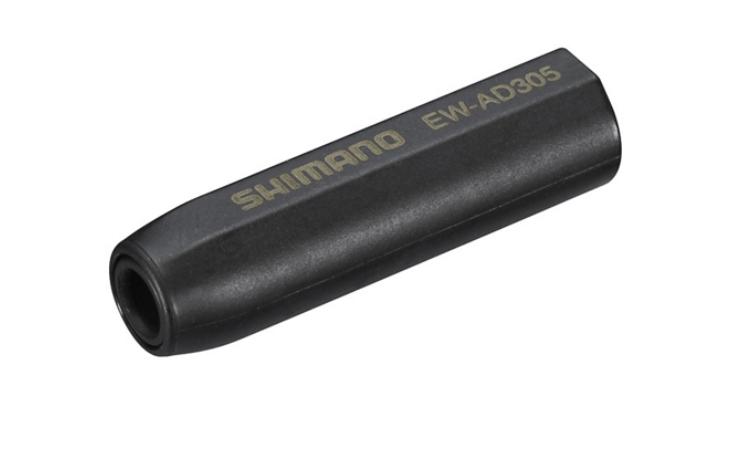
EW-AD305 (Found inside frame at downtube, near headtube junction)
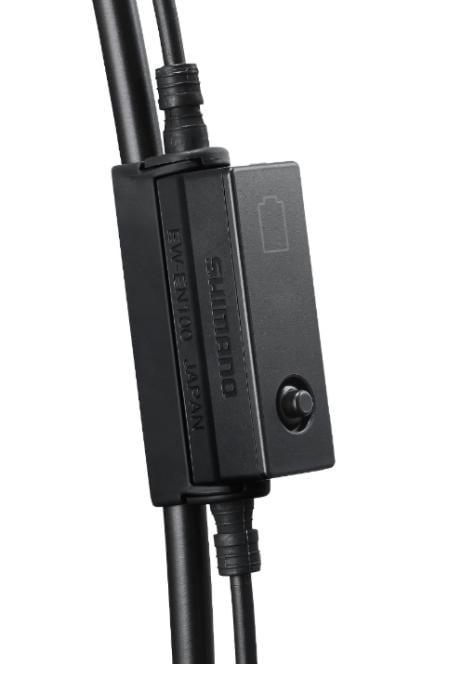
EW-EN100 Junction Box (Found mounted to the dropper post cable housing on the front of bike)
Installation Process:
1) Place your Rise frame in a bike stand. The dropper post must be free and clear, and not clamped in the bike stand. Take a pencil and mark your dropper post height at the seat post clamp. During the display installation process, you will need to remove the dropper post from the frame. The pencil mark allows you to reinstall the dropper post back to the correct height.
2) Remove the EW-EN100 junction box from the front of the bike.
3) Remove the dropper cable housing and cable from the dropper seat post lever. To do this, you will need to remove the cable crimp at the end of the cable. If the dropper post cable housing is attached to the brake hose housing via zip ties or clamps at the front of the bike, free it up.
4) Note, this part is not required, but makes the installation process easier. Remove the two bolts holding your front brake caliper to the fork. Place a spacer block firmly between the two brake pads on the caliper. This will keep the caliper pistons from being accidentally actuated. Remove the fork brake hose clamp. The clamp screw is small, I like to re-thread it onto the fork to prevent it from becoming lost. Remove your front wheel from the fork.
5) Loosen the stem bolts. Loosen and completely remove the stem top cap. Remove the fork completely from the frame and place it off to the side so it doesn't get damaged. Pay attention to your stem spacers, their sizes, and if they are above or below the stem. A picture taken with your phone helps. You want to reinstall the spacers in the correct orientation when you re-install the fork and stem.
Note: Because the stem bolts have been loosened and the stem top cap has been removed, it is possible for the fork to fall out of the frame when you remove the stem top cap. Normally it will take a slight bit of tapping with your hand or rubber mallet to get the fork steerer tube past the headset bearings. Just in case however, keep a hand on the fork so it doesn't accidentally drop out of the frame and become damaged by hitting the floor.
6) When you remove the fork from the headtube, the upper headset bearing cap and seal will come off. The Rise comes with an Acros Integrated Headset. The upper headset bearing may also come out, but will likely stay in the frame's integrated bearing cup. Remove the upper headset bearing from the frame by grabbing it with your fingers and rock it back and forth until it comes out. Place you headset items off to the side so they don't accidentally get knocked about and lost.
With a rag, clean out the upper integrated bearing cup.
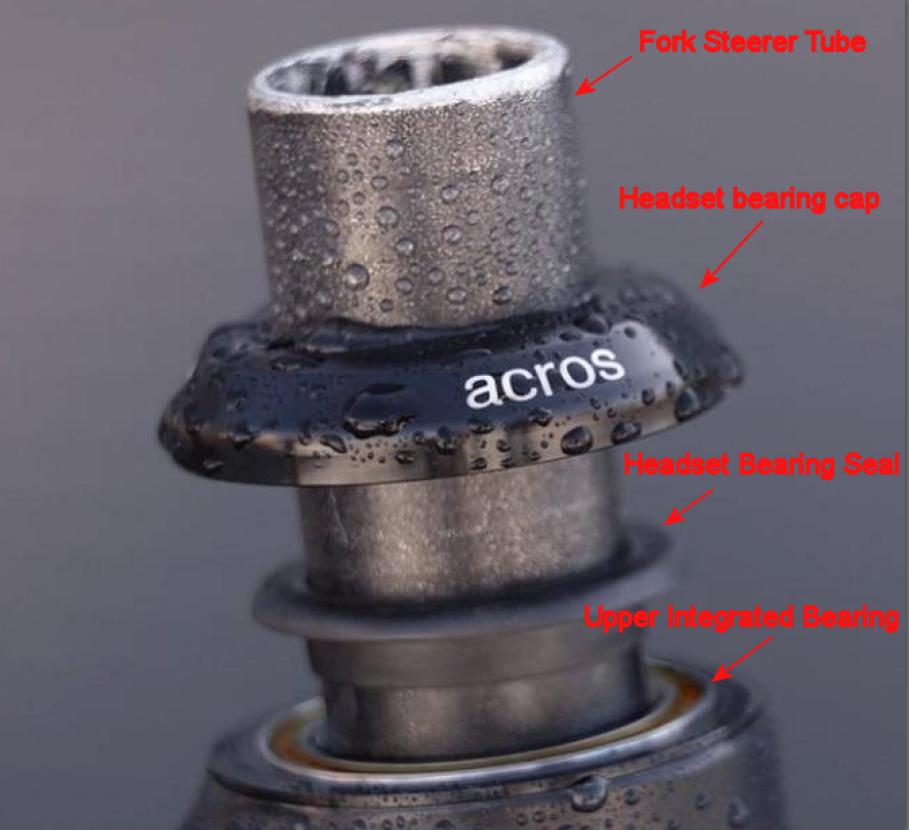
Your lower headset bearing may come off with the fork or remain inside the lower headtube bearing cup. Remove the lower bearing if it remains in the frame. During the re-installation process, you want to inspect your headset bearings and repack with grease if needed.
6) Using a light, shine the light inside the headtube. You will see the dropper cable housing and the EW-SD50 cable. You will notice they are held to the inside wall of the frame headtube by two loops molded into the inside wall of the frame headtube. These loops prevent the EW-SD50 wire and dropper post cable housing from coming into contact with the fork steerer tube and damaging the wire and or housing while riding.
7) The EW-SD50 wire and dropper post cable housing exit the headtube via a small port in the headtube wall. The EW-SD-50 cable's large leads prevent the EW-SD50 cable from being removed from the headtube unless the dropper cable housing has first been moved out of the way. Why Orbea didn't design the left port like the right port side is a design mistake.
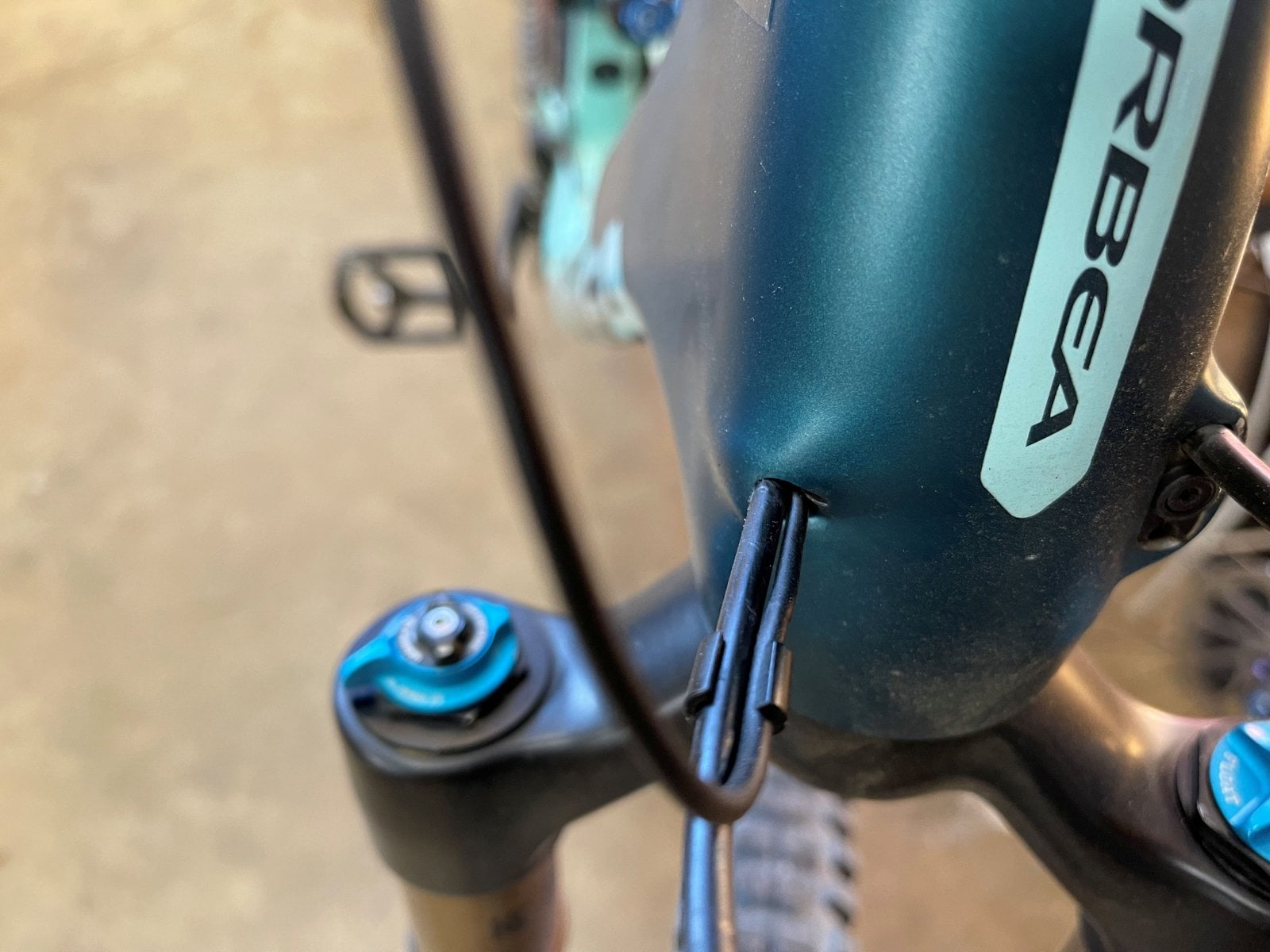
8) Begin the process of slowly backing the dropper post cable housing into the headtube and just slightly into the inside of the headtube. Do not push the dropper post cable housing past the small molded retainer loop. This will clear the headtube port so that the EW-SD50 cable can be removed from the EW-AD305 adapter and removed from the bike via the headtube port. The EW-SD300 cable which is attached to the other end of the EW-AD305 adapter can be routed through the cleared headtube port.
To begin the process of pushing the dropper post cable housing into the headtube, you first have to loosen the seat post clamp. Slowly pull upwards on the dropper post. Using your fingers, keep tension on housing and cable at the same time. Do this because you want to prevent the dropper cable from becoming accidentally disconnected from the bottom of the dropper post. If this does occur, simply remove the dropper post and re-connect the cable. Slowly pull the dropper post up until the housing has just cleared the inside of the headtube.
9) Inside the downtube will be a foam wrapped bundle of wires. The exact location of the bundle varies from bike to bike. Mine was at the junction of the downtube and headtube. I've heard of others being tucked farther into the downtube. The foam bundle will have a small zip tie holding the bundle tightly together. Within the bundle will be a few feet of EW-SD300 wire, which runs from the motor to the adapter, EW-AD305 adapter, and the EW-SD50 wire which runs from the adapter to the EW-EN100 junction box.
Slowly pull on the EW-SD50 wire until the foam bundle appears and has been brought up into the headtube. Cut the zip tire and remove it. Note the EW-SD300 and EW-SD50 wires are fragile and can be damaged if haphazardly pulled or pushed on. Orbea provides a Shimano wire removal/installation tool with each bike. If you were wondering what that odd looking thing in the bike packet is, it's the Shimano wiring tool. Use it to safely remove and install wires.
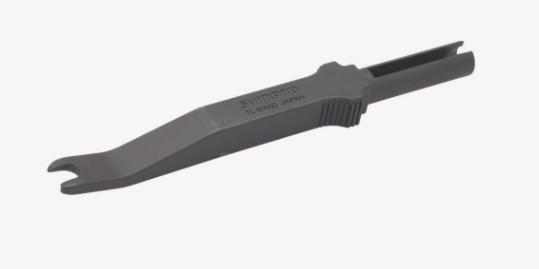
10) With the bundle pulled up into the headtube, remove the EW-SD50 wire from the adapter and completely remove it from the bike. Remove the EW-SD300 wire from the other side of the EW-SD305 adapter. Place the adapter off to the side. It will be needed during the SC-EM800 display installation process. The EW-SD300 wire from the motor has a few feet or extra length or about 60 centimeters for my European friends. As a side note, you guys need to stop this metric nonsense...
Push the EW-SD300 wire through the molded retaining loop located on the inside wall of the headtube and out the head tube port. You want to pull enough wire through so that it will reach the SC-EM800 computer display when it is mounted on the handlebar. You may have some additional length of EW-SD300 wire left over. If you want, you can coil it up, wrap it back in the foam padding, zip tie it, and tuck it back into the downtube for safe keeping.
Begin The Re-Installation Process
11) Hold the dropper post cable housing and cable at the same time with your fingers. Hold both the housing and cable firmly. You want to prevent the housing from sliding away from the bottom of the dropper post. If it does, the cable may become disconnected from the bottom of the dropper post. If this does happen, no biggie, remove the dropper post and re-attach the cable. With tension on the housing and cable, slowly pull on the dropper housing while inserting your dropper post downwards into the seat tube. Feed the dropper housing through the headtube port. If you have accidentally pulled the dropper post housing too far into the headtube and out of the retaining loop, then feed the housing first it through the retaining loop on the inner headtube wall, before inserting it through the head tube port.
12) Insure that the EW-SD300 wire and dropper post cable housing and secure in their retaining loops and not bulging out into the headtube. If they are, they will rub on the fork steerer tube when it is installed. Eventually this may damage the wire, score the steerer tube, or ruin the dropper cable housing.
13) With a rag, clean the lower headtube integrated bearing cup. Apply some grease to the bearing cup. Inspect the lower headset bearing. The bearing should spin smoothly and easily. You should not feel any grinding or bumpiness as you spin the bearing. Grinding/bumpiness indicates a damaged, dirty and or, lack of lubrication bearing. If the bearing is damaged, it will need to be replaced. If the bearing is simply dry or dirty, you can easily clean and repack a headset bearing with grease. Refer to this great YouTube video:
14) Examine the lower headset seal which will be found pressed onto the fork crown for damage. If the rubber seal has been damaged, the lower seal will need to be replaced. If no seal damage is noted, clean the seal with a rag and apply a light coating of grease onto the rubber seal.
15) After inspecting your lower headset bearing, apply a film of grease to the exterior of the bearing. Note that the lower bearing has a chamfered angle on one side the bearing. The chamfered/angled side of the bearing is inserted upwards into the lower integrated frame bearing cup.
16) Inspect your upper headset bearing. Clean the bearing, the headset cap and seal. Apply a coating of grease to the upper integrated bearing cup and upper headset bearing. Apply a light coating of grease to the rubber areas on the upper headset seal and cap.
17) Insert the fork steerer tube into the headset. With the fork steerer tube fully inserted, slide the headset upper seal and upper headset bearing cap onto the steerer tube.
18) Insert your stem spacers in their correct orientation onto the fork steerer tube. Install your stem on the fork steerer tube. Installed the stem top cap and bolt. Lightly tighten the stem clamping screws to keep the stem from twisting and turning.
19) Re-attach the brake hose and clamp to the fork. Re-attach your brake caliper to the fork with the two caliper screws.
20) Remove the spacer block from the brake caliper and Install your front wheel on the fork.
21) Take your bike off the bike stand. Loosen the stem clamping screws. Center your front wheel and stem. Tighten the stem top cap until all play has been removed from the headset. Torque your stem clamp bolts to the correct torque. Tighten your stem top cap. Note: The stem top cap sets headset preload. The stem clamping screws secure the stem to the fork steerer tube. You don't need to crank down tightly on the stem top cap. Here is a YouTube video detailing how to adjust headset play.
22) With everything fully mounted on the bike, loosen the two front brake caliper screws. Apply the front brake while at the same time tightening the two brake caliper screws. This should center the brake caliper over the rotor. If you experience a slight rubbing noise as you spin the front wheel, you will need to loosen the screws and manually adjust the caliper until until it stops rubbing.
23) The SC-EM800 display will come with two clamps, a 35mm clamp and a smaller clamp for smaller diameter bars. Install the correct clamp on the display. Install the SC-EM800 display on your handlebar.
24) Take the EW-SD50 wire lead coming from the mode selector switch and install it into into one side of the EW-AD305 adapter. Take the 150mm length EW-SD300 cable you purchased and install it into the other side of the adapter. Plug the other end of the 150mm long EW-SD300 cable into the SC-EM800 display.
25) Take the EW-SD300 cable coming out of the headtube port and plug it into the SC-EM800 display.
26) Secure the wring to prevent it from getting snagged on a branch and killing your bike.
27) Turn your bike on and check the display for function. Adjust display settings and do any firmware updates as needed.
28) Get out on the trail and ride.
Note: You have several options for running the wiring to and from the SC-EM800 display and mode selector switch. You can use silicone bands to attach the wires to the handlebars. You can use electrical shrink tubing to secure the wiring to the cable housing and run it to the display. You can buy handlebars which are made so that the wiring can run inside the handlebar. Here are examples of using the rubber band and electrical shrink tubing methods:
I hope you have enjoyed this tech article. My fingers are cramping....If you have any questions, shoot me a message and I can help you out.
Wiring is attached to the cable housing with electrical shrink tubing. This method provides a clean look and prevents your cables from flopping around as you ride. As a side note, my buddy has the same color Rise as my bike. I have a SC-E7000 display, he has a SC-EM800 display. Both the EM800 and E7000 are extremely difficult to find in the United States, everything is sold out. He bought his from a vendor in Germany via eBay.
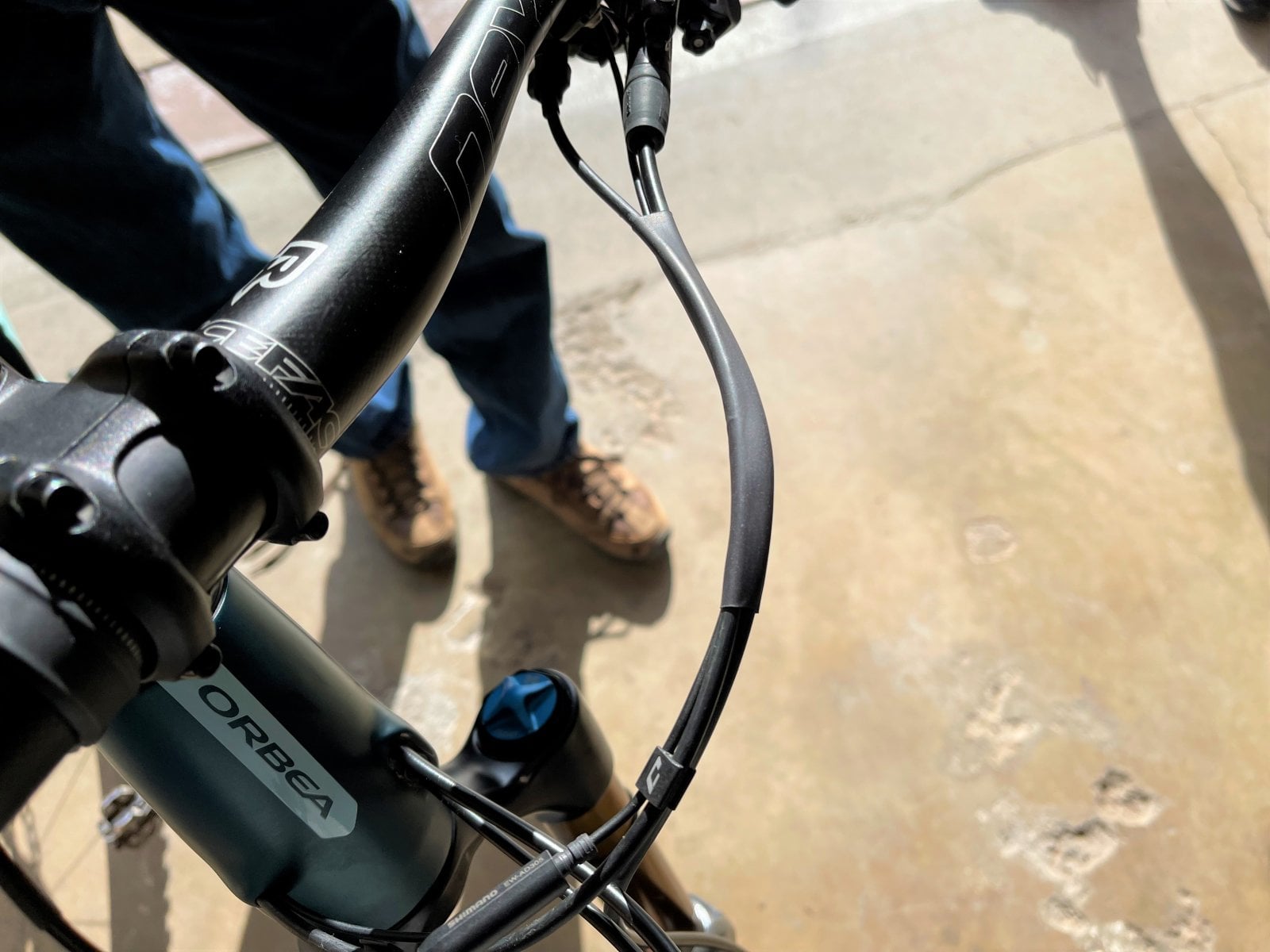
Wires attached to the handlebar with silicone rubber bands purchased off of Amazon. I now have 1,000 miles/1,609 kilometers on my Rise and none of the bands have broken. This method has also worked well.
Installing the SC-EM800 definitely a pain in the ass and requires a bit of fiddling work to install. However, you do not have to cut the EW-SD50 wire. Here is my process for installing the SC-EM800, should anybody wish to install it, instead of installing the SC-E7000 display.
Notes:
A) Preserve the short EW-SD50 wire that formerly went from the EW-AD305 adapter to one end of the EW-EN100. Do not cut and remove it. You want to keep this wire and the EW-EN100 in your riding kit. If you take a bad fall and break the SC-EM800 display, your bike will not work. If you have the EW-SD50 wire and EW-EN100 with you, you can quickly bypass the broken display by re-installing the items and get your badass self back on the trail. For those viewing this post, I've attached pictures of the items for reference.
B) You will need to purchase a 150mm length (Shortest length offered by Shimano) EW-SD300 cable to complete the SC-EM800 installation. You will also need the EW-AD305 adapter located inside the downtube, where it meets at the headtube.
C) Below I've detailed how to install the SC-EM800 using the EW-AD305 adapter located inside the downtube which requires removing the front fork. However, if you are not mechanically inclined, or simply don't want to mess around with dropping the fork, there is an alternative method which will require additional purchase or parts. The SC-EM800 color display only accepts EW-SD300 wire inputs. If you buy the items listed below, you can install the SC-EM800 color display on your Rise as a direct plug and play without having to do any mechanical work. One adapter and EW-SD300 wire will convert the EW-SD50 wire coming out of the headtube and the second adapter and EW-SD300 wire will convert the mode selector switch EW-SD-50 wire. Because you will extend the wiring length by approximately 150mm or 5.90 inches, this will leave you with an excess length of wire at the handlebar which will require a bit of creative management.
Buy Two, 150mm EW-SD300 cables
Buy Two, EW-AD305 adapters
EW-SD50 wire (Formerly went from EW-AD305 adapter to EW-EN100)
EW-AD305 (Found inside frame at downtube, near headtube junction)
EW-EN100 Junction Box (Found mounted to the dropper post cable housing on the front of bike)
Installation Process:
1) Place your Rise frame in a bike stand. The dropper post must be free and clear, and not clamped in the bike stand. Take a pencil and mark your dropper post height at the seat post clamp. During the display installation process, you will need to remove the dropper post from the frame. The pencil mark allows you to reinstall the dropper post back to the correct height.
2) Remove the EW-EN100 junction box from the front of the bike.
3) Remove the dropper cable housing and cable from the dropper seat post lever. To do this, you will need to remove the cable crimp at the end of the cable. If the dropper post cable housing is attached to the brake hose housing via zip ties or clamps at the front of the bike, free it up.
4) Note, this part is not required, but makes the installation process easier. Remove the two bolts holding your front brake caliper to the fork. Place a spacer block firmly between the two brake pads on the caliper. This will keep the caliper pistons from being accidentally actuated. Remove the fork brake hose clamp. The clamp screw is small, I like to re-thread it onto the fork to prevent it from becoming lost. Remove your front wheel from the fork.
5) Loosen the stem bolts. Loosen and completely remove the stem top cap. Remove the fork completely from the frame and place it off to the side so it doesn't get damaged. Pay attention to your stem spacers, their sizes, and if they are above or below the stem. A picture taken with your phone helps. You want to reinstall the spacers in the correct orientation when you re-install the fork and stem.
Note: Because the stem bolts have been loosened and the stem top cap has been removed, it is possible for the fork to fall out of the frame when you remove the stem top cap. Normally it will take a slight bit of tapping with your hand or rubber mallet to get the fork steerer tube past the headset bearings. Just in case however, keep a hand on the fork so it doesn't accidentally drop out of the frame and become damaged by hitting the floor.
6) When you remove the fork from the headtube, the upper headset bearing cap and seal will come off. The Rise comes with an Acros Integrated Headset. The upper headset bearing may also come out, but will likely stay in the frame's integrated bearing cup. Remove the upper headset bearing from the frame by grabbing it with your fingers and rock it back and forth until it comes out. Place you headset items off to the side so they don't accidentally get knocked about and lost.
With a rag, clean out the upper integrated bearing cup.
Your lower headset bearing may come off with the fork or remain inside the lower headtube bearing cup. Remove the lower bearing if it remains in the frame. During the re-installation process, you want to inspect your headset bearings and repack with grease if needed.
6) Using a light, shine the light inside the headtube. You will see the dropper cable housing and the EW-SD50 cable. You will notice they are held to the inside wall of the frame headtube by two loops molded into the inside wall of the frame headtube. These loops prevent the EW-SD50 wire and dropper post cable housing from coming into contact with the fork steerer tube and damaging the wire and or housing while riding.
7) The EW-SD50 wire and dropper post cable housing exit the headtube via a small port in the headtube wall. The EW-SD-50 cable's large leads prevent the EW-SD50 cable from being removed from the headtube unless the dropper cable housing has first been moved out of the way. Why Orbea didn't design the left port like the right port side is a design mistake.
8) Begin the process of slowly backing the dropper post cable housing into the headtube and just slightly into the inside of the headtube. Do not push the dropper post cable housing past the small molded retainer loop. This will clear the headtube port so that the EW-SD50 cable can be removed from the EW-AD305 adapter and removed from the bike via the headtube port. The EW-SD300 cable which is attached to the other end of the EW-AD305 adapter can be routed through the cleared headtube port.
To begin the process of pushing the dropper post cable housing into the headtube, you first have to loosen the seat post clamp. Slowly pull upwards on the dropper post. Using your fingers, keep tension on housing and cable at the same time. Do this because you want to prevent the dropper cable from becoming accidentally disconnected from the bottom of the dropper post. If this does occur, simply remove the dropper post and re-connect the cable. Slowly pull the dropper post up until the housing has just cleared the inside of the headtube.
9) Inside the downtube will be a foam wrapped bundle of wires. The exact location of the bundle varies from bike to bike. Mine was at the junction of the downtube and headtube. I've heard of others being tucked farther into the downtube. The foam bundle will have a small zip tie holding the bundle tightly together. Within the bundle will be a few feet of EW-SD300 wire, which runs from the motor to the adapter, EW-AD305 adapter, and the EW-SD50 wire which runs from the adapter to the EW-EN100 junction box.
Slowly pull on the EW-SD50 wire until the foam bundle appears and has been brought up into the headtube. Cut the zip tire and remove it. Note the EW-SD300 and EW-SD50 wires are fragile and can be damaged if haphazardly pulled or pushed on. Orbea provides a Shimano wire removal/installation tool with each bike. If you were wondering what that odd looking thing in the bike packet is, it's the Shimano wiring tool. Use it to safely remove and install wires.
10) With the bundle pulled up into the headtube, remove the EW-SD50 wire from the adapter and completely remove it from the bike. Remove the EW-SD300 wire from the other side of the EW-SD305 adapter. Place the adapter off to the side. It will be needed during the SC-EM800 display installation process. The EW-SD300 wire from the motor has a few feet or extra length or about 60 centimeters for my European friends. As a side note, you guys need to stop this metric nonsense...
Push the EW-SD300 wire through the molded retaining loop located on the inside wall of the headtube and out the head tube port. You want to pull enough wire through so that it will reach the SC-EM800 computer display when it is mounted on the handlebar. You may have some additional length of EW-SD300 wire left over. If you want, you can coil it up, wrap it back in the foam padding, zip tie it, and tuck it back into the downtube for safe keeping.
Begin The Re-Installation Process
11) Hold the dropper post cable housing and cable at the same time with your fingers. Hold both the housing and cable firmly. You want to prevent the housing from sliding away from the bottom of the dropper post. If it does, the cable may become disconnected from the bottom of the dropper post. If this does happen, no biggie, remove the dropper post and re-attach the cable. With tension on the housing and cable, slowly pull on the dropper housing while inserting your dropper post downwards into the seat tube. Feed the dropper housing through the headtube port. If you have accidentally pulled the dropper post housing too far into the headtube and out of the retaining loop, then feed the housing first it through the retaining loop on the inner headtube wall, before inserting it through the head tube port.
12) Insure that the EW-SD300 wire and dropper post cable housing and secure in their retaining loops and not bulging out into the headtube. If they are, they will rub on the fork steerer tube when it is installed. Eventually this may damage the wire, score the steerer tube, or ruin the dropper cable housing.
13) With a rag, clean the lower headtube integrated bearing cup. Apply some grease to the bearing cup. Inspect the lower headset bearing. The bearing should spin smoothly and easily. You should not feel any grinding or bumpiness as you spin the bearing. Grinding/bumpiness indicates a damaged, dirty and or, lack of lubrication bearing. If the bearing is damaged, it will need to be replaced. If the bearing is simply dry or dirty, you can easily clean and repack a headset bearing with grease. Refer to this great YouTube video:
14) Examine the lower headset seal which will be found pressed onto the fork crown for damage. If the rubber seal has been damaged, the lower seal will need to be replaced. If no seal damage is noted, clean the seal with a rag and apply a light coating of grease onto the rubber seal.
15) After inspecting your lower headset bearing, apply a film of grease to the exterior of the bearing. Note that the lower bearing has a chamfered angle on one side the bearing. The chamfered/angled side of the bearing is inserted upwards into the lower integrated frame bearing cup.
16) Inspect your upper headset bearing. Clean the bearing, the headset cap and seal. Apply a coating of grease to the upper integrated bearing cup and upper headset bearing. Apply a light coating of grease to the rubber areas on the upper headset seal and cap.
17) Insert the fork steerer tube into the headset. With the fork steerer tube fully inserted, slide the headset upper seal and upper headset bearing cap onto the steerer tube.
18) Insert your stem spacers in their correct orientation onto the fork steerer tube. Install your stem on the fork steerer tube. Installed the stem top cap and bolt. Lightly tighten the stem clamping screws to keep the stem from twisting and turning.
19) Re-attach the brake hose and clamp to the fork. Re-attach your brake caliper to the fork with the two caliper screws.
20) Remove the spacer block from the brake caliper and Install your front wheel on the fork.
21) Take your bike off the bike stand. Loosen the stem clamping screws. Center your front wheel and stem. Tighten the stem top cap until all play has been removed from the headset. Torque your stem clamp bolts to the correct torque. Tighten your stem top cap. Note: The stem top cap sets headset preload. The stem clamping screws secure the stem to the fork steerer tube. You don't need to crank down tightly on the stem top cap. Here is a YouTube video detailing how to adjust headset play.
22) With everything fully mounted on the bike, loosen the two front brake caliper screws. Apply the front brake while at the same time tightening the two brake caliper screws. This should center the brake caliper over the rotor. If you experience a slight rubbing noise as you spin the front wheel, you will need to loosen the screws and manually adjust the caliper until until it stops rubbing.
23) The SC-EM800 display will come with two clamps, a 35mm clamp and a smaller clamp for smaller diameter bars. Install the correct clamp on the display. Install the SC-EM800 display on your handlebar.
24) Take the EW-SD50 wire lead coming from the mode selector switch and install it into into one side of the EW-AD305 adapter. Take the 150mm length EW-SD300 cable you purchased and install it into the other side of the adapter. Plug the other end of the 150mm long EW-SD300 cable into the SC-EM800 display.
25) Take the EW-SD300 cable coming out of the headtube port and plug it into the SC-EM800 display.
26) Secure the wring to prevent it from getting snagged on a branch and killing your bike.
27) Turn your bike on and check the display for function. Adjust display settings and do any firmware updates as needed.
28) Get out on the trail and ride.
Note: You have several options for running the wiring to and from the SC-EM800 display and mode selector switch. You can use silicone bands to attach the wires to the handlebars. You can use electrical shrink tubing to secure the wiring to the cable housing and run it to the display. You can buy handlebars which are made so that the wiring can run inside the handlebar. Here are examples of using the rubber band and electrical shrink tubing methods:
I hope you have enjoyed this tech article. My fingers are cramping....If you have any questions, shoot me a message and I can help you out.
Wiring is attached to the cable housing with electrical shrink tubing. This method provides a clean look and prevents your cables from flopping around as you ride. As a side note, my buddy has the same color Rise as my bike. I have a SC-E7000 display, he has a SC-EM800 display. Both the EM800 and E7000 are extremely difficult to find in the United States, everything is sold out. He bought his from a vendor in Germany via eBay.
Wires attached to the handlebar with silicone rubber bands purchased off of Amazon. I now have 1,000 miles/1,609 kilometers on my Rise and none of the bands have broken. This method has also worked well.
Last edited:
I think your reply confirms that you cannot remove the SD50 cable without removing the dropper post cable. I chose not to do so and just cut the SD 50 cable to remove it. I don't need the cable but a replacement cable cost about £20. I have already completed the job and very happy with the new colour display. I see no point in carrying around an SD50 cable and the original en-100 unit just in case the display breaks. The bike can be ridden without the motor with very little effort.
One thing i did different which deletes the need to deal with adjusting the brake callipers is that I removed the front brake lever and gear adjustment lever from the handle bar and separated them which is one screw. This allows the front fork separation to be complete.
I got my display sc-em800 on eBay for quite a good deal but this one is even better than what i paid.

Rod B.
E*POWAH Master
- Thread starter
- #55
Nebo1ss,
I posted a separate SC-EM800 installation guide and mentioned your name and added your suggestion on removing the front brake lever instead of the caliper.
For my bike it won’t work because I use heat shrink tubing to keep my brake and cable housings together on the front of my bike. I could remove the heat shrink, but to reinstall the heat shrink, I’d need to remove the dropper post cable housing and brake hose at the lever. It’s just easier for me to remove the caliper.
I checked the UK eBay website. I can’t believe all the Shimano parts you guys have available. Absolutely everything Shimano related is sold out here in the states. Will be doing a bit of shopping on the UK version. Thank you.
Rod
I posted a separate SC-EM800 installation guide and mentioned your name and added your suggestion on removing the front brake lever instead of the caliper.
For my bike it won’t work because I use heat shrink tubing to keep my brake and cable housings together on the front of my bike. I could remove the heat shrink, but to reinstall the heat shrink, I’d need to remove the dropper post cable housing and brake hose at the lever. It’s just easier for me to remove the caliper.
I checked the UK eBay website. I can’t believe all the Shimano parts you guys have available. Absolutely everything Shimano related is sold out here in the states. Will be doing a bit of shopping on the UK version. Thank you.
Rod
Thanks for this post, the most complete source of information about thus subject anywhere, i'm installing the EM800, how am i going to get the cable thru the port after removing the SD50 ? do i have to remove the dropper cable first ? it's all very narrow, i cannot find a wayI recently installed a Shimano SC-E7000 display on my Rise. When researching the project, I found there wasn't much information available online on how to install a Shimano display on an Orbea Rise. I thought I would post my thoughts and experiences on the matter to help others who are also thinking of installing a display on their bikes. The installation process is relatively simple, however there are some things you need to know before you begin the installation. I am not a professional mechanic, so I apologize in advance if I get any terminology wrong.
Shimano motors, components, displays, and cables are not all compatible with each other. You cannot buy just any Shimano computer display for the Rise. Some displays will work with the Rise's EP8 motor, and some won't. Shimano has an eBike component compatibility chart on it's website. You can check to see which computer display or any other electronic component is compatible with your Rise's EP8 motor before purchasing it. 2021-2022 SHIMANO Product Information Web
To simplify things, know that Shimano computer displays "SC-E7000" which has a black and white display and the "SC-EM800" which has a color display, will work with your Rise EP8 motor.
The SC-E7000 installation is a straight forward remove and replace procedure. If you wish to use the SC-EM800 color display, the installation will be a bit more involved and require you to purchase a new mode controller switch identified as the "SW-EM800." I will go into more detail below on each display and what is required to install each display.
Shimano uses several types of electronic cables for it's eBike control systems. The EW-SD50 cable and the EW-SD300 cable. The EW-SD50 is an older cable version and identified by it's thicker housing. The EW-SD300 is a newer version and identified by a thin housing. The two cables are not compatible with each other. That's because each cable type uses a different style of connection lead.
Shimano computer displays will only accept one type of connection lead or the other, but not both. As an example, the SC-E7000 will only accept EW-SD50 cable connections. The SC-EM800 will only accept EW-SD300 cable connections. There are other display options which will work with the EP8 motor, however I did not research them. Be sure to check the compatibility chart before making a purchase.
Shimano EW-SD50 Cable. Compare the leads of the SD50 against that of the SD300 cable depicted below.
View attachment 69775
Shimano Ew-SD300 Cable
View attachment 69776
My bicycle and most 2021 Rise bicycles came from the factory with a SW-EM7000L handlebar mount mode controller switch. A picture of the SW-E7000 mode controller is seen depicted below. Note that the controller is hard wired with EW-SD50 cable. Because the controller is hardwired with EW-SD50 cable, you will need to use the Shimano SC-E7000 display which accepts EW-SD50 cable connections.
SW-EM7000 L Mode Controller Switch
View attachment 69777
NOTE: If you wish to use the newer color version Shimano display, SC-EM800, you will need to change the mode controller switch. The SC-EM800 color display only accepts EW-SD300 cable connections. The SW-EM7000L controller which comes on your Rise has a EW-SD50 cable connection and will not work with the SC-EM800 display. You will need to change the mode controller to the SW-EM800 which has EW-SD300 cable connections and is compatible with the SC-EM800 display.
2021 RISE CABLE ROUTING:
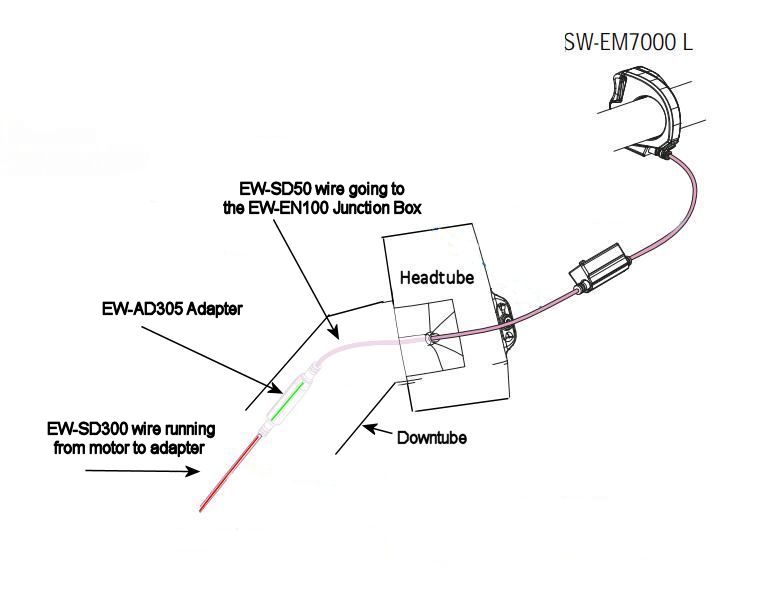
The below wiring diagram was obtained from the Orbea Rise "Bluebook" manual and depicts the wiring used on current 2021 Rise models.
An EW-SD300 wire travels from the EP8 motor up the down tube and into the head tube. The EW-SD300 wire is about five feet long. Orbea wraps the EW-SD300 cable length that is not used in foam padding and zip ties it into a bundle. The cable bundle is placed in the junction where the down tube and head tube meet.
At the end of the EW-SD300 cable (Inside the headtube) Orbea uses a Shimnano EW-AD305 adapter. The adapter allows the EW-SD300 cable to be connected to a EW-SD50 cable. The EW-SD50 cable exits the head tube via a cable port and connects to the EW-EN100 junction, aka Little Black Box. The EW-EN100 junction only accepts EW-SD50 cable connections. The Shimano SW-EM7000 mode controller with it's EW-SD50 cable connects to the other side of the EW-EN100 junction.
View attachment 69753
The SC-E7000 display installation:
The SC-E7000 computer runs approximately $150. It comes with two handlebar adapters for use with standard and 35mm handlebar diameters. The display screen on the SC-E7000 computer is black and white. On the main screen, the computer will tell you your battery level, mode you are in and speed. There are several other sub screens you can go to and will give you accumulated bike mileage, ride mileage, etc. Interestingly, I'd ridden my Rise about 200 miles before switching to the SC-E7000 display. The previous miles were automatically downloaded from the motor to the display.
To install the SC-E7000 display requires nothing other than mounting the display on the handlebar, removing the EW-EN100 junction and plugging the EW-SD50 wires from the mode controller and the wire coming out of the head tube into the computer display ports. You will need to pair the display to your bike via Bluetooth.
Use one of the cable clips or a small zip tie to attach the EW-SD50 cable where it exits the head tube port to the dropper cable housing. This will help minimize chaffing.
I purchased small black silicone bands on Amazon and used them to secure the cable to the handlebar. The wire running from the mode controller switch will barely reach the display mounted to the right of the stem. The EW-SD50 cable coming out of the headtube isn't a problem. Make sure enough cable exits the head tube to loop up into the display's connection port. The cable does not need to be fastened to anything. Refer to my pictures below.
Shimano does make silicone rubber bands specifically designed to attach cables to handlebar or frame tubes. Unfortunately, you cannot buy them separately. They only come in a package with the mode controller. I have seen them sold separately on eBay, however they are pricey. I imagine if you checked with your local bike shop, they might have some spares available for sale. I found the black silicone bands on Amazon, work equally as well and are unobtrusive on the handlebar.
SC-EM800 Display
The SC-EM800 display costs about $200 on the web, providing you can find it. I have seen several on eBay, but they come from Europe. The SC-EM800 has a color screen display and Bluetooth function. The screen display is slightly larger than that of the SC-E7000.
As I've previously mentioned, the SC-EM800 display is only setup to accept only the newer EW-SD300 cable connection. The ports will not accept a EW-SD50 cable connection. Your Rise comes from the factory with a Shimano SW-EM7000 controller which is hardwired with a EW-SD50 cable. To the best of my knowledge, Shimano does not make an adapter which will allow you to plug a EW-SD50 cable into a EW-SD300 port and allow you to use the SW-EM7000 controller. You will need to buy a SW-EM800 mode controller switch which has a EW-SD300 wired connection and will plug into the SC-EM800 display connection ports.
The Orbea Rise "Bluebook" manual has a diagram which depicts the SW-EM800 controller in relation to the SC-EM800 display.
View attachment 69764
Installing the SC-EM800 display requires a bit more work to install. You will need to drop your fork steerer tube out of the headtube in order to gain access to the EW-SD300 cable and EW-AD305 adapter on the end of the EW-SD300 cable.
Once you have removed your fork steerer tube, reach into the downtube/headtube junction and gently pull the EW-SD300 cable bundle out of the down tube. Do not yank and damage the cable, they are delicate. When the EW-SD300 cable comes out of the tube, it will be wrapped in foam and zip tied. Cut the zip tie and untangle the EW-SD300 cable. Remove the adapter from the end of the cable, you will no longer need it.
Measure out approximately eight to ten inches or so of free EW-SD300 cable. The length depends on handlebar, stack height, etc. It doesn't have to be exact. The remainder EW-SD300 cable you must re-wrap in the foam and zip tie. Tuck it back into the downtube so it won't rub on the steerer tube. Feed the remaining loose end of the EW-SD300 cable through the head tube port. Re-install your fork steerer tube, stem and handlebar.
Plug the end of the EW-SD300 cable coming out of the head tube and into one of display's four ports. Save the port farthest to the left for the mode controller switch cable which will come in from the left side of the handlebar. Remove your handlebar grip on the left side and slide the new SW-EM800 controller onto the bar. I use a 800mm OneUp carbon bar. In order for the mode controller cable to reach the display, I had to mount the controller to the right of my SRAM G2 brake lever. I have fairly large hands, so it isn't an issue to reach the controller with my thumb. If you run a smaller bar, it shouldn't be an issue to run the mode controller to the left of the brake lever and still reach the display with the cable. You should experiment with moving the controller to various spots on the bar and make sure the cable will reach the display before firmly attaching everything.
Reuse one of the cable clips or a small zip tie to attach the EW-SD300 cable where it exits the head tube port to the dropper cable housing. This will help minimize chaffing.
I hope this helps you and I didn't totally confuse everyone in the house. I sincerely hope you find it useful. I apologize in advance for any mistakes I've made. If you have any questions, shoot me a message and I'll help you out the best I can.
View attachment 69765View attachment 69766View attachment 69767View attachment 69768View attachment 69769View attachment 69770View attachment 69771
View attachment 69772
View attachment 69763
i got the answer, patience, a lot more patience, and wiggling, in the end i used a small allen key to wiggle/push the dropper cable by a couple of tenths of mm to make sure it was completely snug against the frame, liberating JUST enough space, it's really a mather of tenths of mm, no more, so that the thicker part of the connector got thru, yes it's still narrower than the SD50 it replaces, but im sure orbea puts the electric cabling thru first, then the dropper cable.
Rod B.
E*POWAH Master
- Thread starter
- #58
Thanks for this post, the most complete source of information about thus subject anywhere, i'm installing the EM800, how am i going to get the cable thru the port after removing the SD50 ? do i have to remove the dropper cable first ? it's all very narrow, i cannot find a way
Moots,
To install a SC-EM800 display on your Rise, you must drop the front fork from the headtube. You must also push the dropper post cable housing out of the headtube port opening. The SD50 cable lead cannot be removed nor the SD300 cable lead inserted through the headtube port opening without first backing the dropper post cable out of the headtube port opening. The wire has to be installed first, then the dropper post cable housing.
It is critical that you avoid the dropper post cable accidentally disconnecting from the dropper post while removing the dropper cable housing from the headtube port opening. If slack in the dropper cable occurs, the cable wire's end nib may disconnect from the dropper post's actuator arm. If this occurs, you will likely have to drop the motor to remedy the cable housing and wire disconnect problem. Keep in mind, it's not the end of the world if you have to drop the motor. It's a simple process to drop the motor, but it does require a few tools to do so.
Here is a recent post where I assisted a forum user who accidentally did have his dropper post cable disconnect from the dropper post during his SC-EM800 display installation. In the post I detail how to avoid the dropper cable disconnecting and how to go about dropping the motor.

Motor drop guidance? - EMTB Forums
In attempting to install a SC - EM800 display, my dropper post cable housing is stuck and I will need to drop the motor to get access to it. Is it possible to drop the motor enough to access the dropper cable housing without taking off the crank? If I have to remove the crank and crank arms...
 www.emtbforums.com
Here is an excerpt from my conversation with the forum user, I hope you find it useful. If you have any issues, please feel free to send me a message and I will help you out.
Excerpt:
Issue One: I’ve covered the SC-EM800 display installation in a separate post, however, know that you must access the SD300 wire bundle typically located in the downtube. Remove the SD50 wire jumper and AD305 adapter. Push approximately eight inches/205mm of SD300 wire out of the head tube and over to the SC-EM800 display mounted on the handlebar. The remainder of the SD300 wire is bundled back up in the foam pad and tucked back into the downtube. In order to pass the SD300 wire lead through the headtube port, you must back the dropper cable housing out of the head tube port. The SD300 wire's lead will not fit through the port if the dropper cable housing in the port. The SD300 wire has to be installed first, then the dropper post cable housing last.
There are “U” loops molded into the inner wall of the headtube to retain the wiring, cable housing and rear brake hose. The "U" loop keeps the items from rubbing on the steerer tube. During the routing of the SD300 wire through the inner headtube “U” loop and out the port, you’ve got your fingers jammed into the headtube to sort it out. The dropper post cable housing has been previously been pushed back out of the headtube port and into the headtube. IF you are not absolutely careful, the dropper housing can slide out of the retaining loop and may possibly retract down inside the downtube where it’s extremely difficult to retrieve without dropping the motor to push the housing back up. I would recommend that to be safe, take a length of thread/fishing line and tape it to the end of the dropper housing before you push it back through the headtube port. If the housing does accidentally slide down into the headtube, you can pull it back up using the thread.
Issue Two: This scenario is the most likely to occur. To push the dropper housing out of the headtube port, you have to release the wire cable wire and housing at the dropper post lever. When you do this, it completely loosens tension on the dropper cable. With tension released, the cable's nib end nib may become detached from the actuating lever on the base of the dropper post. With the nib detached from the dropper post, there is nothing to keep the housing attached to the dropper post.
Not knowing the cable has become detached, you complete the SC-EM800 display. You re-attach everything only to find your dropper post doesn’t work. You loosen the seat post clamp and pull up on the dropper post to see what the problem is. Out comes the dropper post, but the cable wire which detached from the dropper post and the housing itself, stay well down and out of reach inside the seat post tube and may require dropping the motor to gain access to it.
Note: The dropper cable housing bends sharply out of the downtube, up over the top of the motor and then makes another sharp bend up the seat tube. There is a lot of friction in this area and it makes pulling the cable housing back up difficult. I’ve tried removing the On/Off button to get access to the housing and shove it back up. It doesn’t help much. It’s quicker and easier to just drop the motor and sort things out.
Prevention: Prevent the dropper cable/housing disconnect issue from occurring in the first place. Before you begin the SC-EM800 installation, loosen the seat post clamp. Next loosen the cable clamp on the dropper post lever. Maintain very firm tension on the dropper cable with your fingers. Slowly pull the dropper post up and out of the seat tube while pushing/feeding the dropper cable housing through the head tube port. Maintain tension on the cable so it will not disconnect from the dropper post. Do this until the dropper cable housing has cleared the top of the seat post tube and the headtube port. Once the dropper cable housing has cleared the top of the seat post tube, you can now release tension on the cable and go about the display installation process.
Note: I like to have the dropper cable housing clear the seat post tube and not just the headtube port. This allows me to remove the dropper post and seat so they don't bang around and potentially damage the paint. Additionally, If you push/pull the cable housing clear of only the headtube port, the cable housing may still be too far down inside the seat tube where you cannot readily grab it with pliers or a "Mechanic's Fingers" type tool.
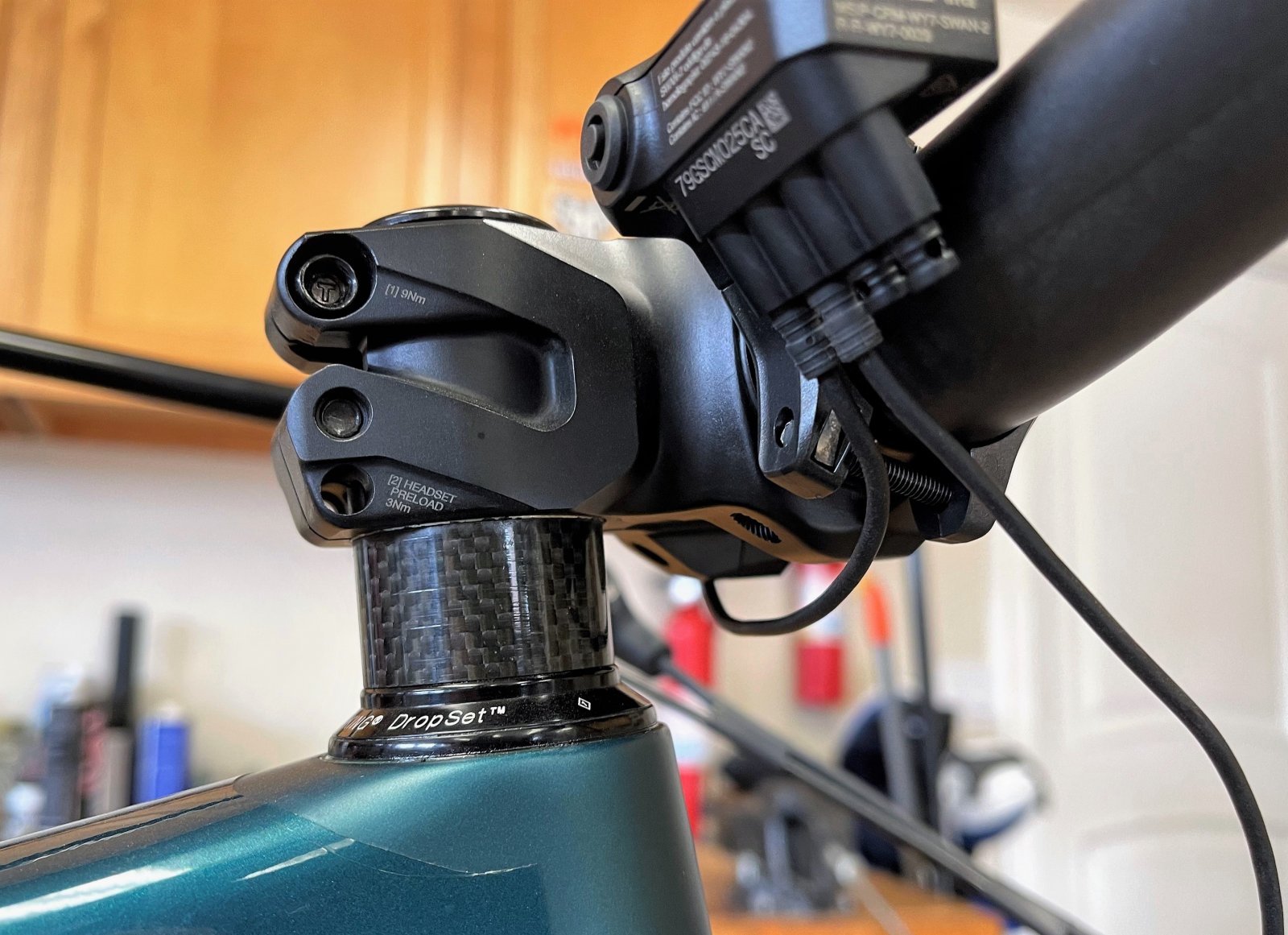
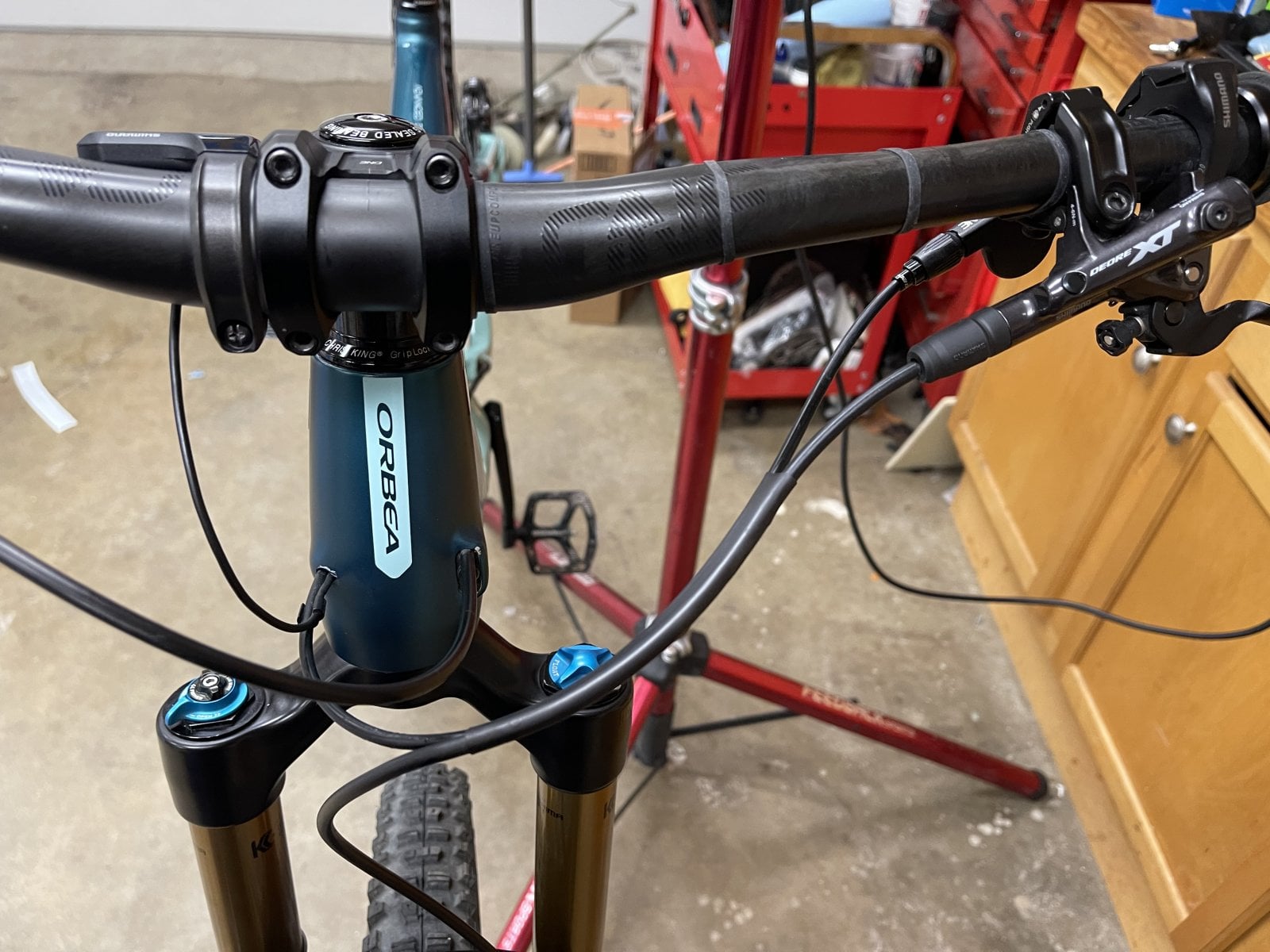
I have a SC-E7000 display on my Rise. Here is a picture of the headtube port with dropper cable and SD50 wire running through the port. Orbea engineers could have done a better design with the port.
you should have a web site of your own, nobody does this better !Moots,
To install a SC-EM800 display on your Rise, you must drop the front fork from the headtube. You must also push the dropper post cable housing out of the headtube port opening. The SD50 cable lead cannot be removed nor the SD300 cable lead inserted through the headtube port opening without first backing the dropper post cable out of the headtube port opening. The wire has to be installed first, then the dropper post cable housing.
It is critical that you avoid the dropper post cable accidentally disconnecting from the dropper post while removing the dropper cable housing from the headtube port opening. If slack in the dropper cable occurs, the cable wire's end nib may disconnect from the dropper post's actuator arm. If this occurs, you will likely have to drop the motor to remedy the cable housing and wire disconnect problem. Keep in mind, it's not the end of the world if you have to drop the motor. It's a simple process to drop the motor, but it does require a few tools to do so.
Here is a recent post where I assisted a forum user who accidentally did have his dropper post cable disconnect from the dropper post during his SC-EM800 display installation. In the post I detail how to avoid the dropper cable disconnecting and how to go about dropping the motor.
Motor drop guidance? - EMTB Forums
In attempting to install a SC - EM800 display, my dropper post cable housing is stuck and I will need to drop the motor to get access to it. Is it possible to drop the motor enough to access the dropper cable housing without taking off the crank? If I have to remove the crank and crank arms...
Here is an excerpt from my conversation with the forum user, I hope you find it useful. If you have any issues, please feel free to send me a message and I will help you out.
Excerpt:
Issue One: I’ve covered the SC-EM800 display installation in a separate post, however, know that you must access the SD300 wire bundle typically located in the downtube. Remove the SD50 wire jumper and AD305 adapter. Push approximately eight inches/205mm of SD300 wire out of the head tube and over to the SC-EM800 display mounted on the handlebar. The remainder of the SD300 wire is bundled back up in the foam pad and tucked back into the downtube. In order to pass the SD300 wire lead through the headtube port, you must back the dropper cable housing out of the head tube port. The SD300 wire's lead will not fit through the port if the dropper cable housing in the port. The SD300 wire has to be installed first, then the dropper post cable housing last.
There are “U” loops molded into the inner wall of the headtube to retain the wiring, cable housing and rear brake hose. The "U" loop keeps the items from rubbing on the steerer tube. During the routing of the SD300 wire through the inner headtube “U” loop and out the port, you’ve got your fingers jammed into the headtube to sort it out. The dropper post cable housing has been previously been pushed back out of the headtube port and into the headtube. IF you are not absolutely careful, the dropper housing can slide out of the retaining loop and may possibly retract down inside the downtube where it’s extremely difficult to retrieve without dropping the motor to push the housing back up. I would recommend that to be safe, take a length of thread/fishing line and tape it to the end of the dropper housing before you push it back through the headtube port. If the housing does accidentally slide down into the headtube, you can pull it back up using the thread.
Issue Two: This scenario is the most likely to occur. To push the dropper housing out of the headtube port, you have to release the wire cable wire and housing at the dropper post lever. When you do this, it completely loosens tension on the dropper cable. With tension released, the cable's nib end nib may become detached from the actuating lever on the base of the dropper post. With the nib detached from the dropper post, there is nothing to keep the housing attached to the dropper post.
Not knowing the cable has become detached, you complete the SC-EM800 display. You re-attach everything only to find your dropper post doesn’t work. You loosen the seat post clamp and pull up on the dropper post to see what the problem is. Out comes the dropper post, but the cable wire which detached from the dropper post and the housing itself, stay well down and out of reach inside the seat post tube and may require dropping the motor to gain access to it.
Note: The dropper cable housing bends sharply out of the downtube, up over the top of the motor and then makes another sharp bend up the seat tube. There is a lot of friction in this area and it makes pulling the cable housing back up difficult. I’ve tried removing the On/Off button to get access to the housing and shove it back up. It doesn’t help much. It’s quicker and easier to just drop the motor and sort things out.
Prevention: Prevent the dropper cable/housing disconnect issue from occurring in the first place. Before you begin the SC-EM800 installation, loosen the seat post clamp. Next loosen the cable clamp on the dropper post lever. Maintain very firm tension on the dropper cable with your fingers. Slowly pull the dropper post up and out of the seat tube while pushing/feeding the dropper cable housing through the head tube port. Maintain tension on the cable so it will not disconnect from the dropper post. Do this until the dropper cable housing has cleared the top of the seat post tube and the headtube port. Once the dropper cable housing has cleared the top of the seat post tube, you can now release tension on the cable and go about the display installation process.
Note: I like to have the dropper cable housing clear the seat post tube and not just the headtube port. This allows me to remove the dropper post and seat so they don't bang around and potentially damage the paint. Additionally, If you push/pull the cable housing clear of only the headtube port, the cable housing may still be too far down inside the seat tube where you cannot readily grab it with pliers or a "Mechanic's Fingers" type tool.
I have a SC-E7000 display on my Rise. Here is a picture of the headtube port with dropper cable and SD50 wire running through the port. Orbea engineers could have done a better design with the port.


(i managed to get the cable thru without removing the dropper cable, but next time i will just ask you first
the biggest mistake i made was ordering the SC EM8000, instead of the SC EM800 !!!, im getting the 800 next week, i found one in germany. no other site i visited has it in stock.
Rod B.
E*POWAH Master
- Thread starter
- #60
you should have a web site of your own, nobody does this better !
(i managed to get the cable thru without removing the dropper cable, but next time i will just ask you first
the biggest mistake i made was ordering the SC EM8000, instead of the SC EM800 !!!, im getting the 800 next week, i found one in germany. no other site i visited has it in stock.
Thank you, I appreciate the kind comments. I started posting the tech articles because I figured others were having the same problems I was having on my Rise. My next Rise tech article will be brake modifications. That's funny about the 8000 display, I did the very same thing. I special ordered the display from my local bike shop and couldn't get it to work. I didn't know there was a difference in displays. The numbering was confusing. Luckily my bike shop took it back. I managed to get my hands on a E7000 display before they all sold out. Everything SRAM and Shimano related is sold out in the USA. I would have preferred an EM800, it has a slightly larger screen which makes it easier to read while riding. My buddy obtained his EM800 from Germany also. If you ever have questions on a modification or gear item, shoot me a message.
Be safe,
Rod
