Navigation
Install the app
How to install the app on iOS
Follow along with the video below to see how to install our site as a web app on your home screen.
Note: This feature may not be available in some browsers.
More options
Style variation
You are using an out of date browser. It may not display this or other websites correctly.
You should upgrade or use an alternative browser.
You should upgrade or use an alternative browser.
Kiox 300, no navigation?
- Thread starter antoinelc
- Start date


Justinitus
Member
Yeah, a bit of a poor show really but apparently it’s coming. Along with other modules such as an alarm/tracker
Justinitus
Member
The write up was on Bike Radar I’m sure I read somewhere that some will be chargeable downloadable apps, although the tracker/alarm is a plug in module I think.

 www.bikeradar.com
Bosch releases new electric bike Smart System
The new system includes a new app and battery that is said to have a greater range than any other Bosch electric bike battery
www.bikeradar.com

Rob asked Bosch, and received a reply:

 www.emtbforums.com
Rail (750Wh) - 2022 Bosch Smart 750 Trek Rail Thread
Great resource, thanks! According to the description on the Trek site, it looks like that the replacement part you linked comes with the bearing cover as well?? It arrived already and it didn't come with it - I think they also sell a complete kit, that includes all of it. But the top bearing...
www.emtbforums.com


You can already see the location of your bike on a map in the "ride" menu option in the flow app but that is not yet ported to the kiox 300 display. So that is the start of the navigation function.....and yes it uses the phone gps. I think the most likely route Bosch will take to get full navigation will be a tie up with Komoot.

Yes, navigation is definitely coming via Komoot to the Kiox display.
- Thread starter
- #10
But when, it’s been months and for me it is still the biggest miss vs the previous KioxYes, navigation is definitely coming via Komoot to the Kiox display.

JP-NZ
E*POWAH Elite World Champion
I thought Navigation via Komoot on the Kiox 300 was already available?


JP-NZ
E*POWAH Elite World Champion
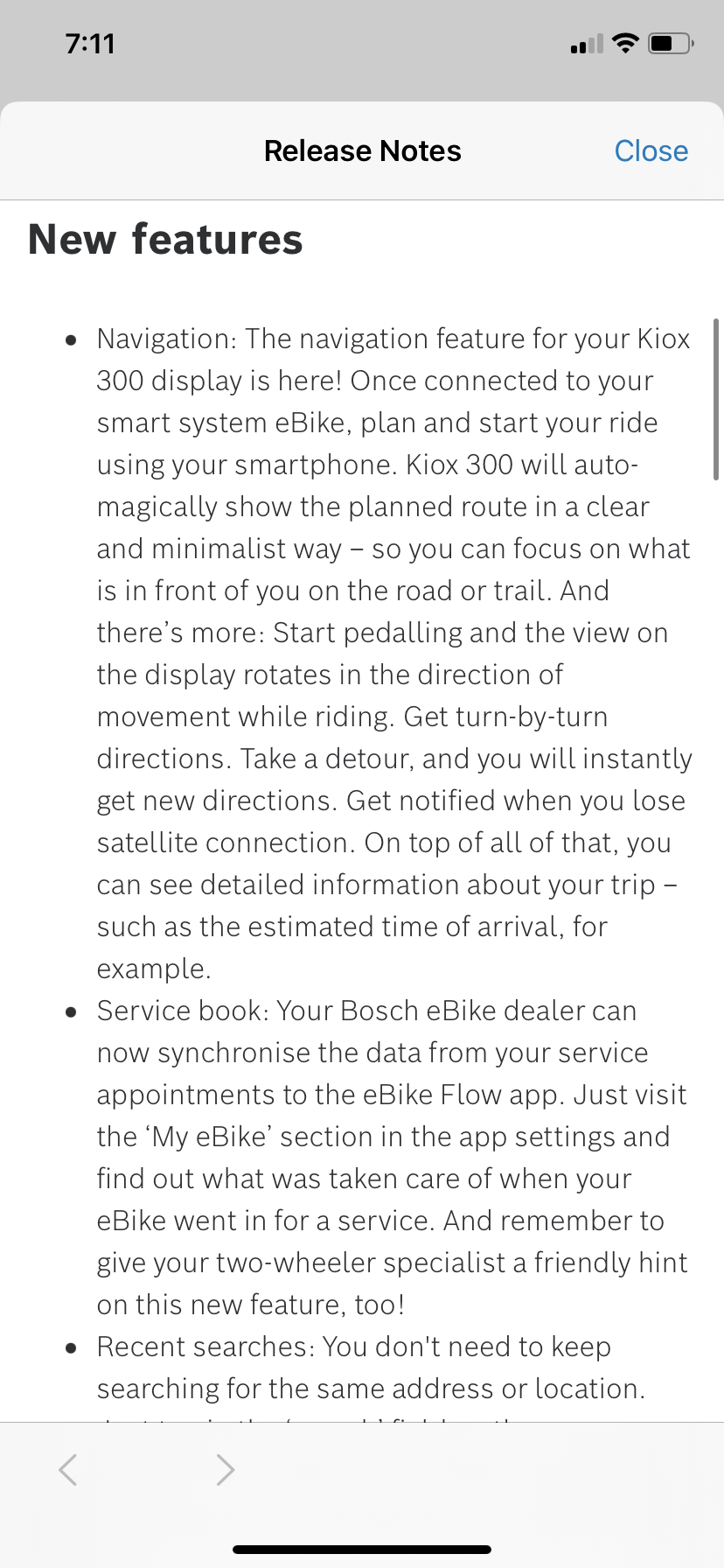
The latest flow app update is out today and here are the release notes. I’m downloading now
JP-NZ
E*POWAH Elite World Champion
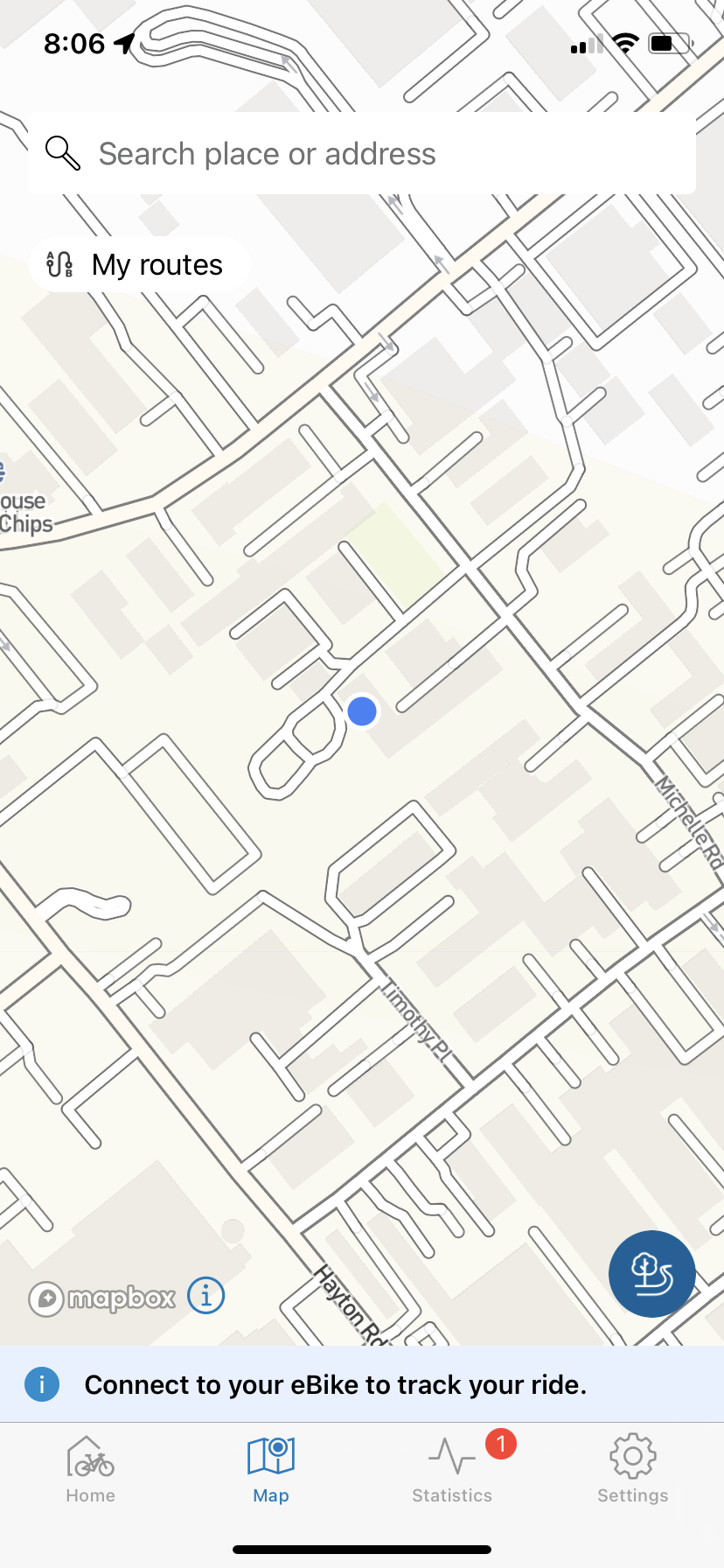
I believe that’s within the flow app. Like this.........plan your route on your smartphone.....................I assume using either Komoot or Strava?? Is that downloaded to Flow? .....Not very instructive those release notes are they!!
JP-NZ
E*POWAH Elite World Champion
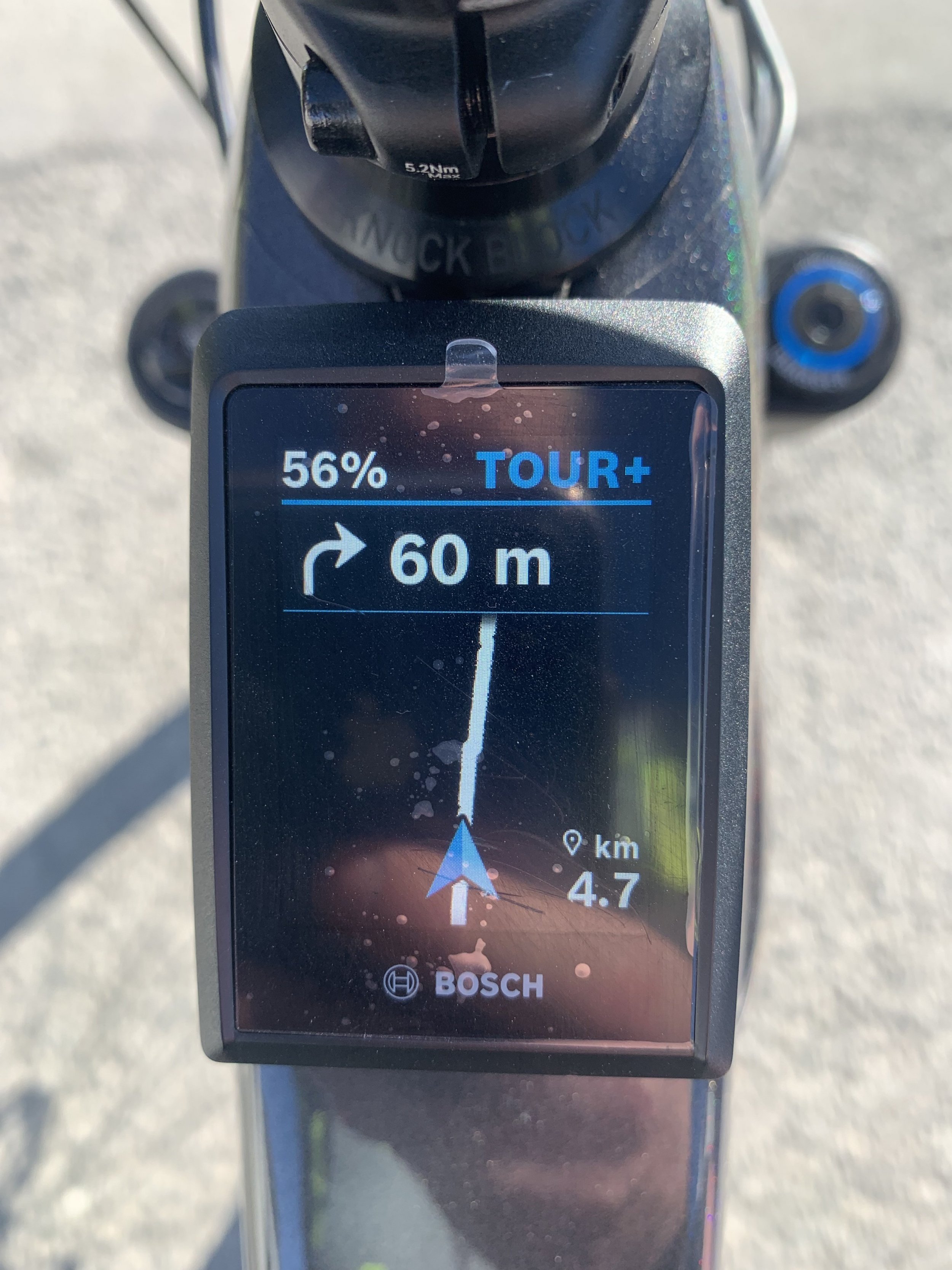
Seems to work well. Can’t test to much as I just arrived at work.
What am I doing wrong? I connected the flow app to the bike and did the update. On the ride menu option I clicked on "my routes" and that then showed my saved Komoot tours. I selected one of those and pressed "go". The route came up on the phone but I could not find any Kiox screen with the navigation arrow.
BikeawaySpain
New Member
I checked it today on "regular" roads, I must say very accurate and easy to follow these "line" navigation indications. Also the screen follows the position/direction of the bike, so it is always a clear path and clear indications when to go left or right.
 I wonder if it can use gpx routes?
I tried a gain today to get the navigation facility on Kiox 300..................and was successfull finally....but not without some messing a bout!!
Initially I could not connect Flow at all and usually it is instantaneous. I kept trying and eventually got a connection. Another software update was flagged. Tried to install it but it stalled halfway............then I could not connect again!
So...............I deleted the Flow app and restarted my phone. Installed the latest release of Flow and connected to the bike.
So now the LED Remote screen option ( top row) has another screen added for navigation saying "plan your ride on the Flow app". In the flow app I have enabled connection to Strava and Komoot. If on Flow I click on "your routes" all the gpxs I have saved in Komoot "Planned" routes section get downloaded to Flow. I select one and press Go..........the selected (planned Komoot) route comes up on Kiox as a complete route then reverts to the direction arrow etc. Because the route I chose does not start immediately from the current bike location it merely said "off route". OK thats fine.
I have yet to actually try to ride the route but it all looks to be working the way I anticipated now.
(p.s. Komoot itself actually provides distance and directions to the start of the tour so probably have to use that on the phone until you get to the starting point of the route)
Pleased so far!!
Initially I could not connect Flow at all and usually it is instantaneous. I kept trying and eventually got a connection. Another software update was flagged. Tried to install it but it stalled halfway............then I could not connect again!
So...............I deleted the Flow app and restarted my phone. Installed the latest release of Flow and connected to the bike.
So now the LED Remote screen option ( top row) has another screen added for navigation saying "plan your ride on the Flow app". In the flow app I have enabled connection to Strava and Komoot. If on Flow I click on "your routes" all the gpxs I have saved in Komoot "Planned" routes section get downloaded to Flow. I select one and press Go..........the selected (planned Komoot) route comes up on Kiox as a complete route then reverts to the direction arrow etc. Because the route I chose does not start immediately from the current bike location it merely said "off route". OK thats fine.
I have yet to actually try to ride the route but it all looks to be working the way I anticipated now.
(p.s. Komoot itself actually provides distance and directions to the start of the tour so probably have to use that on the phone until you get to the starting point of the route)
Pleased so far!!
So for anyone looking to use this facility, this is how/why I use planned routes/tours.
If I am about to go somewhere new and want to ensure I can immediately access good trails I research the area using Trailforks. So for example I was due to go camping in South Wales and wanted to do at least one good ride over the Brecons and then go to Afan Forest. I used trailforks to find trails/routes/tours I liked and then exported those .gpx files to Komoot. On that occasion I ran Komoot on my phone and rather than trying to fix the phone to the bars ( I cant read without glasses anyway!!), I wore a set of mini blutooth headphones to get the verbal instructions, only referring to the tour on the phone if I went wrong.
Now with the navigation on Kiox 300 the headphones are not necessary. The route/tour planning is the same but now they are downloaded to Flow and the navigation guide comes up on the Kiox when one of those tours is selected. The Flow app on the phone becomes the fall back if I go wrong.
Next year I intend camping on Dartmoor and also visiting FOD........so I will be researching Trailforks for rides there.
If I am about to go somewhere new and want to ensure I can immediately access good trails I research the area using Trailforks. So for example I was due to go camping in South Wales and wanted to do at least one good ride over the Brecons and then go to Afan Forest. I used trailforks to find trails/routes/tours I liked and then exported those .gpx files to Komoot. On that occasion I ran Komoot on my phone and rather than trying to fix the phone to the bars ( I cant read without glasses anyway!!), I wore a set of mini blutooth headphones to get the verbal instructions, only referring to the tour on the phone if I went wrong.
Now with the navigation on Kiox 300 the headphones are not necessary. The route/tour planning is the same but now they are downloaded to Flow and the navigation guide comes up on the Kiox when one of those tours is selected. The Flow app on the phone becomes the fall back if I go wrong.
Next year I intend camping on Dartmoor and also visiting FOD........so I will be researching Trailforks for rides there.

JP-NZ
E*POWAH Elite World Champion
Yes... its kinda pointless IMO, on the speed screen there are little arrows that depending on cadence say something like "change up" or "change down". Its pretty funny reallyThe update said that there was also an upgrade to show a suggested gear whilst you are riding , has any one seen this , I have not been out yet
I have just checked and you can turn it off/on in the menuYes... its kinda pointless IMO, on the speed screen there are little arrows that depending on cadence say something like "change up" or "change down". Its pretty funny really
JP-NZ
E*POWAH Elite World Champion
Great! I'll be switching mine off tonightI have just checked and you can turn it off/on in the menu

I will be interested to see what criterea appear to be used to determine whether a gear change is recommended.
Having never been a roadie I had no real concept of cadence until I used the Kiox screen with that displayed for a c ouple of rides. I know the Bosch motor performs best at c 70 rpm and I know now what that feels like to pedal...........so I dont use that screen anymore, but it taught me something.
I think the same may apply with the gearchange indicator...at least on a more pedally type ride so I will try it..........then probably ignore it once I know what sort of cadence it encourages. I think it is a simple thing but at the same time a little window into the Bosch motor performance characteristics. It would actually be a good feature probably on a longer basis for my wife who tends to be in too high a gear most of the time....but she does not the Smart System.
Having never been a roadie I had no real concept of cadence until I used the Kiox screen with that displayed for a c ouple of rides. I know the Bosch motor performs best at c 70 rpm and I know now what that feels like to pedal...........so I dont use that screen anymore, but it taught me something.
I think the same may apply with the gearchange indicator...at least on a more pedally type ride so I will try it..........then probably ignore it once I know what sort of cadence it encourages. I think it is a simple thing but at the same time a little window into the Bosch motor performance characteristics. It would actually be a good feature probably on a longer basis for my wife who tends to be in too high a gear most of the time....but she does not the Smart System.
Similar Threads
-
-

-

-
 Display Kiox 400c vs the standard Bosch System Controller?
- Started by steve_sordy
- Replies: 30
-
