Navigation
Install the app
How to install the app on iOS
Follow along with the video below to see how to install our site as a web app on your home screen.
Note: This feature may not be available in some browsers.
More options
Style variation
You are using an out of date browser. It may not display this or other websites correctly.
You should upgrade or use an alternative browser.
You should upgrade or use an alternative browser.
GoPro Hero 7 Black
- Thread starter Rob Rides EMTB
- Start date


⚡ EMTB PRO
25% off e*thirteen, Peaty’s & more with PRO
Member-only deals from e*thirteen, Peaty’s, PEMBREE and Magicshine · ad-free browsing · PRO badge · Living Intelligence Reports
See the deals →
From £1.99/month
@Rob Hancill or anyone else. What resolution do you upload to YouTube. I'm currently uploading in 3840x2160 but is going to take forever ?

- Thread starter
- #33
Upload in that res... YouTube will give you the most bitrate then. Yep, takes ages!@Rob Hancill or anyone else. What resolution do you upload to YouTube. I'm currently uploading in 3840x2160 but is going to take forever ?
- Thread starter
- #34
Another few bits from yesterday...


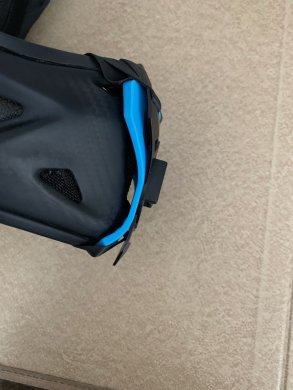
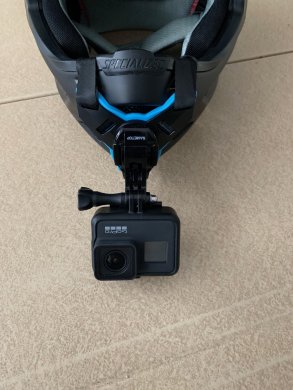
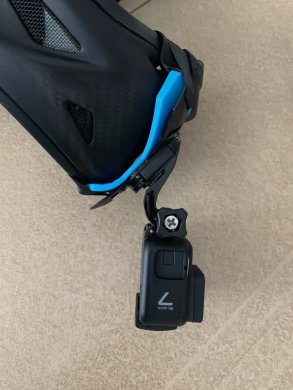
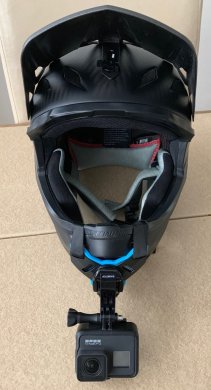
Here's my home made chin mount with the GoPole Arm that I cut down. I cut away a channel of the padding in the helmet chin mount for the GoPole to sit in, then cable tied / glued it in place. Clear glue would have looked much neater but I only had white in the house!
If you need to, you add on more adaptors and stuff to the bottom if you need to make it longer etc. Once its in place its pretty permanent, but you can take off the GoPro housing and just leave the little stubby GoPro mount sticking out of the bottom.
Spare batteries that I use: https://amzn.to/2IHxuzd
View attachment 5995
View attachment 5996
View attachment 5997
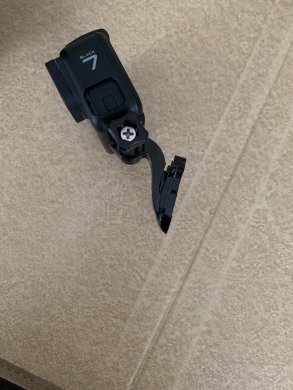
Thanks for the inspiration and idea @Rob Hancill - here's my new setup, a little less 'rustic' than yours ?
The bits I used are one of these
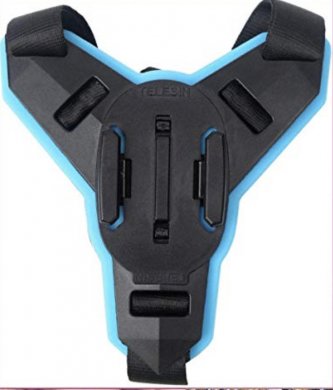
and the bit (small arm, see pic below) that attaches to the GoPro from this.
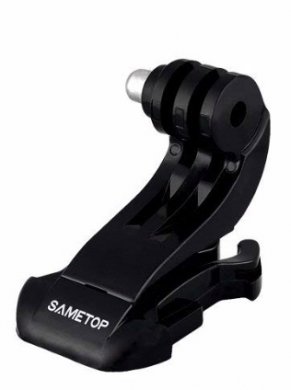
The finished product looks like this
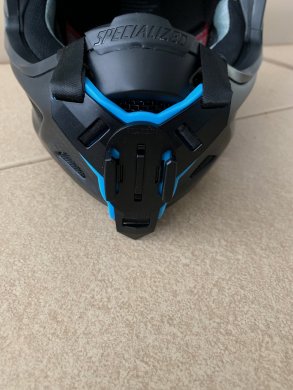
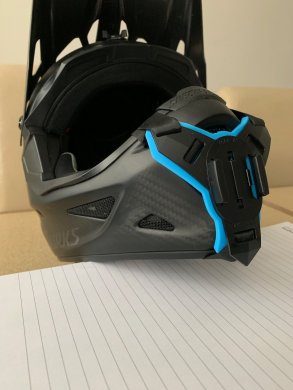
Love it!
@Rob Hancill here's my video. Do you know why it keeps going really grainy in some parts? Did this with my hero 6 as well. Must be something I'm doing but I'm not sure what?? Starting g to question the program I'm using. But when I save it to the computer and don't straight upload to YouTube from the program it's fine. I've tried saving to computer first and then uploading to YouTube from the computer saved file and still ends up like this .....video shot in 2 7k 60fps

That looked bloody awful. £400 well spent 
- Thread starter
- #41
Hi mate. Thanks for sharing. Some definite low bit rate there. Firstly, what is that file size that your software output?@Rob Hancill here's my video. Do you know why it keeps going really grainy in some parts? Did this with my hero 6 as well. Must be something I'm doing but I'm not sure what?? Starting g to question the program I'm using. But when I save it to the computer and don't straight upload to YouTube from the program it's fine. I've tried saving to computer first and then uploading to YouTube from the computer saved file and still ends up like this .....video shot in 2 7k 60fps
You want to be outputting a 4K video. YouTube will give a 4K file a higher bit rate (less compression).
To give an idea, a 10 minute video works out about 2GB, then I upload that to YT.
Rob is the video shot wide or super view mate?
Replaces my Hero 4 / Hero 6 and Gimbal. Very impressed with the video and audio.
Spare batteries that I use: https://amzn.to/2IHxuzd
Removu Wind Remover: https://amzn.to/2C37EnM
- Thread starter
- #43
Superview ? I use wide for talking to camera shots. Superview for everything else.Rob is the video shot wide or super view mate?
Hi early the file size for that was 1.3gb. it's really confusing me as @Gary says it looks bloody awful . But the actual raw files when playing them look fine. Hmmmm.... What bit rate do you use?Hi mate. Thanks for sharing. Some definite low bit rate there. Firstly, what is that file size that your software output?
You want to be outputting a 4K video. YouTube will give a 4K file a higher bit rate (less compression).
To give an idea, a 10 minute video works out about 2GB, then I upload that to YT.
- Thread starter
- #45
Ahh ok. Youtube takes a while to process the quality. When did you upload? It usually improves quite a bit after a good few hours.Hi early the file size for that was 1.3gb. it's really confusing me as @Gary says it looks bloody awful . But the actual raw files when playing them look fine. Hmmmm....
Uploaded about an hour ago. To be honest always had this issue with the hero 6 but didn't do much filming for YouTube so didn't bother me. Now with my e bike I would like to do some filming thus got the hero 7. Just no idea why it gets so grainy like it does. Going to try and upload it with a considerable higher bitrate and see if it makes any difference.Ahh ok. Youtube takes a while to process the quality. When did you upload? It usually improves quite a bit after a good few hours.
- Thread starter
- #47
You filing with Protune on?Uploaded about an hour ago. To be honest always had this issue with the hero 6 but didn't do much filming for YouTube so didn't bother me. Now with my e bike I would like to do some filming thus got the hero 7. Just no idea why it gets so grainy like it does. Going to try and upload it with a considerable higher bitrate and see if it makes any difference.
Yep ? like I say. Raw footage is spot onYou filing with Protune on?
- Thread starter
- #49
Ok - don’t think it has finished processing as it was only displaying at 1080p when I watched it.Yep ? like I say. Raw footage is spot on
Mine shows video unavailable now!!Ok - don’t think it has finished processing as it was only displaying at 1080p when I watched it.
Yep ?
Yeh I removed itm going to do some testing first ?Mine shows video unavailable now!!
I've read somewhere that recording in 60fps is not great for YouTube and that 30fps should be used. Any idea @Rob Hancill . I've exported every setting higherd the bit rate and still comes out pixelated on YouTube when moving through the grassy areas :/
- Thread starter
- #53
Leave it until tomorrow and see if it improves. Is it 4K on YouTube yet? Even when it’s gone to 4K it can still take some time to get to max quality.I've read somewhere that recording in 60fps is not great for YouTube and that 30fps should be used. Any idea @Rob Hancill . I've exported every setting higherd the bit rate and still comes out pixelated on YouTube when moving through the grassy areas :/
RobAnother few bits from yesterday...
Nice vid. As an aside, where is the first part at Swinley, with the small double. I recognise the other parts of the trail but can't place that bit.
- Thread starter
- #55
I think it’s called ‘The Berminator’ at the top next the the red run (and next to babymaker, which I believe is closed)Rob
Nice vid. As an aside, where is the first part at Swinley, with the small double. I recognise the other parts of the trail but can't place that bit.
CheersI think it’s called ‘The Berminator’ at the top next the the red run (and next to babymaker, which I believe is closed)
That makes sense. I always go down Babymaker as been on a mission to completely clear the big table and beat my PB - can't seem to get below 50 seconds. FYI Babymakers been back open again for the last couple of weeks.
@Rob Hancill how long does it take to render your videos and then upload to YouTube?
Such a shame that YouTube causes all that pixelization when you are moving fast on the bike. It looks much better at the end when you do the run test and aren't moving so fast.
I'm wondering if Vimeo might look better and if anyone has tried it?
I'm wondering if Vimeo might look better and if anyone has tried it?
Last edited:
Ditch YouTube and go with Vimeo.Aparently supposed to be allot better.Such a shame that YouTube causes all that pixelization when you are moving fast on the bike. It looks much better at the end when you do the run test and aren't moving so fast.
I'm wondering if Vimeo might look better and if anyone has tried it?
Need to give it a go one day soon.
Similar Threads
-
 Sold 2022 GoPro 10 plus remote/4 batteries etc, £200.00: Chester UK
- Started by Howz
- Replies: 1
-
Trek Rail 7 2024 battery loose and cutting out — where to buy lock delete mount plate?
- Started by Avanlocal
- Replies: 17
-

-
-
Sold 2022 Gopro hero 10 (new) 10 £225.00: Chester UK
- Started by Howz
- Replies: 0

Free account
Join 43,237
eMTB riders
eMTB riders
One tap. No forms. Fewer ads.
or sign up with email
Already a member? Log in