Navigation
Install the app
How to install the app on iOS
Follow along with the video below to see how to install our site as a web app on your home screen.
Note: This feature may not be available in some browsers.
More options
Style variation
You are using an out of date browser. It may not display this or other websites correctly.
You should upgrade or use an alternative browser.
You should upgrade or use an alternative browser.
EP801 RS Custom Profiles
- Thread starter MeatBike
- Start date


As an 80 year old rider who can often use a boost climbing and who enjoys going fast I have all assist settings pretty high on my 2025 Orbea Rise LT. I also have the start assist and overrun “carry over“ set to max. So fun! It takes me back to my younger dualsport motorcycle days
 .
.Range is still pretty good using the higher assist levels. I’m a lighter weight rider at 165 lb, and with my 630 Wh battery get about 35 miles and 3500 ft of climbing on the gas. 40/4k is no problem if I ease back a bit and use the lower Trail settings or Eco (god forbid), but it’s not as fun
 .
.66 ans 100kg, je roule en montagne (+- 40km, +- 1800 D+)
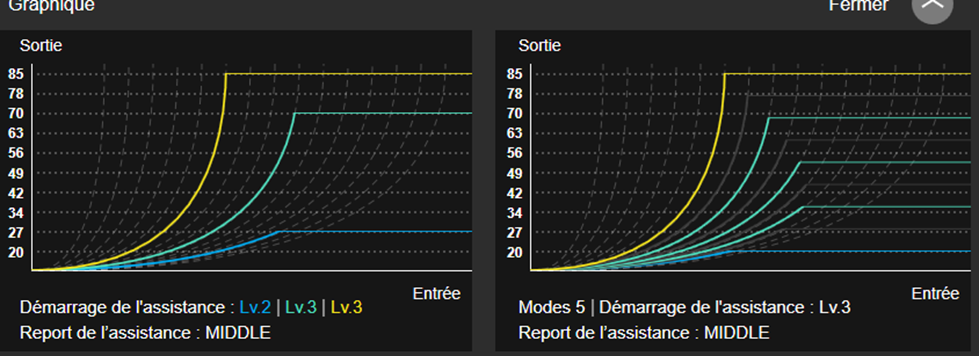
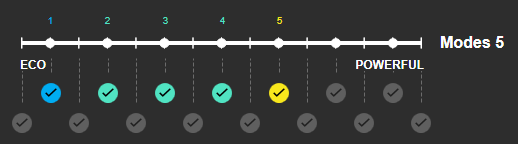
| couple max: | 20 => 85 | |
| demar de l'assistance: | niv 3 | |
| report de l'assitance: | middle | |
| arret de l'assistance | natural |
| eco | trail | boost | |
| Type Assist | 3 | 7 | 10 |
| Couple Maxi | 27 | 70 | 85 |
| Dém. Assist | 2 | 3 | 3 |
| arret de l'assistance | natural | natural | middle |
no, idon't use led display. it's displayed on HMI of my SCORThanks for the replies folks.
When there are more than 3 modes, how do you know which one you're using since there's only 3 LEDs on the switch? Is it just a case of remembering how many times you click up or down?
- Thread starter
- #6
no, idon't use led display. it's displayed on HMI of my SCOR
What's a SCOR?
- Thread starter
- #8
SCOR 4060 Z LT, c’est un EMTB (construit par BMC) avec EP801 normal (pas le RS)
Ah, a bike! I was thinking it may have been a smartwatch or bike computer.
I was actually considering getting a Garmin watch which will display the mode and battery power.
BAh30
Active member
the color of the LED dictates what PAS youre usingThanks for the replies folks.
When there are more than 3 modes, how do you know which one you're using since there's only 3 LEDs on the switch? Is it just a case of remembering how many times you click up or down?
- Light Blue: The system is in the lowest level of assistance.
- Green: The system is in an intermediate level of assistance.
- Yellow: The system is in the highest level of assistance.
- Flashing Yellow: The system has entered adjustment mode.
- Blue (Solid or Flashing): Walk assist mode is active.
- Flashing Red: Indicates an error or warning.
- Thread starter
- #12
That’s a lot of fine tuning options @MeatBike.
You should be able to find the perfect setting,
but it make require several clicks if you want a quick boost.
I also enjoy the LONG carry over setting (overrun), but I’ve found the middle setting better for managing more technical sections.
I'll see how I get on with this set-up but will likely tweak it further

BAh30
Active member
I have all my PAS levels organized my nm output
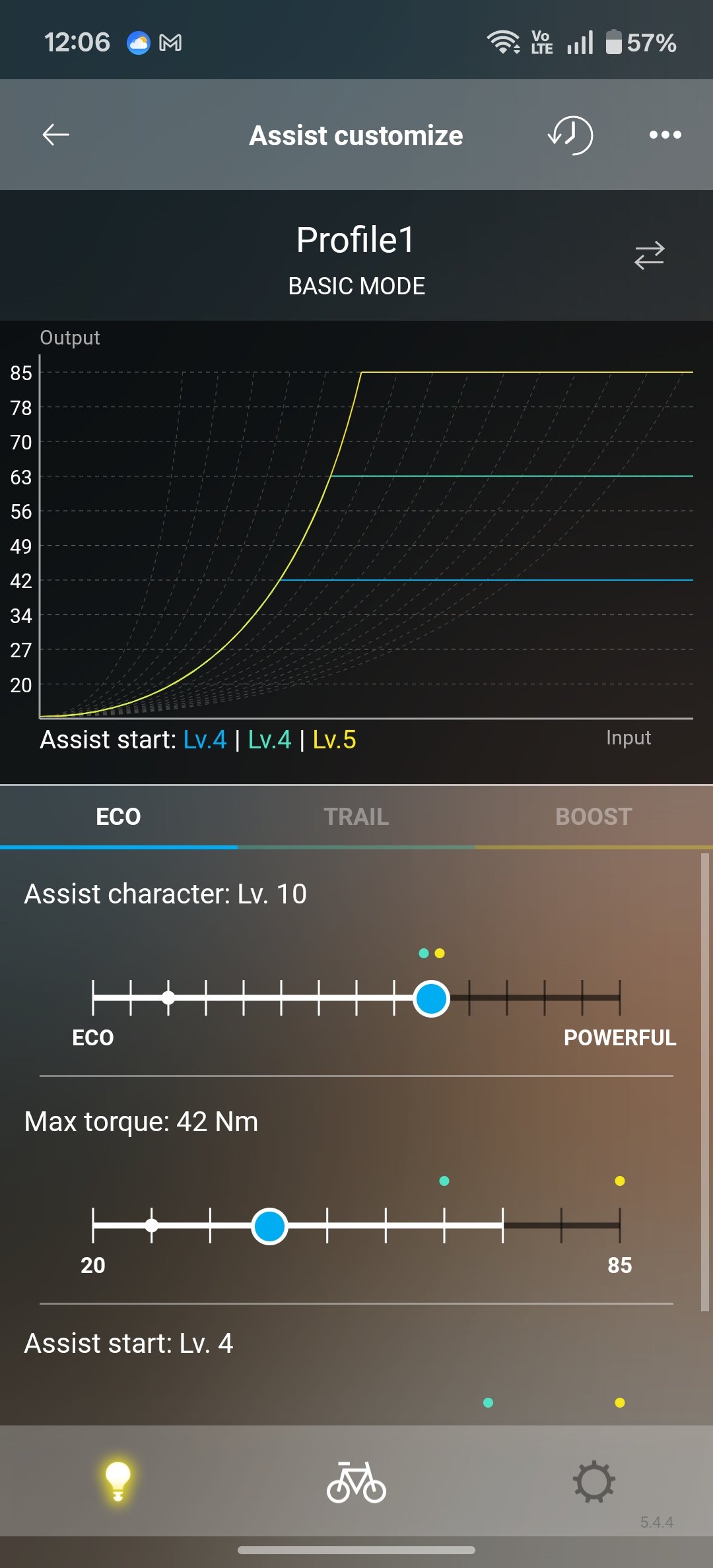

what's the display on it?SCOR 4060 Z LT, c’est un EMTB (construit par BMC) avec EP801 normal (pas le RS)
I've got a Gamin 530 (and a 130) and just use e-bike fields for battery and assist level along with other data. Last time I tried multiple levels they didn't display properly. I'm don't know if I check to see if the STEPS specific screen worked better.
the OEM display is Shimano STEPS FC-E8000 i have also a GPS garmin edge 2, but i feel that displaying motor data slows done the GPS (may be only mine ?)what's the display on it?
I've got a Gamin 530 (and a 130) and just use e-bike fields for battery and assist level along with other data. Last time I tried multiple levels they didn't display properly. I'm don't know if I check to see if the STEPS specific screen worked better.

