Garmin & Orbea RS Toolbox - latest software update 9.10 = ability to change fields

Kermit

Member
Joined
Nov 24, 2021
Messages
39
Reaction score
23
Location
SE UK
Just updated my Garmin 830 to the latest maps and firmware and there is a new 'tile' option in the Garmin Garmin Express App in addition to the usual 'Tools & Content' and 'Garmin Connect' ones.

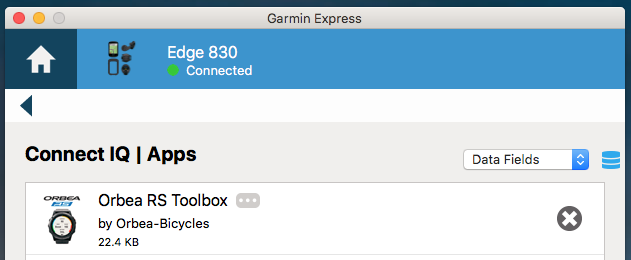
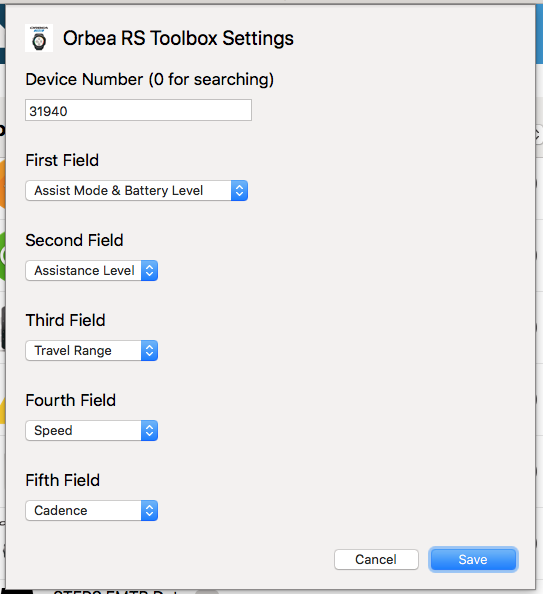
The new tile is called 'IQ Apps', this then shows you all the IQ items on your device and if you select the 3 dots beside the Orbea RS Toolbox item you get the following. You can then swap the fields around :)
Screen Shot 2022-01-04 at 08.59.58.png


Screen Shot 2022-01-04 at 18.51.24.png
 
⚡ EMTB Pro Go Pro — exclusive discounts & ad-free Peaty's 25% off & more · Ad-free browsing · Pro badge See the deals →
Sixth is what i'm looking for... I suppose it's not there yet, right? Will it ever be?
Probably not and that's why I uninstalled the RS Tool box and went with all my own data fields. This way you can add mileage, ascent, gears, HR and still show battery% and cadence. It no longer displays off, Eco, trail, boost, but shows 0,1,2,3 instead. To do this, you go to sensors and add Ebike while your bike is powered on and it will automatically add your bike as a sensor like it does the HR monitor, speed sensor, ect. You can always reinstall the RS Toolbox if you don't like this option.
 
But not leg power, right? That's what i was after...
For leg power, don't you need a sensor in the crank arm, which it doesn't have? It only shows cadence of how fast you are spinning the motor, which I'm guessing is different from what you want.
 
For leg power, don't you need a sensor in the crank arm, which it doesn't have?
No. Bosch system for instance shows it, but can't connect to a Garmin. On my acoustic i have it on the spider, but on an emtb the motor would interfere with it. And rally pedals would probably work, but why spend a hefty extra for something the motor system already knows? How would it otherwise work if it did not know your input; power or torque (and rpm, which it shows).
 
I do not run the garmin express, can I do these mose from either my phone garmin connect or the device itself. Also On my device I typically just add the Toolbox to a large field on one of the other screens, I run screen one with 6b, then the middle box is large, I run the toolbox there and so I see the battery and mode there and the other data fields are whatever I want
 
Keep reading
    Browse all

    Similar Threads

    Community Stats

    Since 2018
    669K
    Messages
    41,012
    Members
    Join 30,000+ Riders, it's free!
    Back
    Top