What's your 27.5" Smart System circumference?

Gauss Guzzler

Member
Joined
Apr 26, 2024
Messages
77
Reaction score
92
Location
CA
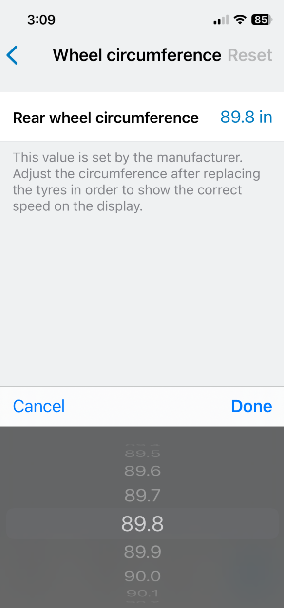
The phone app lets you adjust the circumference +/-5% so you can simply average the max/min allowable values to determine the factory programmed circumference.
1714111418196.png


I ask because my 27.5" came factory programmed as 29" (2280mm/89.8" circumference) and Bosch doesn't know if/how to fix it. I'm wondering if they even support 27.5" wheels anymore or if they just figure that 29" -5% is close enough. Anyone else have a Smart System they can check?

Technically, 29"-5% is pretty close to 27.5" but only if the tire is new and firmly inflated. At my preferred tire pressure the circumference is 2125mm/83.7" which is 7% below the factory setting.
 
⚡ EMTB Pro Go Pro — Living Intelligence Reports, exclusive discounts & ad-free Up to 25% off Peaty's, PEMBREE, Magicshine & more · Ad-free browsing · Pro badge See the deals →
The "factory setting" isn't going to be accurate for all tires, pressures, and rider weights. You need to measure it out for yourself.

Use chalk for marking your tire. Put a line where the tire contacts your garage floor. Put a matching mark on the floor. Sit on your bike. Roll forward until the tire makes one complete revolution. Mark the garage floor again. Measure the distance between the two marks on the floor. That will get you into the ballpark.
 
That's precisely correct Rusty, and exactly the method I used to measure mine, but the question is:
Does Bosch set all Smart motors to 29" and/or is it possible to change them?

Bosch doesn't know the answer so I'm hoping someone here has a 27.5" that is *not* factory programmed as 29" to confirm the theory.
 
My Cube Stereo 160 slx with 27.5 has a circumference setting in Flow of 88.5inches.
 
Hmm... 88.5" definitely sounds like a 29" tire. Are you saying that the user setting is currently at 88.5" or that the total available adjustment range is 84"-93"?

I'm looking for the latter - the max/min allowable settings, the median of which is the hard-coded factory configuration.
 
Hmm... 88.5" definitely sounds like a 29" tire. Are you saying that the user setting is currently at 88.5" or that the total available adjustment range is 84"-93"?

I'm looking for the latter - the max/min allowable settings, the median of which is the hard-coded factory configuration.
I put my tyre size into one of the on-line calculators to give a rough guide to the factory setting in my Flow app. I've got a Maxxi DHR 11 on the back... 27.5/2.4.... the calculator says circumference is 87.12 inches. If I put in the size as 27.5/2.6 it gives me the 88.5 inch number. I haven't changed that setting but when I get a chance I'll have a look and see what is actually available.
One thing I'm not sure about is whether I'd be causing myself any warranty problems by changing it??? If I change the setting to 87.12 that will, if I'm correct, show a lower speed on the Kiox and therefore assistance will stay on for a little bit higher actual speed? Also my recorded distance would be reduced as well.... have I got that right?

Edited to add.... I've now been out to my bike and gone into the wheel circumference settings on Flow. It would appear that I can adjust them from 84.1 to 93 inches.... in 0.1 increments. I haven't changed anything at the moment though.
 
Last edited:
If I change the setting to 87.12 that will, if I'm correct, show a lower speed on the Kiox and therefore assistance will stay on for a little bit higher actual speed? Also my recorded distance would be reduced as well.... have I got that right?
Partly right.

The user changeable value only influences the displayed speed to make it closer to actual.
The cut-off speed cannot be changed by the user or a dealership. This is a second value coded into the drive unit by the bike manufacturer.

Bosch doesn't know the answer
Hard to believe - not what you say, but what Bosch told you.
Bosch delivers all drive units to the bike manufacturer without basic programming. Either during bike assembly or before that at parts reception the bike manufacturer programms each drive unit to desired specs. This includes the four assist modes and the two tire size values. One for the max speed and the second for speed display.

If for any reason the bike manufacturer made a gross mistake and programmed a drive unit scheduled to go into a 27“ bike with 29“ circumference values, this can be changed.

One needs to convince the dealer who sold the bike to collaborate with the bike manufacturer and Bosch. The dealer will do the actual reprogramming but needs a new basic software configuration file from the bike manufacturer and at the same time a special one time code from Bosch to unlock the reprogramming feature on his diagnostic system.

As mistakes can happen with any manufacturing process, this has been done on several occasions. It will need some work and goodwill from all three parties involved. Also, Bosch will not consider the effort for small adjustments. Anything less than 10% off the correct value will be seen as ‚in spec‘.
 
Partly right.

The user changeable value only influences the displayed speed to make it closer to actual.
The cut-off speed cannot be changed by the user or a dealership. This is a second value coded into the drive unit by the bike manufacturer.


Hard to believe - not what you say, but what Bosch told you.
Bosch delivers all drive units to the bike manufacturer without basic programming. Either during bike assembly or before that at parts reception the bike manufacturer programms each drive unit to desired specs. This includes the four assist modes and the two tire size values. One for the max speed and the second for speed display.

If for any reason the bike manufacturer made a gross mistake and programmed a drive unit scheduled to go into a 27“ bike with 29“ circumference values, this can be changed.

One needs to convince the dealer who sold the bike to collaborate with the bike manufacturer and Bosch. The dealer will do the actual reprogramming but needs a new basic software configuration file from the bike manufacturer and at the same time a special one time code from Bosch to unlock the reprogramming feature on his diagnostic system.

As mistakes can happen with any manufacturing process, this has been done on several occasions. It will need some work and goodwill from all three parties involved. Also, Bosch will not consider the effort for small adjustments. Anything less than 10% off the correct value will be seen as ‚in spec‘.
Thanks for clarifying that. At the moment I'm riding with both my Kiox and Garmin 520 logging the ride. Typically, the Flow app records a higher average speed by around 1/1.5 mph than the Garmin and around a similar higher distance completed... this is for a typical 18/20 mile ride when loaded onto Strava. If correcting the wheel circumference is purely cosmetic I don't think I'll bother. Thanks anyway.
 
Thanks @MasterDabber for confirming that your Cube goes from 84.1" to 93", indicating a factory value of 88.5" or 28.2" diameter. This seems really high for a 27.5" wheel which should generally be less than 27.0" (84.8") in practice so I'm not surprised that your speedometer is inaccurate. I suggest changing it to 84.x which should make your speedometer more accurate.

I'm glad to know that Cube set your bike up as 88.5" rather than 89.8" like mine. This is what I was hoping to find from this thread - does Bosch simply lock all motors at 89.8" (2280mm) or do they allow bike builders to configure the correct value? And while Cube doesn't seem to have done any better job configuring your wheel size than Bulls did with mine, the fact that they're different suggests that it's at least possible to do so.

There's some speculation that cutting power at 19mph instead of 18mph might be hard on the motor but this is nonsense. The motor doesn't know what gear you're in, it just blindly delivers 250W and is perfectly happy to do so. The speed limiter is only for legality.

@Shark58 is correct that the user-set wheel circumference only affects the speedometer/odometer, NOT the power assist speed limit, so correcting it will result in a lower speed reading at the time of cutoff even though the actual speed is the same. I tried to verify this with GPS but it's not easy to detect 1 or 2mph variations with certainty. A much better method I found is to ride at max/min circumference and see what pedal cadence the speed cutoff occurs at. If a 10% change in circumference were to actually change the cutoff speed by 10% as expected, the resulting 6-8 rpm difference in cadence would be clearly evident, but it is not. The Bosch service manual also confirms this behavior:

1714356951417.png
 
Last edited:
Resolution:

I'm happy to report that after several weeks of effort and many bikeless days and trips to the LBS, Robert Bosch's yacht came close enough to shore that they were able to airlift a notary out to him and he personally authorized the repair of this manufacturing defect (I assume), thereby allowing the LBS to change the factory circumference from 89.8" to 83.7".

As a result, my top gear (34T/10T) cadence at cutoff went from 64 to 69rpm.

A simple calculation of cadence, circumference, and gearing shows that the Bosch-intended cutoff speed of 18.6 mph is now being accurately reached (GPS agrees) whereas my previous cadence cutoff of 64 rpm was only reaching 17.2 mph (also GPS confirmed).

This is huge because not only can I now ride 1.4 mph faster, but I can actually make use of 12th gear on level ground! The cadence increase allows both me and the motor to provide that little bit of extra power I needed to be able to maintain full speed in 12th gear, whereas previously I could only top out 11th gear.
 
Partly right.

The user changeable value only influences the displayed speed to make it closer to actual.
The cut-off speed cannot be changed by the user or a dealership. This is a second value coded into the drive unit by the bike manufacturer...
If this user-changeable wheel circumference value doesn't influence the cut-off speed, what does? In other words, how does the motor control unit know how fast the bike is moving?

Flow has my 27.5" rear wheel with a factory setting as "81.2 inches" which is about 5"-6" smaller than the actual circumference.
 
If this user-changeable wheel circumference value doesn't influence the cut-off speed, what does? In other words, how does the motor control unit know how fast the bike is moving?

Flow has my 27.5" rear wheel with a factory setting as "81.2 inches" which is about 5"-6" smaller than the actual circumference.

When I bought a shape it link from Whyte to mullet my 29r the instructions said Bosch system update required. Took it to my LBS and they re configured the motor for 27.5 wheel. I can confirm this as if I put the 29 back on it goes faster than its original cutoff.
 
If this user-changeable wheel circumference value doesn't influence the cut-off speed, what does?
There is a second wheel circumference value stored in the motor at bike production which cannot be changed by the user. That is the value the motor uses for cut-off speed.
 
There is a second wheel circumference value stored in the motor at bike production which cannot be changed by the user. That is the value the motor uses for cut-off speed.
That makes sense.

Is this fixed-value circumference the same as the default value shown in Flow?
 
The average of the user-selectable circumference range is what has been factory hard-coded. The hard coded value controls the actual cutoff speed while the user-configurable value controls the displayed speed and odometer. Note that "circumference" is NOT pi * diameter, it's the distance traveled in one revolution under full weight.
 
... Note that "circumference" is NOT pi * diameter, it's the distance traveled in one revolution under full weight.
I understand what you mean, despite circumference being defined as Pi x dia. :)

So, how best to estimate the value to plug in here? It will change during a ride depending on surface conditions: soft silt where the knobs sink in, macadam where the tire is sitting on the tips of the knobs, uphill where more weight is causing the rear tire to deflect more, downhill where there is little weight on the rear tire so less deflection at the contact point, etc.

All that is to say that measuring the diameter of the your wheel from ground to the top of the tire carcass and mulitplying that by 3.14159 isn't necessarily a terribly inaccurate way to come up with a value for "circumference" for an odometer calibration. IMO.

I've tried doing a roll-out measurement and it isn't particularly accurate either. I find it difficult to find the <exact> point where one revolution begins and ends--I'd say at best I'm getting it within .5" or so +/-.
 
I've tried doing a roll-out measurement and it isn't particularly accurate either. I find it difficult to find the <exact> point where one revolution begins and ends--I'd say at best I'm getting it within .5" or so +/-.
That's the way.

Put a toothpaste or color mark on your tire, then ride the bike fully kitted in a straight line on flat ground for 20 meters. I do that in our underground garage. Measure the full distance from first to last visible mark on the floor and divide by number of full revolutions. This will give you an exact measurement of the dynamic circumference you are looking for.
 
It might give you the right circumference but.... if you like a "bit of air" it won't record the distance covered in those big jumps. :cool::eek:o_O:D
 
Start with your valve stem aligned with something on the ground then ride alongside a wall for at least one revolution. Dismount carefully with the valve stem vertical then use a tape measure to record the distance.
 
That's the way.

Put a toothpaste or color mark on your tire, then ride the bike fully kitted in a straight line on flat ground for 20 meters. I do that in our underground garage. Measure the full distance from first to last visible mark on the floor and divide by number of full revolutions. This will give you an exact measurement of the dynamic circumference you are looking for.
OK, I spent the time to do the toothpaste-on-the-driveway-rollout setup. In the interest of science of course!
IMG_9692.jpg


That glob in the foreground is some Colgate Ultra White been laying around in the back of the drawer for some time.
I managed to get 6 revolutions although the last one was barely visible. The privet stems are marking the little specks of toothpaste right at 42'-4.5".

IMG_9691.jpg


That makes my circumference 84.75" using a Maxxis Dissector 27.5 x 2.4/3C MaxxGrip/DD/TR that's about half worn.

Just for comparison my quick 'n dirty method of measuring the diameter from the floor to the top of the carcass yields a circumference of 85.4" which is within 0.7% of the toothpaste method. I'm sure it's more accurate, but I don't think I'll do that again. It's time consuming and I'm still cleaning toothpaste off my driveway.

:LOL:
 
I'm sure it's more accurate, but I don't think I'll do that again. It's time consuming and I'm still cleaning toothpaste off my driveway.
Well done! 👍

I do this only once each time I change the rear tire to a new one and only if it's a new make/model. I don't care about the minuscule changes from new tire to used tire.
 
Keep reading
    Browse all

    Similar Threads

    Community Stats

    Since 2018
    671K
    Messages
    41,289
    Members
    Join 30,000+ Riders, it's free!
    Back
    Top